> ## Documentation Index
> Fetch the complete documentation index at: https://docs.ulm.m1amdocs.com/llms.txt
> Use this file to discover all available pages before exploring further.
# Configure a SMS Provider
Using the configured SMS service, send test sms message(s) to verify the dispatch/delivery in Non-Production. Configure an external provider with your organization's SMS settings to send notifications to your end users with your custom email service. From the **Admin console** provider you:
* Send test SMS message using Digital Identity Management SMS (SMS-to-email) service in a non-production environment
* Send test SMS message using configured SMS provider in a non-production environment
* Configure an external SMS email provider and send a test SMS message in a production environment
**Note:** Twilio is the supported SMS provider currently. More Provider types will be supported in an upcoming release.
1. **Working in Non-Production Environments**
2. Navigate to the **Admin console** > **Branding** > **SMS Provider**.
The Digital Identity Management SMS service sends the message as an SMS-to-email using mailinator.com and is not a full end-to-end sms service.
1. Select **Send Test** to generate/deliver a sms (notification message) to a destination/receiver phone number.
 2. Enter the destination phone number in the **To** field.
3. Click **Send** to send a sms (notification message).
4. Click **Cancel** to end the test.
The destination/phone number receives a sms notification message from the mailinator service.
3. Toggle **Use my own SMS provider** switch to configure a SMS provider with your SMS settings.
4. Select the relevant provider from options listed under **Choose a provider**.
2. Enter the destination phone number in the **To** field.
3. Click **Send** to send a sms (notification message).
4. Click **Cancel** to end the test.
The destination/phone number receives a sms notification message from the mailinator service.
3. Toggle **Use my own SMS provider** switch to configure a SMS provider with your SMS settings.
4. Select the relevant provider from options listed under **Choose a provider**.
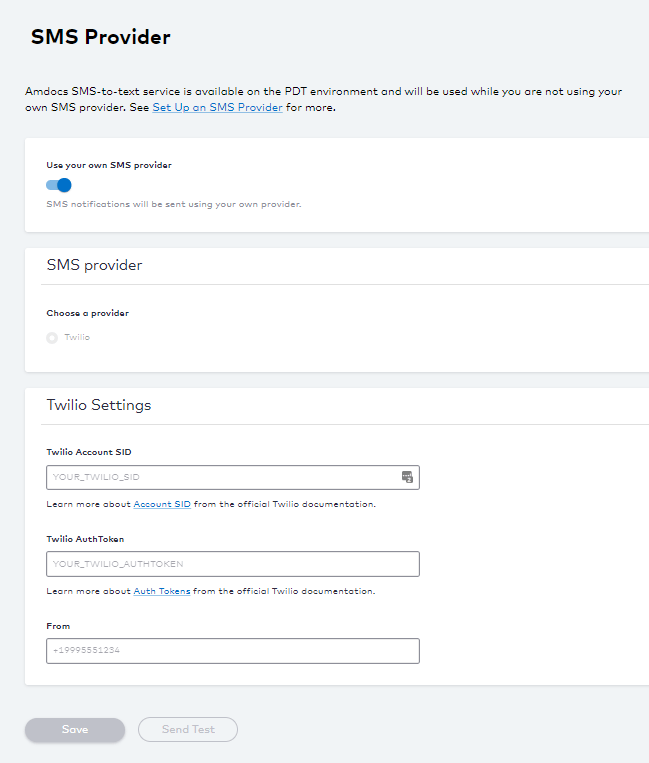 Twilio is the only supported SMS Provider currently.
5. Enter your **SMS Provider Settings**. See the table below for more guidance regarding these fields.
6. Select **Save** to update your changes.
7. Select **Send Test** to verify your connection.
1. Enter the destination phone number in the **To** field.
2. Click **Send** to send a sms (notification message).
3. Click **Cancel** to end the test.
A successful toast message appears when the test message is sent. If the dispatch/delivery fails, a message appears with more information.
A test sms notification message is sent to the destination/receiver phone number by the configured SMS Provider, for example Twilio.
8. **Working in Production Environment**
9. Navigate to **Admin console** > **Branding** > **SMS Provider**.
10. Enter your SMS settings. See [SMS Provider Fields](providerSmsFields_r) table for more guidance regarding the fields.
11. Select **Send Test** to verify your connection.
1. Enter a destination email address ([test@example.com](mailto:test@example.com)).
2. Click **Send**.
3. Select **Cancel** to stop the test.
An external SMS provider is configured and test message(s) are sent to the destination/receiver phone number.
* **[SMS Provider Fields](../topics/providerSmsFields_r)**
**Parent topic:**[About Service Providers](../topics/provider)
This documentation is built and hosted on [Mintlify](https://mintlify.com), a developer documentation platform.
Twilio is the only supported SMS Provider currently.
5. Enter your **SMS Provider Settings**. See the table below for more guidance regarding these fields.
6. Select **Save** to update your changes.
7. Select **Send Test** to verify your connection.
1. Enter the destination phone number in the **To** field.
2. Click **Send** to send a sms (notification message).
3. Click **Cancel** to end the test.
A successful toast message appears when the test message is sent. If the dispatch/delivery fails, a message appears with more information.
A test sms notification message is sent to the destination/receiver phone number by the configured SMS Provider, for example Twilio.
8. **Working in Production Environment**
9. Navigate to **Admin console** > **Branding** > **SMS Provider**.
10. Enter your SMS settings. See [SMS Provider Fields](providerSmsFields_r) table for more guidance regarding the fields.
11. Select **Send Test** to verify your connection.
1. Enter a destination email address ([test@example.com](mailto:test@example.com)).
2. Click **Send**.
3. Select **Cancel** to stop the test.
An external SMS provider is configured and test message(s) are sent to the destination/receiver phone number.
* **[SMS Provider Fields](../topics/providerSmsFields_r)**
**Parent topic:**[About Service Providers](../topics/provider)
This documentation is built and hosted on [Mintlify](https://mintlify.com), a developer documentation platform.