> ## Documentation Index
> Fetch the complete documentation index at: https://docs.ulm.m1amdocs.com/llms.txt
> Use this file to discover all available pages before exploring further.
# Update a User's Details
As a Care agent, you help your users configure their basic identity details or profile settings. These can be details such as display name, first name, email or mobile phone number.
1. Sign in to the Care console.
2. Search for the desired user. The selected user's **Identity** page opens.
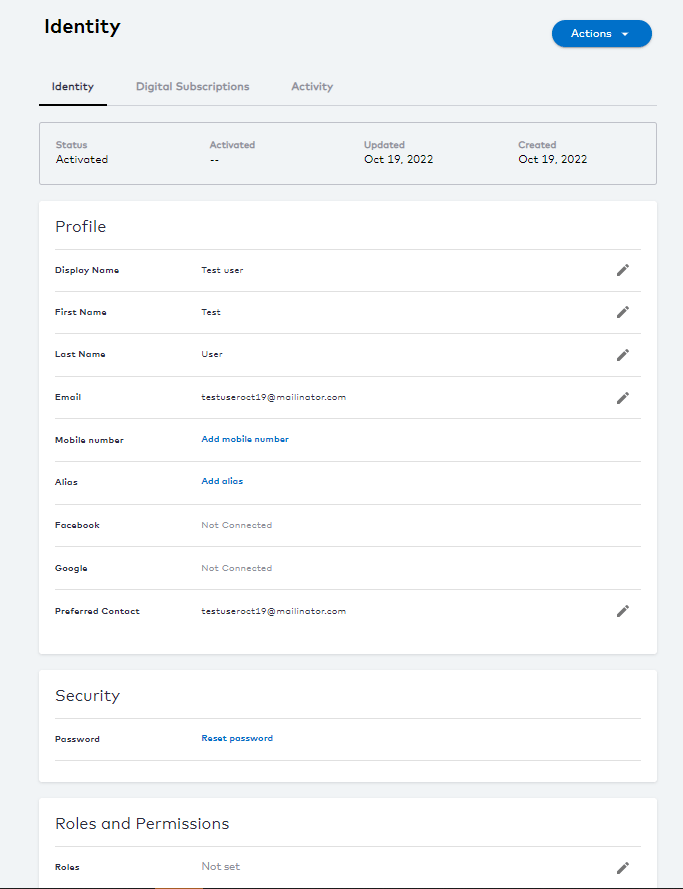 3. Edit the following **Profile** details by clicking
  pencil edit icon:
* **Display Name** - enter the user's preferred display name.
* **First Name** - enter the user's given name.
* **Last Name** - enter the user's family name.
* **Mobile** - enter the user's phone number for display.
* **Email** - enter the user's email for display.
4. After each edit, click one of the following options:
* **Save** to update the changes immediately.
* **Cancel** to revert the changes and return to the user's **Identity** page.
5. Edit the **Security** details to [reset the user password](sgResettingPassword).
6. To assign **Roles and Permissions**, see the [assign user roles](sgCareChangeUserRole) section.
The details of the selected user are updated.
* **[Authentication Identifiers](../topics/sgEmailsAndMobileNumbers)**
* **[Aliases](../topics/aliases)**
* **[Social Connections](../topics/careSocialConnect)**
* **[Preferred Contact](../topics/preferredContact)**\
The preferred contact channel is a user's primary point of contact to receive all Digital Identity Management-driven notification messages.
**Parent topic:**[User Management](../topics/careAboutUserIdentity)
This documentation is built and hosted on [Mintlify](https://mintlify.com), a developer documentation platform.
pencil edit icon:
* **Display Name** - enter the user's preferred display name.
* **First Name** - enter the user's given name.
* **Last Name** - enter the user's family name.
* **Mobile** - enter the user's phone number for display.
* **Email** - enter the user's email for display.
4. After each edit, click one of the following options:
* **Save** to update the changes immediately.
* **Cancel** to revert the changes and return to the user's **Identity** page.
5. Edit the **Security** details to [reset the user password](sgResettingPassword).
6. To assign **Roles and Permissions**, see the [assign user roles](sgCareChangeUserRole) section.
The details of the selected user are updated.
* **[Authentication Identifiers](../topics/sgEmailsAndMobileNumbers)**
* **[Aliases](../topics/aliases)**
* **[Social Connections](../topics/careSocialConnect)**
* **[Preferred Contact](../topics/preferredContact)**\
The preferred contact channel is a user's primary point of contact to receive all Digital Identity Management-driven notification messages.
**Parent topic:**[User Management](../topics/careAboutUserIdentity)
This documentation is built and hosted on [Mintlify](https://mintlify.com), a developer documentation platform.