> ## Documentation Index
> Fetch the complete documentation index at: https://docs.ulm.m1amdocs.com/llms.txt
> Use this file to discover all available pages before exploring further.
# Identity Provider and Single Sign-On
At its core, Digital Identity Management features Identity Provider (IdP) service that enables, among other capabilities, Single Sign-On (SSO). Here's some context about what these terms mean.
## Identity Provider (IdP)
An Identity Provider (IdP) is a service that onboards, authenticates, and manages user identities. It enables authenticated users to access secure resources and services. Digital Identity Management provides an Identity App, that provides an idp service to manage user authentications and associated data for your organization.
Google and Facebook are two examples of platforms that have invested millions in building, managing, and continuously improving their own proprietary IdP. When a user tries to access a resource on Facebook, they must input credentials into a login page. Behind the scenes, credentials are verified by Facebook's IdP and if correct, the service authenticates the user.
IdPs help to reduce the number of credentials required on a per-user basis. Ideally, a user has just one set of credentials. This helps minimize the chance of the user forgetting their credentials and becoming frustrated.
## Single Sign-On (SSO)
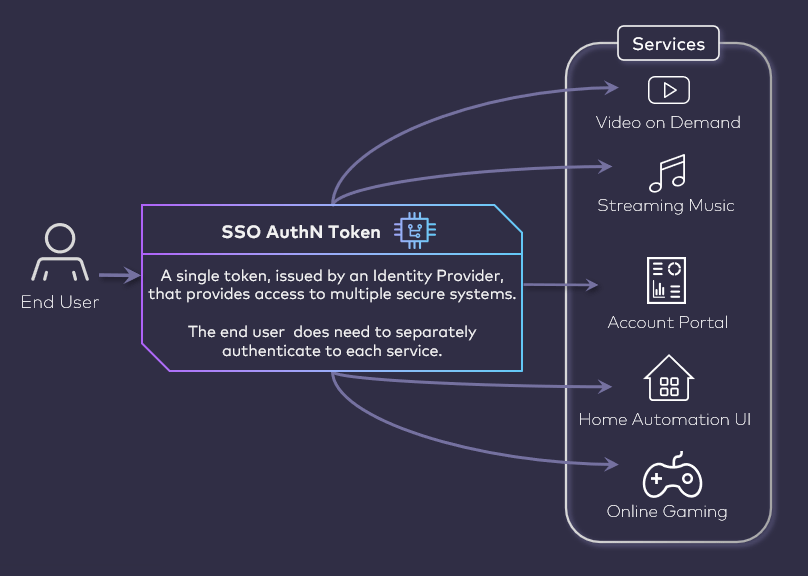
Single Sign-On (SSO) enables a user to enter their credentials and authenticate with an IdP once, and then get access to multiple apps without having to authenticate again. SSO and a robust IdP helps reduce login-related issues and help desk tickets, increase speed for users to authenticate and use new apps, and increase integration speed of new apps to the overall platform.
If your organization has more than one application within an ecosystem, Digital Identity Management negotiates authentication from a central Identity app to every individual application that is registered with the platform, and ensures a seamless user experience across all services.
 As an example: an anonymous (that is, not authenticated) user visits a media streaming service in an app ecosystem that is registered with Digital Identity Management. The service redirects the user to a central Identity app (powered by Digital Identity Management), and the user then authenticates with their credentials or registers for credentials if they don't have one. The IdP then redirects the user back to the service. In that redirect, the IdP passes an access and/or ID token to the service that:
* Verifies who the user is, and that they are authenticated
* Grants that service access to the Digital Identity Management User ID (for example, to render a user profile in the service)
* Provides user management APIs so that the user can perform profile management within that service
When the user navigates to another registered application in the ecosystem, that app redirects to Digital Identity Management as well. However, since the user is already authenticated within the IdP, the IdP automatically redirects back to the application, and provides the relevant token to that service. From the user's perspective, they seamlessly navigate from service to service, with their User ID acting as an implicit passport.
As an example: an anonymous (that is, not authenticated) user visits a media streaming service in an app ecosystem that is registered with Digital Identity Management. The service redirects the user to a central Identity app (powered by Digital Identity Management), and the user then authenticates with their credentials or registers for credentials if they don't have one. The IdP then redirects the user back to the service. In that redirect, the IdP passes an access and/or ID token to the service that:
* Verifies who the user is, and that they are authenticated
* Grants that service access to the Digital Identity Management User ID (for example, to render a user profile in the service)
* Provides user management APIs so that the user can perform profile management within that service
When the user navigates to another registered application in the ecosystem, that app redirects to Digital Identity Management as well. However, since the user is already authenticated within the IdP, the IdP automatically redirects back to the application, and provides the relevant token to that service. From the user's perspective, they seamlessly navigate from service to service, with their User ID acting as an implicit passport.
 **Parent topic:**[Digital Identity Management Features](../topics/connectFeatures_tp)
This documentation is built and hosted on [Mintlify](https://mintlify.com), a developer documentation platform.
**Parent topic:**[Digital Identity Management Features](../topics/connectFeatures_tp)
This documentation is built and hosted on [Mintlify](https://mintlify.com), a developer documentation platform.