> ## Documentation Index
> Fetch the complete documentation index at: https://docs.ulm.m1amdocs.com/llms.txt
> Use this file to discover all available pages before exploring further.
# MarketONE Connect 2021.02 - Release Notes
Release Date: February 24, 2021
## Announcements
This release includes the following announcements:
* Connect Cloud supports creation of Soft Profile (child or guest) users. An Soft Profile user is created and supported by a regular User (parent or service customer).
* Connect Cloud supports organizations to store additional custom data/metadata on Connect User, Runtime, and Group entities (for example, date of birth, preferences, favorites).
* Connect Cloud's notification engine now includes support for customers to leverage Twilio's SendGrid email service.
* Connect Cloud introduces a newOIDC-based Token Exchange Grant flow. This is custom token grant flow type, to cover cases when an end user's device does not support browser access.
* Connect Cloud supports a set of standardized CSV and JSON format business reports that provide an overview of your user base, and the services they consume.
## Connect Features
This section describes the key updates in this release.
### Soft Profile Users
A regular Connect User can now create Soft Profile Users (or SP Users) for the minors in their household and/or friends and family. An SP User is a Connect User ID that grants the end user limited access to one or more services to which the regular User is entitled. Some conditions apply:
* Unlike a regular User, an SP User does not require a fully verified (that is, activated) authentication identifier (authN ID) in order to authenticate and access services.
* Instead, an SP User is authenticated into a service by the regular User (for example, the parent or service owner) first. In otherwords, the regular User authenticates first, and then selects to switch their profile to the SP User.
* Connect Cloud also includes functionality that allows the regular User to set a 4-digit master PIN.
* If the regular User has created more than one SP User, they can set a 4-digit for each SP User, or a single master 4-digit PIN for all users.
* When an SP User attempts to access a profile, or switches a profile, then either the master pin or the specific profile pin will need to be entered.
A common use case involves a parent to child relationship. The parent, a regular Connect User, creates a Soft Profile for their child to access a streaming TV service for which the parent has a subscription. The parent specifies a display name, avatar URL, and PIN. The child, now an SP User, can access services that the parent is entitled to only if the parent is already authenticated, and if they enter the correct PIN. This common use case is synonymous with the "Netflix" multi-user profile experience.
Additionally, a regular end user, when they deem fit, promote a soft profile user to a regular user. This process adds a verifiable authentication identifier (email or mobile number) to the SP User, and prompts the soft profile user to follow an onboarding flow similar to new user invitation. Once onboarding flow is completed, the SP User is converted to a regular User.
### Custom Data
Connect Cloud's identity management data model consists of 7 data entities:
* **User** – a unique individual.
* **Runtime** – a physical endpoint to which services are delivered (for example, mobile device, desktop).
* **Group** – a collection of entities (for example, parent and child users in a household).
* **Account** – the relationship between a User and an organization, usually defined by a collection of subscriptions.
* **Subscription** – defines a service to which the end user is entitled to access. Usually collection of packaged features.
* **Features** – a fine grain entitlement that defines what a User can do within a service.
* **Membership** – a subset of subscriptions/features, typically useful for business-to-business use cases.
Each entity consists of properties and attributes (or default and extensible data fields that define the entity). For example, standard properties and attributes on a Connect User entity include the end user's include display name, a list of their authentication identifiers (emails and mobile numbers), and an avatar URL.
Most organizations rely on Connect User, Runtime and Group entities to capture enough information about the end user, and the devices and services in their orbit. In some cases, your organization may want to collect more data on one or more entities, such as service-related user preferences, date of birth, and favourites list. Connect Cloud now supports the provisioning and storage of these extra data points through its Custom Data service.
Custom Data is a flexible storage mechanism that is collected from the entity (for example, User), either directly (through means such as configuration) or indirectly (through means such as UI engagement), stored and retrieved on demand. For example, an organization may wish to store date of birth per user, and then when that user authenticates into the service, the application can retrieve the User entity and an associated Custom Data object to drive a different UI experience based on the age of the User. Custom Data was built for performance. It is capable of handling millions of requests per day.
### SendGrid Email Service Integration
Connect Cloud's notification engine is now integrated with Twilio's SendGrid service. This means that if your organization leverages SendGrid as your email notification service, Connect Cloud can quickly connect to your SendGrid account.
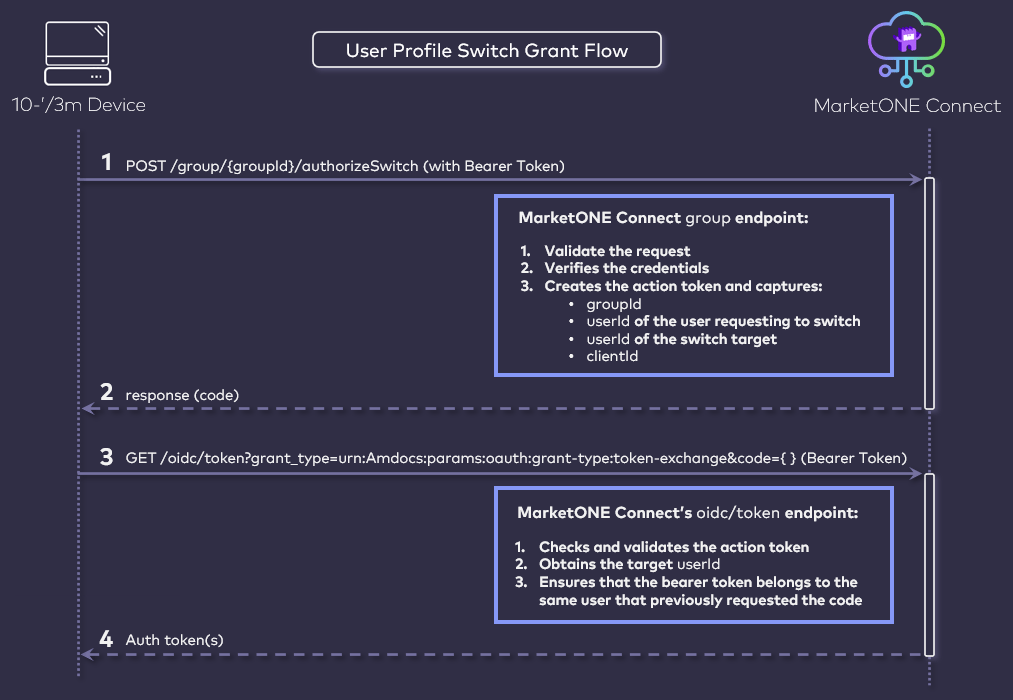
### Soft Profile Switch User Grant
* In service of Connect Cloud's new Soft Profile User feature, this release includes support for a new authorization grant flow to support cases where an end user needs to switch between multiple user profiles within an application. The primary use case for this function involves the following criteria:
* The end user is in an application (that is registered in Vindicia MarketONE Admin as an OIDC-based Relying Party).
* The end user is a regular User that has provisioned least one Soft Profile User under their regular User ID.
* The end user needs to be able to switch between the separate User profiles within the application, including:
* Regular User switches to to SP User's view of the application.
* SP User switches back to to the regular User.
* One SP User switches to a separate SP User (if the regular User has provisioned more than one distinct SP User under the parent regular User ID). Each SP User could have their own preferences or permissions regarding the service based on the Custom Data associated to each User.
* The application is used in a 10 foot / 3 meter device, but that device does not support browser access (for example, certain digital media players, smart TVs, and set-top boxes). The application therefore needs a backend-only method to acquire an authorization token to switch to each User.
 ### Business Reports in CSV and JSON Format
Connect Cloud includes a set of business reports that provide an overview of your user base, and the services they consume. As an administrative user, you can now call an API endpoint and receive reports within a specified time range, in CSV and JSON format.
The reports include:
| Report Number | Report Title |
| - | - |
| 1. | Number of user profiles per group role (Primary/Admin/User). |
| 2. | Number of deleted users. |
| 3. | Number of users with no account. |
| 4. | Number of users with 1 account. |
| 5. | Number of users with 2 accounts. |
| 6. | Number of users with 3 or more accounts. |
| 7. | Number of accounts per service type. |
| 8. | Number of users per service type. |
| 9. | Number of admin users with access to service type. |
| 10. | Number of regular users with access to service type. |
| 11. | Number of admin users with access to accounts. |
| 12. | Number of regular users with access to accounts. |
| 13. | Number of active users onboarded using Mobile. |
| 14. | Number of active users onboarded using Email. |
| 15. | Number of active users onboarded using Social. |
| 16. | Number of active users onboarded using Mobile, Email. |
| 17. | Number of active users onboard using Invite. |
| 18. | Number of users per social media. |
### Updates to the MarketONE Connect Admin Web App
Connect Admin web application is an administrative console available to Connect Cloud customer organizations. From this application, your organization register and manages OIDC-compliant Relying Parties, as well as system settings that determine the general behaviour of your API-based Processes.
As of this release, a few updates have been made to the Admin web app:
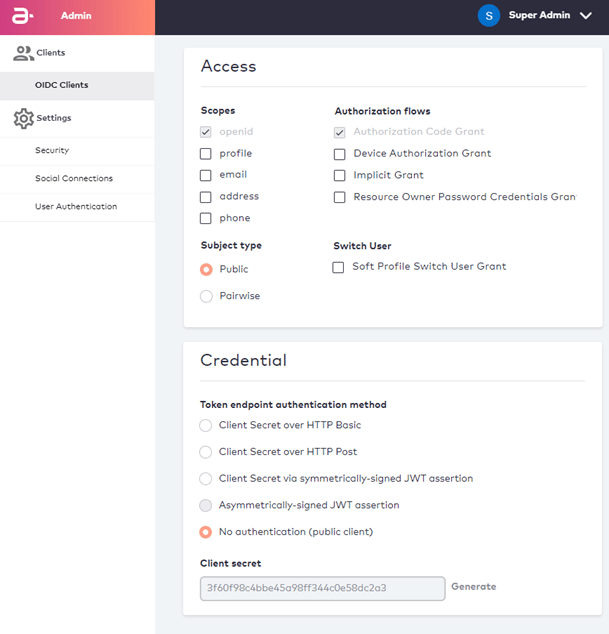
* **Public Client Type** – When registering an OIDC-based Relying Party, you can now designate the RP as a "public" client. This is useful for implementations that leverage OIDC-based [Device Authorization Grant](https://docs.vindicia.com/bundle/b_connectAdminGuide/page/connectGettingStartedGuide/ssoTopics/c_sso10foot3mDevices.html) flows, and for UIs without a backend. From the Admin web app, you can also specify that the client requires no authentication (public client). With this specification, public clients will not be required to supply credentials to the /oidc/token endpoint.
* **Soft Profile Switch User Grant** – Connect Cloud currently supports a variety of authorization grant flows in support of [OAuth 2.0 and its OpenID Connect (OIDC)](https://docs.vindicia.com/bundle/b_connectAdminGuide/page/connectGettingStartedGuide/ssoTopics/c_OAuth2andOpenIDConnect.html). In addition to Authorization Code, Implicit, and Hybrid authorization grant flows, the web app now includes Device Authorization Grant (or DAG) and Resource Owner Password Credentials grant flows. The DAG flow is used for 10 foot devices (Smart TVs, digital media players-Apple TV, Roku, and set top boxes). Resource Owner Password Credentials flow is used for cases where the RP needs to collect the end user's authN ID and password itself, and then pass them along to the identity provider.
### Business Reports in CSV and JSON Format
Connect Cloud includes a set of business reports that provide an overview of your user base, and the services they consume. As an administrative user, you can now call an API endpoint and receive reports within a specified time range, in CSV and JSON format.
The reports include:
| Report Number | Report Title |
| - | - |
| 1. | Number of user profiles per group role (Primary/Admin/User). |
| 2. | Number of deleted users. |
| 3. | Number of users with no account. |
| 4. | Number of users with 1 account. |
| 5. | Number of users with 2 accounts. |
| 6. | Number of users with 3 or more accounts. |
| 7. | Number of accounts per service type. |
| 8. | Number of users per service type. |
| 9. | Number of admin users with access to service type. |
| 10. | Number of regular users with access to service type. |
| 11. | Number of admin users with access to accounts. |
| 12. | Number of regular users with access to accounts. |
| 13. | Number of active users onboarded using Mobile. |
| 14. | Number of active users onboarded using Email. |
| 15. | Number of active users onboarded using Social. |
| 16. | Number of active users onboarded using Mobile, Email. |
| 17. | Number of active users onboard using Invite. |
| 18. | Number of users per social media. |
### Updates to the MarketONE Connect Admin Web App
Connect Admin web application is an administrative console available to Connect Cloud customer organizations. From this application, your organization register and manages OIDC-compliant Relying Parties, as well as system settings that determine the general behaviour of your API-based Processes.
As of this release, a few updates have been made to the Admin web app:
* **Public Client Type** – When registering an OIDC-based Relying Party, you can now designate the RP as a "public" client. This is useful for implementations that leverage OIDC-based [Device Authorization Grant](https://docs.vindicia.com/bundle/b_connectAdminGuide/page/connectGettingStartedGuide/ssoTopics/c_sso10foot3mDevices.html) flows, and for UIs without a backend. From the Admin web app, you can also specify that the client requires no authentication (public client). With this specification, public clients will not be required to supply credentials to the /oidc/token endpoint.
* **Soft Profile Switch User Grant** – Connect Cloud currently supports a variety of authorization grant flows in support of [OAuth 2.0 and its OpenID Connect (OIDC)](https://docs.vindicia.com/bundle/b_connectAdminGuide/page/connectGettingStartedGuide/ssoTopics/c_OAuth2andOpenIDConnect.html). In addition to Authorization Code, Implicit, and Hybrid authorization grant flows, the web app now includes Device Authorization Grant (or DAG) and Resource Owner Password Credentials grant flows. The DAG flow is used for 10 foot devices (Smart TVs, digital media players-Apple TV, Roku, and set top boxes). Resource Owner Password Credentials flow is used for cases where the RP needs to collect the end user's authN ID and password itself, and then pass them along to the identity provider.
 * **Invite Admin Users** - An Admin user with the "Super Admin" role can now add new users to the Admin app. To do this, the Admin user selects the Invite a User under their drop-down menu in the upper right corner.
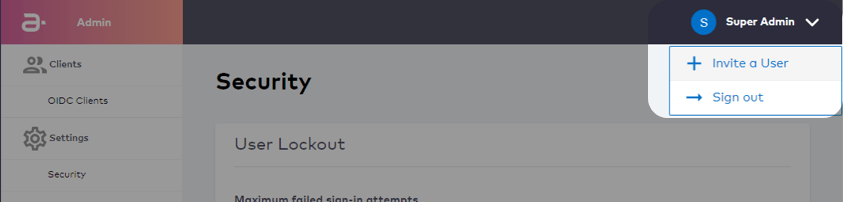 The Admin user specifies the invitee's name and email address. The invitee then receives an invitation and prompt to set their password.
* **Reset Admin User Password** - The Admin sign-in screen now includes a "Forgot your Password?" function for Admin users that have forgotten or misplaced their password.
The Admin user specifies the invitee's name and email address. The invitee then receives an invitation and prompt to set their password.
* **Reset Admin User Password** - The Admin sign-in screen now includes a "Forgot your Password?" function for Admin users that have forgotten or misplaced their password.
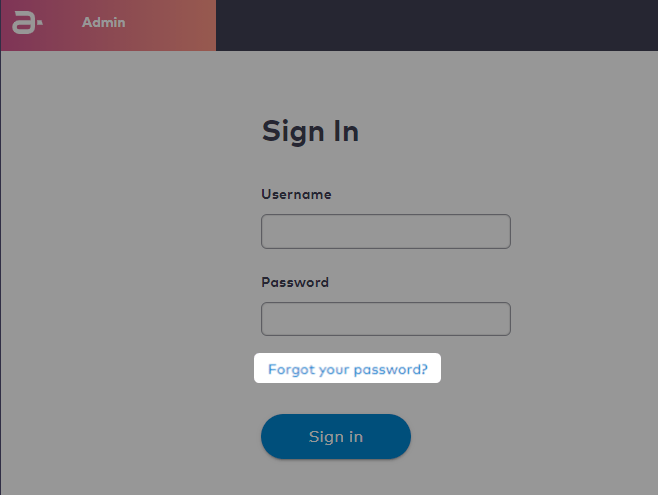 Once the function is invoked, the Admin user then receives an email and prompt to set a new password.
## Bug Fixes
The following bugs have been fixed in this release:
| Summary | Description |
| - | - |
| 504 Gateway Time-Out error when answering security question. | In the IDP, if users try to link an account and answers the security question correctly, a 504 Gateway Time-Out error emerges. This issue was resolved. |
| SMS template changes not propagating immediately. | When a change is made to SMS templates, the update is not reflected immediately. This issue was resolved. |
| "Share Account or Service" showing additional details not needed. | In the Connect Care Portal, if the Care user selects "Share Account or Service" activity, both the "Share Account or Service" and "Accept Invite to Share Account or Service" processes are displayed. This issue was resolved. |
## Known Issues
There are no known issues in this release.
This documentation is built and hosted on [Mintlify](https://mintlify.com), a developer documentation platform.
Once the function is invoked, the Admin user then receives an email and prompt to set a new password.
## Bug Fixes
The following bugs have been fixed in this release:
| Summary | Description |
| - | - |
| 504 Gateway Time-Out error when answering security question. | In the IDP, if users try to link an account and answers the security question correctly, a 504 Gateway Time-Out error emerges. This issue was resolved. |
| SMS template changes not propagating immediately. | When a change is made to SMS templates, the update is not reflected immediately. This issue was resolved. |
| "Share Account or Service" showing additional details not needed. | In the Connect Care Portal, if the Care user selects "Share Account or Service" activity, both the "Share Account or Service" and "Accept Invite to Share Account or Service" processes are displayed. This issue was resolved. |
## Known Issues
There are no known issues in this release.
This documentation is built and hosted on [Mintlify](https://mintlify.com), a developer documentation platform.