> ## Documentation Index
> Fetch the complete documentation index at: https://docs.ulm.m1amdocs.com/llms.txt
> Use this file to discover all available pages before exploring further.
# MarketONE Connect 2021.07 - Release Notes
Release Date: July 29, 2021
## Announcements
There are no announcements for this release.
## Connect Features
This section describes the key updates in this release.
### Update User Notification Channel Process
As of this release, a new Connect API Process is available that enables an authenticated end user to update their preferred notification channel. Once a client invokes the Update User Notification Channel Process, Connect calculates which of the current user's registered, verified authenticated identifiers (authN IDs) are valid options. The Process responds with an indexed list of options for the end user to select. The response will only include a given authN ID if:
* The authN ID is externally verified (that is, the channel can only be an email or mobile — no aliases)
* The authN ID currently has an **activated** status
* The authN ID is not already the current preferred contact channel
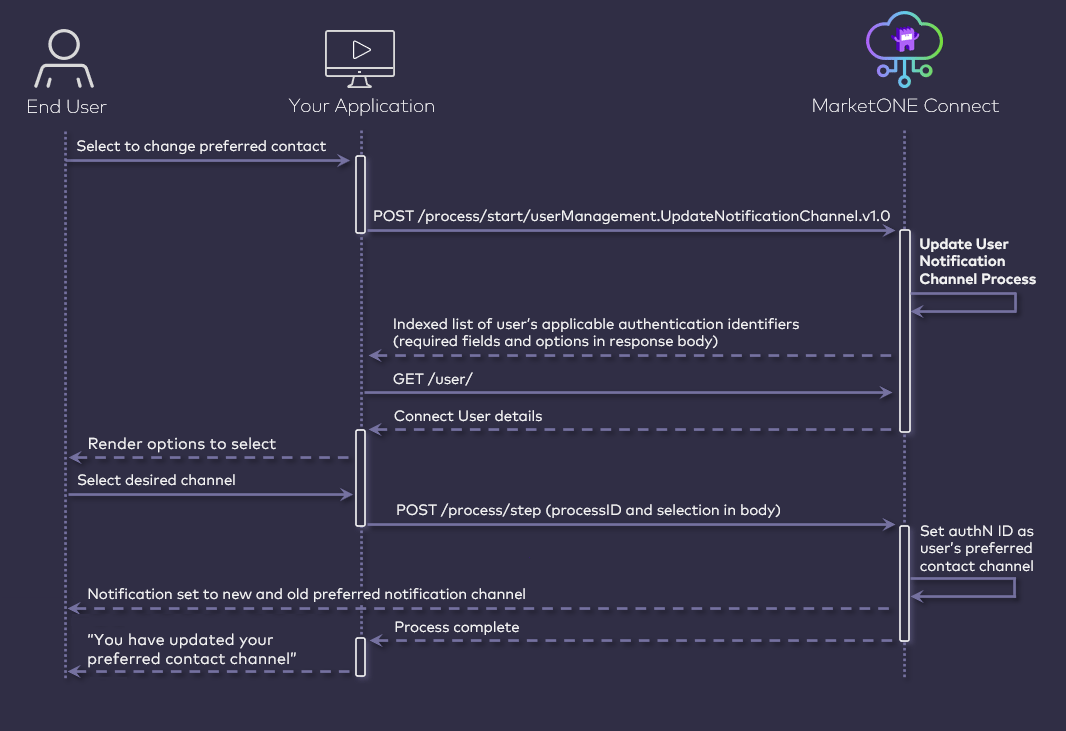 The Process also supports a single-step "expedited" flow wherein the client can supply the desired authN ID upfront in the Process Start API request.
**Note:** If your organization's integration with Connect involves the use of your own notification dispatch service, then Connect will first send the message details to your service. In that scenario, the message will specify the end user's preferred notification channel as the destination for that message, and your service can then construct and forward the message accordingly.
For more details on update user notification channel, refer to the [Update Notification Channel Process](https://docs.vindicia.com/bundle/b_processGuide/page/connectProcessAPIGuide/processes/identityManagementProcesses/c_updateNotificationChannel.html).
### Enhancements to the Onboard, Authenticate, and Purchase Process
In the June 2021 release, Connect introduced a new API Process (soft release) that combines onboarding, authentication, and prompt for a subscription purchase in one seamless flow.
As of this release, the Onboard, Authenticate, and Purchase Process includes a few new functional enhancements:
* **User Activity in Connect Care** – Connect Care web application includes an Activity screen that captures a selected end user's interactions with Connect, step-by-step as part of their overall journey. These interactions are generated by Connect Processes, and enable the Care User to review where an end user is in a given Process. Events for the Onboard, Login, and Enroll Process
* **Locale Language Setting** – A locale setting has been added that determines what language setting is applied to a new user who onboards through this Process.
* **Identity Portal Rework** – Significant changes have been added to our out of the box IdP UI to support this combined Process. This enables your organization to take advantage of this Process whether you're building your own sign-up/sign-in portal, or if you're using our IdP UI.
### Connect Social Processes now Support Azure ID
Connect's Process API library includes Processes for user onboarding, authentication, and association with a social account. These Processes implement the OAuth 2.0 framework, and enable end users to sign-up and sign-in using their preferred account from a supported external account provider.
The Process also supports a single-step "expedited" flow wherein the client can supply the desired authN ID upfront in the Process Start API request.
**Note:** If your organization's integration with Connect involves the use of your own notification dispatch service, then Connect will first send the message details to your service. In that scenario, the message will specify the end user's preferred notification channel as the destination for that message, and your service can then construct and forward the message accordingly.
For more details on update user notification channel, refer to the [Update Notification Channel Process](https://docs.vindicia.com/bundle/b_processGuide/page/connectProcessAPIGuide/processes/identityManagementProcesses/c_updateNotificationChannel.html).
### Enhancements to the Onboard, Authenticate, and Purchase Process
In the June 2021 release, Connect introduced a new API Process (soft release) that combines onboarding, authentication, and prompt for a subscription purchase in one seamless flow.
As of this release, the Onboard, Authenticate, and Purchase Process includes a few new functional enhancements:
* **User Activity in Connect Care** – Connect Care web application includes an Activity screen that captures a selected end user's interactions with Connect, step-by-step as part of their overall journey. These interactions are generated by Connect Processes, and enable the Care User to review where an end user is in a given Process. Events for the Onboard, Login, and Enroll Process
* **Locale Language Setting** – A locale setting has been added that determines what language setting is applied to a new user who onboards through this Process.
* **Identity Portal Rework** – Significant changes have been added to our out of the box IdP UI to support this combined Process. This enables your organization to take advantage of this Process whether you're building your own sign-up/sign-in portal, or if you're using our IdP UI.
### Connect Social Processes now Support Azure ID
Connect's Process API library includes Processes for user onboarding, authentication, and association with a social account. These Processes implement the OAuth 2.0 framework, and enable end users to sign-up and sign-in using their preferred account from a supported external account provider.
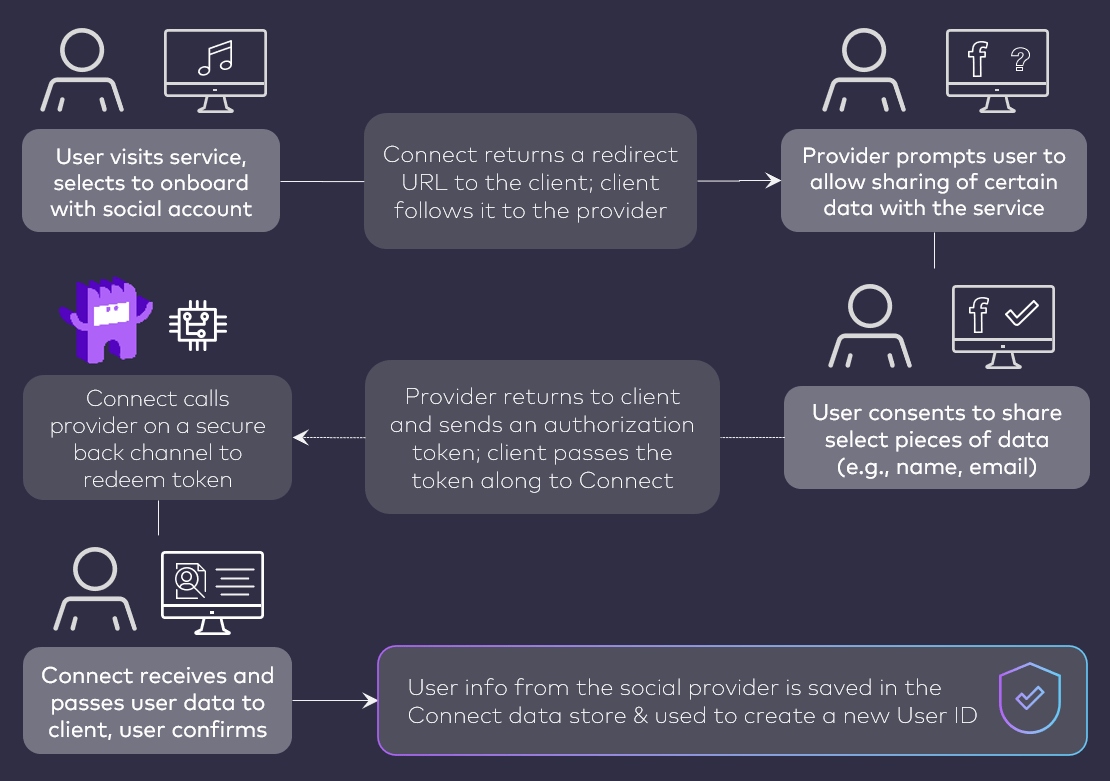 The two primary social-driven Processes are:
* [Onboard and Authenticate User with Social Account Process](https://docs.vindicia.com/bundle/b_processGuide/page/connectProcessAPIGuide/processes/identityManagementProcesses/c_onboardAuthenticateUserSocial.html) – Allows an anonymous end user to either sign-up and/or sign-in with an external account.
* [Associate Social Account to User ID Process](https://docs.vindicia.com/bundle/b_processGuide/page/connectProcessAPIGuide/processes/identityManagementProcesses/c_associateSocial.html) – Allows an authenticated end user to add their preferred external account to their User ID.
Connect already supports integrations with Facebook, Google, Apple, and LinkedIn. These integrations are configured in the Connect Admin web application.
As of this release, Connect now supports an integration Microsoft Azure. Much like the aforementioned account providers, your organization can now configure and enable an Azure integration through the Connect Admin web application. Once an integration is configured, your client application(s) can specify Azure during Social Process executions. This enables your end users onboard and authenticate into Connect (that is, into your services) with their Azure ID.
The two primary social-driven Processes are:
* [Onboard and Authenticate User with Social Account Process](https://docs.vindicia.com/bundle/b_processGuide/page/connectProcessAPIGuide/processes/identityManagementProcesses/c_onboardAuthenticateUserSocial.html) – Allows an anonymous end user to either sign-up and/or sign-in with an external account.
* [Associate Social Account to User ID Process](https://docs.vindicia.com/bundle/b_processGuide/page/connectProcessAPIGuide/processes/identityManagementProcesses/c_associateSocial.html) – Allows an authenticated end user to add their preferred external account to their User ID.
Connect already supports integrations with Facebook, Google, Apple, and LinkedIn. These integrations are configured in the Connect Admin web application.
As of this release, Connect now supports an integration Microsoft Azure. Much like the aforementioned account providers, your organization can now configure and enable an Azure integration through the Connect Admin web application. Once an integration is configured, your client application(s) can specify Azure during Social Process executions. This enables your end users onboard and authenticate into Connect (that is, into your services) with their Azure ID.
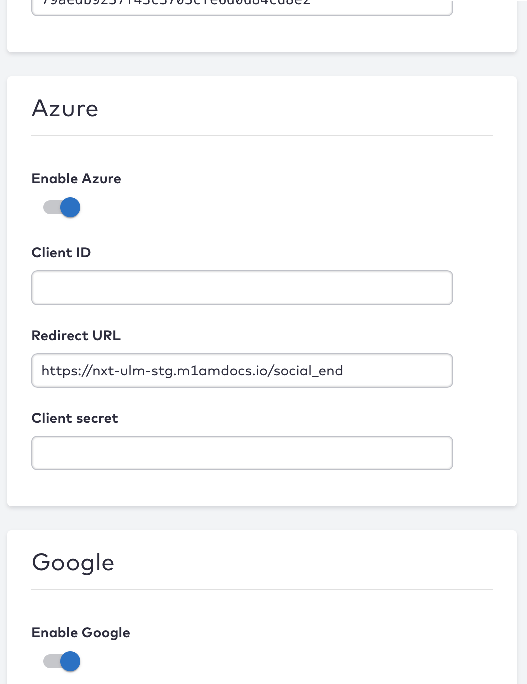 Configuring Social Integrations: Not sure how to set up your integration with one or more of our supported providers? You can check out [Managing Social Connection Settings](https://docs.vindicia.com/bundle/b_connectAdminGuide/page/connectAdminUserGuide/t_socialConnections.html) in the [Connect Admin Guide](https://docs.vindicia.com/bundle/b_connectAdminGuide) for more details.
## Bug Fixes
The following bug has been fixed in this release:
| Summary | Description |
| - | - |
| DAG flow not sending user confirmation emails | When executing Connect's Device Authorization Grant flow (or DAG flow), some end users were not receiving emails from Connect the approve their devices. This issue has been resolved. End users will receive an email to approve their device as expected. |
## Known Issues
There are no known issues in this release.
This documentation is built and hosted on [Mintlify](https://mintlify.com), a developer documentation platform.
Configuring Social Integrations: Not sure how to set up your integration with one or more of our supported providers? You can check out [Managing Social Connection Settings](https://docs.vindicia.com/bundle/b_connectAdminGuide/page/connectAdminUserGuide/t_socialConnections.html) in the [Connect Admin Guide](https://docs.vindicia.com/bundle/b_connectAdminGuide) for more details.
## Bug Fixes
The following bug has been fixed in this release:
| Summary | Description |
| - | - |
| DAG flow not sending user confirmation emails | When executing Connect's Device Authorization Grant flow (or DAG flow), some end users were not receiving emails from Connect the approve their devices. This issue has been resolved. End users will receive an email to approve their device as expected. |
## Known Issues
There are no known issues in this release.
This documentation is built and hosted on [Mintlify](https://mintlify.com), a developer documentation platform.