> ## Documentation Index
> Fetch the complete documentation index at: https://docs.ulm.m1amdocs.com/llms.txt
> Use this file to discover all available pages before exploring further.
# MarketONE Connect 2022.01 - Release Notes
Release Date: January 27, 2022
## Announcements
There are no announcements for this release.
## Connect Features
This section describes the key updates in this release.
### **New Process API: Onboard and Authenticate with Mobile Number and Passcode**
A new Process API called **Onboard and Authenticate with Mobile Number and Passcode** has been introduced to Connect. A user can onboard and then authenticate themselves using their mobile number and passcode, where a passcode is a string of numeric characters used as a password. This new Process API is intended to be used for applications or systems that allow users to input only numerical characters. For example, an application or system could be a telephone Interactive Voice Response (IVR) whereby a user calls a support phone number and inputs numerical characters from their phone's keypad to perform an action.
The following use cases are supported:
* **New user onboarding**: User receives a One-Time Password (OTP) → User enters OTP successfully → User sets passcode → User is onboarded and authenticated
* **Existing user authentication with passcode**: User enters passcode → User is authenticated
* **Existing user authentication without passcode**: User receives a One-Time Password (OTP) → User enters OTP successfully → User sets passcode → User is authenticated
* **Existing user authentication but forgot passcode**: User receives a One-Time Password (OTP) → User enters OTP successfully → User updates passcode → User is authenticated
The passcode complexity settings require only numerical characters of at least four numeric characters and two unique characters. For example, **1111** is not permitted because it does not contain two unique numeric characters. Passcode complexity settings are configurable by the merchant.
In order to integrate with this process, merchants require permission from the Connect team to identify use cases and target application or system. Once approved, Connect will allowlist a special key that only the application will be permitted to use.
### **Identity Provider Portal Enhancements**
The Identity Provider (IdP) Portal is a ready-to-use onboarding, authentication, and profile management application for end users.
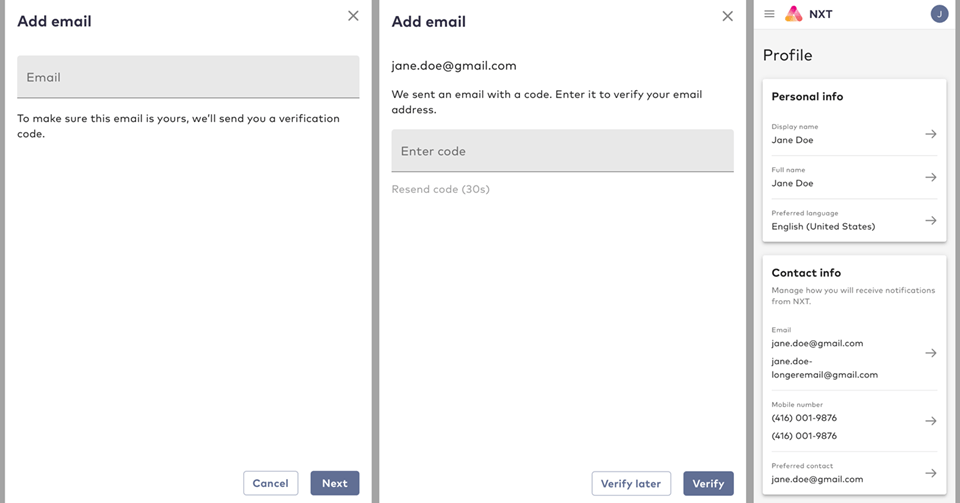
**Support for Additional Email Address and Mobile Number**
Prior to this release, end users were limited to only one email address and mobile number as an authentication identifier (also known as, login method).
As of this release, end users may add more than one email address and mobile number as an authentication identifier. The number of permitted additional authentication identifiers (additional email address or mobile number) is configurable by the merchant.
 **Support for Password Enhancement Features on the IdP Portal**
In October release (2021.10), three new password enhancement features were released at the API-level. These are now also supported in the IdP Portal, when enabled:
* **Password Lifetime**: Controls how long an end user can use a password before they are required to set a new one. For example, if the value of **Password Lifetime** is set to 90 days (or 7,776,000 seconds), then an end user that signs in 91 days after they set their password will need to set a new password before they can continue to use the service. Once an end user sets an acceptable new password, Connect closes all sessions that they may have open, except for the current one.
* **Password Historical Check Count**: Controls the number of most recently used passwords that an end user is not allowed to reuse, when they are setting a new password. For example, if the value of **Password Historical Check Count** is set to 5, then an end user cannot reuse any of their five most recent passwords when they are setting a new password.
* **Password Historical Check Period**: Controls the minimum amount of time that must pass before a previously used password may be used again. For example, if the value of **Password Historical Check Period** is set to 6 months (15,768,000 seconds), then once an end user replaces a password, that password cannot be used again for six months.
**Hide fields from IdP Portal**
The ID Management capabilities of the IdP Portal let end users update their profile such as update their passwords or change display names.
In this release, Connect provides merchants the ability to show or hide fields. Merchants that leverage the IdP Portal may prefer to hide certain fields from end users, especially if they are not in use. For example, a merchant may not have any use for PIN and therefore the set or update PIN field should be hidden from the end user for a simpler user experience, but if in the future they have use for PIN, they can easily show the field again with a simple configuration change that can be applied in real-time. As of this release, merchants can show or hide fields.
### Connect IPv6 Support
Internet Protocol (IP) identifies devices across the internet and every device that uses the internet is identified through its own IP address. IPv4 uses a 32-bit addressing scheme that is capable of supporting approximately 4 billion devices. IPv6 uses a 128-bit addressing scheme that is capable of supporting approximately 340 trillion devices. With the growth of internet usage, and especially with Internet of Things (IOT) devices, the world will reach IPv4's limit.
As of this release, Connect supports IPv6 in addition to IPv4. Both protocols are now supported, out-of-the-box, when a merchant onboards with Connect.
### UXDR® Enhancements
Connect User eXperience Data Record (UXDR®) is a detailed data record that collects and organizes the details of end users interactions with Connect, as well as recording all create, read, update, and delete (CRUD) events performed on [Connect entities](https://docs.vindicia.com/bundle/b_restApiGuide/page/c_connectDataModel.html).
As of this release, UXDRs have been enhanced to include the following data points:
* Custom Data patch array API call (for example, `[PATCH /customData/v1/user/\{userID\}/\{ArrayPropertyName\}](https://app.swaggerhub.com/apis/Amdocs_Media/CustomData/2021.03.Released#/Custom%20Data/patchCustomDataListItem)`) updates UXDR entries, and those entries appear on the **Activity** UI.
* Soft Profile API and Switch Profile API calls (for example, `[POST /group/\{groupId\}/addUser](https://app.swaggerhub.com/apis/Amdocs_Media/ULM/Released#/Group/createGroupUser)`, `[POST /session/switch](https://app.swaggerhub.com/apis/Amdocs_Media/ULM/Released#/group%20user/switchUserGroupSession)`) generate UXDR entries, and those entries appear in the **Activity** UI.
Connect UXDR® is used by different areas of the platform. Most notable use is made by the **Activity** UI in [Connect Care](https://docs.vindicia.com/bundle/b_careGuide). An organization's Customer Service Representatives (CSRs) can leverage this UI to review a selected User ID history, and take appropriate steps if needed.
**Support for Password Enhancement Features on the IdP Portal**
In October release (2021.10), three new password enhancement features were released at the API-level. These are now also supported in the IdP Portal, when enabled:
* **Password Lifetime**: Controls how long an end user can use a password before they are required to set a new one. For example, if the value of **Password Lifetime** is set to 90 days (or 7,776,000 seconds), then an end user that signs in 91 days after they set their password will need to set a new password before they can continue to use the service. Once an end user sets an acceptable new password, Connect closes all sessions that they may have open, except for the current one.
* **Password Historical Check Count**: Controls the number of most recently used passwords that an end user is not allowed to reuse, when they are setting a new password. For example, if the value of **Password Historical Check Count** is set to 5, then an end user cannot reuse any of their five most recent passwords when they are setting a new password.
* **Password Historical Check Period**: Controls the minimum amount of time that must pass before a previously used password may be used again. For example, if the value of **Password Historical Check Period** is set to 6 months (15,768,000 seconds), then once an end user replaces a password, that password cannot be used again for six months.
**Hide fields from IdP Portal**
The ID Management capabilities of the IdP Portal let end users update their profile such as update their passwords or change display names.
In this release, Connect provides merchants the ability to show or hide fields. Merchants that leverage the IdP Portal may prefer to hide certain fields from end users, especially if they are not in use. For example, a merchant may not have any use for PIN and therefore the set or update PIN field should be hidden from the end user for a simpler user experience, but if in the future they have use for PIN, they can easily show the field again with a simple configuration change that can be applied in real-time. As of this release, merchants can show or hide fields.
### Connect IPv6 Support
Internet Protocol (IP) identifies devices across the internet and every device that uses the internet is identified through its own IP address. IPv4 uses a 32-bit addressing scheme that is capable of supporting approximately 4 billion devices. IPv6 uses a 128-bit addressing scheme that is capable of supporting approximately 340 trillion devices. With the growth of internet usage, and especially with Internet of Things (IOT) devices, the world will reach IPv4's limit.
As of this release, Connect supports IPv6 in addition to IPv4. Both protocols are now supported, out-of-the-box, when a merchant onboards with Connect.
### UXDR® Enhancements
Connect User eXperience Data Record (UXDR®) is a detailed data record that collects and organizes the details of end users interactions with Connect, as well as recording all create, read, update, and delete (CRUD) events performed on [Connect entities](https://docs.vindicia.com/bundle/b_restApiGuide/page/c_connectDataModel.html).
As of this release, UXDRs have been enhanced to include the following data points:
* Custom Data patch array API call (for example, `[PATCH /customData/v1/user/\{userID\}/\{ArrayPropertyName\}](https://app.swaggerhub.com/apis/Amdocs_Media/CustomData/2021.03.Released#/Custom%20Data/patchCustomDataListItem)`) updates UXDR entries, and those entries appear on the **Activity** UI.
* Soft Profile API and Switch Profile API calls (for example, `[POST /group/\{groupId\}/addUser](https://app.swaggerhub.com/apis/Amdocs_Media/ULM/Released#/Group/createGroupUser)`, `[POST /session/switch](https://app.swaggerhub.com/apis/Amdocs_Media/ULM/Released#/group%20user/switchUserGroupSession)`) generate UXDR entries, and those entries appear in the **Activity** UI.
Connect UXDR® is used by different areas of the platform. Most notable use is made by the **Activity** UI in [Connect Care](https://docs.vindicia.com/bundle/b_careGuide). An organization's Customer Service Representatives (CSRs) can leverage this UI to review a selected User ID history, and take appropriate steps if needed.
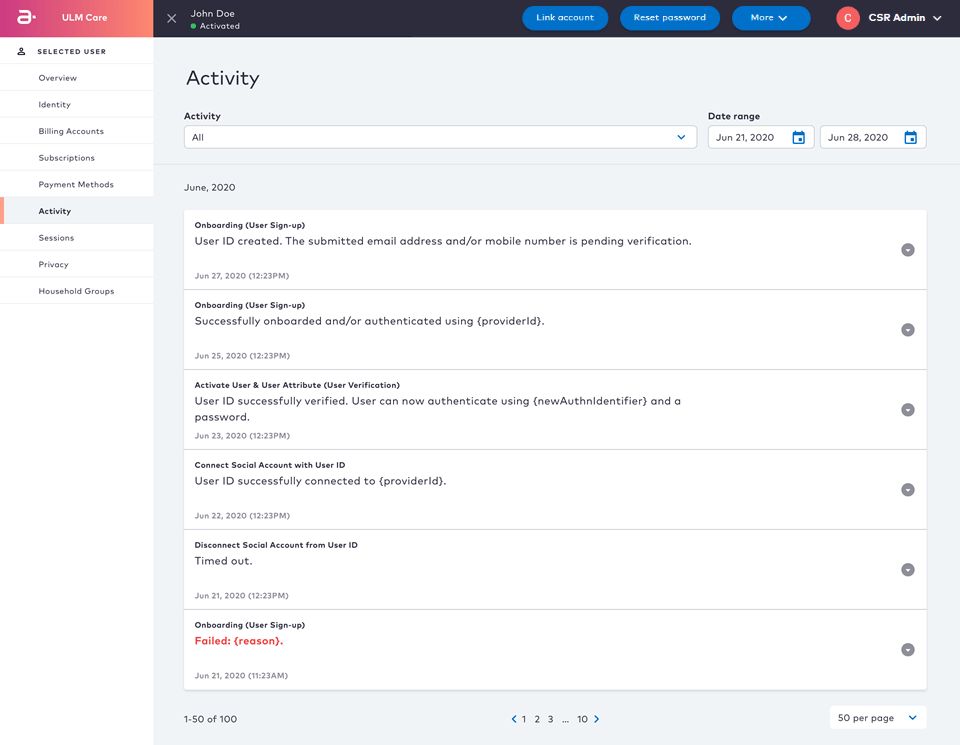 Connect UXDRs primarily hold event data generated by Connect Processes. For example, if an end user goes through the **Forgot Password?** flow, then the [Recover ID & Reset Password Processes](https://docs.vindicia.com/bundle/b_processGuide/page/connectProcessAPIGuide/processes/identityManagementProcesses/c_forgotPassword.html) generate event data as the end user goes through the flow.
### MarketONE OTT Payment Authorization and Payment Method APIs Support
Connect is a component of the MarketONE platform, which enables users to purchase and manage over-the-top (OTT) services. These services are typically purchased from the OTT service provider storefront.
As of this release the following enhancements have been made:
* MarketONE API [GET /partnersub/v3/partnerSubscription](https://app.swaggerhub.com/apis/Amdocs_Media/MarketONE/Released#/partnerSubscription/getPartnerSubscription) was updated to return all OTT payment authorizations related to the billing account associated to the mobile number.
* A new Storefront Gateway API call [GET /paymentMethod](https://app.swaggerhub.com/apis/Amdocs_Media/Storefront-Gateway/Storefront-Gateway-V1#/paymentMethod/getAccountPaymentMethods) was added and it returns a list of payment methods linked to an account that is active.
* A new Storefront Gateway API call [PUT /partnerSubscription/\{id}/paymentMethod](https://app.swaggerhub.com/apis/Amdocs_Media/Storefront-Gateway/Storefront-Gateway-V1#/partnerSubscription/updateBillingPartnerSubscriptionPaymentMethod) was added and it updates an active billing Partner subscription's payment method.
These changes enable full return of all OTT payment authorizations, payment methods, and update to an existing payment method.
## Bug Fixes
The following bugs have been fixed in this release:
| Summary | Description |
| - | - |
| IdP Portal restarted onboarding process when preferred language is changed | When a user is onboarding through IdP Portal and changes the preferred language mid- way through, then the onboarding process restarted. The issue is now resolved and the onboarding process continues from where it was left off, regardless of language selection. |
| Email-based authentication required characters to be case sensitive in some cases | A new issue emerged whereby email addresses had to be entered with case sensitivity in some cases. The issue is now resolved and email-based authentication is always case insensitive. |
| Connect (platform) UXDR daily data dump job failed for some days in December and in January | The issue is now resolved and affected merchants have achieved data consistency. |
## Known Issues
There are no known issues in this release.
This documentation is built and hosted on [Mintlify](https://mintlify.com), a developer documentation platform.
Connect UXDRs primarily hold event data generated by Connect Processes. For example, if an end user goes through the **Forgot Password?** flow, then the [Recover ID & Reset Password Processes](https://docs.vindicia.com/bundle/b_processGuide/page/connectProcessAPIGuide/processes/identityManagementProcesses/c_forgotPassword.html) generate event data as the end user goes through the flow.
### MarketONE OTT Payment Authorization and Payment Method APIs Support
Connect is a component of the MarketONE platform, which enables users to purchase and manage over-the-top (OTT) services. These services are typically purchased from the OTT service provider storefront.
As of this release the following enhancements have been made:
* MarketONE API [GET /partnersub/v3/partnerSubscription](https://app.swaggerhub.com/apis/Amdocs_Media/MarketONE/Released#/partnerSubscription/getPartnerSubscription) was updated to return all OTT payment authorizations related to the billing account associated to the mobile number.
* A new Storefront Gateway API call [GET /paymentMethod](https://app.swaggerhub.com/apis/Amdocs_Media/Storefront-Gateway/Storefront-Gateway-V1#/paymentMethod/getAccountPaymentMethods) was added and it returns a list of payment methods linked to an account that is active.
* A new Storefront Gateway API call [PUT /partnerSubscription/\{id}/paymentMethod](https://app.swaggerhub.com/apis/Amdocs_Media/Storefront-Gateway/Storefront-Gateway-V1#/partnerSubscription/updateBillingPartnerSubscriptionPaymentMethod) was added and it updates an active billing Partner subscription's payment method.
These changes enable full return of all OTT payment authorizations, payment methods, and update to an existing payment method.
## Bug Fixes
The following bugs have been fixed in this release:
| Summary | Description |
| - | - |
| IdP Portal restarted onboarding process when preferred language is changed | When a user is onboarding through IdP Portal and changes the preferred language mid- way through, then the onboarding process restarted. The issue is now resolved and the onboarding process continues from where it was left off, regardless of language selection. |
| Email-based authentication required characters to be case sensitive in some cases | A new issue emerged whereby email addresses had to be entered with case sensitivity in some cases. The issue is now resolved and email-based authentication is always case insensitive. |
| Connect (platform) UXDR daily data dump job failed for some days in December and in January | The issue is now resolved and affected merchants have achieved data consistency. |
## Known Issues
There are no known issues in this release.
This documentation is built and hosted on [Mintlify](https://mintlify.com), a developer documentation platform.