> ## Documentation Index
> Fetch the complete documentation index at: https://docs.ulm.m1amdocs.com/llms.txt
> Use this file to discover all available pages before exploring further.
# MarketONE Connect 2022.03 - Release Note
Release Date: March 31, 2022
## Announcements
We are migrating documentation from MarketONE Developer site at [https://developer.m1amdocs.com/documentation/](https://developer.m1amdocs.com/documentation/) to our Knowledge Center at [https://docs.vindicia.com/](https://docs.vindicia.com/). New documentation updates will only be available in the [Knowledge Center](https://docs.vindicia.com/).
## Connect Features
This section describes the key enhancements in this release:
### IdP UI Support for Multi-Factor Authentication (MFA)
Prior to this release Connect supported Multi-Factor Authentication (MFA) use cases via [APIs](https://docs.vindicia.com/bundle/b_processGuide/page/connectProcessAPIGuide/processes/c_mfaProcesses.html).
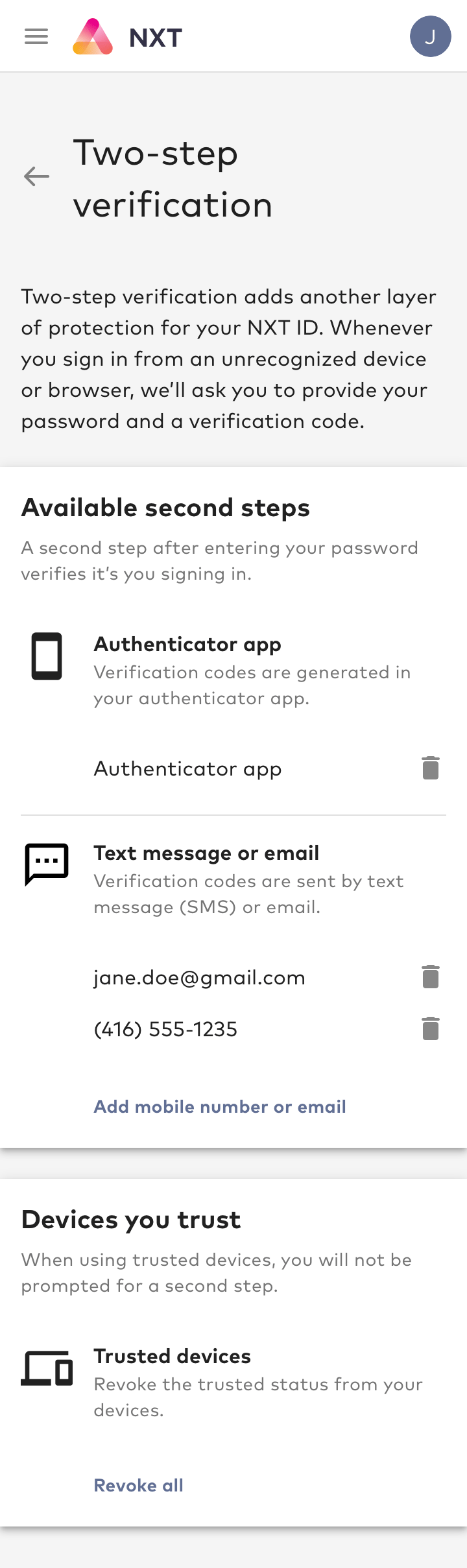
From this release, Connect IdP UI also provides support for MFA use cases.
The following MFA use cases are supported in Connect IdP UI:
**Note:** These use cases are only applicable if MFA is enabled in your organization.
* **Register/Unregister Authenticator App as an MFA Option**: An authenticated user may register (or once registered, remove) an [RFC-6238](https://datatracker.ietf.org/doc/html/rfc6238) compliant third-party authentication app such as Google Authenticator, LastPass, 1Password.
* **Register/Unregister Email Address or Mobile Number as an MFA Option**: An authenticated user (with a verified email address or mobile number for their profile) may register (or once registered, remove) their verified email address or mobile number as an MFA option.
* **Revoke Trusted Devices**: If the user is authenticated and has at least one MFA option registered, they may revoke all trusted devices with a single click or tap of a button.
* **Authentication with MFA Enabled**: If the user has at least one MFA option registered and they are attempting to log in from an untrusted device, they will be required to pass an MFA challenge. For example, if the user selects their authenticator app as the MFA option, they will be required to enter the code from the authenticator app to pass the challenge. For this challenge, the user can optionally also add the device as a trusted device. Once the user passes the challenge, the user is authenticated and the device becomes a trusted device.
 ### Theme Management in Admin Web App
Connect's IdP UI is a configurable user interface for user onboarding, sign-in and profile management. Prior to this release, updating the IdP UI theme was only possible via administrative APIs.
From this release, Connect Admin Web App includes an easy-to-use interface to update the theme. The new interface is accessible from **BRANDING** > **IdP Portal UI**.
### Theme Management in Admin Web App
Connect's IdP UI is a configurable user interface for user onboarding, sign-in and profile management. Prior to this release, updating the IdP UI theme was only possible via administrative APIs.
From this release, Connect Admin Web App includes an easy-to-use interface to update the theme. The new interface is accessible from **BRANDING** > **IdP Portal UI**.
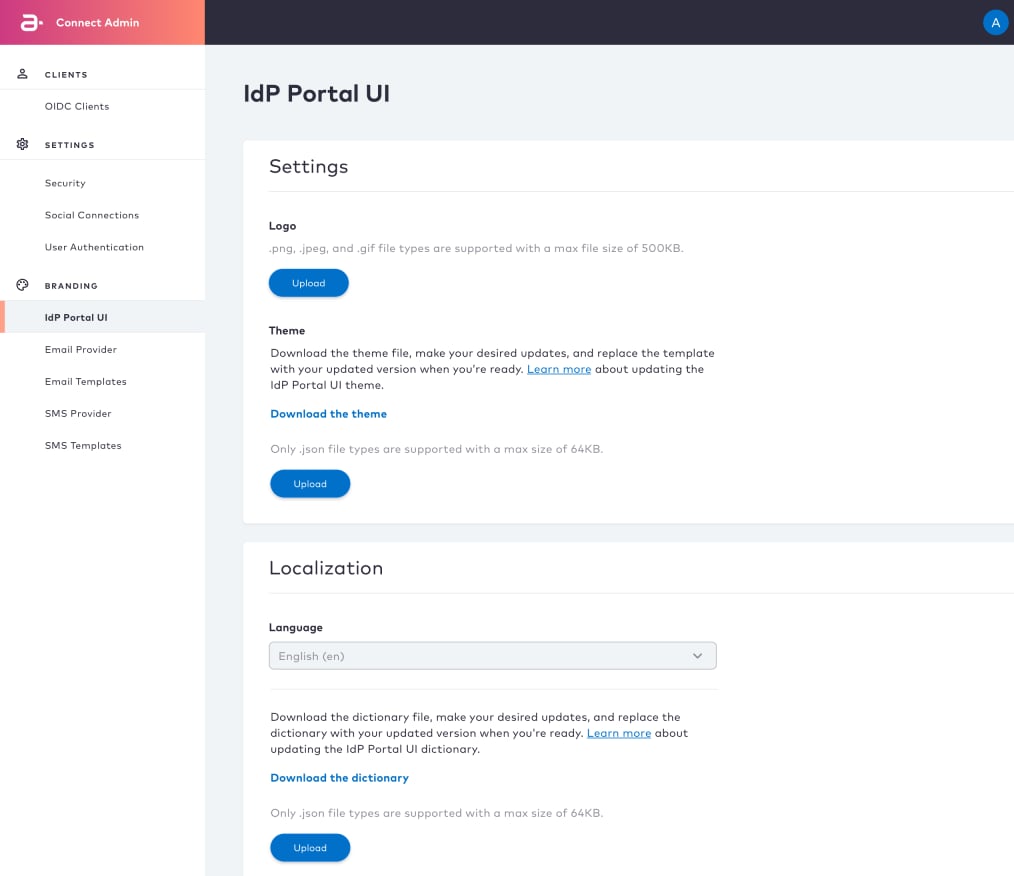 The following capabilities are supported:
* Upload logo file: Supported logo file types are PNG, JPEG, and GIF with a max size of 500kb
* Download theme file: Download the theme file to customize the IdP UI theme. It is a JSON type file, which contains CSS, font, and other theming parameters.
* Upload theme file: Upload the theme file with the customizations you made.
## Bug Fixes
There are no fixed bugs in this release:
## Known Issues
There are no known issues in this release.
This documentation is built and hosted on [Mintlify](https://mintlify.com), a developer documentation platform.
The following capabilities are supported:
* Upload logo file: Supported logo file types are PNG, JPEG, and GIF with a max size of 500kb
* Download theme file: Download the theme file to customize the IdP UI theme. It is a JSON type file, which contains CSS, font, and other theming parameters.
* Upload theme file: Upload the theme file with the customizations you made.
## Bug Fixes
There are no fixed bugs in this release:
## Known Issues
There are no known issues in this release.
This documentation is built and hosted on [Mintlify](https://mintlify.com), a developer documentation platform.