> ## Documentation Index
> Fetch the complete documentation index at: https://docs.ulm.m1amdocs.com/llms.txt
> Use this file to discover all available pages before exploring further.
# Connect 2023.03 - Release Note
Release Date: March 29, 2023
## Announcements
The following are MarketONE Connect Announcements:
* We are migrating documentation from MarketONE Developer site at [https://developer.m1amdocs.com/documentation/](https://developer.m1amdocs.com/documentation/) to our Knowledge Center at [https://docs.vindicia.com/](https://docs.vindicia.com/). New documentation updates will only be available in the [Knowledge Center](https://docs.vindicia.com/).
* We are in the process of updating documentation and UIs to reflect new product names for the following:
* **IdP UI** renamed to **Identity app**
* **Admin app** renamed to **Admin console**
* **Care app** renamed to **Care console**
## Connect Features and Enhancements
This section describes the key updates in this release:
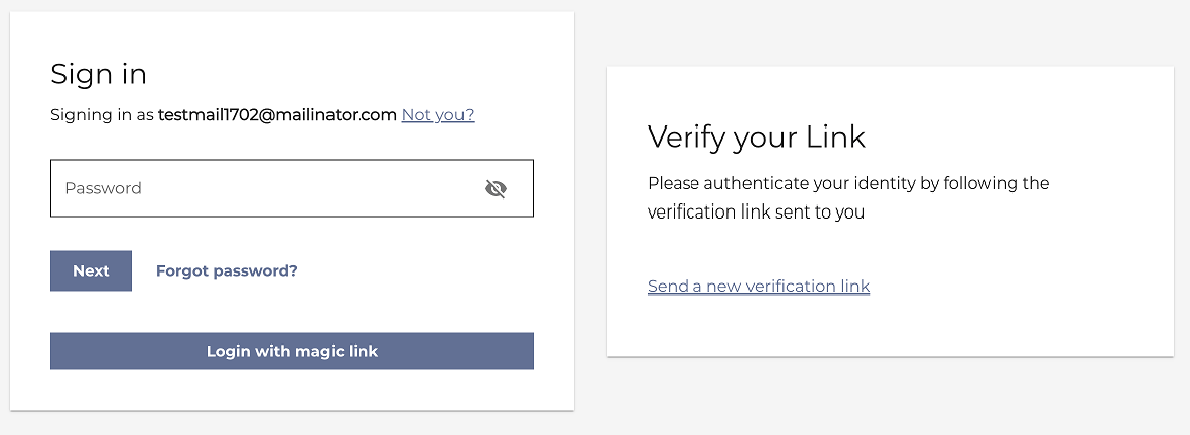
### Authenticate with Magic Link in the Identity App
MarketONE Connect's 2023.01 release allowed users to authenticate with a magic link by using Connect's [OnboardAndAuthneticateV2](https://docs.vindicia.com/bundle/b_processGuide/page/topics/c_processOverview.html) Process API call. From this release, this feature is now available in the **Identity app**.
With this capability, organizations can leverage the **Identity app** to provide their users with a magic link instead requiring them to enter a password to authenticate. This feature is helpful for users that:
* have forgotten their password and don't want to reset it.
* use extremely long passwords, as defined by password complexity rules, and don't want to enter their password.
* want to login quickly and efficiently by clicking or tapping a link.
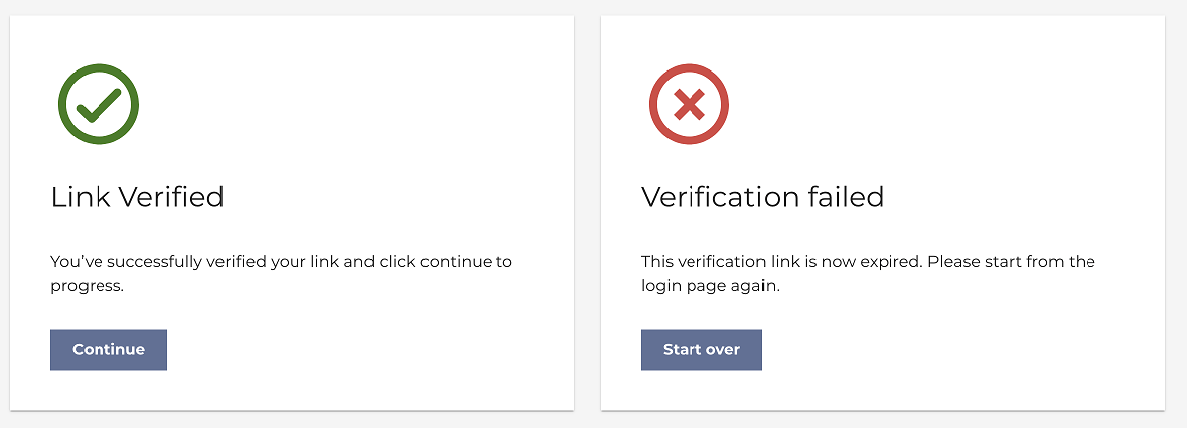
 Connect informs the users of their authentication status with the magic link and what actions to take next.
 ### Authenticate with One Time Password (OTP) in the Identity App
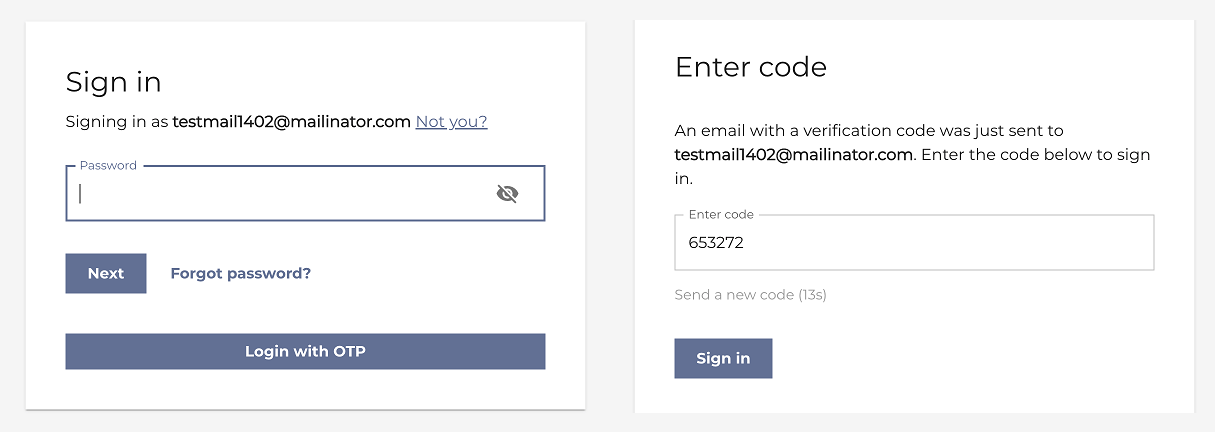
MarketONE Connect's 2023.01 release allowed users to authenticate with an OTP by using Connect's [OnboardAndAuthneticateV2](https://docs.vindicia.com/bundle/b_processGuide/page/topics/c_processOverview.html) Process API call. From this release, this feature is now available in the **Identity app**.
Using this feature, organizations can use the **Identity app** to provide their users with an OTP code instead of a password to authenticate.
### Authenticate with One Time Password (OTP) in the Identity App
MarketONE Connect's 2023.01 release allowed users to authenticate with an OTP by using Connect's [OnboardAndAuthneticateV2](https://docs.vindicia.com/bundle/b_processGuide/page/topics/c_processOverview.html) Process API call. From this release, this feature is now available in the **Identity app**.
Using this feature, organizations can use the **Identity app** to provide their users with an OTP code instead of a password to authenticate.
 ### Identity Router
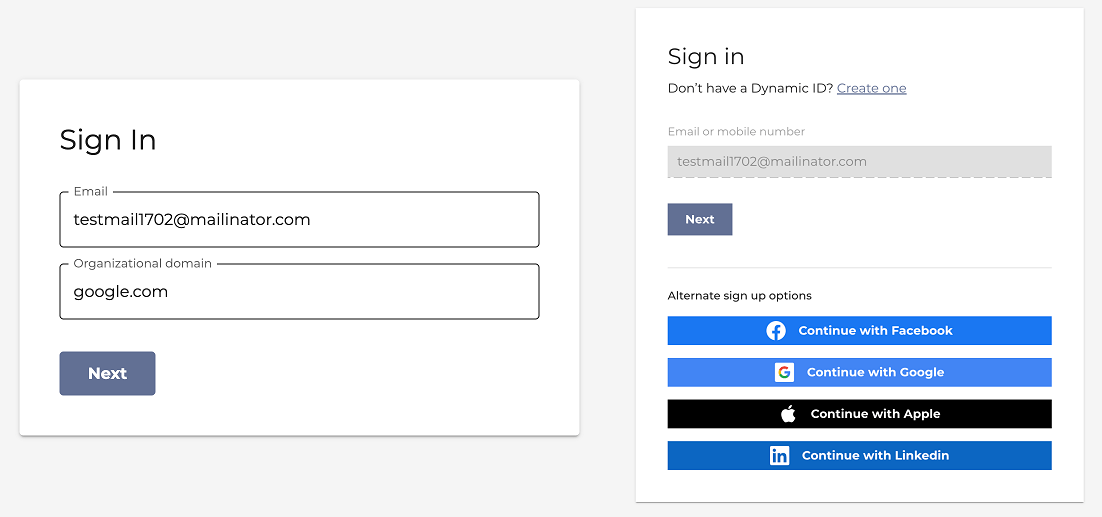
From this release, Connect provides an Identity Router enabling organizations to streamline authentication, registration, and access for users. The Identity Router can process user requests internally with the Connect IdP service or act as a Relying Party (RP) for 3rd Identity Providers. New sign in pages allow users to specify their organizational domain or choose a social provider for authentication.
This feature helps organization eliminate the need to maintain complex configurations for multiple IdPs and user-IdP associations.
### Identity Router
From this release, Connect provides an Identity Router enabling organizations to streamline authentication, registration, and access for users. The Identity Router can process user requests internally with the Connect IdP service or act as a Relying Party (RP) for 3rd Identity Providers. New sign in pages allow users to specify their organizational domain or choose a social provider for authentication.
This feature helps organization eliminate the need to maintain complex configurations for multiple IdPs and user-IdP associations.
 ### OIDC Scopes for Machine to Machine (M2M) calls
In previous releases, Connect supplied protected M2M calls that used a set of associated scopes. Connect provides additional new scopes and deprecated certain scopes. With this enhancement, M2M calls are more robust because of the improved granularity and security to access resources. The updated list of M2M scopes include the following:
| Scope | Description |
| - | - |
| m2m.customdata.read | To provide read-only access to the APIs |
| m2m.customdata.manage | To access custom data microservice |
| m2m.migration.manage | For data migration from the Migration microservice |
| m2m.storefront.csr.manage | Administrative access to Storefront Transactions and Refund-based APIs |
| m2m.storefront.csr.read | Read-only Access to storefront transaction APIs |
| m2m.ulm.accounts.manage | Administrative access to Account-only APIs |
| m2m.ulm.accounts.read | Read-only access to Account Activation APIs |
| m2m.ulm.groups.manage | Administrative access to Group-only APIs |
| m2m.ulm.groups.read | Read-only access to Group Activation APIs |
| m2m.ulm.users.manage | Administrative access to only User Activation APIs |
| m2m.ulm.users.read | Read-only access to User Activation APIs |
| m2m.ulm.tokens.manage | For machines to generate and send tokens |
### Manage User Roles in the Care Console
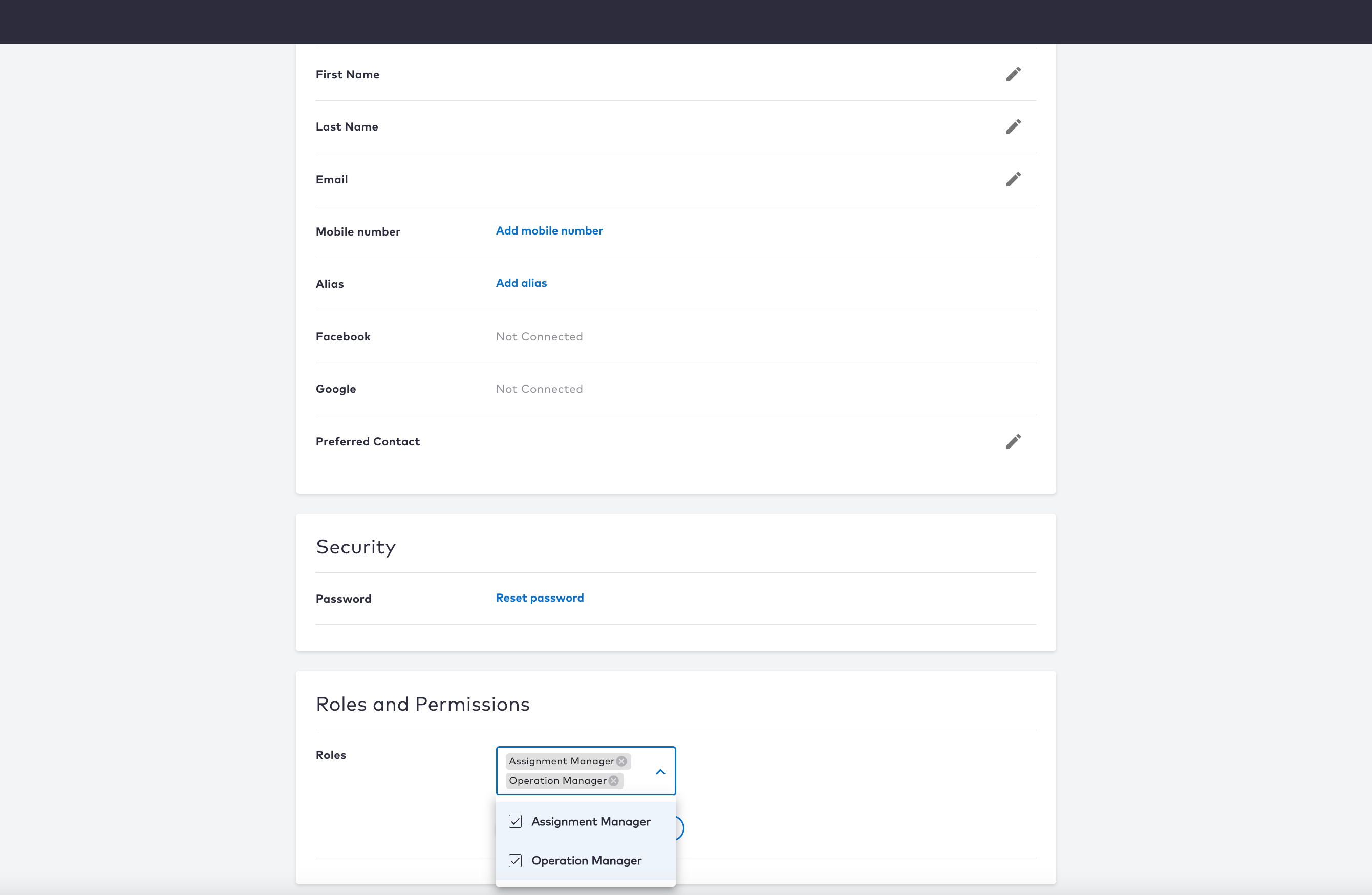
The **Care console** now allows admin users or care representatives with appropriate permissions to assign or remove roles from users.
### OIDC Scopes for Machine to Machine (M2M) calls
In previous releases, Connect supplied protected M2M calls that used a set of associated scopes. Connect provides additional new scopes and deprecated certain scopes. With this enhancement, M2M calls are more robust because of the improved granularity and security to access resources. The updated list of M2M scopes include the following:
| Scope | Description |
| - | - |
| m2m.customdata.read | To provide read-only access to the APIs |
| m2m.customdata.manage | To access custom data microservice |
| m2m.migration.manage | For data migration from the Migration microservice |
| m2m.storefront.csr.manage | Administrative access to Storefront Transactions and Refund-based APIs |
| m2m.storefront.csr.read | Read-only Access to storefront transaction APIs |
| m2m.ulm.accounts.manage | Administrative access to Account-only APIs |
| m2m.ulm.accounts.read | Read-only access to Account Activation APIs |
| m2m.ulm.groups.manage | Administrative access to Group-only APIs |
| m2m.ulm.groups.read | Read-only access to Group Activation APIs |
| m2m.ulm.users.manage | Administrative access to only User Activation APIs |
| m2m.ulm.users.read | Read-only access to User Activation APIs |
| m2m.ulm.tokens.manage | For machines to generate and send tokens |
### Manage User Roles in the Care Console
The **Care console** now allows admin users or care representatives with appropriate permissions to assign or remove roles from users.
 ## Bug Fixes
There are no bug fixes in this release.
## Known Issues
There are no known issues in this release.
This documentation is built and hosted on [Mintlify](https://mintlify.com), a developer documentation platform.
## Bug Fixes
There are no bug fixes in this release.
## Known Issues
There are no known issues in this release.
This documentation is built and hosted on [Mintlify](https://mintlify.com), a developer documentation platform.