> ## Documentation Index
> Fetch the complete documentation index at: https://docs.ulm.m1amdocs.com/llms.txt
> Use this file to discover all available pages before exploring further.
# Digital Identity Management Action Token
Some user journeys only need one Process or standard REST API to complete a task. Other user journeys are multi-step, dependent processes linked together with **action tokens**. The Digital Identity Management Process framework manages the **action tokens** and how they are linked together and executed.
## How Tokens Work
An action token is a unique one-time use token that triggers a one-time action when redeemed. Action tokens are context-aware, meaning that upon token redemption:
* Digital Identity Management knows what task needs to be performed such as what Process is executed next on what resource(s).
* Digital Identity Management knows who is redeeming the token, even if no current Digital Identity Management user session exists.
To achieve this, Digital Identity Management issues an action token at the end of the first Process, and sends that action token to the specified contact channel (the email address or mobile number as set by the user). The token knows who the user is and the contact channel being used, and this information allows the second Process, when invoked, to complete its task without ambiguity.
 For example, an email onboarding journey starts with the [Onboard User with Email and Mobile Process](c_onboardUserEmailMobile). This Process consumes and validates a user's information (such as the email address and password) to create a new User ID (user entity) that's saved in the Digital Identity Management data store. The same Process also sends a verification message to the end user's email address with a clickable verification link. The user is notified to check their email, and they must select the link to trigger the [Activate User (and User Attribute) Process](c_activateUser).
Other common use cases of dependent Processes using action tokens are:
* **Recover lost passwords**: A anonymous user forgets their password and invokes the [Process](c_forgotPassword). Digital Identity Management sends a token to the end user's email address or mobile number, and the user retrieves that token to complete their password reset.
* **Add new authentication identifiers**: An authenticated user adds a new email or mobile to their user ID with the [Add/Update Email, Mobile, or Alias Process](c_addUpdateAuthnID). Digital Identity Management sends a token to the new email or mobile for verification. The user retrieves and uses the token to trigger the [Activate User (and User Attribute) Process](c_activateUser).
Digital Identity Management continues to develop new user lifecycle management Processes with tokens to facilitate multi-step user journeys with multiple entry points.
## Token Formats & Notifications
When Digital Identity Management Process issues an action token, it is rendered and delivered to the user in one or more of the following formats:
* A long-form clickable link (URL) with the full token appended to the URL that the user clicks or taps.
* A short One-Time Passcode (OTP) that the user enters into the client application. Digital Identity Management also generates a Proof Key Action Token (PKAT) for OTP redemption and Token Resends.
**Token URL**
A long-form, redirect URL that sends the user back to the client application UI. Next, the client application calls the [`sessionTokenGet`](c_sessionToken) API to invoke the next dependent Process.
The token URL is composed to two separate pieces of information:
* A redirect URL that navigates the user from their email/SMS back to the client application UI. These URLs are Process-specific app settings in the Digital Identity Management [**Admin** > **Authentication** > **Tokens** > **Advanced Settings**](https://docs.vindicia.com/bundle/b_connectAdminGuide/page/topics/appSettings_c.html) page.
* A long-form token ID which represents the actual token. When a Process completes, a token value is automatically generated and appended to the redirect URL that is sent to the user.
An example Session Token Get call response is `GET /session/token?value=b8a2ac7c-47be-4d4b-8c`. See the [Developer Hub](https://docs.vindicia.com/category/developerhub) for more details on this APIs.
For example, an email onboarding journey starts with the [Onboard User with Email and Mobile Process](c_onboardUserEmailMobile). This Process consumes and validates a user's information (such as the email address and password) to create a new User ID (user entity) that's saved in the Digital Identity Management data store. The same Process also sends a verification message to the end user's email address with a clickable verification link. The user is notified to check their email, and they must select the link to trigger the [Activate User (and User Attribute) Process](c_activateUser).
Other common use cases of dependent Processes using action tokens are:
* **Recover lost passwords**: A anonymous user forgets their password and invokes the [Process](c_forgotPassword). Digital Identity Management sends a token to the end user's email address or mobile number, and the user retrieves that token to complete their password reset.
* **Add new authentication identifiers**: An authenticated user adds a new email or mobile to their user ID with the [Add/Update Email, Mobile, or Alias Process](c_addUpdateAuthnID). Digital Identity Management sends a token to the new email or mobile for verification. The user retrieves and uses the token to trigger the [Activate User (and User Attribute) Process](c_activateUser).
Digital Identity Management continues to develop new user lifecycle management Processes with tokens to facilitate multi-step user journeys with multiple entry points.
## Token Formats & Notifications
When Digital Identity Management Process issues an action token, it is rendered and delivered to the user in one or more of the following formats:
* A long-form clickable link (URL) with the full token appended to the URL that the user clicks or taps.
* A short One-Time Passcode (OTP) that the user enters into the client application. Digital Identity Management also generates a Proof Key Action Token (PKAT) for OTP redemption and Token Resends.
**Token URL**
A long-form, redirect URL that sends the user back to the client application UI. Next, the client application calls the [`sessionTokenGet`](c_sessionToken) API to invoke the next dependent Process.
The token URL is composed to two separate pieces of information:
* A redirect URL that navigates the user from their email/SMS back to the client application UI. These URLs are Process-specific app settings in the Digital Identity Management [**Admin** > **Authentication** > **Tokens** > **Advanced Settings**](https://docs.vindicia.com/bundle/b_connectAdminGuide/page/topics/appSettings_c.html) page.
* A long-form token ID which represents the actual token. When a Process completes, a token value is automatically generated and appended to the redirect URL that is sent to the user.
An example Session Token Get call response is `GET /session/token?value=b8a2ac7c-47be-4d4b-8c`. See the [Developer Hub](https://docs.vindicia.com/category/developerhub) for more details on this APIs.
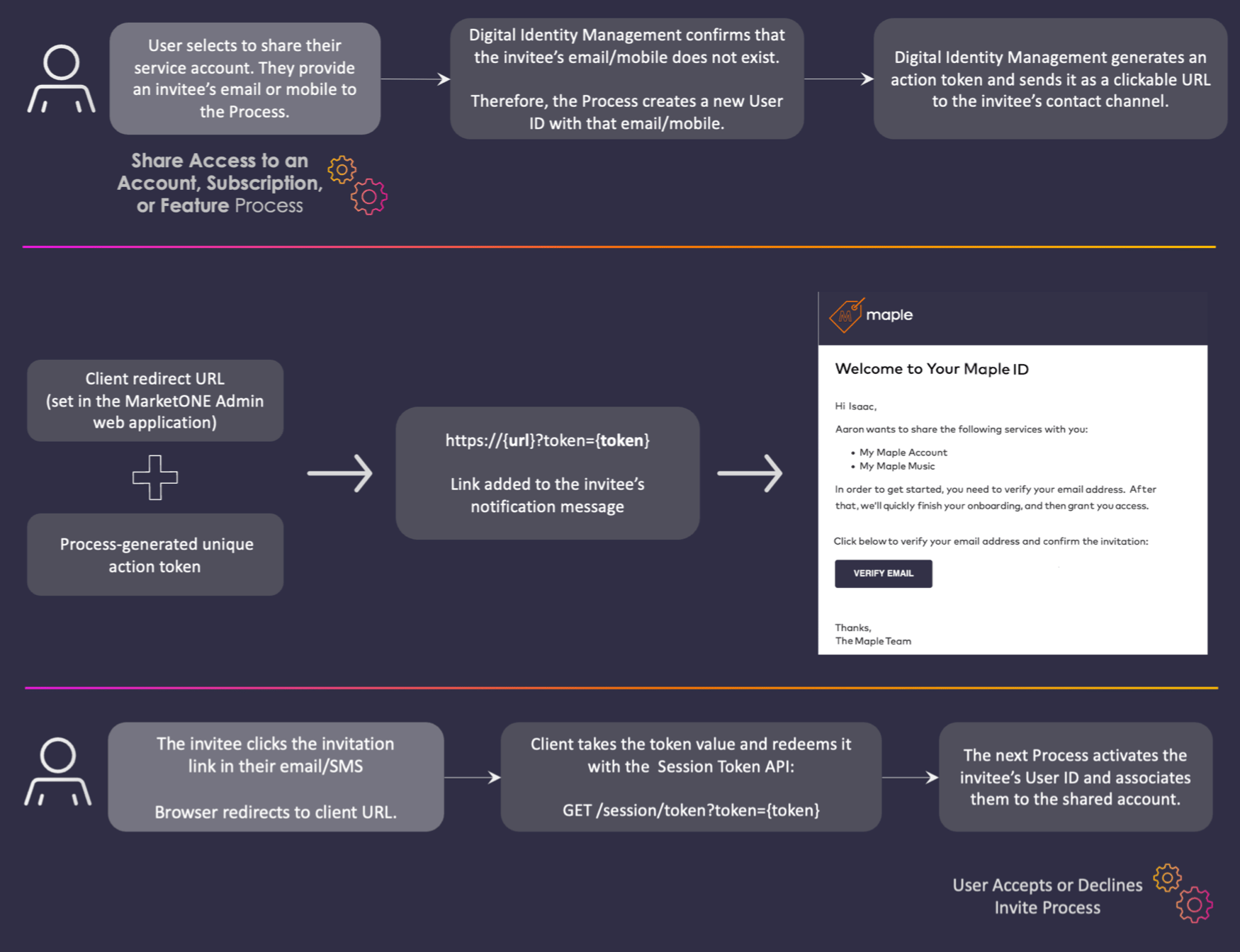 Token URLs are easier for a user to complete their journey with a single click or tap (if sent over SMS) the link to redeem the action token and trigger the next Process. An OTP requires the user to enter the digits into the client application UI.
**Note:** Long-form Token URLs default expiration period is **28800 minutes** (20 days). Configure tokens in the Admin console from the [**Admin** > **Authentication** > **Tokens**](https://docs.vindicia.com/bundle/b_connectAdminGuide/page/topics/appSettings_c.html) page.
**One-time Passcode (OTP)**
This short-form code represents the actual token value Digital Identity Management sends to the specified contact channel. When the user receives the OTP code, they enter code into the client application UI. Next, the client application calls the [`sessionTokenGet`](c_sessionToken) API to invoke the next linked or dependent process.
An example of this API call is `GET /session/token?customValue=7834&pkat=b8a2ac7c-47be-4d4b-8cf1-7fa6576d07fe`
Token URLs are easier for a user to complete their journey with a single click or tap (if sent over SMS) the link to redeem the action token and trigger the next Process. An OTP requires the user to enter the digits into the client application UI.
**Note:** Long-form Token URLs default expiration period is **28800 minutes** (20 days). Configure tokens in the Admin console from the [**Admin** > **Authentication** > **Tokens**](https://docs.vindicia.com/bundle/b_connectAdminGuide/page/topics/appSettings_c.html) page.
**One-time Passcode (OTP)**
This short-form code represents the actual token value Digital Identity Management sends to the specified contact channel. When the user receives the OTP code, they enter code into the client application UI. Next, the client application calls the [`sessionTokenGet`](c_sessionToken) API to invoke the next linked or dependent process.
An example of this API call is `GET /session/token?customValue=7834&pkat=b8a2ac7c-47be-4d4b-8cf1-7fa6576d07fe`
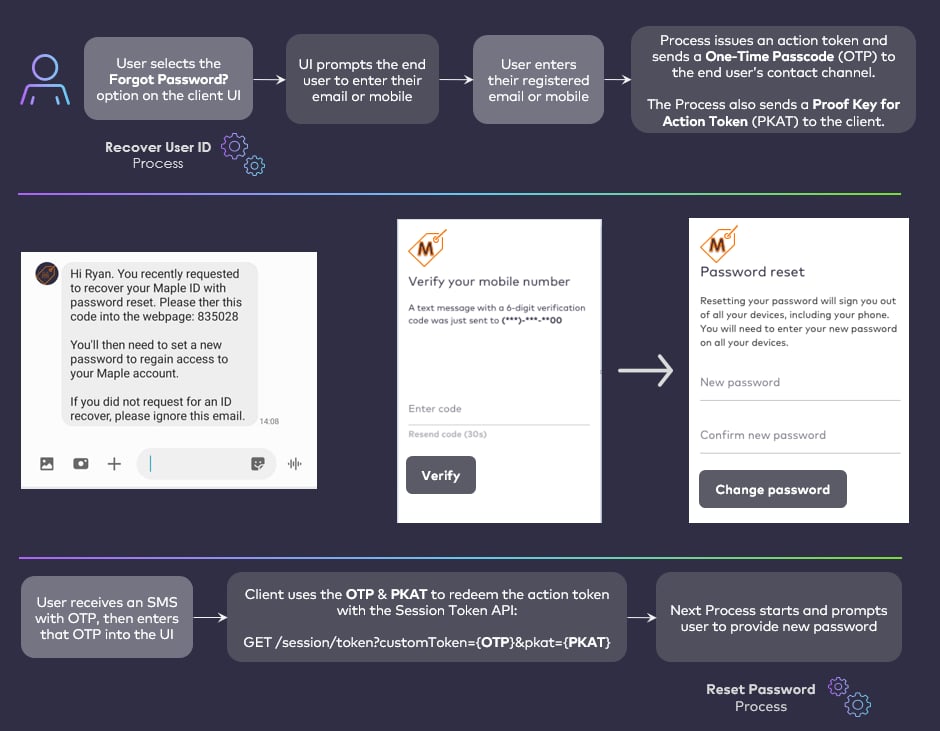 Token OTPs are useful because a verification step is performed when the user retrieves the OTP from their SMS or email, and then enters the number into the client application UI.
**Note:** The Token OTP expiration period is **5 minutes** and can't be configured from the [Admin console](https://docs.vindicia.com/bundle/b_connectAdminGuide/page/topics/appSettings_c.html).
**Use a Notification Service**
Digital Identity Management's notification service is available for configuration and testing in PDT environments only (not in PROD). Digital Identity Management also provides a notification framework that allows you to integrate your own system. Your notification system leverages the Digital Identity Management processes and templates to instruct end users on their journeys.
**Note:** Digital Identity Management supports the MarketONE CSP Adapter API to enable large-scale Service Providers to integrate their existing notification system. When a user completes a Process, Digital Identity Management sends all of the relevant data (user information, redirect+token URL, custom token OTP) to your external notification delivery system via this API.
Most Digital Identity Management Processes send **both** a long-form clickable link **and** a short-form custom OTP to the selected contact channel. Digital Identity Management controls what token types are sent on each channel type based on HTML & thymeleaf templates saved in the Digital Identity Management data store.
## Resending Tokens
There are use cases where Digital Identity Management needs to resend an action token to a user upon request.
For client application(s) that need to facilitate a quick **Resend** function or OTP validation option on the application UI, then the UI must retain and use the `pkat` that is returned from a Process.
Token OTPs are useful because a verification step is performed when the user retrieves the OTP from their SMS or email, and then enters the number into the client application UI.
**Note:** The Token OTP expiration period is **5 minutes** and can't be configured from the [Admin console](https://docs.vindicia.com/bundle/b_connectAdminGuide/page/topics/appSettings_c.html).
**Use a Notification Service**
Digital Identity Management's notification service is available for configuration and testing in PDT environments only (not in PROD). Digital Identity Management also provides a notification framework that allows you to integrate your own system. Your notification system leverages the Digital Identity Management processes and templates to instruct end users on their journeys.
**Note:** Digital Identity Management supports the MarketONE CSP Adapter API to enable large-scale Service Providers to integrate their existing notification system. When a user completes a Process, Digital Identity Management sends all of the relevant data (user information, redirect+token URL, custom token OTP) to your external notification delivery system via this API.
Most Digital Identity Management Processes send **both** a long-form clickable link **and** a short-form custom OTP to the selected contact channel. Digital Identity Management controls what token types are sent on each channel type based on HTML & thymeleaf templates saved in the Digital Identity Management data store.
## Resending Tokens
There are use cases where Digital Identity Management needs to resend an action token to a user upon request.
For client application(s) that need to facilitate a quick **Resend** function or OTP validation option on the application UI, then the UI must retain and use the `pkat` that is returned from a Process.
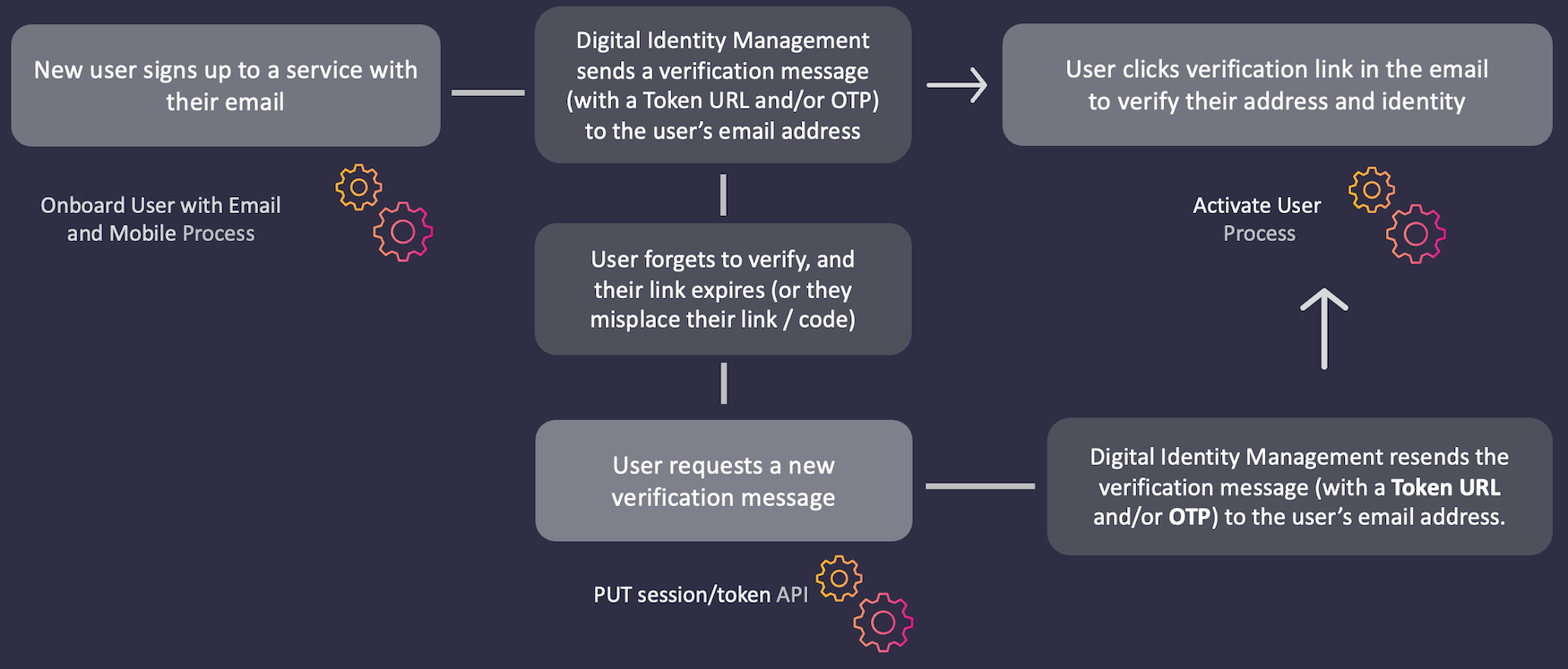 If your organization needs to facilitate a quick **Resend** function or OTP validation option on the client application UI, then the UI must retain and use the `pkat` that's returned from a Process.
## Proof Key for Action Tokens (PKATs)
Any Process that issues a Digital Identity Management action token also sends a key in the final API Step response to the client application. This key is known as a `pkat`, or Proof Key for Action Token.
```
{
"processId": "8bca30ca-dd44-4050-aece-53b0dbed1922",
"returnParameters": {
"pkat":"sdfsd-gfsdfgsd-sdgsdg-sfddsf-dsfsdf"
}
}
```
The client application UI must retain and use the `pkat` to facilitate OTP verification and/or a quick **Resend** option on the client application UI.
An example of the Resend Process using OTP and pkat is `PUT /session/token?pkat=b8a2ac7c-47be-4d4b-8cf1-7fa6576d07f`. The following occurs:
* The API returns a new pkat value that must be used instead of the value used before.
* The API generates a new OTP value and invalidates the previous OTP value issued.
* The OTP expiration period is reset by the process.
* The maximum failed sign in attempts counter is reset.
This documentation is built and hosted on [Mintlify](https://mintlify.com), a developer documentation platform.
If your organization needs to facilitate a quick **Resend** function or OTP validation option on the client application UI, then the UI must retain and use the `pkat` that's returned from a Process.
## Proof Key for Action Tokens (PKATs)
Any Process that issues a Digital Identity Management action token also sends a key in the final API Step response to the client application. This key is known as a `pkat`, or Proof Key for Action Token.
```
{
"processId": "8bca30ca-dd44-4050-aece-53b0dbed1922",
"returnParameters": {
"pkat":"sdfsd-gfsdfgsd-sdgsdg-sfddsf-dsfsdf"
}
}
```
The client application UI must retain and use the `pkat` to facilitate OTP verification and/or a quick **Resend** option on the client application UI.
An example of the Resend Process using OTP and pkat is `PUT /session/token?pkat=b8a2ac7c-47be-4d4b-8cf1-7fa6576d07f`. The following occurs:
* The API returns a new pkat value that must be used instead of the value used before.
* The API generates a new OTP value and invalidates the previous OTP value issued.
* The OTP expiration period is reset by the process.
* The maximum failed sign in attempts counter is reset.
This documentation is built and hosted on [Mintlify](https://mintlify.com), a developer documentation platform.