> ## Documentation Index
> Fetch the complete documentation index at: https://docs.ulm.m1amdocs.com/llms.txt
> Use this file to discover all available pages before exploring further.
# Associate Billing Account to User Process
Also known as the Associate Account Process, this Process associates an external billing account to a Digital Identity Management User. Digital Identity Management retrieves account information from the billing system, and then uses that data to provision a Digital Identity Management Account entity. The full operation is technically executed by two distinct but directly related Digital Identity Management Processes. See below for more details.
## **Multiple Process Orchestration**
Most user journeys are facilitated by a single Process. Conversely, there are some cases where Digital Identity Management orchestrates and links two or more distinct Processes to complete a given journey.
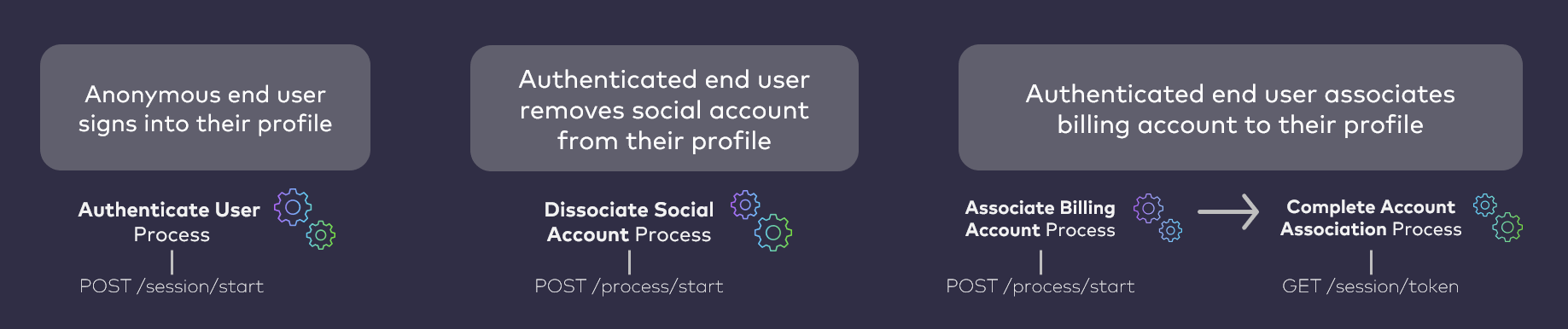 The [Process Start API](c_processStart) invokes the **Associate Billing Account** Process to start the user journey. That Process consumes a mobile number, queries the external system with that number, and (if successful) discovers external account data. Digital Identity Management then issues an action token and delivers it as a short, custom One-time Passcode (OTP) to that mobile number over SMS. The Process ends at this point, and the client application prompts the user to supply that OTP.
The user then retrieves the OTP from their phone, and supplies it to the client application. The client application then supplies that OTP to the [Session Token API](c_sessionToken#), and that API initializes the **Complete Account Association** Process to complete the operation. That secondary Process uses the external account data to provision the Digital Identity Management Account entity in our data store.
## AuthN ID Creation
If the user supplies a mobile number is not already one of their registered, activated authentication identifiers (authN IDs), then this Process automatically adds and activates the mobile number to the User ID (i.e., to the user's corresponding Digital Identity Management User entity) at the very end of the user journey. This is because they are, in effect, verifying their ownership of the mobile through OTP verification.
In some cases, the user might supply a mobile that is already registered as one of their activated authN IDs. They will still need to receive the OTP and supply it back to Digital Identity Management to complete the account association.
## **External Account Discovery**
This Process consumes metadata provided by the user to search for and discover the external account. Currently, the only acceptable data type is a mobile number.
**Note:** Support for this Process to accept email addresses and external account numbers is roadmapped for a future release.
## **Digital Identity Management Account Provisioning**
If the external system returns an account record to Digital Identity Management, Digital Identity Management then sends an OTP to the user to verify the account ownership. Once the OTP is verified, the Process provisions an equivalent Digital Identity Management Account entity. The Account's attributes are populated with details from the external B/OSS record data.
Account and subscription data will differ architecturally from external service to service. How the account data maps to the Digital Identity Management Account (and or Digital Identity Management Subscriptions and Features, if any) depends on an integration between Digital Identity Management and the external B/OSS. Digital Identity Management's flexible data model maps external account details to a standard Digital Identity Management Account entity according to a pre-defined template based on the service-specific business requirements. These templates are defined as a part of the onboarding and integration between your business and Digital Identity Management.
**Note:** If your organization is an OTT service provider, and is integrated with MarketONE Subscribe/Partner, then this Process can pull data from the account/subscriptions to create the Digital Identity Management equivalent of those Accounts/Subscriptions/Features.
## **Account Association**
Once Digital Identity Management provisions a Digital Identity Management Account, the Process then associates the Account entity to the Digital Identity Management User entity (or user ID / user profile, from the front-end user's perspective). The Process also associates the Account to a Digital Identity Management Group entity.
* If the user is a Primary User of a Group, then Digital Identity Management associates the Account (and any Subscriptions/Features under the Account) to that Group.
* If the user does not yet have a Group, then Digital Identity Management creates a Group and associates the Account (and Subscriptions/Features) to the Group.
**About Digital Identity Management Accounts and Associations**
In the Digital Identity Management Data Model, all primary Digital Identity Management Entities exist independent of each other, and are then associated to one another. Associations are defined by secondary association entities, and each association has its own attributes and permission flags that define the relationship between two primary Digital Identity Management entities. For example, a given user and the device they use to sign into an application are represented in by a Digital Identity Management User entity and an associated Digital Identity Management Runtime entity, respectively, in the Digital Identity Management data store. These entities exist independent of each other first, and are connected by associations thereafter. **The exception to this rule** is that a Digital Identity Management Account can (and often does) contain an array Digital Identity Management Subscription entities, and each individual Digital Identity Management Subscription entity can contain its own array of Digital Identity Management Feature entities. In other words:
* A Digital Identity Management Feature cannot exist independent of a parent Digital Identity Management Subscription
* A Digital Identity Management Subscription cannot exist independent of a parent Digital Identity Management Account
Therefore, when a Digital Identity Management Account is provisioned, it may also involve the provisioning of Subscriptions and Features that belong to the Account. Mapping of data across the Account / Subscription / Feature (A/S/F) hierarchy depends on integration between your organization's back end billing and records system and Digital Identity Management. See the next two sections for more details on what a Digital Identity Management A/S/F entity hierarchy looks like, and how Digital Identity Management Groups are leveraged for account and service sharing.
## **Mapping External Service Data**
When a customer's account records or service subscriptions are provisioned in Digital Identity Management, that data is mapped across an entity hierarchy that consists of a parent Digital Identity Management Account entity, the Digital Identity Management Subscription(s) owned by the Account, and any Digital Identity Management Features that belong to each individual Digital Identity Management Subscription (if any).
The [Process Start API](c_processStart) invokes the **Associate Billing Account** Process to start the user journey. That Process consumes a mobile number, queries the external system with that number, and (if successful) discovers external account data. Digital Identity Management then issues an action token and delivers it as a short, custom One-time Passcode (OTP) to that mobile number over SMS. The Process ends at this point, and the client application prompts the user to supply that OTP.
The user then retrieves the OTP from their phone, and supplies it to the client application. The client application then supplies that OTP to the [Session Token API](c_sessionToken#), and that API initializes the **Complete Account Association** Process to complete the operation. That secondary Process uses the external account data to provision the Digital Identity Management Account entity in our data store.
## AuthN ID Creation
If the user supplies a mobile number is not already one of their registered, activated authentication identifiers (authN IDs), then this Process automatically adds and activates the mobile number to the User ID (i.e., to the user's corresponding Digital Identity Management User entity) at the very end of the user journey. This is because they are, in effect, verifying their ownership of the mobile through OTP verification.
In some cases, the user might supply a mobile that is already registered as one of their activated authN IDs. They will still need to receive the OTP and supply it back to Digital Identity Management to complete the account association.
## **External Account Discovery**
This Process consumes metadata provided by the user to search for and discover the external account. Currently, the only acceptable data type is a mobile number.
**Note:** Support for this Process to accept email addresses and external account numbers is roadmapped for a future release.
## **Digital Identity Management Account Provisioning**
If the external system returns an account record to Digital Identity Management, Digital Identity Management then sends an OTP to the user to verify the account ownership. Once the OTP is verified, the Process provisions an equivalent Digital Identity Management Account entity. The Account's attributes are populated with details from the external B/OSS record data.
Account and subscription data will differ architecturally from external service to service. How the account data maps to the Digital Identity Management Account (and or Digital Identity Management Subscriptions and Features, if any) depends on an integration between Digital Identity Management and the external B/OSS. Digital Identity Management's flexible data model maps external account details to a standard Digital Identity Management Account entity according to a pre-defined template based on the service-specific business requirements. These templates are defined as a part of the onboarding and integration between your business and Digital Identity Management.
**Note:** If your organization is an OTT service provider, and is integrated with MarketONE Subscribe/Partner, then this Process can pull data from the account/subscriptions to create the Digital Identity Management equivalent of those Accounts/Subscriptions/Features.
## **Account Association**
Once Digital Identity Management provisions a Digital Identity Management Account, the Process then associates the Account entity to the Digital Identity Management User entity (or user ID / user profile, from the front-end user's perspective). The Process also associates the Account to a Digital Identity Management Group entity.
* If the user is a Primary User of a Group, then Digital Identity Management associates the Account (and any Subscriptions/Features under the Account) to that Group.
* If the user does not yet have a Group, then Digital Identity Management creates a Group and associates the Account (and Subscriptions/Features) to the Group.
**About Digital Identity Management Accounts and Associations**
In the Digital Identity Management Data Model, all primary Digital Identity Management Entities exist independent of each other, and are then associated to one another. Associations are defined by secondary association entities, and each association has its own attributes and permission flags that define the relationship between two primary Digital Identity Management entities. For example, a given user and the device they use to sign into an application are represented in by a Digital Identity Management User entity and an associated Digital Identity Management Runtime entity, respectively, in the Digital Identity Management data store. These entities exist independent of each other first, and are connected by associations thereafter. **The exception to this rule** is that a Digital Identity Management Account can (and often does) contain an array Digital Identity Management Subscription entities, and each individual Digital Identity Management Subscription entity can contain its own array of Digital Identity Management Feature entities. In other words:
* A Digital Identity Management Feature cannot exist independent of a parent Digital Identity Management Subscription
* A Digital Identity Management Subscription cannot exist independent of a parent Digital Identity Management Account
Therefore, when a Digital Identity Management Account is provisioned, it may also involve the provisioning of Subscriptions and Features that belong to the Account. Mapping of data across the Account / Subscription / Feature (A/S/F) hierarchy depends on integration between your organization's back end billing and records system and Digital Identity Management. See the next two sections for more details on what a Digital Identity Management A/S/F entity hierarchy looks like, and how Digital Identity Management Groups are leveraged for account and service sharing.
## **Mapping External Service Data**
When a customer's account records or service subscriptions are provisioned in Digital Identity Management, that data is mapped across an entity hierarchy that consists of a parent Digital Identity Management Account entity, the Digital Identity Management Subscription(s) owned by the Account, and any Digital Identity Management Features that belong to each individual Digital Identity Management Subscription (if any).
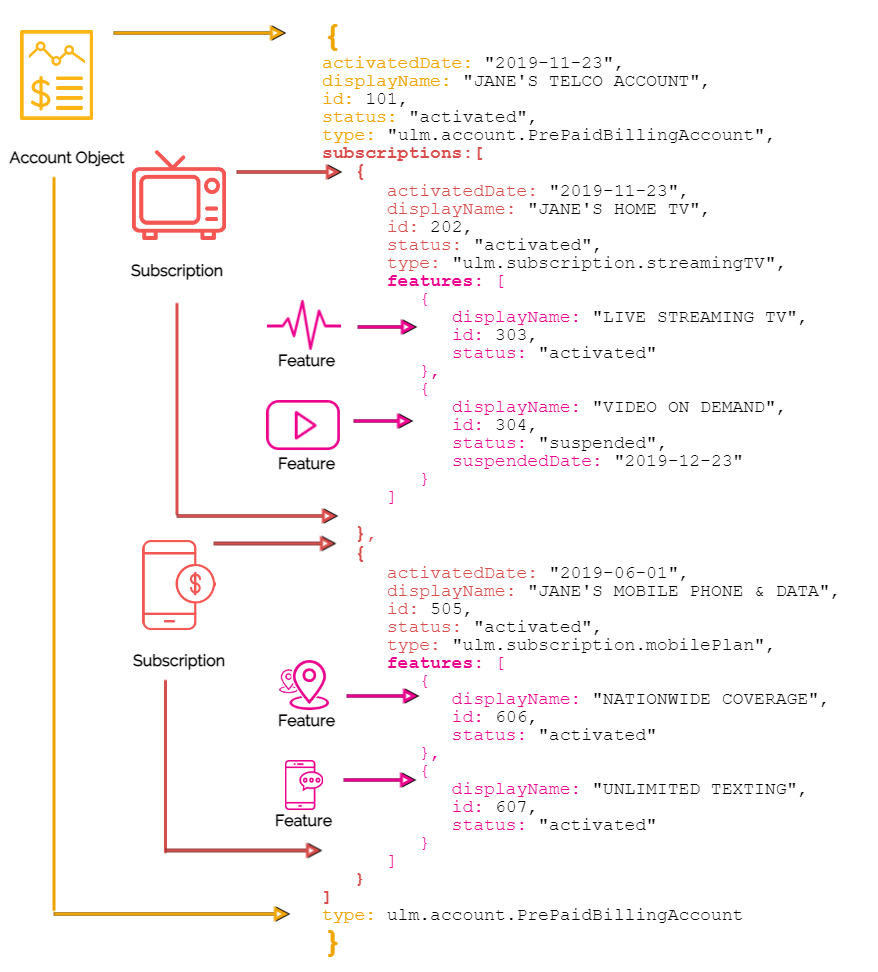 The Digital Identity Management Account entity represents the B/OSS billing account. Subscription entities represent subscriptions or services under the account, and Feature entities represent specific functionalities under a service, if necessary. The Account object will vary in terms of how many Subscriptions and Features are present (if at all) based on the integration between the external billing system and Digital Identity Management, the nature of your business and the services you offer, and the services to which a given customer subscribes. MarketONE's technical resources will work your team to help define the A/S/F mapping during your organization's onboarding phase with Digital Identity Management.
## **Service Sharing with Group Association**
Digital Identity Management enables service sharing by way of user groups. When the Process associates a billing account (and any services/subscriptions under that account) to a Digital Identity Management User ID, the Process also associates the Account entity to a Digital Identity Management user Group entity to which the user is a Primary user. The Primary user of a group can then add other Digital Identity Management users to the same group in order to grant those users conditional access to either the whole Account, or to only specific services under the account.
**Note:** Only a Group's Primary User can add more accounts or services the existing Group. If the user does not have a Group during an account association, then the Process automatically creates a new Group entity on the back end and assigns the user the "Primary User" role for the that Group to the end user.
Once a user adds their Account to a Group (again, **this will likely happen automatically**), Digital Identity Management also automatically associates the Digital Identity Management Group entity to the entire Account/Subscription/Feature hierarchy.
The Digital Identity Management Account entity represents the B/OSS billing account. Subscription entities represent subscriptions or services under the account, and Feature entities represent specific functionalities under a service, if necessary. The Account object will vary in terms of how many Subscriptions and Features are present (if at all) based on the integration between the external billing system and Digital Identity Management, the nature of your business and the services you offer, and the services to which a given customer subscribes. MarketONE's technical resources will work your team to help define the A/S/F mapping during your organization's onboarding phase with Digital Identity Management.
## **Service Sharing with Group Association**
Digital Identity Management enables service sharing by way of user groups. When the Process associates a billing account (and any services/subscriptions under that account) to a Digital Identity Management User ID, the Process also associates the Account entity to a Digital Identity Management user Group entity to which the user is a Primary user. The Primary user of a group can then add other Digital Identity Management users to the same group in order to grant those users conditional access to either the whole Account, or to only specific services under the account.
**Note:** Only a Group's Primary User can add more accounts or services the existing Group. If the user does not have a Group during an account association, then the Process automatically creates a new Group entity on the back end and assigns the user the "Primary User" role for the that Group to the end user.
Once a user adds their Account to a Group (again, **this will likely happen automatically**), Digital Identity Management also automatically associates the Digital Identity Management Group entity to the entire Account/Subscription/Feature hierarchy.
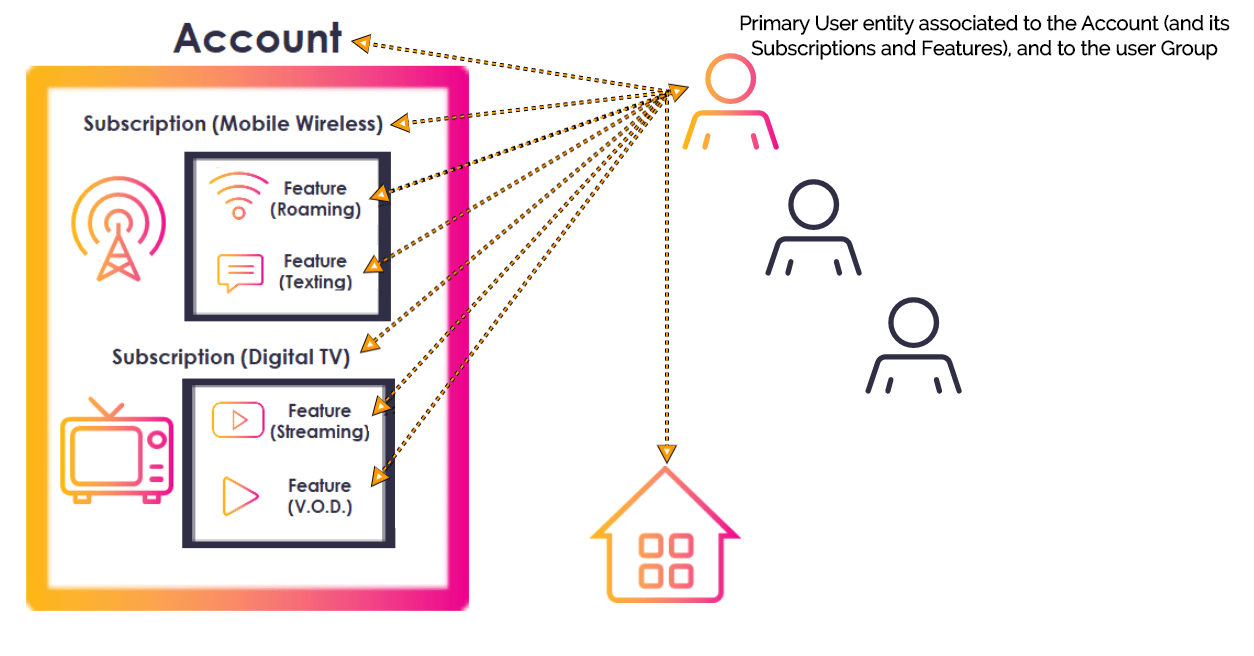
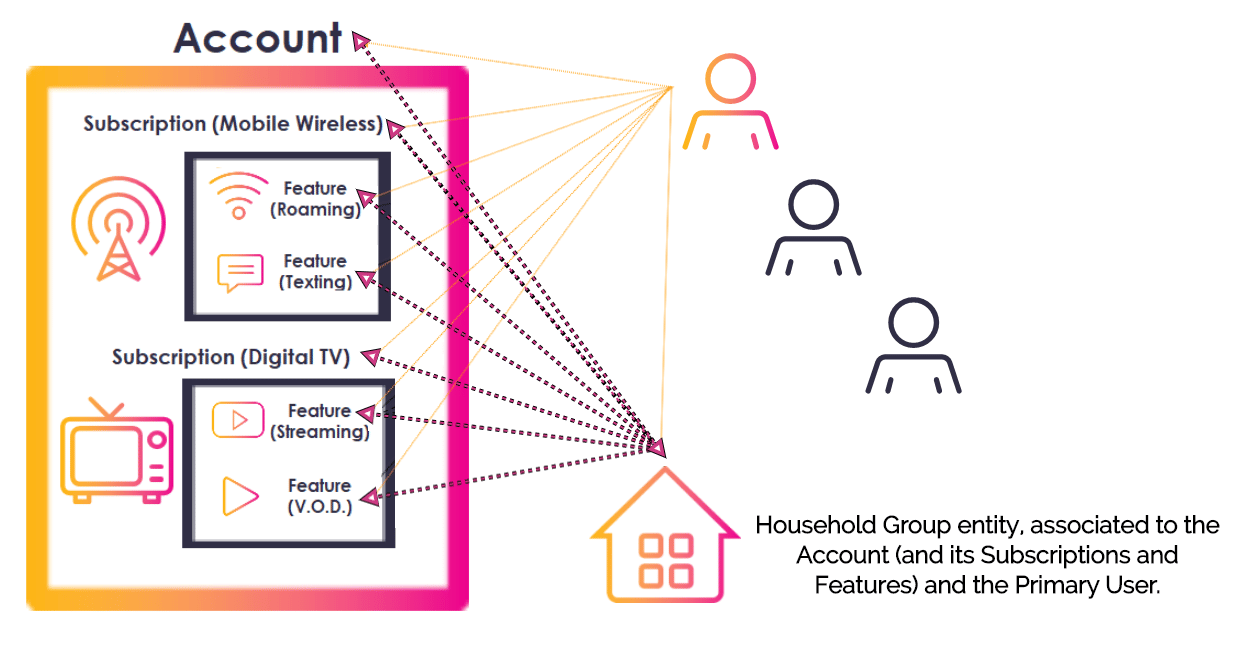 A Group's Primary User can add other Users to the group, grant each additional User "Admin" or "Regular" User permissions for the Group, and assign specific service entitlements on a granular per-User, per-service basis. This means one Regular user's User entity will be associated to the Group and only the specific Subscription(s) or Feature(s) that the Primary wishes to share with that individual. A separate User in the Group may have their User entity associated to the Group and other Subscriptions or Features. Account or service sharing is facilitated by the [Share Account or Service](c_shareAccessASF) Process.
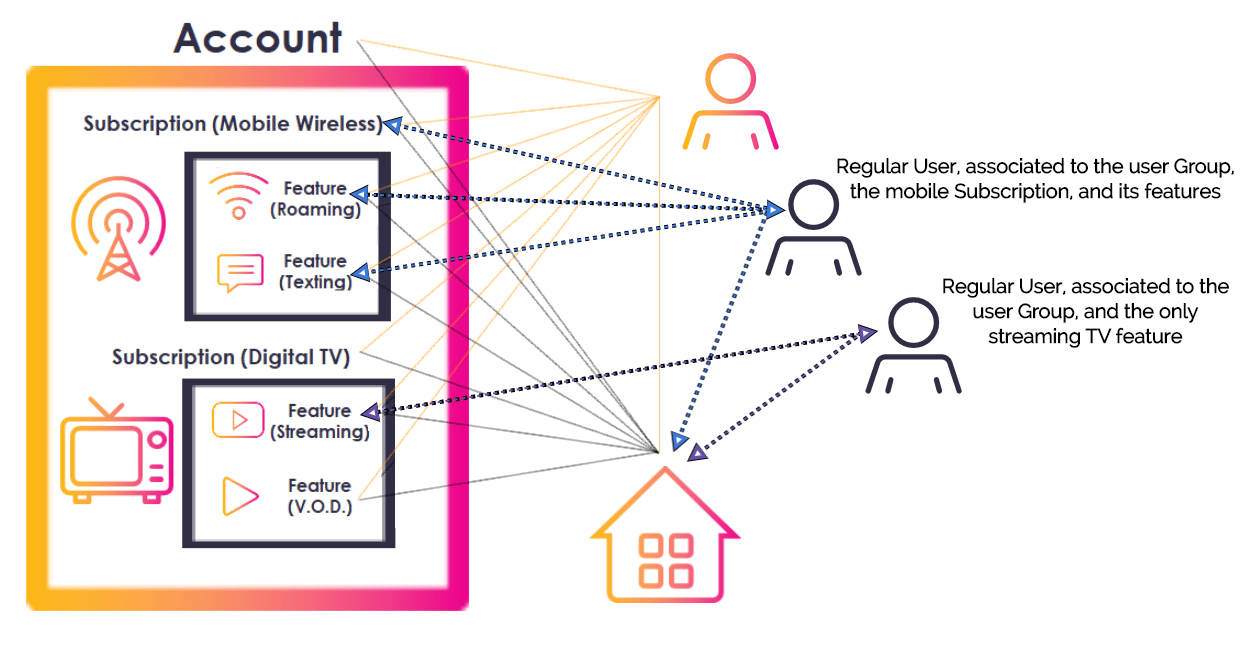 In most cases, multiple accounts and services are all added to a single Group that is owned and maintained by the Group Primary, who usually owns/pays for the Account with the service provider.
A common use case would be the head of a household pays for a variety of services under a single account bill. That user associates their billing account to their User ID, and to a User Group (and again, this user is the Group's Primary User by default). The Primary User then adds other household members to the group, and gives them conditional Group User types, including:
* **Admin** User access to their spouse. A Group Admin User can access all A/S/F entities in the Group, and add/remove Regular Users from the Group.
* **Regular** User access to their teenagers. A Group Regular User can only access specific services or features, determined by a Primary or Admin User. They cannot manage any entities or set permissions for other Group Users.
**Note:** There can only be a maximum of 10 users in a group (or 10 User entities that can be associated to a Group entity). This limit is controlled by an internal **Group Size Limit** setting. When a Group Primary or Admin User attempts to add another user to a Group, Digital Identity Management checks this setting to see if the Group is at its limit before proceeding. Your organization can self-manage the Group limit as needed from the **Admin console**.
**User Groups as a Concept**
A user can associate multiple accounts and services to a single Digital Identity Management Group, or they can keep multiple accounts separate in separate Digital Identity Management Groups, if desired. How this plays out on the user experience level is up to you and how you build out your application user interface. Groups are an essential component of account association and service sharing, but they do not necessarily need to be an explicit concept built into your UI. You can silently enforce a single group underneath the UI, and simply provide the user with a page for managing all their associated accounts and services. This maintains simple and straightforward user experience.
By default, the maximum number of Digital Identity Management Users that can be associated to a given Digital Identity Management Account, Subscription, or Feature is 5 Users, including the Primary User. This means that a Primary can add as many users as they desire to their user Group, but each individual service can only be shared with up to four other Digital Identity Management Users.
## Process Flow
This flow describes the Process at a high level.
**Preconditions**
* The user is currently authenticated in Digital Identity Management
* The user has at least one billing account or subscription in the external BSS/OSS.
**Basic Flow**
1. The user selects to associate (or "link") an external account.
2. The UI prompts the user to provide a unique account identifier (i.e., mobile number).
3. The user provides their mobile number, and the client passes it to Digital Identity Management.
* Before it the Process continues, Digital Identity Management first performs a backend check on the user-supplied mobile number.
* If the mobile number is registered to **another** Digital Identity Management User entity, then the Process returns an error.
* If the mobile number is registered to the **current** Digital Identity Management User, then the Process continues.
* If the mobile number is not yet registered in Digital Identity Management at all, then the Process continues.
4. Digital Identity Management calls the external system, and requests account data for the user-supplied number.
5. The BSS responds, and Digital Identity Management inspects the response.
* If the external account maps to an existing Digital Identity Management Account of another Digital Identity Management User, then the Process returns an error.
* If the external account maps to an existing Digital Identity Management Account of the current Digital Identity Management User, then the Process returns an error.
* If the external account does not map to an existing Digital Identity Management Account, then the Process continues.
6. Digital Identity Management issues and sends One-time Passcode (OTP) to the user, and the client prompts them for that OTP.
7. The user retrieves that OTP from their SMS, and provides it to the client application (and the client passes it back to Digital Identity Management).
8. Digital Identity Management takes the external account data and creates the Digital Identity Management Account (including Subscriptions and Features, if any).
9. Digital Identity Management associates the Account to the corresponding User entity, and the back end Group entity.
**Post-conditions**
* The user's external account is now provisioned and linked in Digital Identity Management.
* The external account details are mapped to the Digital Identity Management Account (and Subscriptions and Features, if any).
* **(Conditional)** The mobile number is added to the User profile as an authN ID, and activated (if it wasn't already prior to the Process).
**Possible or Common Errors**
* Invalid account identifier (i.e., not a valid mobile number format)
* No matching account details found in the operator's external system.
* The Account is already associated to another Digital Identity Management User entity.
* The Account is already associated to the current User entity.
## App Settings
Certain aspects of the Process' behavior are controlled by configurable system or app settings. Your organization can manage these and other settings in the [Admin](https://docs.vindicia.com/bundle/b_ConnectProductDescription/page/topics/adminPortal_c.html) console.
This Process is affected by the following settings:
| Application Settings | Default Setting | |
| - | - | - |
| **Token (short-form) expiration** | Determines the number of minutes before an OTP expires. **This setting is not configurable; it is noted here for context**. | 5 minutes |
| **Valid phone pattern** | Defines the basic validation criteria for what a valid mobile looks like, as defined by the Regular Expression (or "regex"). This setting defines the format for the mobile number that the Process will accept. | `^\(?([0-9]{3})\)?[-.\s]?([0-9]{3})[-.\s]?([0-9]{4})$` |
## User Journey Diagram
This flow diagram illustrates the complete user journey using the **Associate Billing Account** Process (that calls the external system and issues the OTP), and the **Complete Account Association** Process (that redeems the OTP and associates the account).
\[product: dim]
In most cases, multiple accounts and services are all added to a single Group that is owned and maintained by the Group Primary, who usually owns/pays for the Account with the service provider.
A common use case would be the head of a household pays for a variety of services under a single account bill. That user associates their billing account to their User ID, and to a User Group (and again, this user is the Group's Primary User by default). The Primary User then adds other household members to the group, and gives them conditional Group User types, including:
* **Admin** User access to their spouse. A Group Admin User can access all A/S/F entities in the Group, and add/remove Regular Users from the Group.
* **Regular** User access to their teenagers. A Group Regular User can only access specific services or features, determined by a Primary or Admin User. They cannot manage any entities or set permissions for other Group Users.
**Note:** There can only be a maximum of 10 users in a group (or 10 User entities that can be associated to a Group entity). This limit is controlled by an internal **Group Size Limit** setting. When a Group Primary or Admin User attempts to add another user to a Group, Digital Identity Management checks this setting to see if the Group is at its limit before proceeding. Your organization can self-manage the Group limit as needed from the **Admin console**.
**User Groups as a Concept**
A user can associate multiple accounts and services to a single Digital Identity Management Group, or they can keep multiple accounts separate in separate Digital Identity Management Groups, if desired. How this plays out on the user experience level is up to you and how you build out your application user interface. Groups are an essential component of account association and service sharing, but they do not necessarily need to be an explicit concept built into your UI. You can silently enforce a single group underneath the UI, and simply provide the user with a page for managing all their associated accounts and services. This maintains simple and straightforward user experience.
By default, the maximum number of Digital Identity Management Users that can be associated to a given Digital Identity Management Account, Subscription, or Feature is 5 Users, including the Primary User. This means that a Primary can add as many users as they desire to their user Group, but each individual service can only be shared with up to four other Digital Identity Management Users.
## Process Flow
This flow describes the Process at a high level.
**Preconditions**
* The user is currently authenticated in Digital Identity Management
* The user has at least one billing account or subscription in the external BSS/OSS.
**Basic Flow**
1. The user selects to associate (or "link") an external account.
2. The UI prompts the user to provide a unique account identifier (i.e., mobile number).
3. The user provides their mobile number, and the client passes it to Digital Identity Management.
* Before it the Process continues, Digital Identity Management first performs a backend check on the user-supplied mobile number.
* If the mobile number is registered to **another** Digital Identity Management User entity, then the Process returns an error.
* If the mobile number is registered to the **current** Digital Identity Management User, then the Process continues.
* If the mobile number is not yet registered in Digital Identity Management at all, then the Process continues.
4. Digital Identity Management calls the external system, and requests account data for the user-supplied number.
5. The BSS responds, and Digital Identity Management inspects the response.
* If the external account maps to an existing Digital Identity Management Account of another Digital Identity Management User, then the Process returns an error.
* If the external account maps to an existing Digital Identity Management Account of the current Digital Identity Management User, then the Process returns an error.
* If the external account does not map to an existing Digital Identity Management Account, then the Process continues.
6. Digital Identity Management issues and sends One-time Passcode (OTP) to the user, and the client prompts them for that OTP.
7. The user retrieves that OTP from their SMS, and provides it to the client application (and the client passes it back to Digital Identity Management).
8. Digital Identity Management takes the external account data and creates the Digital Identity Management Account (including Subscriptions and Features, if any).
9. Digital Identity Management associates the Account to the corresponding User entity, and the back end Group entity.
**Post-conditions**
* The user's external account is now provisioned and linked in Digital Identity Management.
* The external account details are mapped to the Digital Identity Management Account (and Subscriptions and Features, if any).
* **(Conditional)** The mobile number is added to the User profile as an authN ID, and activated (if it wasn't already prior to the Process).
**Possible or Common Errors**
* Invalid account identifier (i.e., not a valid mobile number format)
* No matching account details found in the operator's external system.
* The Account is already associated to another Digital Identity Management User entity.
* The Account is already associated to the current User entity.
## App Settings
Certain aspects of the Process' behavior are controlled by configurable system or app settings. Your organization can manage these and other settings in the [Admin](https://docs.vindicia.com/bundle/b_ConnectProductDescription/page/topics/adminPortal_c.html) console.
This Process is affected by the following settings:
| Application Settings | Default Setting | |
| - | - | - |
| **Token (short-form) expiration** | Determines the number of minutes before an OTP expires. **This setting is not configurable; it is noted here for context**. | 5 minutes |
| **Valid phone pattern** | Defines the basic validation criteria for what a valid mobile looks like, as defined by the Regular Expression (or "regex"). This setting defines the format for the mobile number that the Process will accept. | `^\(?([0-9]{3})\)?[-.\s]?([0-9]{3})[-.\s]?([0-9]{4})$` |
## User Journey Diagram
This flow diagram illustrates the complete user journey using the **Associate Billing Account** Process (that calls the external system and issues the OTP), and the **Complete Account Association** Process (that redeems the OTP and associates the account).
\[product: dim]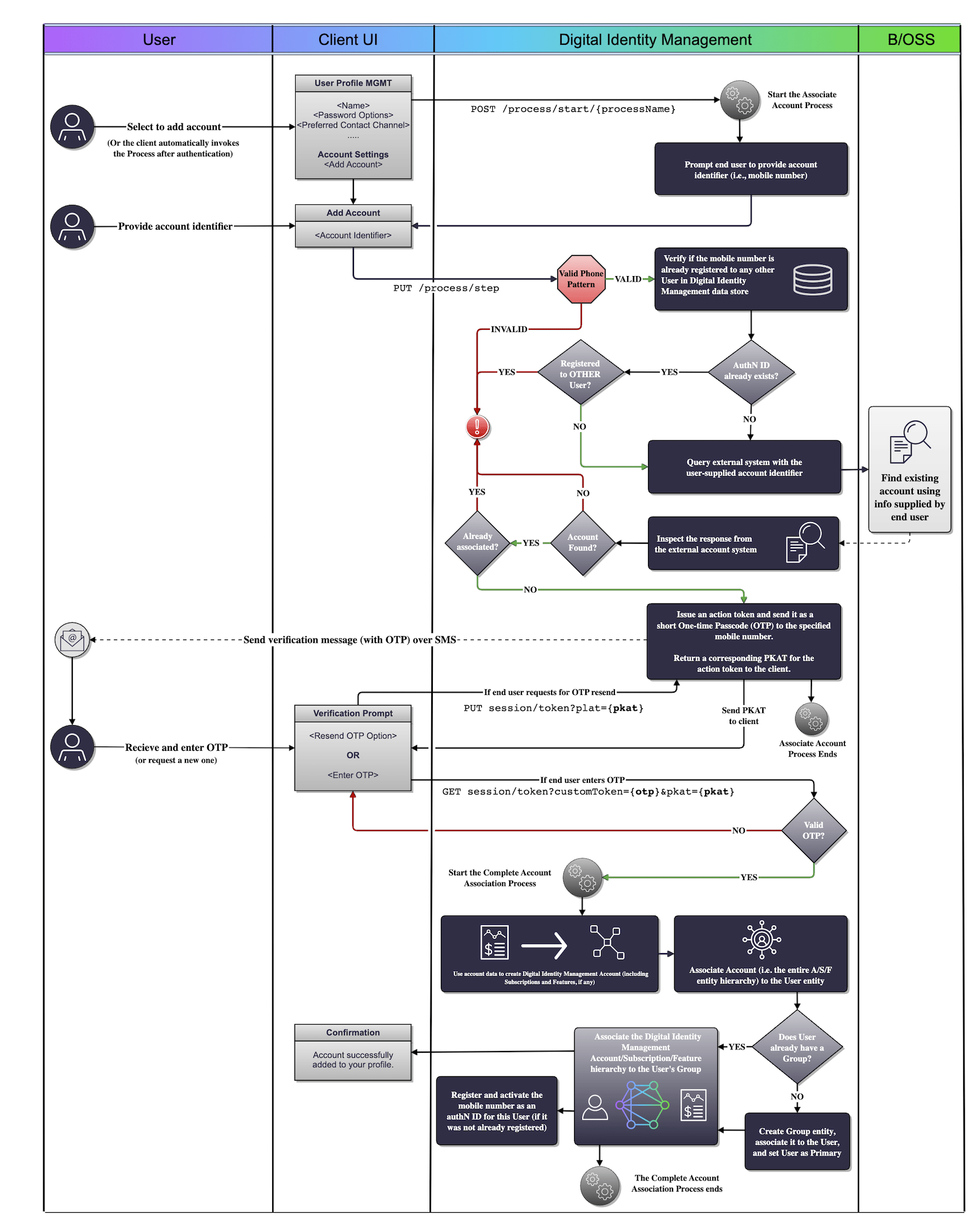 \[/product: dim]
This diagram shows the Process as invoked by the user. As alternative, the UI could also automatically invoke the Associate Account Process when the user first onboards and authenticates.
## Use Cases
The following use cases provide guided API walkthoughs of this Process for client developers:
* [Associate account (single account, single group)](https://docs.vindicia.com/bundle/b_processGuide/page/topics/c_useCaseAssociateAccountSingle.html)
* [Billing account association errors](c_associateBillingAccountV2)
* **[Associate external billing account](../topics/c_useCaseAssociateAccountSingle)**
* **[Associate billing account errors](../topics/c_accountAssociationErrors)**
**Parent topic:**[Account Association & Management Processes](../images/c_accountProcesses)
This documentation is built and hosted on [Mintlify](https://mintlify.com), a developer documentation platform.
\[/product: dim]
This diagram shows the Process as invoked by the user. As alternative, the UI could also automatically invoke the Associate Account Process when the user first onboards and authenticates.
## Use Cases
The following use cases provide guided API walkthoughs of this Process for client developers:
* [Associate account (single account, single group)](https://docs.vindicia.com/bundle/b_processGuide/page/topics/c_useCaseAssociateAccountSingle.html)
* [Billing account association errors](c_associateBillingAccountV2)
* **[Associate external billing account](../topics/c_useCaseAssociateAccountSingle)**
* **[Associate billing account errors](../topics/c_accountAssociationErrors)**
**Parent topic:**[Account Association & Management Processes](../images/c_accountProcesses)
This documentation is built and hosted on [Mintlify](https://mintlify.com), a developer documentation platform.