> ## Documentation Index
> Fetch the complete documentation index at: https://docs.ulm.m1amdocs.com/llms.txt
> Use this file to discover all available pages before exploring further.
# Activate user, password is required
This is something of an edge case. An user onboards into Digital Identity Management successfully with their social account, using the [Onboard and Authenticate with Social Account](c_onboardAuthenticateUserSocial) Process). Therefore, they now have a verified authN ID, a fully activated User entity, but no password. At a later date, the user then decides to add a another email address or mobile number to their profile, using the [Add/Update Email or Mobile](c_addUpdateAuthnID) Process. At the end of that Process, Digital Identity Management will:
* Issue an [action token](c_actionTokens) for the Activate User Process, and store the token in the cloud.
* Send a notification to the newly registered email or mobile. The message contains either a verification link, or a verification One-time Passcode (OTP), or both.
**Note:** The verification type (link or OTP) that Digital Identity Management sends is dependent on your organization's notification settings and notification templates. These settings are configured during your initial onboarding and integration period with Digital Identity Management.
* Return a Proof Key for Action Token (PKAT) to the client application.
Once the user redeems their action token, the Process prompts for a required password before it completes its task. This is because a user **must** set a password before they are allowed to have more than one registered authN ID.
\[product: dim]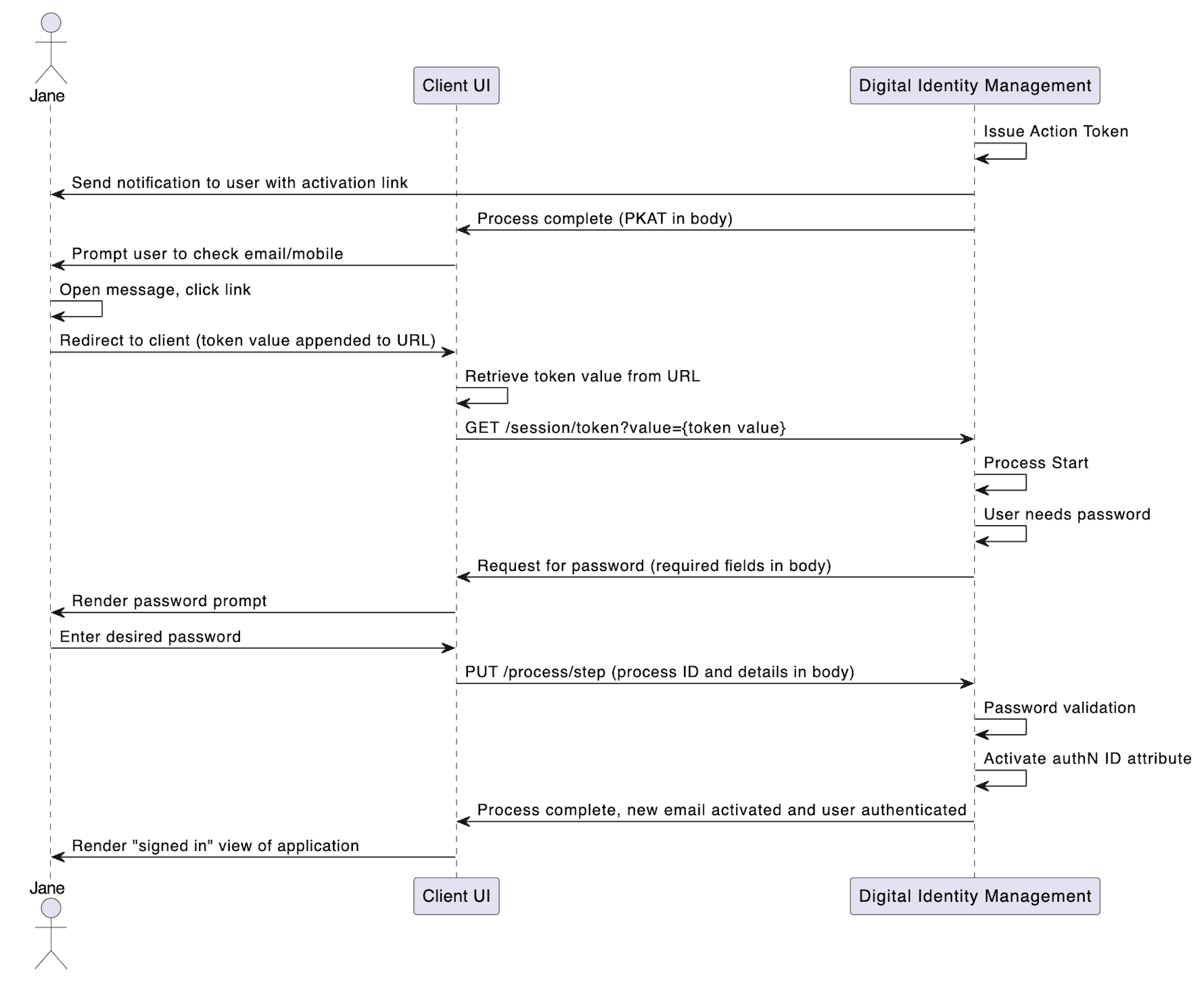 \[/product: dim]
**Note:** This use case uses the clickable redirect URL method for calling the Activate User Process, but this case also applies if the user activates the authN ID with an OTP instead.
## Initial Request
The user clicks the verification link that Digital Identity Management sent to them in an email or SMS. This redirects the user's browser back to the client application. The client immediately takes the token value from the URL, and calls the [Session Token](c_sessionToken#) API with the token value as a request path parameter:
```
**GET https://\{your.url\}/session/token?value=28965cc4-6b5f-4f41-aba4-7dfef2432fee**
```
## Response: Need Password
If the token is valid, the Process starts and requests for the user to set a password:
```
**RESPONSE - body**
{
"processId": "c8f337af-5cf1-4958-bdc2-e83fb942c8fd",
"processName": "onboard.ActivateUserAndAttribute.v1.0",
"stepName": "CreateCredentialPrompt",
"lastStep": false,
"displayMessage": "Please set a password",
"parameters": {
"credential": "String"
},
"output": {
"activatedAuthenticationIdentifier": {
"type": "EMAIL",
"value": "email@amdocs.com"
},
"userDisplayName": "Jane Smith",
"newUser": false
}
}
```
| `processId` | Unique identifier for the current instance of this Process. |
| - | - |
| `processName` | Full name of the Process, including the category and version number. |
| `stepName` | Name of the specific step that the Process is currently on. |
| `lastStep` | Boolean that indicates whether or not this was the last step in the Process. |
| `displayMessage` | Optional message that the UI can display to the user. |
| `parameters` | Object that contains the data that was requested in the previous Process response |
| `credential` | The user's desired password. |
| `output` | Object that contains data that the client can consume, retain, and use for additional operations. |
| `activatedAuthenticationIdentifier` | Object that contains the target authN ID to be activated. |
| `type` | The authN ID type (e.g. e-mail or phone number). |
| `value` | The actual authN ID value |
| `userDisplayName` | User's display name (first and/or last name). |
| `newUser` | Boolean that indicates if the user is new to Digital Identity Management and is being activated for the first time. False if the user is activating a new Authentication Identifier to an existing Digital Identity Management ID. |
## Next Request: Provide Password
The user enters their desired password, and the client passes that info to the Process with the Process Step API.
```
**PUT https://\{your.url\}/process/step**
{
"processId": "c8f337af-5cf1-4958-bdc2-e83fb942c8fd",
"parameters": {
"credential": "Te$t_p@ss1!13"
}
}
```
| `processId` | Unique identifier for the current instance of this Process. |
| - | - |
| `parameters` | Object that contains the data that was requested in the previous Process response. |
| `credential` | The desired password. |
| **Note:** The Process does not explicitly ask for the user to enter their desired password twice. However, we recommend that your application UI prompts the user to do this, and validates that both entries match before passing that password back to Digital Identity Management. This ensures that the user provides an accurate password without any unintentional mistakes. | |
## Final Response
If the password passes validation, the Process activates the authN ID, and returns a `HTTP 200` status:
```
**RESPONSE - body**
{
"processId": "eec918ff-5db4-4fee-a601-5ff76a099c8e",
"lastStep": true,
"runtimeId": 229,
"userId": 12345,
"userAuthenticated:" true
}
```
The Process also authenticates the user, if they are not already authenticated. Going forward, the user can now authenticate with a verified authN ID and password.
| `processId` | The unique identifier for this instance of the Process. |
| - | - |
| `lastStep` | Boolean that indicates whether or not this was the last step in the Process. |
| `runtimeId` | Identifier of the Digital Identity Management Runtime entity currently associated to the Digital Identity Management User entity.\*\*About Runtime Entities:\*\*Upon user creation or authentication, Digital Identity Management looks for a JRUNTIMEID cookie in the user's browser or application. If no cookie is found, Digital Identity Management creates a Runtime Entity with a unique ID and associates it to the user during the login phase. Digital Identity Management will generate and pass a corresponding JRUNTIMEID cookie for clients to store and return with subsequent requests. |
| `userId` | The unique identifier of the current user. |
| `userAuthenticated` | Boolean that indicates if the user was authenticated into Digital Identity Management. |
| **Parent topic:**[Activate User (and User Attribute) Process](../topics/c_activateUser) | |
This documentation is built and hosted on [Mintlify](https://mintlify.com), a developer documentation platform.
\[/product: dim]
**Note:** This use case uses the clickable redirect URL method for calling the Activate User Process, but this case also applies if the user activates the authN ID with an OTP instead.
## Initial Request
The user clicks the verification link that Digital Identity Management sent to them in an email or SMS. This redirects the user's browser back to the client application. The client immediately takes the token value from the URL, and calls the [Session Token](c_sessionToken#) API with the token value as a request path parameter:
```
**GET https://\{your.url\}/session/token?value=28965cc4-6b5f-4f41-aba4-7dfef2432fee**
```
## Response: Need Password
If the token is valid, the Process starts and requests for the user to set a password:
```
**RESPONSE - body**
{
"processId": "c8f337af-5cf1-4958-bdc2-e83fb942c8fd",
"processName": "onboard.ActivateUserAndAttribute.v1.0",
"stepName": "CreateCredentialPrompt",
"lastStep": false,
"displayMessage": "Please set a password",
"parameters": {
"credential": "String"
},
"output": {
"activatedAuthenticationIdentifier": {
"type": "EMAIL",
"value": "email@amdocs.com"
},
"userDisplayName": "Jane Smith",
"newUser": false
}
}
```
| `processId` | Unique identifier for the current instance of this Process. |
| - | - |
| `processName` | Full name of the Process, including the category and version number. |
| `stepName` | Name of the specific step that the Process is currently on. |
| `lastStep` | Boolean that indicates whether or not this was the last step in the Process. |
| `displayMessage` | Optional message that the UI can display to the user. |
| `parameters` | Object that contains the data that was requested in the previous Process response |
| `credential` | The user's desired password. |
| `output` | Object that contains data that the client can consume, retain, and use for additional operations. |
| `activatedAuthenticationIdentifier` | Object that contains the target authN ID to be activated. |
| `type` | The authN ID type (e.g. e-mail or phone number). |
| `value` | The actual authN ID value |
| `userDisplayName` | User's display name (first and/or last name). |
| `newUser` | Boolean that indicates if the user is new to Digital Identity Management and is being activated for the first time. False if the user is activating a new Authentication Identifier to an existing Digital Identity Management ID. |
## Next Request: Provide Password
The user enters their desired password, and the client passes that info to the Process with the Process Step API.
```
**PUT https://\{your.url\}/process/step**
{
"processId": "c8f337af-5cf1-4958-bdc2-e83fb942c8fd",
"parameters": {
"credential": "Te$t_p@ss1!13"
}
}
```
| `processId` | Unique identifier for the current instance of this Process. |
| - | - |
| `parameters` | Object that contains the data that was requested in the previous Process response. |
| `credential` | The desired password. |
| **Note:** The Process does not explicitly ask for the user to enter their desired password twice. However, we recommend that your application UI prompts the user to do this, and validates that both entries match before passing that password back to Digital Identity Management. This ensures that the user provides an accurate password without any unintentional mistakes. | |
## Final Response
If the password passes validation, the Process activates the authN ID, and returns a `HTTP 200` status:
```
**RESPONSE - body**
{
"processId": "eec918ff-5db4-4fee-a601-5ff76a099c8e",
"lastStep": true,
"runtimeId": 229,
"userId": 12345,
"userAuthenticated:" true
}
```
The Process also authenticates the user, if they are not already authenticated. Going forward, the user can now authenticate with a verified authN ID and password.
| `processId` | The unique identifier for this instance of the Process. |
| - | - |
| `lastStep` | Boolean that indicates whether or not this was the last step in the Process. |
| `runtimeId` | Identifier of the Digital Identity Management Runtime entity currently associated to the Digital Identity Management User entity.\*\*About Runtime Entities:\*\*Upon user creation or authentication, Digital Identity Management looks for a JRUNTIMEID cookie in the user's browser or application. If no cookie is found, Digital Identity Management creates a Runtime Entity with a unique ID and associates it to the user during the login phase. Digital Identity Management will generate and pass a corresponding JRUNTIMEID cookie for clients to store and return with subsequent requests. |
| `userId` | The unique identifier of the current user. |
| `userAuthenticated` | Boolean that indicates if the user was authenticated into Digital Identity Management. |
| **Parent topic:**[Activate User (and User Attribute) Process](../topics/c_activateUser) | |
This documentation is built and hosted on [Mintlify](https://mintlify.com), a developer documentation platform.