> ## Documentation Index
> Fetch the complete documentation index at: https://docs.ulm.m1amdocs.com/llms.txt
> Use this file to discover all available pages before exploring further.
# Activate user with a verification link
An user completes a separate Process (e.g., either they onboard for the first time, or they register a new email or mobile to their existing User entity). Once that Process completes, Digital Identity Management will:
* Issue an action token [action token](c_actionTokens) for the Activate User Process, and store the token in the cloud.
* Send a notification to the newly registered email or mobile. The message contains either a verification link, or a verification One-time Passcode (OTP), or both.
**Note:** The verification type (link or OTP) that Digital Identity Management sends is dependent on your organization's notification settings and notification templates. These settings are configured during your initial onboarding and integration period with Digital Identity Management.
* Return a Proof Key for Action Token (PKAT) to the client application.
In this use case, the user receives a clickable/tappable verification link. The link consists of a redirect URL back to your client application, and the action token appended to the end of that URL.
\[product: dim]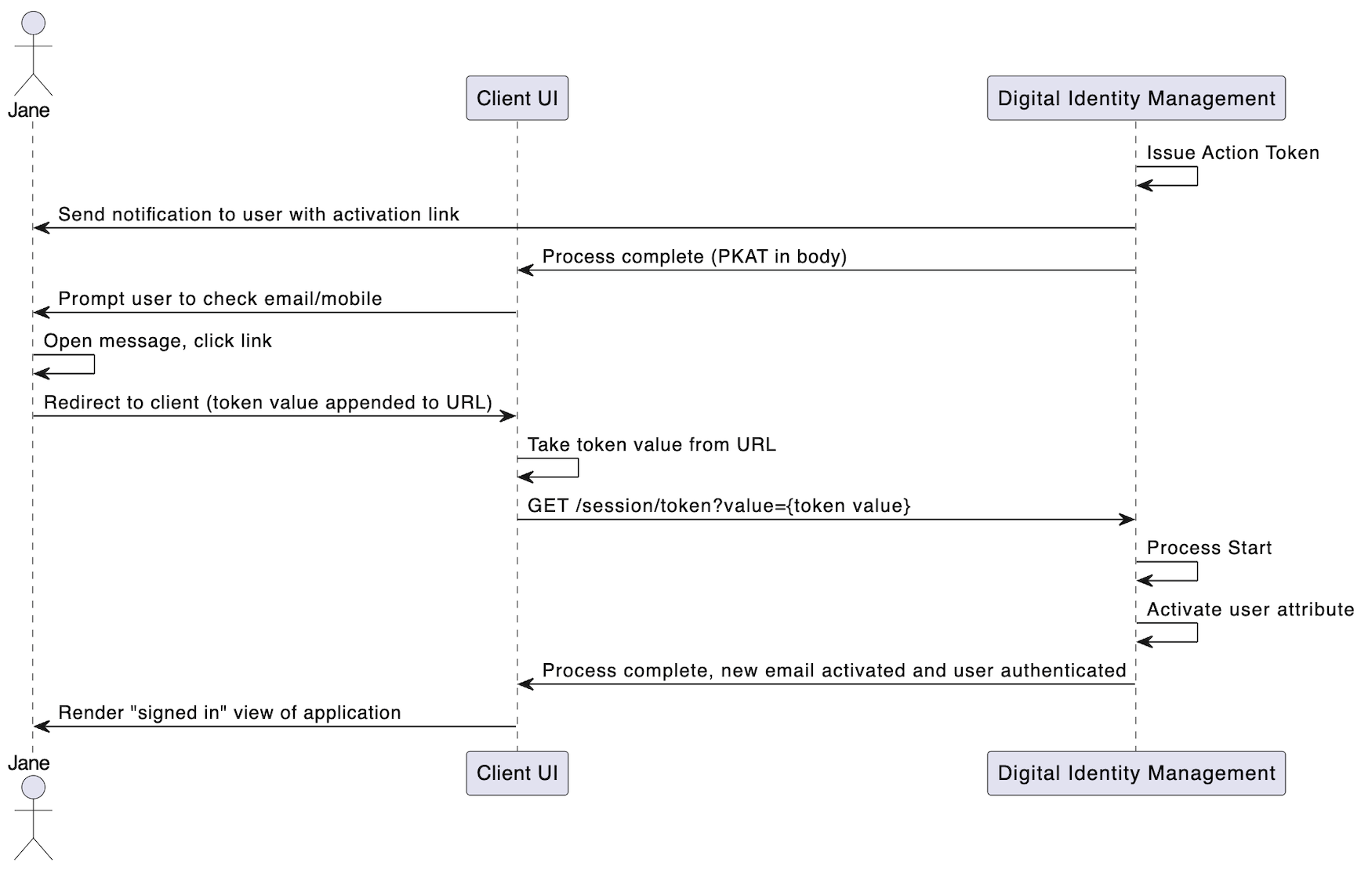 \[/product: dim]
## Request
The user clicks the verification link, which then redirects them back to a landing page in client application. The client immediately takes the token value from the URL, and calls the [Session Token](c_sessionToken#) API with the token value as a request path parameter:
```
**GET https://\{your.url\}/session/token?value=28965cc4-6b5f-4f41-aba4-7dfef2432fee**
```
## Process Complete
If the token is valid, the Process starts. Digital Identity Management activates email or mobile number, and then returns a `200 HTTP` status:
```
**RESPONSE - body**
{
"processId": "eec918ff-5db4-4fee-a601-5ff76a099c8e",
"lastStep": true,
"runtimeId": 229,
"userId": 12345,
"userAuthenticated:" true
}
```
| `processId` | The unique identifier for this instance of the Process. |
| - | - |
| `lastStep` | Boolean that indicates whether or not this was the last step in the Process. |
| `runtimeId` | Identifier of the Digital Identity Management Runtime entity currently associated to the Digital Identity Management User entity.\*\*About Runtime Entities:\*\*Upon user creation or authentication, Digital Identity Management looks for a JRUNTIMEID cookie in the user's browser or application. If no cookie is found, Digital Identity Management creates a Runtime Entity with a unique ID and associates it to the user during the login phase. Digital Identity Management will generate and pass a corresponding JRUNTIMEID cookie for clients to store and return with subsequent requests. |
| `userId` | The unique identifier of the current user. |
| `userAuthenticated` | Boolean that indicates if the user was authenticated into Digital Identity Management. |
| The Process also authenticates the user (if they are not already authenticated). Going forward, the user can authenticate with this activated authN ID and their password. | |
**Note:** If the client somehow supplies an incorrect token value to the [Session Token](c_sessionToken#) API three times, the API will lock out and invalidate that token. The user would then to request a verification message resend. They can do this through one of three methods:
* Token Resend APi [PUT /session/token?pkat=\{pkat}](c_putSessionToken) - this API resends the same new action token (i.e., the same link). Ideal for use cases where the user is anonymous. Requires the corresponding PKAT.
* Send Verification Process [Send Verification](c_sendVerification) Process — Issues and sends a new action token (i.e., a new link). Ideal for use cases where the user is authenticated.
* [Authenticate User](c_authenticateUser) Process — If an end user attempts to sign in with an unverified authN ID, Digital Identity Management will issue and send a new action token. The Process then ends without authenticating the user.
**Parent topic:**[Activate User (and User Attribute) Process](../topics/c_activateUser)
This documentation is built and hosted on [Mintlify](https://mintlify.com), a developer documentation platform.
\[/product: dim]
## Request
The user clicks the verification link, which then redirects them back to a landing page in client application. The client immediately takes the token value from the URL, and calls the [Session Token](c_sessionToken#) API with the token value as a request path parameter:
```
**GET https://\{your.url\}/session/token?value=28965cc4-6b5f-4f41-aba4-7dfef2432fee**
```
## Process Complete
If the token is valid, the Process starts. Digital Identity Management activates email or mobile number, and then returns a `200 HTTP` status:
```
**RESPONSE - body**
{
"processId": "eec918ff-5db4-4fee-a601-5ff76a099c8e",
"lastStep": true,
"runtimeId": 229,
"userId": 12345,
"userAuthenticated:" true
}
```
| `processId` | The unique identifier for this instance of the Process. |
| - | - |
| `lastStep` | Boolean that indicates whether or not this was the last step in the Process. |
| `runtimeId` | Identifier of the Digital Identity Management Runtime entity currently associated to the Digital Identity Management User entity.\*\*About Runtime Entities:\*\*Upon user creation or authentication, Digital Identity Management looks for a JRUNTIMEID cookie in the user's browser or application. If no cookie is found, Digital Identity Management creates a Runtime Entity with a unique ID and associates it to the user during the login phase. Digital Identity Management will generate and pass a corresponding JRUNTIMEID cookie for clients to store and return with subsequent requests. |
| `userId` | The unique identifier of the current user. |
| `userAuthenticated` | Boolean that indicates if the user was authenticated into Digital Identity Management. |
| The Process also authenticates the user (if they are not already authenticated). Going forward, the user can authenticate with this activated authN ID and their password. | |
**Note:** If the client somehow supplies an incorrect token value to the [Session Token](c_sessionToken#) API three times, the API will lock out and invalidate that token. The user would then to request a verification message resend. They can do this through one of three methods:
* Token Resend APi [PUT /session/token?pkat=\{pkat}](c_putSessionToken) - this API resends the same new action token (i.e., the same link). Ideal for use cases where the user is anonymous. Requires the corresponding PKAT.
* Send Verification Process [Send Verification](c_sendVerification) Process — Issues and sends a new action token (i.e., a new link). Ideal for use cases where the user is authenticated.
* [Authenticate User](c_authenticateUser) Process — If an end user attempts to sign in with an unverified authN ID, Digital Identity Management will issue and send a new action token. The Process then ends without authenticating the user.
**Parent topic:**[Activate User (and User Attribute) Process](../topics/c_activateUser)
This documentation is built and hosted on [Mintlify](https://mintlify.com), a developer documentation platform.