> ## Documentation Index
> Fetch the complete documentation index at: https://docs.ulm.m1amdocs.com/llms.txt
> Use this file to discover all available pages before exploring further.
# Add a new email address or mobile number
An authenticated user adds a new email or mobile to their User ID, independent of any existing authN IDs on the User entity.
\[product: dim]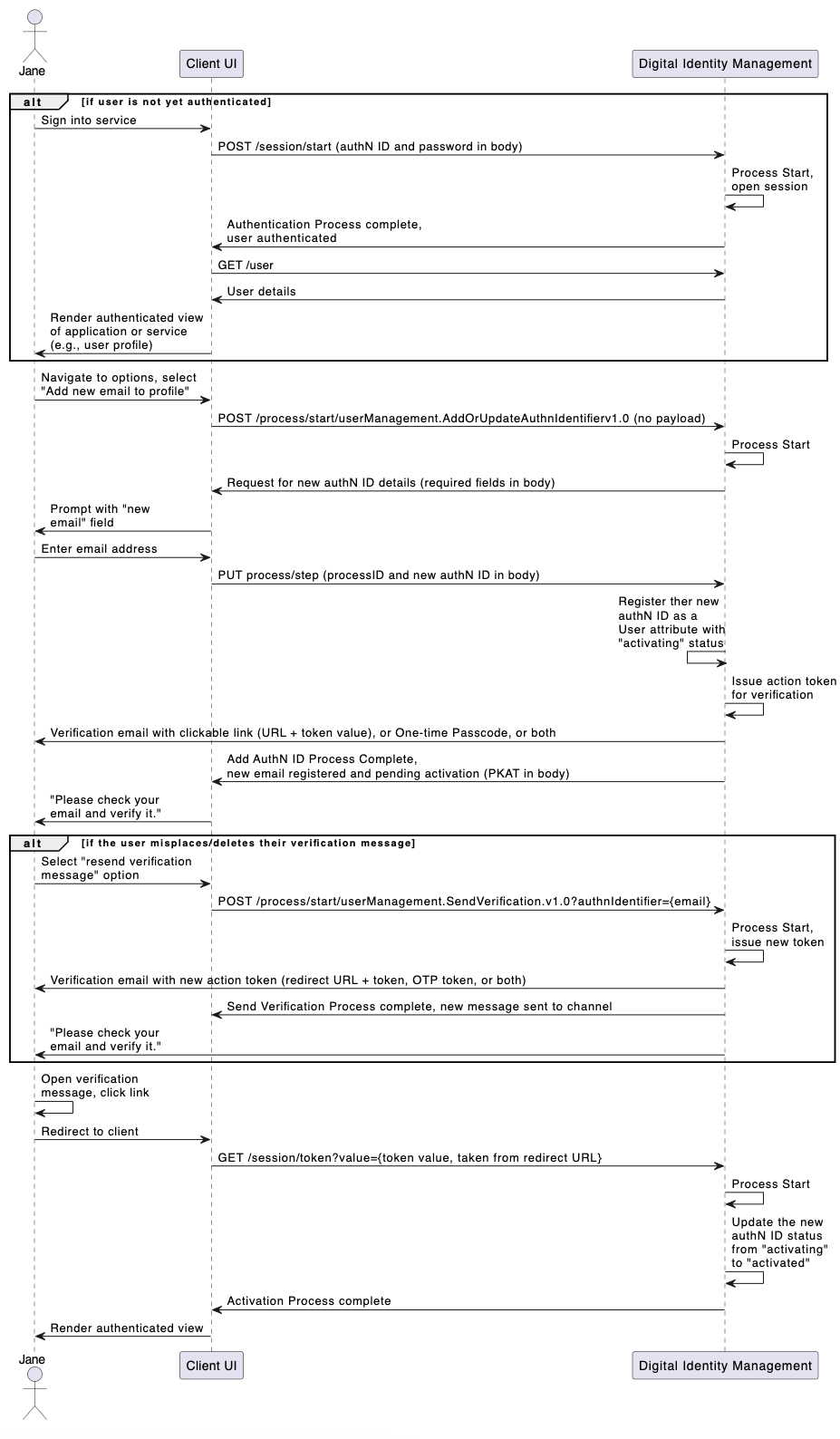 \[/product: dim]
## Initial Request
The [Process Start](c_processStart) API initializes the Process:
```
**POST https://\{your.url\}/process/start/userManagement.AddOrUpdateAuthnIdentifier.v1.0**
```
## Response
Digital Identity Management responds with a request for authN ID information:
```
**RESONSE - body**
{
"processId": "4e8c8ac0-c4f0-40cc-9dd5-08dd2e48510d",
"processName": "userManagement.AddOrUpdateAuthnIdentifier.v1.0",
"displayMessage": "Please input required information",
"parameters": {
"newAuthnIdentifier": "String",
"oldAuthnIdentifier": "String"
},
"stepName": "AddOrUpdateAuthnIdentifierPrompt",
"lastStep": false
}
```
| `processId` | Unique identifier for the current instance of this Process. |
| - | - |
| `processName` | Full name of the Process, including the category and version number. |
| `stepName` | The internal name of the step that the Process is currently on / just executed. |
| `lastStep` | Boolean that indicates whether or not this was the last step in the Process. |
| `displayMessage` | Optional message that the UI can display to the user. |
| `parameters` | Object that specifies the info this Process requires to continue its task. |
| `newAuthnIdentifier` | The user's desired new authN ID. |
| `oldAuthnIdentifier` | An existing authN ID that the user wants to replace. This field is required only in the "Update" scenario. |
| Note that the user will only need to provide a `newAuthnIdentifier` value in this use case. | |
## Next Request: New AuthN ID
The user enters their desired authN ID and the client passes that info to the Process with the [Process Step](c_processStep) API.
```
**PUT https://\{your.url\}/process/step**
{
"processId": "4e8c8ac0-c4f0-40cc-9dd5-08dd2e48510d",
"parameters": {
"newAuthnIdentifier": "john@example.com"
}
}
```
| `processId` | Unique identifier for the current instance of this Process. |
| - | - |
| `parameters` | Object that contains the data that was requested in the previous Process response. |
| `newAuthnIdentifier` | The user's new authN ID (email, mobile, or alias). |
## Process Complete
If the new authN ID does not match an existing authN ID already assigned to the end user (or any other Digital Identity Management User entity), the Process completes its task and returns a 200 HTTP status code. The Process also sends an [action token](c_actionTokens) to the user through email or SMS.
```
**RESPONSE - body**
{
"processId": "4e8c8ac0-c4f0-40cc-9dd5-08dd2e48510d",
"processName": "userManagement.AddOrUpdateAuthnIdentifier.v1.0",
"lastStep": true,
"output": {
"newAuthnIdentifier": {
"id": 3,
"status": "activating",
"value": "john@example.com"
},
"attributeName": "emails",
"pkat": "4c6fd6cd-78a7-487d-b746-2628a77a0131"
}
}
```
**OTP Verification & Resend Verification**
Any Process that sends a Digital Identity Management action token to a user also returns a corresponding Proof key for Action Token (PKAT) to the client application. In order to enable OTP verification on the UI, the client **must** retain the PKAT returned in the final Process response. The PKAT, along with the user-supplied OTP, is required for the [Session Token](c_sessionToken#) API to invoke the subsequent [Activate User](c_activateUser) Process to complete the new authN ID activation.
In cases where the user is anonymous, the PKAT is required if the application wants to provide a quick token resend option on the UI, using the [Token Resend](c_putSessionToken) API. This method applies to cases where the user is anonymous (i.e., they are not authenticated in Digital Identity Management). However, if the user is currently authenticated in Digital Identity Management, the client application can instead invoke the [Send Verification](c_sendVerification) Process for this purpose.
| `processId` | The unique identifier for this instance of the Process. |
| - | - |
| `processName` | Full name of the Process, including the category and version number. |
| `lastStep` | Boolean that indicates whether or not this was the last step in the Process. |
| `output` | Object that contains data that the client can consume, retain, and use for additional operations. |
| `newAuthnIdentifier` | Object that contains details of the newly provisioned authN ID. |
| `id` | Unique identifier for the authN ID. |
| `status` | The authN ID's current status. |
| `value` | The actual authN ID value. |
| `attributeName` | The authN ID grouping type (`emails`, `mobiles`, or `aliases`) |
| `pkat` | Unique Proof Key for Action Token that corresponds to an existing action token. See [Action Tokens](c_actionTokens) for more details. |
## Add a new alias
Adding a new alias is identical to the Email or Mobile-based use case, except that there is no verification required for the new authN ID. If the user submits a valid alias, then Digital Identity Management immediately activates the alias.
**Parent topic:**[Add/Update Email, Mobile, or Alias Process](../topics/c_addUpdateAuthnID)
This documentation is built and hosted on [Mintlify](https://mintlify.com), a developer documentation platform.
\[/product: dim]
## Initial Request
The [Process Start](c_processStart) API initializes the Process:
```
**POST https://\{your.url\}/process/start/userManagement.AddOrUpdateAuthnIdentifier.v1.0**
```
## Response
Digital Identity Management responds with a request for authN ID information:
```
**RESONSE - body**
{
"processId": "4e8c8ac0-c4f0-40cc-9dd5-08dd2e48510d",
"processName": "userManagement.AddOrUpdateAuthnIdentifier.v1.0",
"displayMessage": "Please input required information",
"parameters": {
"newAuthnIdentifier": "String",
"oldAuthnIdentifier": "String"
},
"stepName": "AddOrUpdateAuthnIdentifierPrompt",
"lastStep": false
}
```
| `processId` | Unique identifier for the current instance of this Process. |
| - | - |
| `processName` | Full name of the Process, including the category and version number. |
| `stepName` | The internal name of the step that the Process is currently on / just executed. |
| `lastStep` | Boolean that indicates whether or not this was the last step in the Process. |
| `displayMessage` | Optional message that the UI can display to the user. |
| `parameters` | Object that specifies the info this Process requires to continue its task. |
| `newAuthnIdentifier` | The user's desired new authN ID. |
| `oldAuthnIdentifier` | An existing authN ID that the user wants to replace. This field is required only in the "Update" scenario. |
| Note that the user will only need to provide a `newAuthnIdentifier` value in this use case. | |
## Next Request: New AuthN ID
The user enters their desired authN ID and the client passes that info to the Process with the [Process Step](c_processStep) API.
```
**PUT https://\{your.url\}/process/step**
{
"processId": "4e8c8ac0-c4f0-40cc-9dd5-08dd2e48510d",
"parameters": {
"newAuthnIdentifier": "john@example.com"
}
}
```
| `processId` | Unique identifier for the current instance of this Process. |
| - | - |
| `parameters` | Object that contains the data that was requested in the previous Process response. |
| `newAuthnIdentifier` | The user's new authN ID (email, mobile, or alias). |
## Process Complete
If the new authN ID does not match an existing authN ID already assigned to the end user (or any other Digital Identity Management User entity), the Process completes its task and returns a 200 HTTP status code. The Process also sends an [action token](c_actionTokens) to the user through email or SMS.
```
**RESPONSE - body**
{
"processId": "4e8c8ac0-c4f0-40cc-9dd5-08dd2e48510d",
"processName": "userManagement.AddOrUpdateAuthnIdentifier.v1.0",
"lastStep": true,
"output": {
"newAuthnIdentifier": {
"id": 3,
"status": "activating",
"value": "john@example.com"
},
"attributeName": "emails",
"pkat": "4c6fd6cd-78a7-487d-b746-2628a77a0131"
}
}
```
**OTP Verification & Resend Verification**
Any Process that sends a Digital Identity Management action token to a user also returns a corresponding Proof key for Action Token (PKAT) to the client application. In order to enable OTP verification on the UI, the client **must** retain the PKAT returned in the final Process response. The PKAT, along with the user-supplied OTP, is required for the [Session Token](c_sessionToken#) API to invoke the subsequent [Activate User](c_activateUser) Process to complete the new authN ID activation.
In cases where the user is anonymous, the PKAT is required if the application wants to provide a quick token resend option on the UI, using the [Token Resend](c_putSessionToken) API. This method applies to cases where the user is anonymous (i.e., they are not authenticated in Digital Identity Management). However, if the user is currently authenticated in Digital Identity Management, the client application can instead invoke the [Send Verification](c_sendVerification) Process for this purpose.
| `processId` | The unique identifier for this instance of the Process. |
| - | - |
| `processName` | Full name of the Process, including the category and version number. |
| `lastStep` | Boolean that indicates whether or not this was the last step in the Process. |
| `output` | Object that contains data that the client can consume, retain, and use for additional operations. |
| `newAuthnIdentifier` | Object that contains details of the newly provisioned authN ID. |
| `id` | Unique identifier for the authN ID. |
| `status` | The authN ID's current status. |
| `value` | The actual authN ID value. |
| `attributeName` | The authN ID grouping type (`emails`, `mobiles`, or `aliases`) |
| `pkat` | Unique Proof Key for Action Token that corresponds to an existing action token. See [Action Tokens](c_actionTokens) for more details. |
## Add a new alias
Adding a new alias is identical to the Email or Mobile-based use case, except that there is no verification required for the new authN ID. If the user submits a valid alias, then Digital Identity Management immediately activates the alias.
**Parent topic:**[Add/Update Email, Mobile, or Alias Process](../topics/c_addUpdateAuthnID)
This documentation is built and hosted on [Mintlify](https://mintlify.com), a developer documentation platform.