> ## Documentation Index
> Fetch the complete documentation index at: https://docs.ulm.m1amdocs.com/llms.txt
> Use this file to discover all available pages before exploring further.
# Onboard user with email address
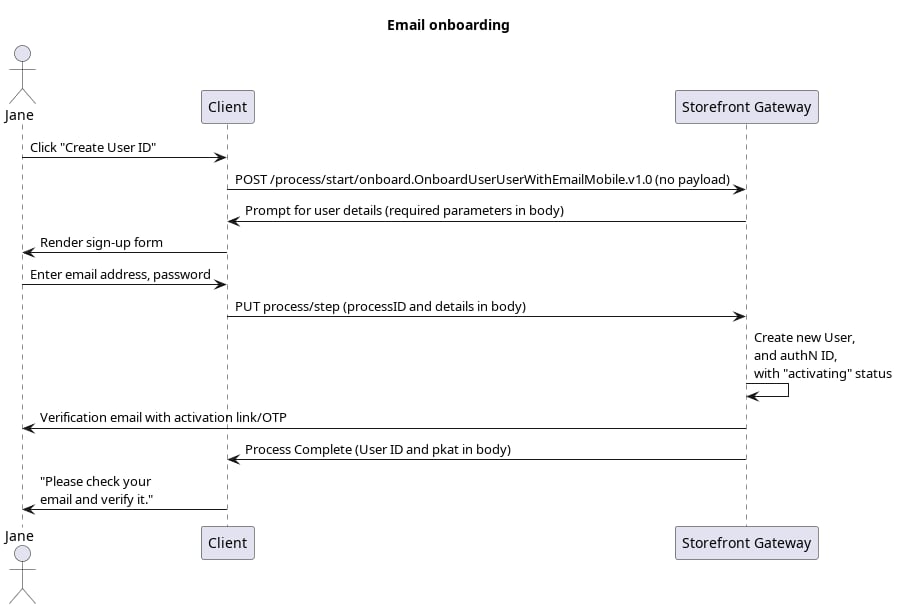
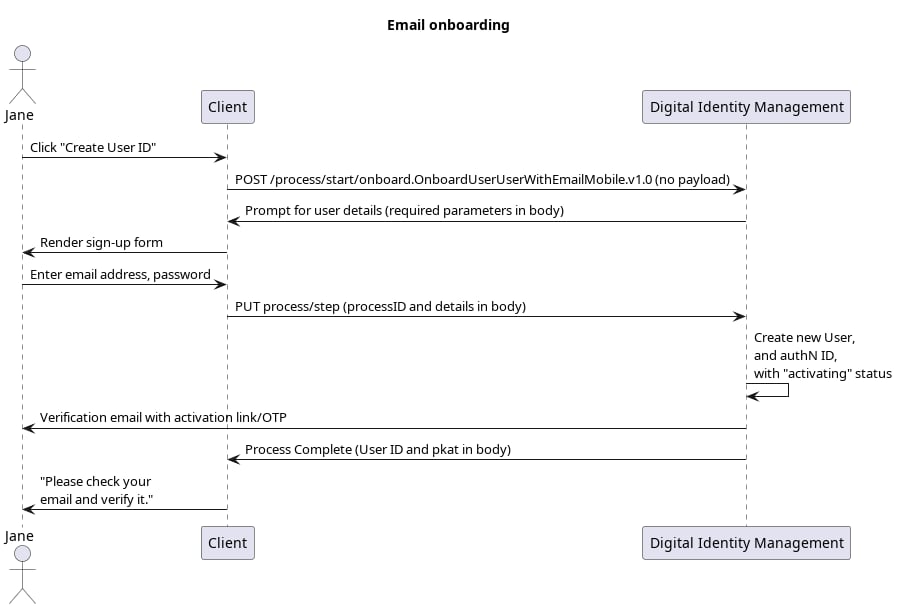
This is the email-driven onboarding use case delivered by the [Onboard User with Email and Mobile](c_onboardUserEmailMobile) Process.
This is the most standard onboarding use case. The Process consumes the end user's email address and password, creates a new unique Digital Identity Management User entity, and then registers the email as an attribute and authentication identifier (authN ID) on that User entity. Both the Digital Identity Management User and the authN ID are created with an `activating` status, pending verification of the email.
 \[product: dim]
 \[/product: dim]
## Initial Request
Your client calls the [POST /process/start/\{processName}](c_processStart) API to initialize the Process:
```
**POST https://\{your.url\}/process/start/onboard.OnboardUserWithEmailMobile.v1.0**
```
## Response
Digital Identity Management responds with a request for user information:
```
**RESPONSE - body**
{
"processId": "8bca30ca-dd44-4050-aece-53b0dbed1922",
"processName:" "onboard.OnboardUserWithEmailMobile.v1.0"
"stepName": "UserDetailsPrompt",
"lastStep": false
"displayMessage": "Please Enter User details for self onboarding",
"parameters": {
"email": "String",
"phone": "String",
"credential": "String",
"firstName": "String",
"lastName": "String",
"displayName": "String",
"lang": "String"
}
}
```
| `processId` | Unique identifier for the current instance of this Process. |
| - | - |
| `processName` | Full name of the Process, including the category and version number. |
| `stepName` | Name of the specific step that the Process is currently on. |
| `lastStep` | Boolean that indicates whether or not this was the last step in the Process. |
| `displayMessage` | Optional message that the UI can display to the end user. |
| `parameters` | Object that specifies the info this Process requires to continue its task. |
| `email` | (**Conditional**) The user's email address. **Required** if `phone` is not provided. |
| `phone` | (**Conditional**) The user's mobile phone number. **Required** if `email` is not provided. |
| `credential` | (**Required**) The user's desired password. |
| `firstName` | (**Optional**) The user's first name. |
| `lastName` | (**Optional**) The user's last name. |
| `displayName` | (**Optional**) A display name for the user. This could be just a combination of the user's first and last name or a nickname. |
| `lang` | (**Optional**) The user's preferred language. |
## Next Request: User Details
Your client calls the [PUT /process/step](c_processStep) API, and passes the user-supplied info to the Process.
```
**PUT https://\{your.url\}/process/step**
{
"processId": "8bca30ca-dd44-4050-aece-53b0dbed1922",
"parameters": {
"credential": "GoodPas$word123",
"email": "bob@example.com"
}
}
```
| `processId` | Unique identifier for the current instance of this Process. |
| - | - |
| `parameters` | Data object that contains the data requested in the previous Process response. |
| `email` | The user's email address. |
| `credential` | The user's desired password. |
## Process Complete
If the email and password pass validation, then the Process creates and saves a user to the data store, and returns a `200 HTTP` status:
```
**RESPONSE - body**
{
"processId": "8bca30ca-dd44-4050-aece-53b0dbed1922",
"processName": "onboard.OnboardUserWithEmailMobile.v1.0",
"output": {
"pkat": "sdfsd-gfsdfgsd-sdgsdg-sfddsf-dsfsdf",
},
"lastStep": true
}
```
Digital Identity Management also sends an [action token](c_actionTokens) out to the user's email address in the form of a clickable verification link (or OTP, depending on your organization's notification settings).
**OTP Verification & Resend Verification**
Any Process step that sends a Digital Identity Management action token to a user also returns a corresponding [PKAT](c_actionTokens#section_irr_wss_cpb) to the client application. In order to enable OTP verification on the UI, the client **must** retain the PKAT returned by the final Process step. The PKAT, along with the user-supplied OTP, is required for the `[GET /session/token?customToken=\{OTP\}&pkat=\{pkat\}](c_sessionToken#)` API to invoke the subsequent **Activate User** Process to complete the user onboarding.
In cases where the user is anonymous, the PKAT is required if the application wants to provide a quick token resend option on the UI, using the `[PUT /session/token?pkat=\{pkat\}](c_putSessionToken)` API. This method applies to cases where the user is anonymous (i.e., they are not authenticated in Digital Identity Management). However, if the user is currently authenticated in Digital Identity Management, the client application can instead invoke the **Resend Verification** Process for this purpose.
| `processId` | Unique identifier for the current instance of this Process. | |
| - | - | - |
| `processName` | Full name of the Process, including the category and version number. | |
| `lastStep` | Boolean that indicates whether or not this was the last step in the Process. | |
| `output` | Object that contains data that the client can consume, retain, and use for additional operations. | |
| | `pkat` | Unique [Proof Key for Action Token](c_actionTokens#section_irr_wss_cpb) that corresponds to an existing action token. |
| The end user has successfully onboarded with their email address. The User entity is stored with an `activating` status. The email address, stored on the User entity as an attribute, also has an activating status. The end user needs to verify their email address and fully **Activate** their User identity. | | |
**Parent topic:**[Onboard and Authenticate with Email Address](../topics/userOnboardAuthWithEmail)
This documentation is built and hosted on [Mintlify](https://mintlify.com), a developer documentation platform.
\[/product: dim]
## Initial Request
Your client calls the [POST /process/start/\{processName}](c_processStart) API to initialize the Process:
```
**POST https://\{your.url\}/process/start/onboard.OnboardUserWithEmailMobile.v1.0**
```
## Response
Digital Identity Management responds with a request for user information:
```
**RESPONSE - body**
{
"processId": "8bca30ca-dd44-4050-aece-53b0dbed1922",
"processName:" "onboard.OnboardUserWithEmailMobile.v1.0"
"stepName": "UserDetailsPrompt",
"lastStep": false
"displayMessage": "Please Enter User details for self onboarding",
"parameters": {
"email": "String",
"phone": "String",
"credential": "String",
"firstName": "String",
"lastName": "String",
"displayName": "String",
"lang": "String"
}
}
```
| `processId` | Unique identifier for the current instance of this Process. |
| - | - |
| `processName` | Full name of the Process, including the category and version number. |
| `stepName` | Name of the specific step that the Process is currently on. |
| `lastStep` | Boolean that indicates whether or not this was the last step in the Process. |
| `displayMessage` | Optional message that the UI can display to the end user. |
| `parameters` | Object that specifies the info this Process requires to continue its task. |
| `email` | (**Conditional**) The user's email address. **Required** if `phone` is not provided. |
| `phone` | (**Conditional**) The user's mobile phone number. **Required** if `email` is not provided. |
| `credential` | (**Required**) The user's desired password. |
| `firstName` | (**Optional**) The user's first name. |
| `lastName` | (**Optional**) The user's last name. |
| `displayName` | (**Optional**) A display name for the user. This could be just a combination of the user's first and last name or a nickname. |
| `lang` | (**Optional**) The user's preferred language. |
## Next Request: User Details
Your client calls the [PUT /process/step](c_processStep) API, and passes the user-supplied info to the Process.
```
**PUT https://\{your.url\}/process/step**
{
"processId": "8bca30ca-dd44-4050-aece-53b0dbed1922",
"parameters": {
"credential": "GoodPas$word123",
"email": "bob@example.com"
}
}
```
| `processId` | Unique identifier for the current instance of this Process. |
| - | - |
| `parameters` | Data object that contains the data requested in the previous Process response. |
| `email` | The user's email address. |
| `credential` | The user's desired password. |
## Process Complete
If the email and password pass validation, then the Process creates and saves a user to the data store, and returns a `200 HTTP` status:
```
**RESPONSE - body**
{
"processId": "8bca30ca-dd44-4050-aece-53b0dbed1922",
"processName": "onboard.OnboardUserWithEmailMobile.v1.0",
"output": {
"pkat": "sdfsd-gfsdfgsd-sdgsdg-sfddsf-dsfsdf",
},
"lastStep": true
}
```
Digital Identity Management also sends an [action token](c_actionTokens) out to the user's email address in the form of a clickable verification link (or OTP, depending on your organization's notification settings).
**OTP Verification & Resend Verification**
Any Process step that sends a Digital Identity Management action token to a user also returns a corresponding [PKAT](c_actionTokens#section_irr_wss_cpb) to the client application. In order to enable OTP verification on the UI, the client **must** retain the PKAT returned by the final Process step. The PKAT, along with the user-supplied OTP, is required for the `[GET /session/token?customToken=\{OTP\}&pkat=\{pkat\}](c_sessionToken#)` API to invoke the subsequent **Activate User** Process to complete the user onboarding.
In cases where the user is anonymous, the PKAT is required if the application wants to provide a quick token resend option on the UI, using the `[PUT /session/token?pkat=\{pkat\}](c_putSessionToken)` API. This method applies to cases where the user is anonymous (i.e., they are not authenticated in Digital Identity Management). However, if the user is currently authenticated in Digital Identity Management, the client application can instead invoke the **Resend Verification** Process for this purpose.
| `processId` | Unique identifier for the current instance of this Process. | |
| - | - | - |
| `processName` | Full name of the Process, including the category and version number. | |
| `lastStep` | Boolean that indicates whether or not this was the last step in the Process. | |
| `output` | Object that contains data that the client can consume, retain, and use for additional operations. | |
| | `pkat` | Unique [Proof Key for Action Token](c_actionTokens#section_irr_wss_cpb) that corresponds to an existing action token. |
| The end user has successfully onboarded with their email address. The User entity is stored with an `activating` status. The email address, stored on the User entity as an attribute, also has an activating status. The end user needs to verify their email address and fully **Activate** their User identity. | | |
**Parent topic:**[Onboard and Authenticate with Email Address](../topics/userOnboardAuthWithEmail)
This documentation is built and hosted on [Mintlify](https://mintlify.com), a developer documentation platform.