> ## Documentation Index
> Fetch the complete documentation index at: https://docs.ulm.m1amdocs.com/llms.txt
> Use this file to discover all available pages before exploring further.
# Register Google Authenticator
This is the standard flow for registering any [RFC 6238](https://datatracker.ietf.org/doc/html/rfc6238)-compliant authenticator app. Google Authenticator is simply named here as an example.
An authenticated end user registers their Google Authenticator app to their Digital Identity Management User ID as a multi-factor authentication (MFA) option.
\[product: dim]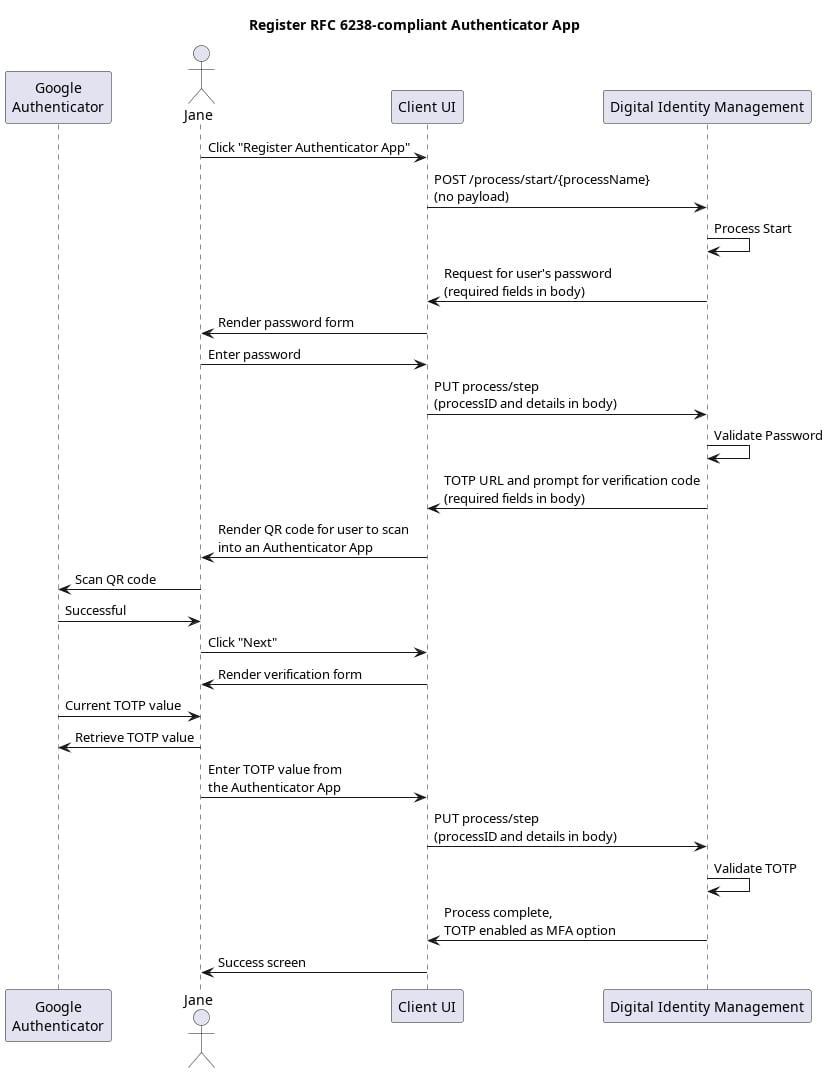 \[/product: dim]
**Note:** Although the end user is already authenticated when they invoke this Process, Digital Identity Management requires them to provide their password to "raise" their authentication level before adding or removing an external MFA security option.
## Initial Request
Your client calls the [Process Start](c_processStart) API to initialize the Process:
```
**REQUEST - POST https://\{your.url\}/process/start/userManagement.registerAuthenticatorAppAsMFA.v1.0**
```
## Response: Password prompt
Digital Identity Management checks to see if the current end user has a registered password. If they do, then the Process returns a prompt for that password.
```
**RESPONSE - body**
{
"processId": "7e034cfd-85fb-464c-a995-8eee3acb98c2",
"processName": "userManagement.registerAuthenticatorAppAsMFA.v1.0",
"stepName": "PasswordPrompt",
"lastStep": false,
"displayMessage": "Please provide your password.",
"parameters": {
"password": "String"
}
}
```
**Note:** If the end user onboarded with their social account, and do not have a registered password, then the Process returns an error, and ends.
| `processId` | Unique identifier for the current instance of this Process. |
| - | - |
| `processName` | Full name of the Process, including the category and version number. |
| `stepName` | Name of the specific step that the Process is currently on. |
| `lastStep` | Boolean that indicates whether or not this was the last step in the Process. |
| `displayMessage` | Optional message the client can render for the end user. |
| `parameters` | Object that specifies the info this Process requires to continue its task. |
| `password` | The current Digital Identity Management User's registered password. |
## Next Step: User provides password
The user enters their password, and your client passes it to Digital Identity Management in a [Process Step](c_processStep) API request:
```
**PUT https://\{your.url\}/process/step**
{
"processId": "7e034cfd-85fb-464c-a995-8eee3acb98c2",
"parameters": {
"password": "L3tm3inplease"
}
}
```
| `processId` | Unique identifier for the current instance of this Process. |
| - | - |
| `parameters` | Object that contains the data that was requested in the previous Process response. |
| `password` | The current Digital Identity Management User's registered password. |
## Response: QR validation
Digital Identity Management internally generates a secret key, and the Process returns a protocol-compliant URL (intended to be encoded in a Quick Response, or QR code) to your client, intended for the end user to see and for the Authenticator App to consume. The Authenticator App reads the QR code, configures the end user's Digital Identity Management User profile within that application, and then produces a visible code for the end user. The Process response includes a request for that app-generated code:
```
**RESPONSE - body**
{
"processId": "7e034cfd-85fb-464c-a995-8eee3acb98c2",
"processName": "userManagement.registerAuthenticatorAppAsMFA.v1.0",
"stepName": "TotpVerificationPrompt",
"lastStep": false,
"displayMessage": "Please provide the verification code by scanning the QR Url provided",
"output": {
"qrUrl": "otpauth://totp/ryan%40example.com?secret=zapCVtcIXg",
"attemptsRemaining": 5
},
"parameters": {
"code": "String"
},
}
```
| `processId` | Unique identifier for the current instance of this Process. |
| - | - |
| `processName` | Full name of the Process, including the category and version number. |
| `stepName` | Name of the specific step that the Process is currently on. |
| `lastStep` | Boolean that indicates whether or not this was the last step in the Process. |
| `output` | Object that contains data that the client can consume, retain, and use for additional operations. |
| `qrURL` | A RFC 6238-compliant URL to be provided (typically via scanned QR code) to an Authenticator App, to register the user's Digital Identity Management User ID within the app. **Note:** The visual UI generation of the QR code is beyond the scope of this walk-through. You may wish to look for QR code generation library to assist your platform, such as [qrcode.js](https://davidshimjs.github.io/qrcodejs/) for web applications. |
| `attemptsRemaining` | The number of attempts remaining to provide a valid verification code from the Authenticator App before the Process terminates in failure. |
| `parameters` | Object that specifies the info this Process requires to continue its task. |
| `code` | Object that contains a representation of the structure in which answers to the challenge questions must be presented to the Process, for reference. |
| **Note:** Scanning a QR code is the optimal, automated method of Authenticator App configuration. However, some Authenticator Apps support manual configuration wherein the end user can see and subsequently type the secret key into the App. UI designers may want to take this into consideration, and enable an option to display of the secret, should scanning a QR code not be feasible for the end user. | |
## Final Request: User provides verification code
The end user retrieves the verification code from the authenticator app, and then enters it into your client UI. The client then passes the code to Digital Identity Management in a [Process Step](c_processStep) API request:
```
**PUT https://\{your.url\}/process/step**
{
"processId": "7e034cfd-85fb-464c-a995-8eee3acb98c2",
"parameters": {
"code": "1234"
}
}
```
| `processId` | Unique identifier for the current instance of this Process. |
| - | - |
| `parameters` | Object that contains the data that was requested in the previous Process response. |
| `code` | Verification code generated by the third-party authenticator app. |
## Process Complete
Digital Identity Management validates the verification code, and registers the TOTP option as an attribute on the User entity. The Process returns a `200 HTTP` status:
```
**RESPONSE - body**
{
"processId": "7e034cfd-85fb-464c-a995-8eee3acb98c2",
"processName": "userManagement.registerAuthenticatorAppAsMFA.v1.0",
"lastStep": true
}
```
The Digital Identity Management User entity is now configured to use a TOTP from that particular authenticator app as an MFA option, if and when the end user is prompted for MFA during authentication.
| `processId` | The unique identifier for this instance of the Process. |
| - | - |
| `processName` | Full name of the Process, including the category and version number. |
| `lastStep` | Boolean that indicates whether or not this was the last step in the Process. |
| **Parent topic:**[Register Authenticator App Process](../topics/c_registerAuthnApp) | |
This documentation is built and hosted on [Mintlify](https://mintlify.com), a developer documentation platform.
\[/product: dim]
**Note:** Although the end user is already authenticated when they invoke this Process, Digital Identity Management requires them to provide their password to "raise" their authentication level before adding or removing an external MFA security option.
## Initial Request
Your client calls the [Process Start](c_processStart) API to initialize the Process:
```
**REQUEST - POST https://\{your.url\}/process/start/userManagement.registerAuthenticatorAppAsMFA.v1.0**
```
## Response: Password prompt
Digital Identity Management checks to see if the current end user has a registered password. If they do, then the Process returns a prompt for that password.
```
**RESPONSE - body**
{
"processId": "7e034cfd-85fb-464c-a995-8eee3acb98c2",
"processName": "userManagement.registerAuthenticatorAppAsMFA.v1.0",
"stepName": "PasswordPrompt",
"lastStep": false,
"displayMessage": "Please provide your password.",
"parameters": {
"password": "String"
}
}
```
**Note:** If the end user onboarded with their social account, and do not have a registered password, then the Process returns an error, and ends.
| `processId` | Unique identifier for the current instance of this Process. |
| - | - |
| `processName` | Full name of the Process, including the category and version number. |
| `stepName` | Name of the specific step that the Process is currently on. |
| `lastStep` | Boolean that indicates whether or not this was the last step in the Process. |
| `displayMessage` | Optional message the client can render for the end user. |
| `parameters` | Object that specifies the info this Process requires to continue its task. |
| `password` | The current Digital Identity Management User's registered password. |
## Next Step: User provides password
The user enters their password, and your client passes it to Digital Identity Management in a [Process Step](c_processStep) API request:
```
**PUT https://\{your.url\}/process/step**
{
"processId": "7e034cfd-85fb-464c-a995-8eee3acb98c2",
"parameters": {
"password": "L3tm3inplease"
}
}
```
| `processId` | Unique identifier for the current instance of this Process. |
| - | - |
| `parameters` | Object that contains the data that was requested in the previous Process response. |
| `password` | The current Digital Identity Management User's registered password. |
## Response: QR validation
Digital Identity Management internally generates a secret key, and the Process returns a protocol-compliant URL (intended to be encoded in a Quick Response, or QR code) to your client, intended for the end user to see and for the Authenticator App to consume. The Authenticator App reads the QR code, configures the end user's Digital Identity Management User profile within that application, and then produces a visible code for the end user. The Process response includes a request for that app-generated code:
```
**RESPONSE - body**
{
"processId": "7e034cfd-85fb-464c-a995-8eee3acb98c2",
"processName": "userManagement.registerAuthenticatorAppAsMFA.v1.0",
"stepName": "TotpVerificationPrompt",
"lastStep": false,
"displayMessage": "Please provide the verification code by scanning the QR Url provided",
"output": {
"qrUrl": "otpauth://totp/ryan%40example.com?secret=zapCVtcIXg",
"attemptsRemaining": 5
},
"parameters": {
"code": "String"
},
}
```
| `processId` | Unique identifier for the current instance of this Process. |
| - | - |
| `processName` | Full name of the Process, including the category and version number. |
| `stepName` | Name of the specific step that the Process is currently on. |
| `lastStep` | Boolean that indicates whether or not this was the last step in the Process. |
| `output` | Object that contains data that the client can consume, retain, and use for additional operations. |
| `qrURL` | A RFC 6238-compliant URL to be provided (typically via scanned QR code) to an Authenticator App, to register the user's Digital Identity Management User ID within the app. **Note:** The visual UI generation of the QR code is beyond the scope of this walk-through. You may wish to look for QR code generation library to assist your platform, such as [qrcode.js](https://davidshimjs.github.io/qrcodejs/) for web applications. |
| `attemptsRemaining` | The number of attempts remaining to provide a valid verification code from the Authenticator App before the Process terminates in failure. |
| `parameters` | Object that specifies the info this Process requires to continue its task. |
| `code` | Object that contains a representation of the structure in which answers to the challenge questions must be presented to the Process, for reference. |
| **Note:** Scanning a QR code is the optimal, automated method of Authenticator App configuration. However, some Authenticator Apps support manual configuration wherein the end user can see and subsequently type the secret key into the App. UI designers may want to take this into consideration, and enable an option to display of the secret, should scanning a QR code not be feasible for the end user. | |
## Final Request: User provides verification code
The end user retrieves the verification code from the authenticator app, and then enters it into your client UI. The client then passes the code to Digital Identity Management in a [Process Step](c_processStep) API request:
```
**PUT https://\{your.url\}/process/step**
{
"processId": "7e034cfd-85fb-464c-a995-8eee3acb98c2",
"parameters": {
"code": "1234"
}
}
```
| `processId` | Unique identifier for the current instance of this Process. |
| - | - |
| `parameters` | Object that contains the data that was requested in the previous Process response. |
| `code` | Verification code generated by the third-party authenticator app. |
## Process Complete
Digital Identity Management validates the verification code, and registers the TOTP option as an attribute on the User entity. The Process returns a `200 HTTP` status:
```
**RESPONSE - body**
{
"processId": "7e034cfd-85fb-464c-a995-8eee3acb98c2",
"processName": "userManagement.registerAuthenticatorAppAsMFA.v1.0",
"lastStep": true
}
```
The Digital Identity Management User entity is now configured to use a TOTP from that particular authenticator app as an MFA option, if and when the end user is prompted for MFA during authentication.
| `processId` | The unique identifier for this instance of the Process. |
| - | - |
| `processName` | Full name of the Process, including the category and version number. |
| `lastStep` | Boolean that indicates whether or not this was the last step in the Process. |
| **Parent topic:**[Register Authenticator App Process](../topics/c_registerAuthnApp) | |
This documentation is built and hosted on [Mintlify](https://mintlify.com), a developer documentation platform.