> ## Documentation Index
> Fetch the complete documentation index at: https://docs.ulm.m1amdocs.com/llms.txt
> Use this file to discover all available pages before exploring further.
# Social authentication
This is the standard user authentication flow delivered by the [Onboard and Authenticate User with Social Account Process](c_onboardAuthenticateUserSocial) Process.
An anonymous user authenticates into to Digital Identity Management using an already-associated social account. At the end of this flow, the user will be authenticated to Digital Identity Management, dependent on a successful response from the chosen social provider.
\[product: dim]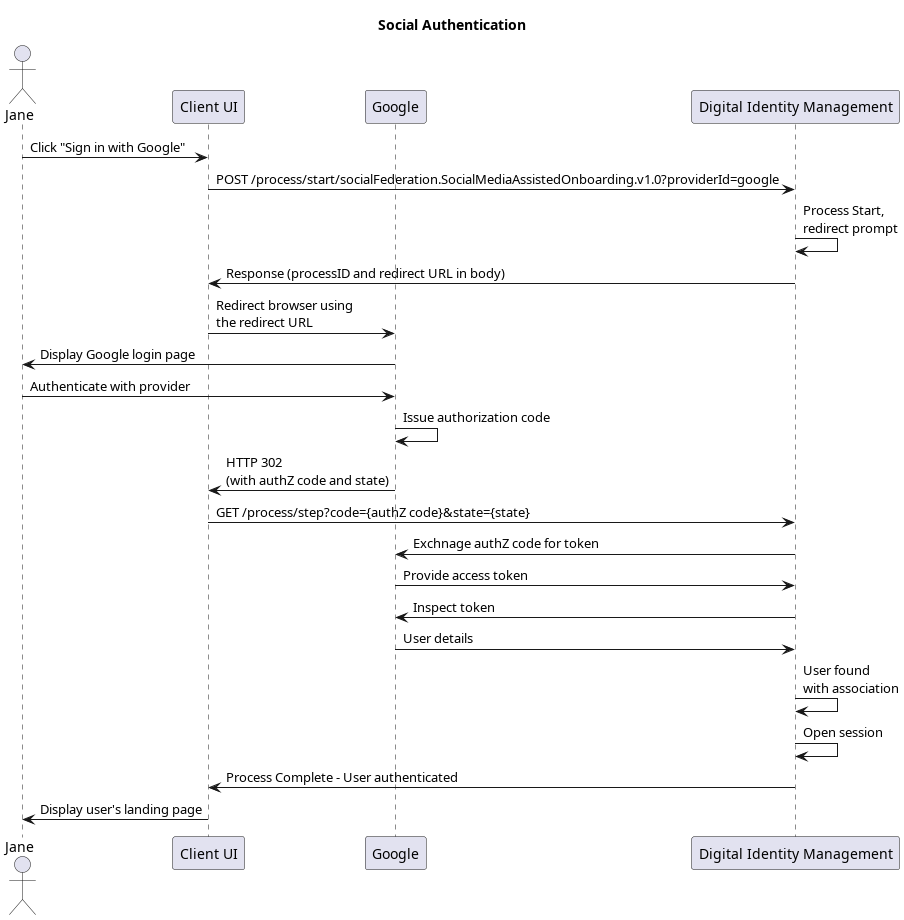 \[/product: dim]
## Initial Request
Your client calls the [Process Start](c_processStart) API to initialize the Process:
```
**POST https://\{your.url\}/process/start/socialFederation.SocialMediaAssistedOnboarding.v1.0**
```
## Response
The Process responds with a request to specify a social provider. The response includes an array of available providers:
```
**RESPONSE - body**
{
"processId": "8f41d5cc-a4ab-45e9-9e3b-7f58a2ed183f",
"processName": "socialFederation.SocialMediaAssistedOnboarding.v1.0",
"displayMessage": "Please input required information",
"stepName": "ProviderPrompt",
"lastStep": false,
"parameters": {
"providerId": "String"
},
"output": {
"providers": [
"linkedin",
"google",
"facebook",
"apple"
]
}
}
```
| `processId` | Unique identifier for the current instance of this Process. |
| - | - |
| `processName` | Full name of the Process, including the category and version number. |
| `stepName` | Name of the specific step that the Process is currently on. |
| `lastStep` | Boolean that indicates whether or not this was the last step in the Process. |
| `displayMessage` | Optional message that the UI can display to the user. |
| `parameters` | Object that specifies the info this Process requires to continue its task. |
| `providerId` | The social provider requested for social onboarding/authentication. |
| `Output` | Object that contains data that the client can (or needs to) consume, retain, and use for additional operations. |
| `providers` | Array of the available social providers that the client can specify.The array will only include options that your organization has enabled and configured in MarketONE Admin web app. In other words, if your organization only has Facebook and Google enabled, then only those options will appear in this response. |
## Next Request: Choose Provider
Your client calls the [Process Step](c_processStep) API, and passes the selected provider to Process.
```
**PUT https://\{your.url\}/process/step**
{
"processId": "8bca30ca-dd44-4050-aece-53b0dbed1922",
"parameters": {
"provider": "google"
}
}
```
Google is the provider in this example, but the steps are the same regardless of the chosen provider.
| `processId` | Unique identifier for the current instance of this Process. |
| - | - |
| `parameters` | Data object that contains the data requested in the previous Process response. |
| `provider` | Identifier of the social provider requested for social onboarding/authentication. |
| **Note:** The client can skip this initial step if the social provider ID is specified in the initial [Process Start](c_processStart) request URL: | |
```
**POST https://\{your.url\}/process/start/socialFederation.SocialMediaAssistedOnboarding.v1.0?providerId=google**
```
This method is useful when social provider badges are displayed on a UI (for end users to click and immediately begin the onboarding or authentication Process for that specific provider).
## Response: Redirect URL
The Process responds with a redirect for the client to follow:
```
**RESPONSE - body**
{
"processId": "8f41d5cc-a4ab-45e9-9e3b-7f58a2ed183f",
"processName": "socialFederation.SocialMediaAssistedOnboarding.v1.0",
"displayMessage": "Please input required information",
"stepName": "CodePrompt",
"lastStep": false,
"output": {
"eyJraWQiOiJyc2ExIiwiYWxnIjoiConnectyNTYifQ.eyJzdWIiOiI0ZmE2ZmZlMS05NmMwLTQ3ODAtYjNkYi1kNTMwY2RjN
"requestUrl":"https://www.google.com/dialog/oauth?response_type=code&client_id=&
state=&scope=public_profile%20email&redirect_uri=https%3A%2F%2Fidp-local.corp.amd
ocs.com%2Frest%2Fv70%2Fprocess%2Fstep"
}
}
```
| `processId` | Unique identifier for the current instance of this Process. |
| - | - |
| `processName` | Full name of the Process, including the category and version number. |
| `stepName` | Name of the specific step that the Process is currently on. |
| `lastStep` | Boolean that indicates whether or not this was the last step in the Process. |
| `displayMessage` | Optional message that the UI can display to the user. |
| `Output` | Object that contains data that the client can (or needs to) consume, retain, and use for additional operations. |
| `requestURL` | URL to the social provider to which the client application needs to redirect. |
## Next Step: Redirect to Social Provider
Your client must then redirect to the location provided in the `requestUrl` parameter. This URL redirects to the selected social provider (in this example, Google), and includes the request for certain "scopes" or user resources as defined by OAuth 2.0 authorization framework. The user then authenticates with the provider, and grants the provider permission to share basic information (their name, email address, etc) with Digital Identity Management.
**Redirect back to Digital Identity Management**
The social provider then redirects back to Digital Identity Management and makes this call to provide Digital Identity Management with an authorization code:
```
**GET /process/step?code=<redacted>&state=<redacted>**
```
Digital Identity Management independently redeems the authorization code with the social provider through a secure backend call.
## Process Complete
Digital Identity Management then authenticates and Digital Identity Management then redirects back to the client application, and returns a `200 HTTP` status:
```
**RESPONSE - body**
{
"processId": "8f41d5cc-a4ab-45e9-9e3b-7f58a2ed183f",
"processName": "socialFederation.SocialMediaAssistedOnboarding.v1.0",
"lastStep": true,
"runtimeId": 5009,
"userAuthenticated": true,
"userId": 6013
}
```
| `processId` | Unique identifier for the current instance of this Process. |
| - | - |
| `processName` | Full name of the Process, including the category and version number. |
| `lastStep` | Boolean that indicates whether or not this was the last step in the Process. |
| `runtimeId` | The unique internal identifier of the Runtime entity associated authenticated User. |
| `userAuthenticated` | Boolean that indicates if the user was authenticated into Digital Identity Management. |
| `userId` | The unique internal identifying number of the authenticated User. |
| The client application can retain the User and Runtime entity IDs to use [Digital Identity Management APIs](https://developer.m1amdocs.com/api) to perform CRUD operations against those (and other associated) entities. | |
In some cases, the user already has an open session with the social provider in the same browser, so they will not be prompted to sign-in with the provider. From the user's perspective, they simply click the "Sign In with \{Social Provider}" badge and, within a few seconds, they are automatically redirected to the authenticated view of your client application.
**Parent topic:**[Onboard and Authenticate User with Social Account Process](../topics/c_onboardAuthenticateUserSocial)
This documentation is built and hosted on [Mintlify](https://mintlify.com), a developer documentation platform.
\[/product: dim]
## Initial Request
Your client calls the [Process Start](c_processStart) API to initialize the Process:
```
**POST https://\{your.url\}/process/start/socialFederation.SocialMediaAssistedOnboarding.v1.0**
```
## Response
The Process responds with a request to specify a social provider. The response includes an array of available providers:
```
**RESPONSE - body**
{
"processId": "8f41d5cc-a4ab-45e9-9e3b-7f58a2ed183f",
"processName": "socialFederation.SocialMediaAssistedOnboarding.v1.0",
"displayMessage": "Please input required information",
"stepName": "ProviderPrompt",
"lastStep": false,
"parameters": {
"providerId": "String"
},
"output": {
"providers": [
"linkedin",
"google",
"facebook",
"apple"
]
}
}
```
| `processId` | Unique identifier for the current instance of this Process. |
| - | - |
| `processName` | Full name of the Process, including the category and version number. |
| `stepName` | Name of the specific step that the Process is currently on. |
| `lastStep` | Boolean that indicates whether or not this was the last step in the Process. |
| `displayMessage` | Optional message that the UI can display to the user. |
| `parameters` | Object that specifies the info this Process requires to continue its task. |
| `providerId` | The social provider requested for social onboarding/authentication. |
| `Output` | Object that contains data that the client can (or needs to) consume, retain, and use for additional operations. |
| `providers` | Array of the available social providers that the client can specify.The array will only include options that your organization has enabled and configured in MarketONE Admin web app. In other words, if your organization only has Facebook and Google enabled, then only those options will appear in this response. |
## Next Request: Choose Provider
Your client calls the [Process Step](c_processStep) API, and passes the selected provider to Process.
```
**PUT https://\{your.url\}/process/step**
{
"processId": "8bca30ca-dd44-4050-aece-53b0dbed1922",
"parameters": {
"provider": "google"
}
}
```
Google is the provider in this example, but the steps are the same regardless of the chosen provider.
| `processId` | Unique identifier for the current instance of this Process. |
| - | - |
| `parameters` | Data object that contains the data requested in the previous Process response. |
| `provider` | Identifier of the social provider requested for social onboarding/authentication. |
| **Note:** The client can skip this initial step if the social provider ID is specified in the initial [Process Start](c_processStart) request URL: | |
```
**POST https://\{your.url\}/process/start/socialFederation.SocialMediaAssistedOnboarding.v1.0?providerId=google**
```
This method is useful when social provider badges are displayed on a UI (for end users to click and immediately begin the onboarding or authentication Process for that specific provider).
## Response: Redirect URL
The Process responds with a redirect for the client to follow:
```
**RESPONSE - body**
{
"processId": "8f41d5cc-a4ab-45e9-9e3b-7f58a2ed183f",
"processName": "socialFederation.SocialMediaAssistedOnboarding.v1.0",
"displayMessage": "Please input required information",
"stepName": "CodePrompt",
"lastStep": false,
"output": {
"eyJraWQiOiJyc2ExIiwiYWxnIjoiConnectyNTYifQ.eyJzdWIiOiI0ZmE2ZmZlMS05NmMwLTQ3ODAtYjNkYi1kNTMwY2RjN
"requestUrl":"https://www.google.com/dialog/oauth?response_type=code&client_id=&
state=&scope=public_profile%20email&redirect_uri=https%3A%2F%2Fidp-local.corp.amd
ocs.com%2Frest%2Fv70%2Fprocess%2Fstep"
}
}
```
| `processId` | Unique identifier for the current instance of this Process. |
| - | - |
| `processName` | Full name of the Process, including the category and version number. |
| `stepName` | Name of the specific step that the Process is currently on. |
| `lastStep` | Boolean that indicates whether or not this was the last step in the Process. |
| `displayMessage` | Optional message that the UI can display to the user. |
| `Output` | Object that contains data that the client can (or needs to) consume, retain, and use for additional operations. |
| `requestURL` | URL to the social provider to which the client application needs to redirect. |
## Next Step: Redirect to Social Provider
Your client must then redirect to the location provided in the `requestUrl` parameter. This URL redirects to the selected social provider (in this example, Google), and includes the request for certain "scopes" or user resources as defined by OAuth 2.0 authorization framework. The user then authenticates with the provider, and grants the provider permission to share basic information (their name, email address, etc) with Digital Identity Management.
**Redirect back to Digital Identity Management**
The social provider then redirects back to Digital Identity Management and makes this call to provide Digital Identity Management with an authorization code:
```
**GET /process/step?code=<redacted>&state=<redacted>**
```
Digital Identity Management independently redeems the authorization code with the social provider through a secure backend call.
## Process Complete
Digital Identity Management then authenticates and Digital Identity Management then redirects back to the client application, and returns a `200 HTTP` status:
```
**RESPONSE - body**
{
"processId": "8f41d5cc-a4ab-45e9-9e3b-7f58a2ed183f",
"processName": "socialFederation.SocialMediaAssistedOnboarding.v1.0",
"lastStep": true,
"runtimeId": 5009,
"userAuthenticated": true,
"userId": 6013
}
```
| `processId` | Unique identifier for the current instance of this Process. |
| - | - |
| `processName` | Full name of the Process, including the category and version number. |
| `lastStep` | Boolean that indicates whether or not this was the last step in the Process. |
| `runtimeId` | The unique internal identifier of the Runtime entity associated authenticated User. |
| `userAuthenticated` | Boolean that indicates if the user was authenticated into Digital Identity Management. |
| `userId` | The unique internal identifying number of the authenticated User. |
| The client application can retain the User and Runtime entity IDs to use [Digital Identity Management APIs](https://developer.m1amdocs.com/api) to perform CRUD operations against those (and other associated) entities. | |
In some cases, the user already has an open session with the social provider in the same browser, so they will not be prompted to sign-in with the provider. From the user's perspective, they simply click the "Sign In with \{Social Provider}" badge and, within a few seconds, they are automatically redirected to the authenticated view of your client application.
**Parent topic:**[Onboard and Authenticate User with Social Account Process](../topics/c_onboardAuthenticateUserSocial)
This documentation is built and hosted on [Mintlify](https://mintlify.com), a developer documentation platform.