> ## Documentation Index
> Fetch the complete documentation index at: https://docs.ulm.m1amdocs.com/llms.txt
> Use this file to discover all available pages before exploring further.
# Social onboarding
This is the standard user onboarding flow delivered by the [Onboard & Authenticate User with Social Account](c_onboardAuthenticateUserSocial) Process.
A new, anonymous user onboards using their desired social account. The Process retrieves user data from the social provider through secure back channel communications, and then uses that data as the basis for the new User creation. The email address or mobile number from the provider is registered as an attribute and authentication identifier (authN ID) on the User entity. The User and its authN ID are both created with an `activated` status, and the user is authenticated at the end of the flow.
\[product: dim]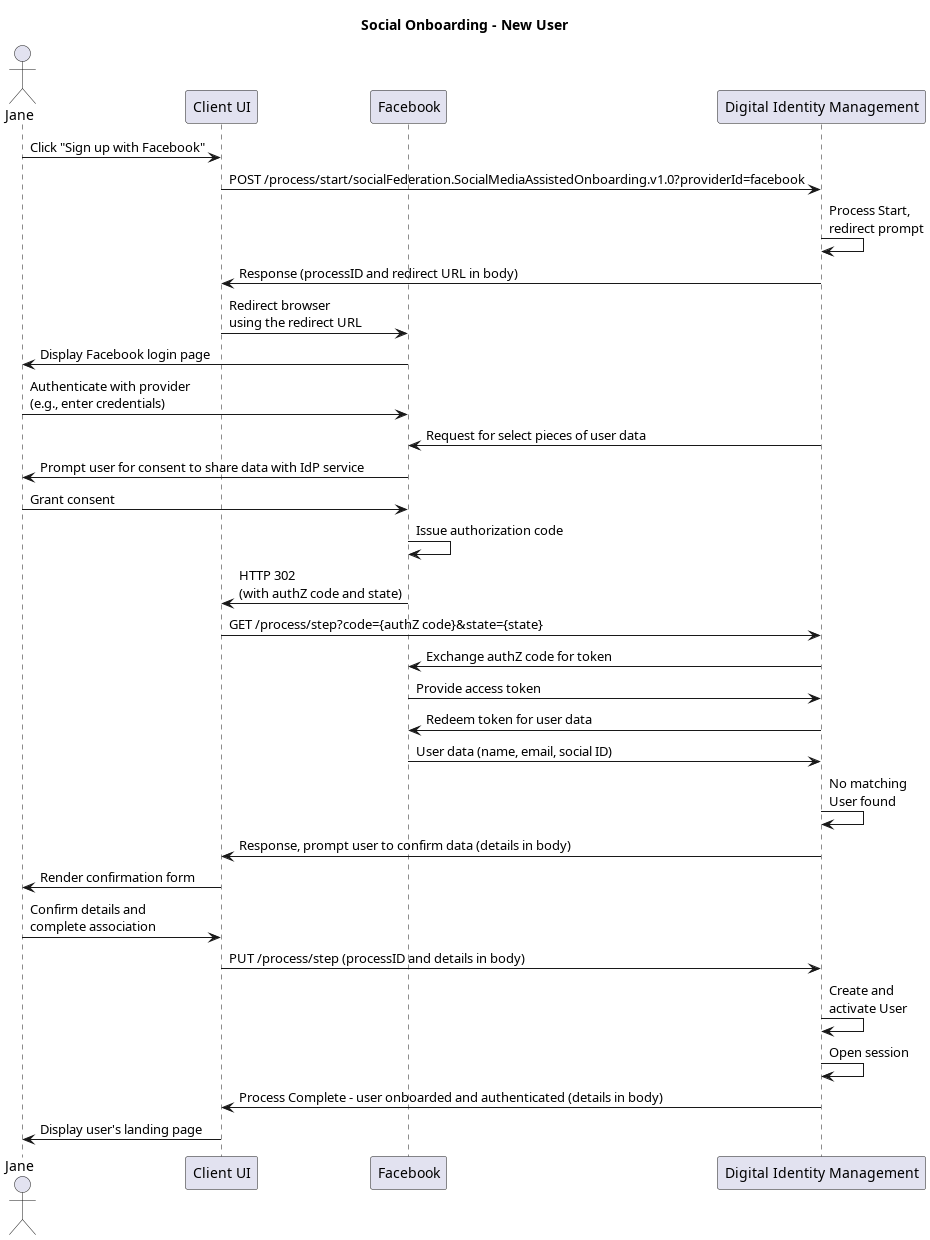 \[/product: dim]
## Initial Request
Your client calls the [Process Start](c_processStart) API to initialize the Process:
```
**POST https://\{your.url\}/process/start/socialFederation.SocialMediaAssistedOnboarding.v1.0**
```
## Response
The Process responds with a request to specify a social provider. The response includes an array of available providers:
```
**RESPONSE - body**
{
"processId": "8f41d5cc-a4ab-45e9-9e3b-7f58a2ed183f",
"processName": "socialFederation.SocialMediaAssistedOnboarding.v1.0",
"displayMessage": "Please input required information",
"stepName": "ProviderPrompt",
"lastStep": false,
"parameters": {
"providerId": "String"
},
"output": {
"providers": [
"linkedin",
"google",
"facebook",
"apple"
]
}
}
```
| `processId` | Unique identifier for the current instance of this Process. |
| - | - |
| `processName` | Full name of the Process, including the category and version number. |
| `stepName` | Name of the specific step that the Process is currently on. |
| `lastStep` | Boolean that indicates whether or not this was the last step in the Process. |
| `displayMessage` | Optional message that the UI can display to the user. |
| `parameters` | Object that specifies the info this Process requires to continue its task. |
| `providerId` | The social provider requested for social onboarding/authentication. |
| `Output` | Object that contains data that the client can (or needs to) consume, retain, and use for additional operations. |
| `providers` | Array of the available social providers that the client can specify.The array will only include options that your organization has enabled and configured in MarketONE Admin web app. In other words, if your organization only has Facebook and Google enabled, then only those options will appear in this response. |
## Next Request: Specify social provider
Your client calls the [Process Step](c_processStep) API, and passes the selected provider to Process:
```
**PUT https://\{your.url\}/process/step**
{
"processId": "8bca30ca-dd44-4050-aece-53b0dbed1922",
"parameters": {
"provider": "facebook"
}
}
```
Facebook is the provider in this example, but the steps are the same regardless of the chosen provider.
| `processId` | Unique identifier for the current instance of this Process. |
| - | - |
| `parameters` | Data object that contains the data requested in the previous Process response. |
| `provider` | Identifier of the social provider requested for social onboarding/authentication. |
| **Note:** The client can skip this initial step if the social provider ID is specified in the initial [Process Start](c_processStart) request URL: | |
```
**POST https://\{your.url\}/process/start/socialFederation.SocialMediaAssistedOnboarding.v1.0?providerId=google**
```
This method is useful when social provider badges are displayed on a UI (for end users to click and immediately begin the onboarding or authentication Process for that specific provider).
## Response: Redirect URL
The Process responds with a redirect for the client to follow:
```
**RESPONSE - body**
{
"processId": "8f41d5cc-a4ab-45e9-9e3b-7f58a2ed183f",
"processName": "socialFederation.SocialMediaAssistedOnboarding.v1.0",
"displayMessage": "Please input required information",
"stepName": "CodePrompt",
"lastStep": false,
"output": {
"eyJraWQiOiJyc2ExIiwiYWxnIjoiConnectyNTYifQ.eyJzdWIiOiI0ZmE2ZmZlMS05NmMwLTQ3ODAtYjNkYi1kNTMwY2RjN
"requestUrl":"https://www.facebook.com/dialog/oauth?response_type=code&client_id=&
state=&scope=public_profile%20email&redirect_uri=https%3A%2F%2Fidp-local.corp.amd
ocs.com%2Frest%2Fv70%2Fprocess%2Fstep"
}
}
```
| `processId` | Unique identifier for the current instance of this Process. |
| - | - |
| `processName` | Full name of the Process, including the category and version number. |
| `stepName` | Name of the specific step that the Process is currently on. |
| `lastStep` | Boolean that indicates whether or not this was the last step in the Process. |
| `displayMessage` | Optional message that the UI can display to the user. |
| `Output` | Object that contains data that the client can (or needs to) consume, retain, and use for additional operations. |
| `requestURL` | URL to the social provider to which the client application needs to redirect. |
## Next Request: Redirect to social provider
Your client must then redirect to the location provided in the `requestUrl` parameter. This URL redirects to the selected social provider (in this example, Facebook), and includes the request for certain "scopes" or user resources as defined by OAuth 2.0 authorization framework. The user then authenticates with the provider, and grants the provider permission to share basic information (their name, email address, etc) with Digital Identity Management.
## Response: Authorization code and state
The social provider then sends an HTTPS 302 redirect to the user's browser, and sends the browser back to your client application.
**Note:** The social provider redirects to a landing page that you need you construct and host on your client. The redirect to this page is defined in the Digital Identity Management Admin console when you enable and configure the integration with the social provider. Setting that redirect URL in Digital Identity Management Admin allows this Process to automatically supply that information to the social provider during the initial redirect to the provider website.
Ensure that you have this landing page made, and that you have the redirect to this page set in Digital Identity Management Admin console. See [Managing Social Digital Identity Management Settings](https://docs.vindicia.com/bundle/b_connectAdminGuide/page/topics/socialConnectionsSettings_r.html) in the [Digital Identity Management Admin User Guide](https://docs.vindicia.com/bundle/b_connectAdminGuide/page/topics/adminIntroduction_c.html) for more details.
When the social provider redirects back to your client, it passes along an authorization `code`, and `state` in the URL:
```
**https://\{your.url\}/\{etc\}/social\_end?code=\{authZ code\}&state=\{state value\}**
```
Your client must retain the `code` and `state`, as it will use these values in the next request to Digital Identity Management.
## Next Step: Pass code and state to Digital Identity Management
Your client immediately takes the `code` and `state` values from the social provider's redirect, and then passes those values to Digital Identity Management using the `[GET /process/step](c_getProcessStep)` API. These values must be provided in the request URL:
```
**GET https://\{your.url\}/process/step?code=<authZ code>&state=<state value>**
```
| `code` | Authorization code sent to your client from the social provider. |
| - | - |
| `state` | State value sent to your client from the social provider. |
| Digital Identity Management then independently verifies the authorization code and retrieves the user information from the provider over secure back-channel communications. | |
## Response: No user found
Once the Process acquires the actual user data from the provider, it quickly checks to see if there is an existing Digital Identity Management User with a matching email or mobile. This use case assumes that no existing Digital Identity Management User match is found, so the Process returns the provider details to the client for user confirmation:
```
**RESPONSE - body**
{
"processId": "8f41d5cc-a4ab-45e9-9e3b-7f58a2ed183f",
"processName": "socialFederation.SocialMediaAssistedOnboarding.v1.0",
"displayMessage": "Please input required information",
"parameters": {
"confirm": "boolean",
"lastName": "String",
"firstName": "String",
"phone": "String",
"displayName": "String",
"email": "String"
},
"stepName": "SocialUserInfoPrompt",
"lastStep": false,
"output": {
"providerId": "facebook",
"socialUserInfo": {
"id": "1425242407805720",
"email": "uxpsystemsmint@gmail.com",
"firstName": "Bob",
"lastName": "Jones"
}
}
}
```
| `processId` | Unique identifier for the current instance of this Process. |
| - | - |
| `processName` | Full name of the Process, including the category and version number. |
| `stepName` | Name of the specific step that the Process is currently on. |
| `lastStep` | Boolean that indicates whether or not this was the last step in the Process. |
| `displayMessage` | Optional message that the UI can display to the user. |
| `parameters` | Object that specifies the info this Process requires from the client application in order to continue its task. |
| `confirm` | A boolean value indicative of the user's agreement to associate the authenticated social profile with Digital Identity Management. |
| `lastName` | **(Optional)** The user's last name. |
| `firstName` | **(Optional)** The user's first name. |
| `displayName` | **(Optional)** A display name for the user. This could be just a combination of the user's first and last name or a nickname. |
| `phone` | **(Conditional**\*\*)\*\* The end user's mobile phone number. **Required** if `email` is not provided. |
| `email` | **(Conditional**\*\*)\*\* The end user's email address. **Required** if `phone` is not provided. |
| `displayName` | **(Optional)** Display name from the provider, usually a nickname, or a first and last name pairing. |
| `Output` | Object that contains data that the client can (or needs to) consume, retain, and use for additional operations. |
| `providerId` | The identifier of the provider of the social account. |
| `socialUserInfo` | Object of user data given by the social provider. Can be used to pre-populate user fields, such as first/last name, and email/mobile. |
| `id` | The social provider's own unique identifier for the user's social account. |
## Last Request: Confirm new user details
Your client application should render the data as returned by the social provider, and prompt the user to confirm that the details are accurate. This use case assumes the user confirms/submit their details and **does not** change the contact channel (email or mobile) that was returned by the social provider.
Your client then sends that confirmed data back to the Process in a final [Process Step](c_processStep) request:
```
**PUT https://\{your.url\}/process/step**
{
"processId": "8f41d5cc-a4ab-45e9-9e3b-7f58a2ed183f",
"parameters": {
"confirm": "true",
"lastName": "Jones",
"firstName": "Bob",
"email": "bobj@example.com",
"displayName": "Bob Jones"
}
}
```
| `processId` | Unique identifier for the current instance of this Process. |
| - | - |
| `parameters` | Object that contains the data requested in the previous Process response. |
| `confirm` | A boolean value indicative of the user's agreement to associate the authenticated social profile with Digital Identity Management. |
| `lastName` | **(Optional)** The user's last name. |
| `firstName` | **(Optional)** The user's first name. |
| `displayName` | **(Optional)** A display name for the user. This could be just a combination of the user's first and last name or a nickname. |
| `phone` | **(Conditional**\*\*)\*\* The end user's mobile phone number. **Required** if `email` is not provided. |
| `email` | **(Conditional**\*\*)\*\* The end user's email address. **Required** if `phone` is not provided. |
## Process Complete
If the user confirms the information returned by the provider, Digital Identity Management trusts the provider has already verified that contact channel. The new User is created, activated, and associated to the social account without any need to verify their authN ID.
The Process automatically authenticates the user, and returns a `200 HTTP` status:
```
**RESPONSE - body**
{
"processId": "8f41d5cc-a4ab-45e9-9e3b-7f58a2ed183f",
"processName": "socialFederation.SocialMediaAssistedOnboarding.v1.0",
"lastStep": true,
"runtimeId": 5009,
"userAuthenticated": true,
"userId": 6013
}
```
| `processId` | Unique identifier for the current instance of this Process. |
| - | - |
| `processName` | Full name of the Process, including the category and version number. |
| `lastStep` | Boolean that indicates whether or not this was the last step in the Process. |
| runtimeId | The unique identifier of the Runtime associated with the user's session. |
| | Boolean that indicates if the user was authenticated into Digital Identity Management. |
| | The unique identifier of the User associated with the session. The client may want to leverage this ID for various Digital Identity Management entity APIs. |
| Going forward, the user can now sign in using their associated social account. In that scenario, your client will invoke the exact same Process, and it'll go through the same flow, with the exception that it won't return the prompt for the user to confirm anything. See the Social Authentication use case for exact details. | |
## Alternate Flows
* If the user changes the contact channel returned from the provider, they will need to first verify that channel in order to fully activate the User entity. The Process sends a verification message to that updated contact channel, returns a[PKAT](c_actionTokens#section_irr_wss_cpb) to the client, and ends.
* If the user invokes this Process from the onboarding/authentication page, and Digital Identity Management discovers an existing User entity with a matching email or mobile, then the Process prompts the client for the user's password. If the user provides their password, then the Process authenticates them, associates the social account, and ends.
**Parent topic:**[Onboard and Authenticate User with Social Account Process](../topics/c_onboardAuthenticateUserSocial)
This documentation is built and hosted on [Mintlify](https://mintlify.com), a developer documentation platform.
\[/product: dim]
## Initial Request
Your client calls the [Process Start](c_processStart) API to initialize the Process:
```
**POST https://\{your.url\}/process/start/socialFederation.SocialMediaAssistedOnboarding.v1.0**
```
## Response
The Process responds with a request to specify a social provider. The response includes an array of available providers:
```
**RESPONSE - body**
{
"processId": "8f41d5cc-a4ab-45e9-9e3b-7f58a2ed183f",
"processName": "socialFederation.SocialMediaAssistedOnboarding.v1.0",
"displayMessage": "Please input required information",
"stepName": "ProviderPrompt",
"lastStep": false,
"parameters": {
"providerId": "String"
},
"output": {
"providers": [
"linkedin",
"google",
"facebook",
"apple"
]
}
}
```
| `processId` | Unique identifier for the current instance of this Process. |
| - | - |
| `processName` | Full name of the Process, including the category and version number. |
| `stepName` | Name of the specific step that the Process is currently on. |
| `lastStep` | Boolean that indicates whether or not this was the last step in the Process. |
| `displayMessage` | Optional message that the UI can display to the user. |
| `parameters` | Object that specifies the info this Process requires to continue its task. |
| `providerId` | The social provider requested for social onboarding/authentication. |
| `Output` | Object that contains data that the client can (or needs to) consume, retain, and use for additional operations. |
| `providers` | Array of the available social providers that the client can specify.The array will only include options that your organization has enabled and configured in MarketONE Admin web app. In other words, if your organization only has Facebook and Google enabled, then only those options will appear in this response. |
## Next Request: Specify social provider
Your client calls the [Process Step](c_processStep) API, and passes the selected provider to Process:
```
**PUT https://\{your.url\}/process/step**
{
"processId": "8bca30ca-dd44-4050-aece-53b0dbed1922",
"parameters": {
"provider": "facebook"
}
}
```
Facebook is the provider in this example, but the steps are the same regardless of the chosen provider.
| `processId` | Unique identifier for the current instance of this Process. |
| - | - |
| `parameters` | Data object that contains the data requested in the previous Process response. |
| `provider` | Identifier of the social provider requested for social onboarding/authentication. |
| **Note:** The client can skip this initial step if the social provider ID is specified in the initial [Process Start](c_processStart) request URL: | |
```
**POST https://\{your.url\}/process/start/socialFederation.SocialMediaAssistedOnboarding.v1.0?providerId=google**
```
This method is useful when social provider badges are displayed on a UI (for end users to click and immediately begin the onboarding or authentication Process for that specific provider).
## Response: Redirect URL
The Process responds with a redirect for the client to follow:
```
**RESPONSE - body**
{
"processId": "8f41d5cc-a4ab-45e9-9e3b-7f58a2ed183f",
"processName": "socialFederation.SocialMediaAssistedOnboarding.v1.0",
"displayMessage": "Please input required information",
"stepName": "CodePrompt",
"lastStep": false,
"output": {
"eyJraWQiOiJyc2ExIiwiYWxnIjoiConnectyNTYifQ.eyJzdWIiOiI0ZmE2ZmZlMS05NmMwLTQ3ODAtYjNkYi1kNTMwY2RjN
"requestUrl":"https://www.facebook.com/dialog/oauth?response_type=code&client_id=&
state=&scope=public_profile%20email&redirect_uri=https%3A%2F%2Fidp-local.corp.amd
ocs.com%2Frest%2Fv70%2Fprocess%2Fstep"
}
}
```
| `processId` | Unique identifier for the current instance of this Process. |
| - | - |
| `processName` | Full name of the Process, including the category and version number. |
| `stepName` | Name of the specific step that the Process is currently on. |
| `lastStep` | Boolean that indicates whether or not this was the last step in the Process. |
| `displayMessage` | Optional message that the UI can display to the user. |
| `Output` | Object that contains data that the client can (or needs to) consume, retain, and use for additional operations. |
| `requestURL` | URL to the social provider to which the client application needs to redirect. |
## Next Request: Redirect to social provider
Your client must then redirect to the location provided in the `requestUrl` parameter. This URL redirects to the selected social provider (in this example, Facebook), and includes the request for certain "scopes" or user resources as defined by OAuth 2.0 authorization framework. The user then authenticates with the provider, and grants the provider permission to share basic information (their name, email address, etc) with Digital Identity Management.
## Response: Authorization code and state
The social provider then sends an HTTPS 302 redirect to the user's browser, and sends the browser back to your client application.
**Note:** The social provider redirects to a landing page that you need you construct and host on your client. The redirect to this page is defined in the Digital Identity Management Admin console when you enable and configure the integration with the social provider. Setting that redirect URL in Digital Identity Management Admin allows this Process to automatically supply that information to the social provider during the initial redirect to the provider website.
Ensure that you have this landing page made, and that you have the redirect to this page set in Digital Identity Management Admin console. See [Managing Social Digital Identity Management Settings](https://docs.vindicia.com/bundle/b_connectAdminGuide/page/topics/socialConnectionsSettings_r.html) in the [Digital Identity Management Admin User Guide](https://docs.vindicia.com/bundle/b_connectAdminGuide/page/topics/adminIntroduction_c.html) for more details.
When the social provider redirects back to your client, it passes along an authorization `code`, and `state` in the URL:
```
**https://\{your.url\}/\{etc\}/social\_end?code=\{authZ code\}&state=\{state value\}**
```
Your client must retain the `code` and `state`, as it will use these values in the next request to Digital Identity Management.
## Next Step: Pass code and state to Digital Identity Management
Your client immediately takes the `code` and `state` values from the social provider's redirect, and then passes those values to Digital Identity Management using the `[GET /process/step](c_getProcessStep)` API. These values must be provided in the request URL:
```
**GET https://\{your.url\}/process/step?code=<authZ code>&state=<state value>**
```
| `code` | Authorization code sent to your client from the social provider. |
| - | - |
| `state` | State value sent to your client from the social provider. |
| Digital Identity Management then independently verifies the authorization code and retrieves the user information from the provider over secure back-channel communications. | |
## Response: No user found
Once the Process acquires the actual user data from the provider, it quickly checks to see if there is an existing Digital Identity Management User with a matching email or mobile. This use case assumes that no existing Digital Identity Management User match is found, so the Process returns the provider details to the client for user confirmation:
```
**RESPONSE - body**
{
"processId": "8f41d5cc-a4ab-45e9-9e3b-7f58a2ed183f",
"processName": "socialFederation.SocialMediaAssistedOnboarding.v1.0",
"displayMessage": "Please input required information",
"parameters": {
"confirm": "boolean",
"lastName": "String",
"firstName": "String",
"phone": "String",
"displayName": "String",
"email": "String"
},
"stepName": "SocialUserInfoPrompt",
"lastStep": false,
"output": {
"providerId": "facebook",
"socialUserInfo": {
"id": "1425242407805720",
"email": "uxpsystemsmint@gmail.com",
"firstName": "Bob",
"lastName": "Jones"
}
}
}
```
| `processId` | Unique identifier for the current instance of this Process. |
| - | - |
| `processName` | Full name of the Process, including the category and version number. |
| `stepName` | Name of the specific step that the Process is currently on. |
| `lastStep` | Boolean that indicates whether or not this was the last step in the Process. |
| `displayMessage` | Optional message that the UI can display to the user. |
| `parameters` | Object that specifies the info this Process requires from the client application in order to continue its task. |
| `confirm` | A boolean value indicative of the user's agreement to associate the authenticated social profile with Digital Identity Management. |
| `lastName` | **(Optional)** The user's last name. |
| `firstName` | **(Optional)** The user's first name. |
| `displayName` | **(Optional)** A display name for the user. This could be just a combination of the user's first and last name or a nickname. |
| `phone` | **(Conditional**\*\*)\*\* The end user's mobile phone number. **Required** if `email` is not provided. |
| `email` | **(Conditional**\*\*)\*\* The end user's email address. **Required** if `phone` is not provided. |
| `displayName` | **(Optional)** Display name from the provider, usually a nickname, or a first and last name pairing. |
| `Output` | Object that contains data that the client can (or needs to) consume, retain, and use for additional operations. |
| `providerId` | The identifier of the provider of the social account. |
| `socialUserInfo` | Object of user data given by the social provider. Can be used to pre-populate user fields, such as first/last name, and email/mobile. |
| `id` | The social provider's own unique identifier for the user's social account. |
## Last Request: Confirm new user details
Your client application should render the data as returned by the social provider, and prompt the user to confirm that the details are accurate. This use case assumes the user confirms/submit their details and **does not** change the contact channel (email or mobile) that was returned by the social provider.
Your client then sends that confirmed data back to the Process in a final [Process Step](c_processStep) request:
```
**PUT https://\{your.url\}/process/step**
{
"processId": "8f41d5cc-a4ab-45e9-9e3b-7f58a2ed183f",
"parameters": {
"confirm": "true",
"lastName": "Jones",
"firstName": "Bob",
"email": "bobj@example.com",
"displayName": "Bob Jones"
}
}
```
| `processId` | Unique identifier for the current instance of this Process. |
| - | - |
| `parameters` | Object that contains the data requested in the previous Process response. |
| `confirm` | A boolean value indicative of the user's agreement to associate the authenticated social profile with Digital Identity Management. |
| `lastName` | **(Optional)** The user's last name. |
| `firstName` | **(Optional)** The user's first name. |
| `displayName` | **(Optional)** A display name for the user. This could be just a combination of the user's first and last name or a nickname. |
| `phone` | **(Conditional**\*\*)\*\* The end user's mobile phone number. **Required** if `email` is not provided. |
| `email` | **(Conditional**\*\*)\*\* The end user's email address. **Required** if `phone` is not provided. |
## Process Complete
If the user confirms the information returned by the provider, Digital Identity Management trusts the provider has already verified that contact channel. The new User is created, activated, and associated to the social account without any need to verify their authN ID.
The Process automatically authenticates the user, and returns a `200 HTTP` status:
```
**RESPONSE - body**
{
"processId": "8f41d5cc-a4ab-45e9-9e3b-7f58a2ed183f",
"processName": "socialFederation.SocialMediaAssistedOnboarding.v1.0",
"lastStep": true,
"runtimeId": 5009,
"userAuthenticated": true,
"userId": 6013
}
```
| `processId` | Unique identifier for the current instance of this Process. |
| - | - |
| `processName` | Full name of the Process, including the category and version number. |
| `lastStep` | Boolean that indicates whether or not this was the last step in the Process. |
| runtimeId | The unique identifier of the Runtime associated with the user's session. |
| | Boolean that indicates if the user was authenticated into Digital Identity Management. |
| | The unique identifier of the User associated with the session. The client may want to leverage this ID for various Digital Identity Management entity APIs. |
| Going forward, the user can now sign in using their associated social account. In that scenario, your client will invoke the exact same Process, and it'll go through the same flow, with the exception that it won't return the prompt for the user to confirm anything. See the Social Authentication use case for exact details. | |
## Alternate Flows
* If the user changes the contact channel returned from the provider, they will need to first verify that channel in order to fully activate the User entity. The Process sends a verification message to that updated contact channel, returns a[PKAT](c_actionTokens#section_irr_wss_cpb) to the client, and ends.
* If the user invokes this Process from the onboarding/authentication page, and Digital Identity Management discovers an existing User entity with a matching email or mobile, then the Process prompts the client for the user's password. If the user provides their password, then the Process authenticates them, associates the social account, and ends.
**Parent topic:**[Onboard and Authenticate User with Social Account Process](../topics/c_onboardAuthenticateUserSocial)
This documentation is built and hosted on [Mintlify](https://mintlify.com), a developer documentation platform.