

Flow Diagram
The diagram below represents the communication between the key actors using the Authorization Code Grant flow: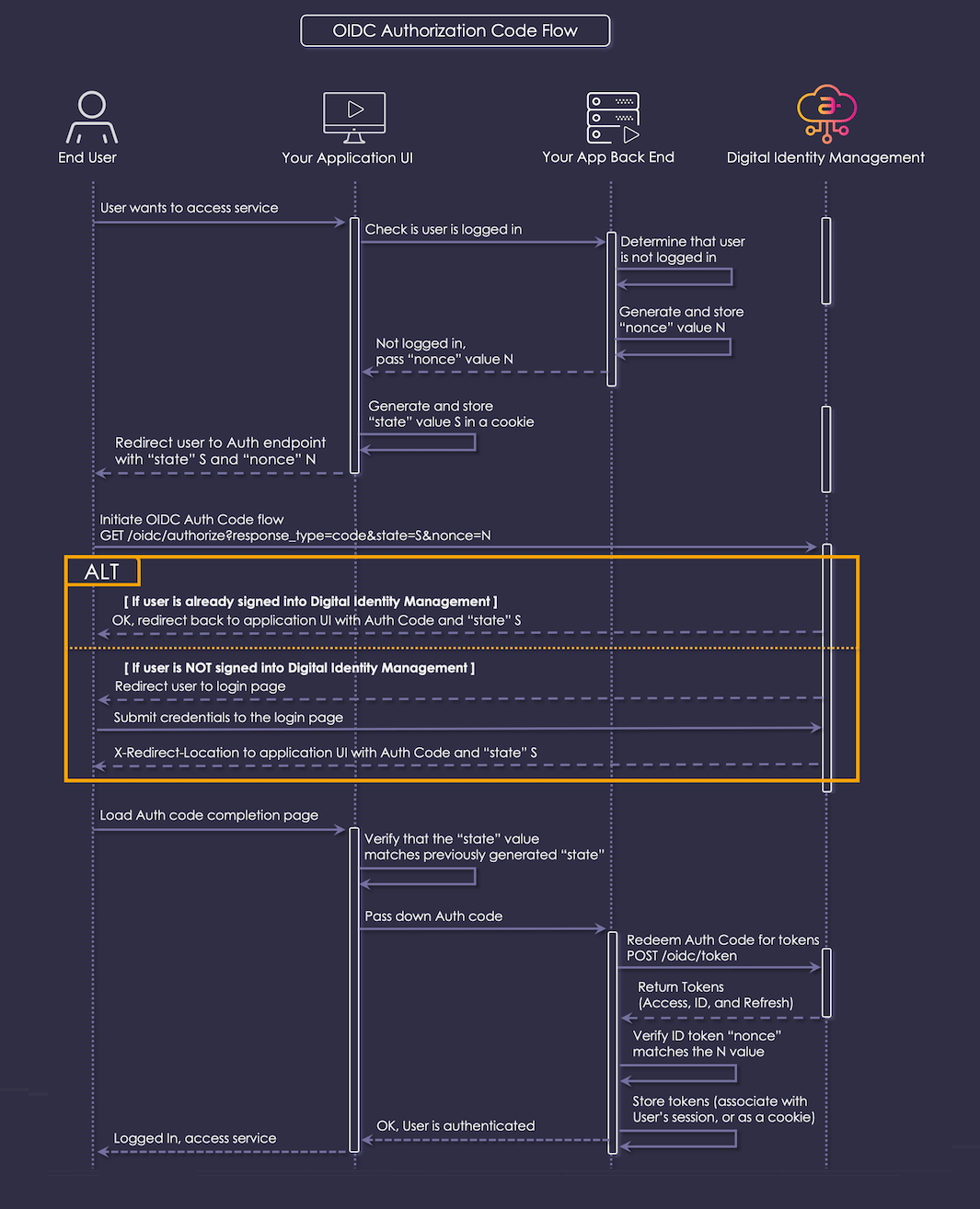
Interaction Steps
The interaction steps between each actor in the Authorization Code Grant flow are as a follows:- The user’s browser visits the web application to access the secured service.
- Your web app UI checks with its back end to determined whether the user is already considered as signed in. For example, the user’s browser has a cookie or a session ID from a previous login.
- Your back end determines that the user is not signed in.
- Your back end generates and stores a
nonceASCII string. This is used to validate the OIDC response, and must not be guessable by an outside attacker. - Your back end returns a response to the UI that indicates the browser should redirect to the OIDC Authorization endpoint with parameters appropriate to the application RP.
- Your UI generates a secure
stateASCII string, and stores it in a browser cookie. This will be used to mitigate against Cross-Site Request Forgery (CSRF/XSRF) attacks. - Your app UI redirects the browser to Digital Identity Management’s
/oidc/authorizeendpoint with the following HTTP GET query string parameters:
- The user’s browser loads the oidc/authorize URL as per the HTTP 302 response from step 7. Digital Identity Management inspects the browser’s cookies to determine if the user is already authenticated. The next step depends on whether the user is already authenticated in Digital Identity Management.
-
(Conditional) If the request is not valid, or if the user is already authenticated and re-authentication is not being forced, then Digital Identity Management immediately responds with an
HTTP 302 Temporary Redirectto theredirect_uriwith certain HTTP Query parameters. Skip steps 10 through 12 and go to step 13 directly. -
(Conditional) If the user is not authenticated, then Digital Identity Management redirects them to the configured IdP Portal (that is, the central sign-in page for all of your registered RPs).
-
In the most conventional use case, the user authenticates with Digital Identity Management’s
POST /session/startAPI. This API invokes Digital Identity Management’s multi-step Authenticate User Process. Alternatively, the user may need to first onboard with the Onboard User with Email or Mobile Process, which is invoked by thePOST /proces/start/{processName}API. This and other variations are not included in the flow diagram. -
Eventually, whether from a
/session/startor other Process API call, and potentially after several more steps (for example, to satisfy multi-factor authentication rules, if enabled), the user is authenticated. The final HTTP response from Digital Identity Management includes a specialX-Redirect-Locationheader with a URL constructed from theredirect_uriparameter provided by the RP in step 7. The IdP then redirects the browser to that location. -
The user’s browser loads a URL which Digital Identity Management has constructed from the
redirect_uriparameter, to which the following HTTP Query parameters will have been added: -
Your UI checks the
statevalue in the request against the originalstatevalue stored in a browser cookie. If there is a mismatch, a cross-site request forgery (CSRF/XSRF) attack is suspected, and the operation must be aborted with an error. - Your UI passes the received Authorization Code down to your back end.
-
Your back end makes a call to Digital Identity Management’s
POST /oidc/tokenendpoint with the following parameters to redeem the Authorization Code for actual tokens:
-
If all parameters are correct and the Authorization Code is valid, Digital Identity Management replies with a JSON payload that contains the requested token(s). The payload is of type
application/json, and it consists of a JSON object resembling the following:The fields of this JSON object are as follows: -
Your back end decodes the ID token, and inspects the payload to make sure the
noncekey is present and its value matches thenoncevalue N from the original request (generated in step 4). If not, a replay attack is suspected and the operation must be aborted with an error. - Your system stores the token(s), preferably on the back end side (for example, in a session state), but also possibly as cookies in the web UI.
- Your back end informs the web UI that the user is now considered authenticated or signed in.
- As long as the access token remains valid, the user remains authenticated and can take actions. For more details on how to refresh (that is, get replacement) a token, refer to the Refreshing Tokens topic.