> ## Documentation Index
> Fetch the complete documentation index at: https://docs.ulm.m1amdocs.com/llms.txt
> Use this file to discover all available pages before exploring further.
# Authenticate with Email Address or Mobile Number and OTP (user has no password)
Digital Identity Management provides user authentication with an email address or mobile number and a one-time password (OTP). The user navigates to the organization's login page to enter their credentials, and once authenticated, they can access and start using the services associated with their account.
## User Authentication Flow
**Preconditions**
* The User ID exists in Digital Identity Management.
* The user has no password.
* The user is configured to use OTP to verify their authN ID.
Following is a typical user authentication example for this flow:
* The user navigates to your organization's login page.
* The user enters a previously verified AuthN ID such as their email address or mobile number.
* Digital Identity Management sends a verification message with a One-Time Password (OTP) to the user's email address or mobile number.
* The user submits the OTP verification code sent by Digital Identity Management.
* The user is logged in after Digital Identity Management's successful identity verification.
## Authenticate User with Email or Mobile and OTP
The first process begins the user's journey and verifies that the user exists in Digital Identity Management.
\[product: dim]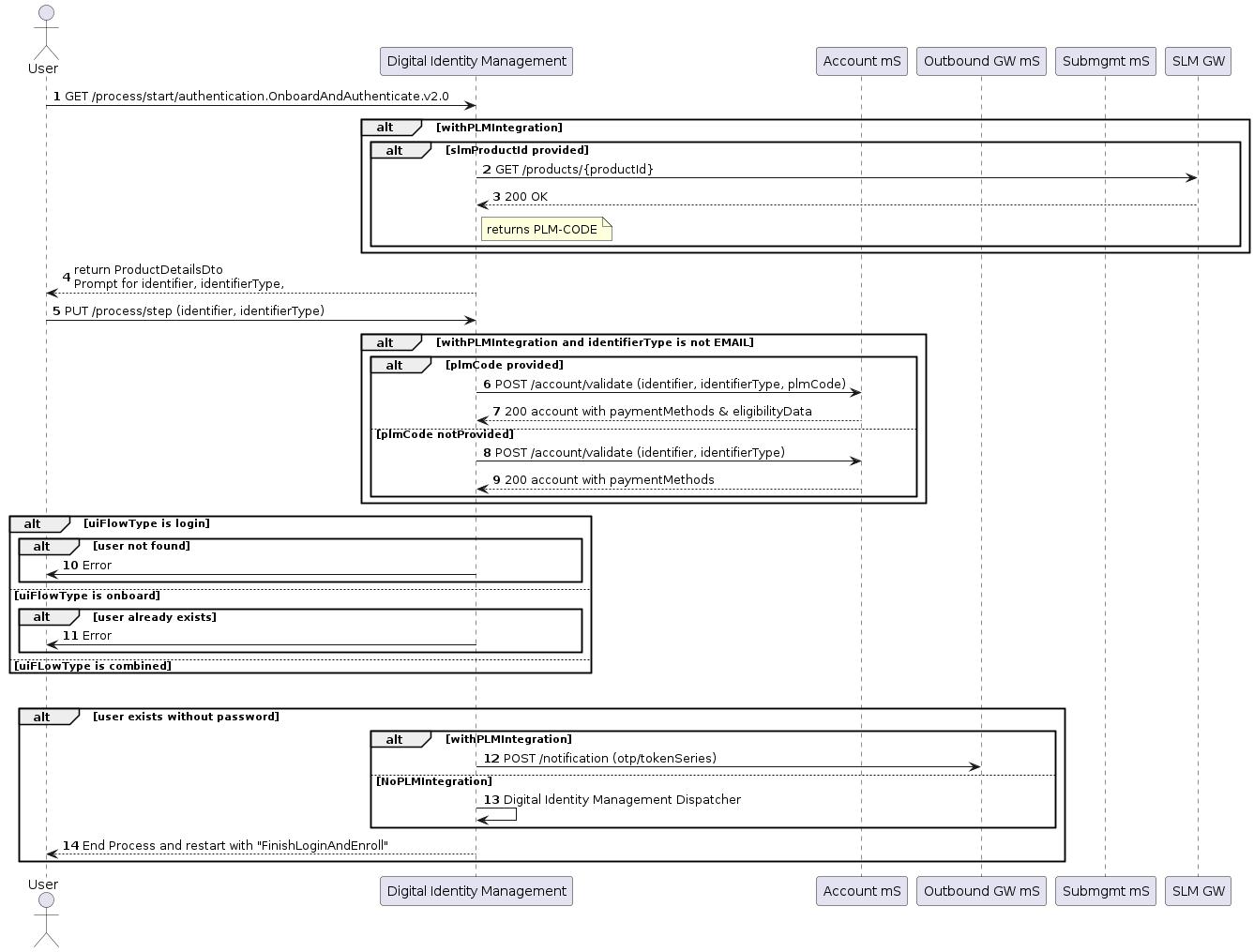 \[/product: dim]
The second **Onboard, Authenticate and Activate** Process, also known as the **Finish Login and Enroll** Process, finishes the user's password creation and authentication journey. This process completes with [Associate Account to User](c_associateBillingAccountV2) once the user submits their OTP for verification.
**Note:** The `create-password-prompt` is an optional parameter on the UI and is disabled (false).
\[product: dim]
\[/product: dim]
The second **Onboard, Authenticate and Activate** Process, also known as the **Finish Login and Enroll** Process, finishes the user's password creation and authentication journey. This process completes with [Associate Account to User](c_associateBillingAccountV2) once the user submits their OTP for verification.
**Note:** The `create-password-prompt` is an optional parameter on the UI and is disabled (false).
\[product: dim]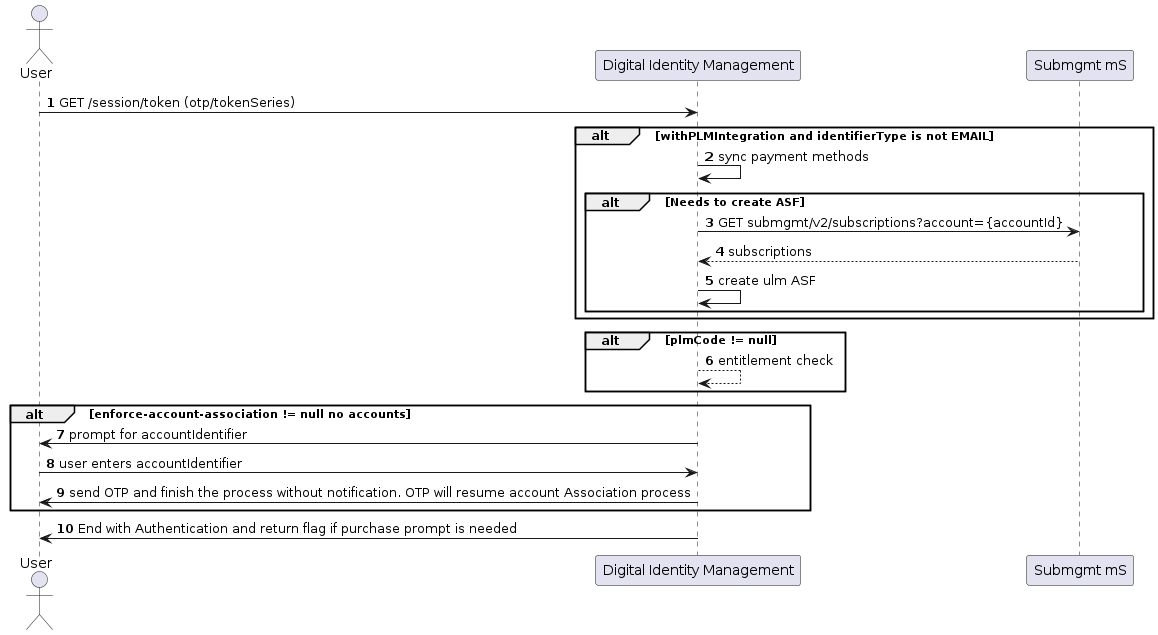 \[/product: dim]
## Application Settings
Some of the relevant app settings for this use case are:
* `shortTokenExpirationPeriodinMinutes`
* `create-password-prompt`
* `withAccountDiscovery`
* `discoverAccountsBy`
See additional details about more [app settings](onboardAuthenticateUserV2#section_t4k_m2t_cpb) in the Admin console and [parameters](onboardAuthenticateUserV2StepInterfaces) to help you configure your Digital Identity Management instance.
## Example
**Request Process Start: POST \{url}/process/start?\{process}productId=\{}**
| `POST {url}/process/start?authentication.OnboardAndAuthenticate.v2.0?productId=` |
| - |
| **Response Process Start: Identifier Prompt** |
| `HttpStatus 200 { "processId": "b33d8abf-a807-4818-800b-7c9dcb34935d", "processName": "authentication.OnboardAndAuthenticate.v2.0", "stepName": "IdentifierPrompt", "output": { "productDetailsDTO": { "productId": "Product_One", "productName": "Subscription One", "productDescription": "Sample Description Subscription One", "productPrice": "100", "productCurrency": "USD", "productTrialPeriod": "P30D", "productBillingCycle": "P1M", "appleDownloadLink": "https://apps.apple.com/us/app/example%A3%B3n/id444456788", "androidDownloadLink": "https://play.google.com/store/apps/details?id=com.example", "subscriptionName": "Streaming Subscription", "shortServiceName": "Sub stream", "serviceDescription": "Example of service description, includes online streaming services and access", "appTagLine": "Streaming Selection", "appName": "Stream Package", "subscriptionNameSms": "Streaming Subscription", "eligibilityWindow": 30, "eligibilityThreshold": 2, "checkEligibility": false } }, "parameters": { "identifier": "String" } }` |
| - |
| **Request Step: PUT \{url}/process/step** |
| `PUT {url}/process/step { "processId": "b33d8abf-a807-4818-800b-7c9dcb34935d", "parameters": { "identifier": "42343452" } }` |
| - |
| **Response End Step** |
| `HttpStatus 200 { "processId": "b33d8abf-a807-4818-800b-7c9dcb34935d", "processName": "authentication.OnboardAndAuthenticate.v2.0", "stepName": "IdentifierPrompt", "output": { "shortToken": "1234", "pkat": "d52dx89-3d8f-43c5-b6a9-eb6fa3ddfcf6", "productDetailsDTO": { "productId": "Product_One", "productName": "Subscription One", "productDescription": "Sample Description Subscription One", "productPrice": "100", "productCurrency": "USD", "productTrialPeriod": "P30D", "productBillingCycle": "P1M", "appleDownloadLink": "https://apps.apple.com/us/app/example%A3%B3n/id444456788", "androidDownloadLink": "https://play.google.com/store/apps/details?id=com.example", "subscriptionName": "Streaming Subscription", "shortServiceName": "Sub stream", "serviceDescription": "example of service description, includes online streaming services and access", "appTagLine": "Streaming Selection", "appName": "Stream Package", "subscriptionNameSms": "Streaming Subscription", "eligibilityWindow": 30, "eligibilityThreshold": 2, "checkEligibility": false } } }` |
| - |
| **Parent topic:**[Onboard and Authenticate Process](../topics/onboardAuthenticateUserV2) |
This documentation is built and hosted on [Mintlify](https://mintlify.com), a developer documentation platform.
\[/product: dim]
## Application Settings
Some of the relevant app settings for this use case are:
* `shortTokenExpirationPeriodinMinutes`
* `create-password-prompt`
* `withAccountDiscovery`
* `discoverAccountsBy`
See additional details about more [app settings](onboardAuthenticateUserV2#section_t4k_m2t_cpb) in the Admin console and [parameters](onboardAuthenticateUserV2StepInterfaces) to help you configure your Digital Identity Management instance.
## Example
**Request Process Start: POST \{url}/process/start?\{process}productId=\{}**
| `POST {url}/process/start?authentication.OnboardAndAuthenticate.v2.0?productId=` |
| - |
| **Response Process Start: Identifier Prompt** |
| `HttpStatus 200 { "processId": "b33d8abf-a807-4818-800b-7c9dcb34935d", "processName": "authentication.OnboardAndAuthenticate.v2.0", "stepName": "IdentifierPrompt", "output": { "productDetailsDTO": { "productId": "Product_One", "productName": "Subscription One", "productDescription": "Sample Description Subscription One", "productPrice": "100", "productCurrency": "USD", "productTrialPeriod": "P30D", "productBillingCycle": "P1M", "appleDownloadLink": "https://apps.apple.com/us/app/example%A3%B3n/id444456788", "androidDownloadLink": "https://play.google.com/store/apps/details?id=com.example", "subscriptionName": "Streaming Subscription", "shortServiceName": "Sub stream", "serviceDescription": "Example of service description, includes online streaming services and access", "appTagLine": "Streaming Selection", "appName": "Stream Package", "subscriptionNameSms": "Streaming Subscription", "eligibilityWindow": 30, "eligibilityThreshold": 2, "checkEligibility": false } }, "parameters": { "identifier": "String" } }` |
| - |
| **Request Step: PUT \{url}/process/step** |
| `PUT {url}/process/step { "processId": "b33d8abf-a807-4818-800b-7c9dcb34935d", "parameters": { "identifier": "42343452" } }` |
| - |
| **Response End Step** |
| `HttpStatus 200 { "processId": "b33d8abf-a807-4818-800b-7c9dcb34935d", "processName": "authentication.OnboardAndAuthenticate.v2.0", "stepName": "IdentifierPrompt", "output": { "shortToken": "1234", "pkat": "d52dx89-3d8f-43c5-b6a9-eb6fa3ddfcf6", "productDetailsDTO": { "productId": "Product_One", "productName": "Subscription One", "productDescription": "Sample Description Subscription One", "productPrice": "100", "productCurrency": "USD", "productTrialPeriod": "P30D", "productBillingCycle": "P1M", "appleDownloadLink": "https://apps.apple.com/us/app/example%A3%B3n/id444456788", "androidDownloadLink": "https://play.google.com/store/apps/details?id=com.example", "subscriptionName": "Streaming Subscription", "shortServiceName": "Sub stream", "serviceDescription": "example of service description, includes online streaming services and access", "appTagLine": "Streaming Selection", "appName": "Stream Package", "subscriptionNameSms": "Streaming Subscription", "eligibilityWindow": 30, "eligibilityThreshold": 2, "checkEligibility": false } } }` |
| - |
| **Parent topic:**[Onboard and Authenticate Process](../topics/onboardAuthenticateUserV2) |
This documentation is built and hosted on [Mintlify](https://mintlify.com), a developer documentation platform.