

- Send test SMS message using Digital Identity Management SMS (SMS-to-email) service in a non-production environment
- Send test SMS message using configured SMS provider in a non-production environment
- Configure an external SMS email provider and send a test SMS message in a production environment
- Working in Non-Production Environments
-
Navigate to the Admin console > Branding > SMS Provider.
The Digital Identity Management SMS service sends the message as an SMS-to-email using mailinator.com and is not a full end-to-end sms service.
-
Select Send Test to generate/deliver a sms (notification message) to a destination/receiver phone number.

- Enter the destination phone number in the To field.
- Click Send to send a sms (notification message).
- Click Cancel to end the test.
-
Select Send Test to generate/deliver a sms (notification message) to a destination/receiver phone number.
- Toggle Use my own SMS provider switch to configure a SMS provider with your SMS settings.
-
Select the relevant provider from options listed under Choose a provider.
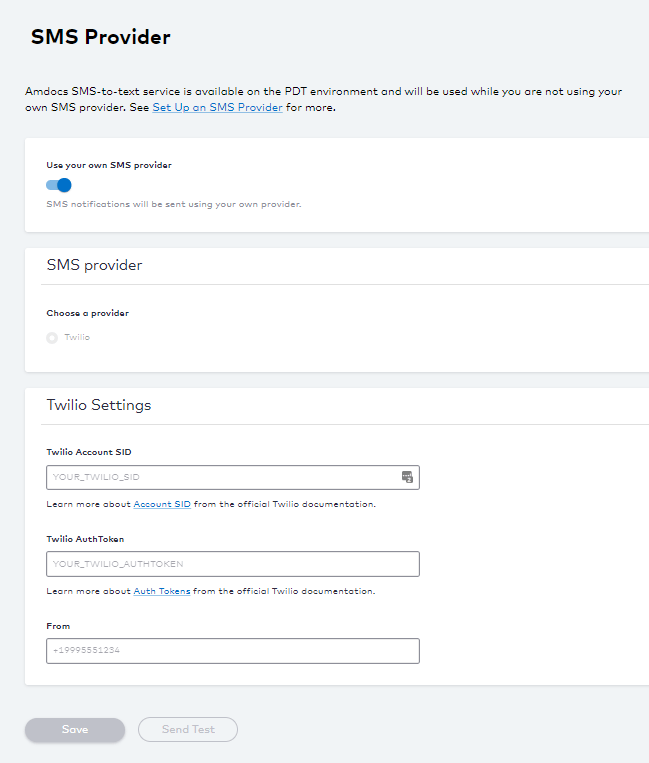
- Enter your SMS Provider Settings. See the table below for more guidance regarding these fields.
- Select Save to update your changes.
-
Select Send Test to verify your connection.
- Enter the destination phone number in the To field.
- Click Send to send a sms (notification message).
- Click Cancel to end the test.
- Working in Production Environment
-
Navigate to Admin console > Branding > SMS Provider.
- Enter your SMS settings. See SMS Provider Fields table for more guidance regarding the fields.
-
Select Send Test to verify your connection.
- Enter a destination email address (test@example.com).
- Click Send.
- Select Cancel to stop the test.