

About This Guide
This guide describes Digital Identity Management’s user lifecycle management processes – how they work, the APIs involved, and the step-by-step and interaction flows for front end developers building applications to leverage identity and user management.Who Are the Process APIs For?
Digital Identity Management’s Process APIs are designed for developers and technical teams building applications that require digital identity and user lifecycle management. These APIs facilitate complex, multi-step user journeys, such as user authentication, session management, and user data updates.Digital Identity Management Process API Features
- Identity Paths: Standard user onboarding, authentication, and profile management flows.
- Multi-Factor Authentication (MFA) Journeys: Registration (and un-registration) of Multi-Factor Authentication options for an end user to make their authentication more secure.
- Account Association & Management Processes: Provisioning and management of Account, Subscription, and Feature entities using billing records from your organization’s billing system.
Digital Identity Management Process API Advantages
- Comprehensive Lifecycle Management: The API enables applications to perform comprehensive user lifecycle management functions such as user provisioning, authentication, and authorization.
- High Volume Data Synchronization: The API supports high volume machine-to-machine data synchronization between Digital Identity Management and external systems.
- Service Entitlement and Secure Access: The API ensures secure access to resources by authenticating users and retrieving their service entitlements.
- Ease of Integration: Designed for ease of use across various devices and platforms, enhancing developer productivity.
- Efficient Data Format: Utilizes JSON for data exchange, ensuring a lightweight, efficient, and easy-to-handle format for developers.
- Compliance and Security: Adheres to HTTP specifications and requires appropriate headers to ensure secure data transmission.
Process Framework
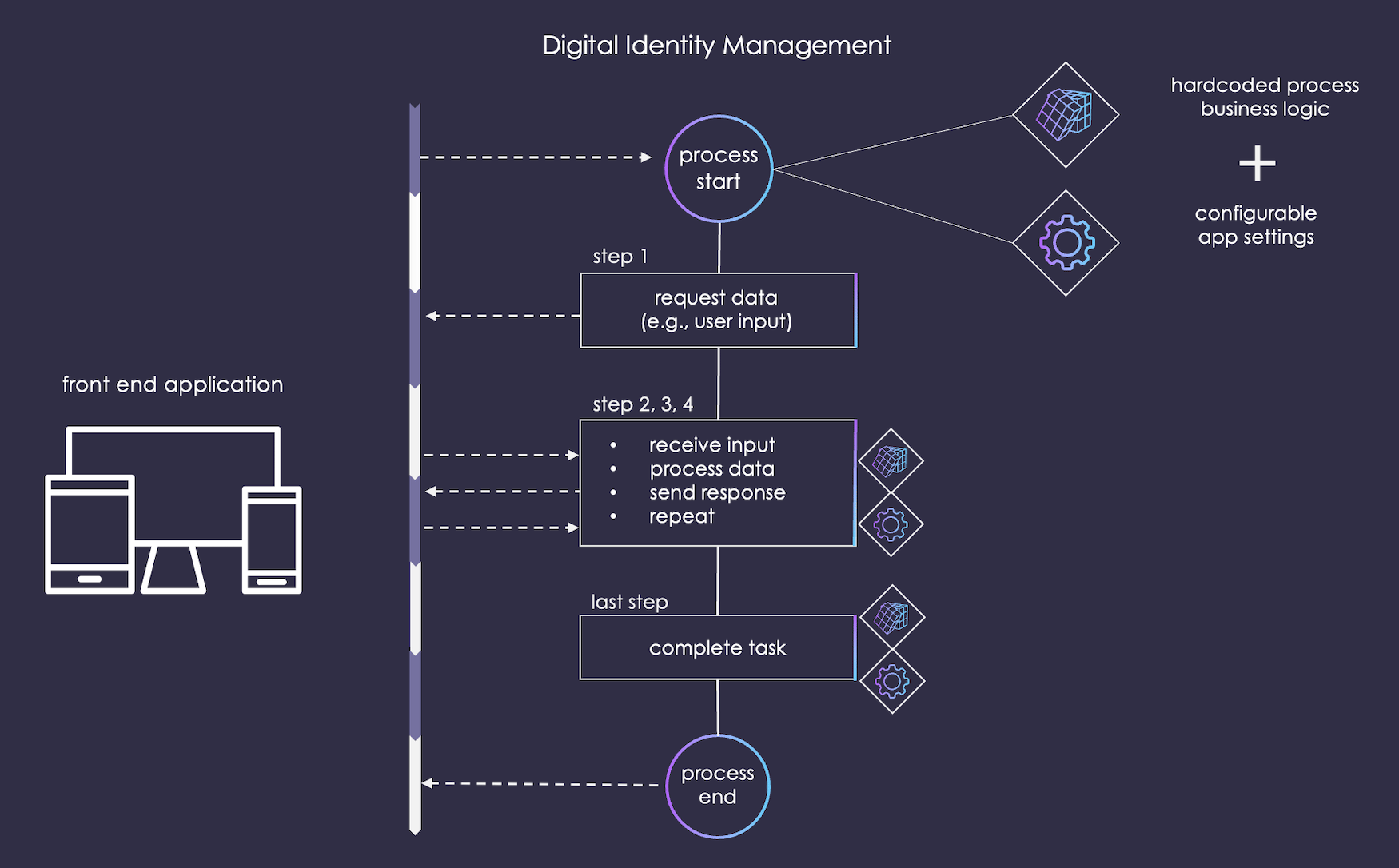
Digital Identity Management includes a Process framework. This framework executes workflows through a suite of lightweight, digestible, and predictable REST APIs. Unlike traditional APIs which behave in an atomic manner, Connect Process APIs enable more complex, multi-step journeys that simple APIs do not. Each Process is comprised of a number of Process steps. In each step, the Process requests and/or returns resources to and from the front end UI. The framework executes each Process according to a combination of:- The Process’ default business logic
- Configurable application settings (set in the MarketONE Admin console)
- The choices and input provided by the user during Process execution
Process Steps
Whereas a standard REST API tasks consist of a single request and response, Processes can perform multiple steps. A Process takes each step based on the request sent from the client application.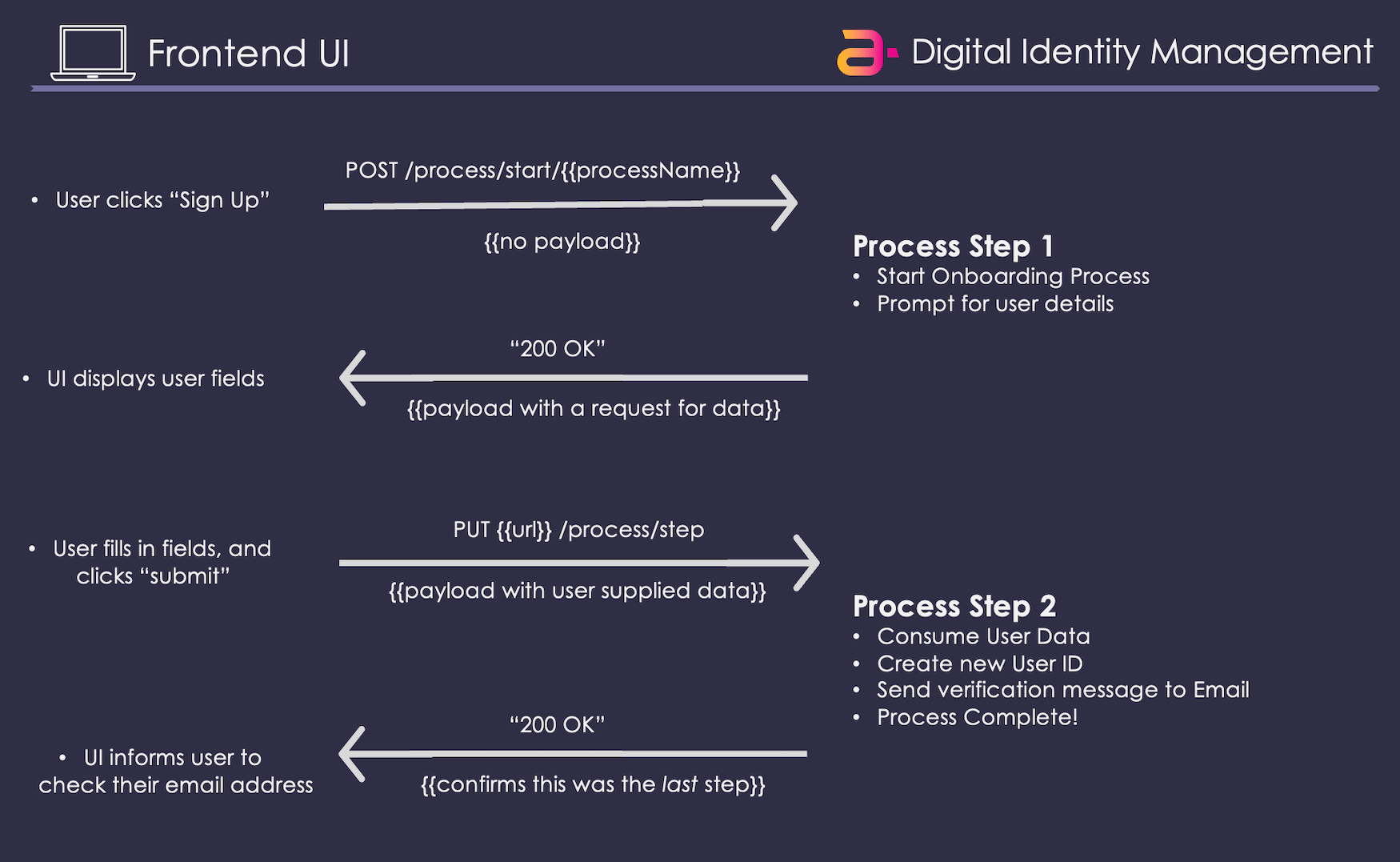
Process IDs
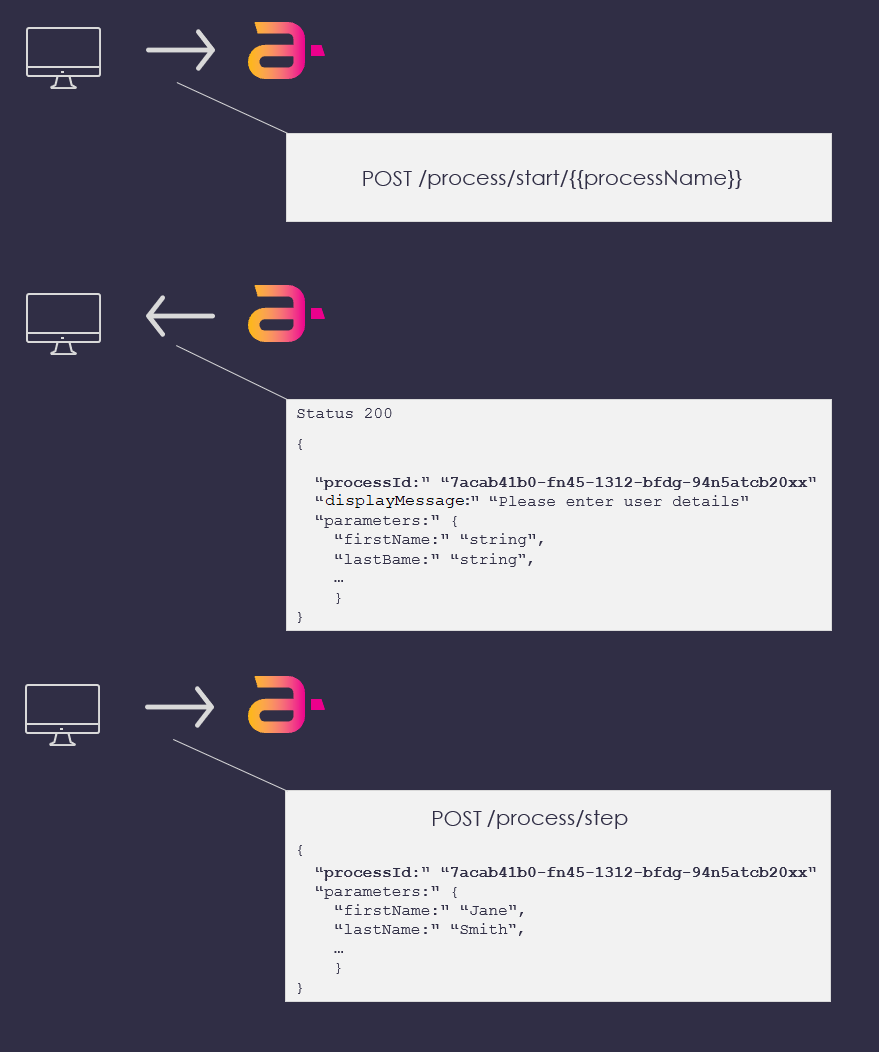
Once a client initiates a Process, Digital Identity Management issues a uniqueprocessID that identifies that particular Process’ execution context. The processID is included in the initial Process response, and it must be retained by the client and provided in subsequent process step requests.
Multiple Points of Entry
Processes are optimized for workflows where multiple points of interaction may be required with a user. In other words, certain tasks might require a user to navigate away from the UI and then re-enter the Process from a separate location where critical information retained by the UI is not available. To get a better idea, consider the Authenticate User Process as an example. In the simplest use case, this Process consumes and validates a user’s credentials (e.g., email and password) and then opens a user session. However, this Process optionally supports multi-factor authentication (MFA) wherein a user registers an additional means by which to prove who they are, such as a backup email or mobile address. In a MFA-enabled scenario, the Process consumes a user’s credentials, checks to see if the user has a registered a second factor, generates an action token, and sends it to that second factor as a short-form access code. The Process then prompts the user to supply that code to the UI before they can Proceed. Once the code is provided in a Process Step API request, Digital Identity Management validates the token and then authenticates the user.
Process Interactions
Most interactions with the Digital Identity Management Process framework are executed through two basic APIs:-
An initial API request from the client to start up a specified process:
This API optionally requires no payload, and derives the specific task from the name and version in the invoked URL. After the request, Digital Identity Management responds with a prompt for additional information.
-
One or more subsequent API requests from the client continue or finish that Process:
Information provided in each subsequent
PUT /process/steprequest must reference theprocessIDthat Digital Identity Management issued in the initial process response.
POST process/start and PUT process/step are two of the common APIs that facilitate Process execution, there are additional APIs that are used in the Process framework. See the Process APIs section for more information.
Example: Update User Password
In this example, a client application invokes the Update Password Process in Digital Identity Management, on behalf of a currently authenticated user.
-
The user is currently authenticated, and sitting in their profile. They selects an Update Password option, and the client then invokes the following API:
-
Once Digital Identity Management receives the request, it then:
- Initiates a new, unique instance of the Update Password Process within the Digital Identity Management data store.
- Assigns that instance a unique identifier (delivered as a
processIdfield in the response). - Responds to the client with a request for further input
-
When the Process responds with request for further data, it includes three key items in the response payload:
- A
**processId**that identifies the unique instance of this Process - A
**parameters**object that contains the required data (data fields and their required format) - A
**lastStep**boolean that indicates whether or not this was the last step in the process In our example, the Process asks for the user’soldPasswordandnewPasswordas simple string values:
- A
-
The application UI renders the appropriate prompt to the user, and the user provides their input. The client then invokes the
PUT {url}/process/stepAPI and passes the user’s input back to Digital Identity Management. In our example, theoldPasswordandnewPasswordparameters would be provided like this:Note: Any Process response may include a variety of key parameters as well as parameters the client can ignore. You can consult each Process topic (and more specifically, their use case subtopics) for a fuller view of the key information for each Process API request and response on a step-by-step basis. -
The Process consumes and validates the user’s passwords, and then invokes its business logic to complete the password update. Digital Identity Management then sends a final response confirming the process completion:
The response indicates that this was the last step in the Process by displaying
lastStepastrue.
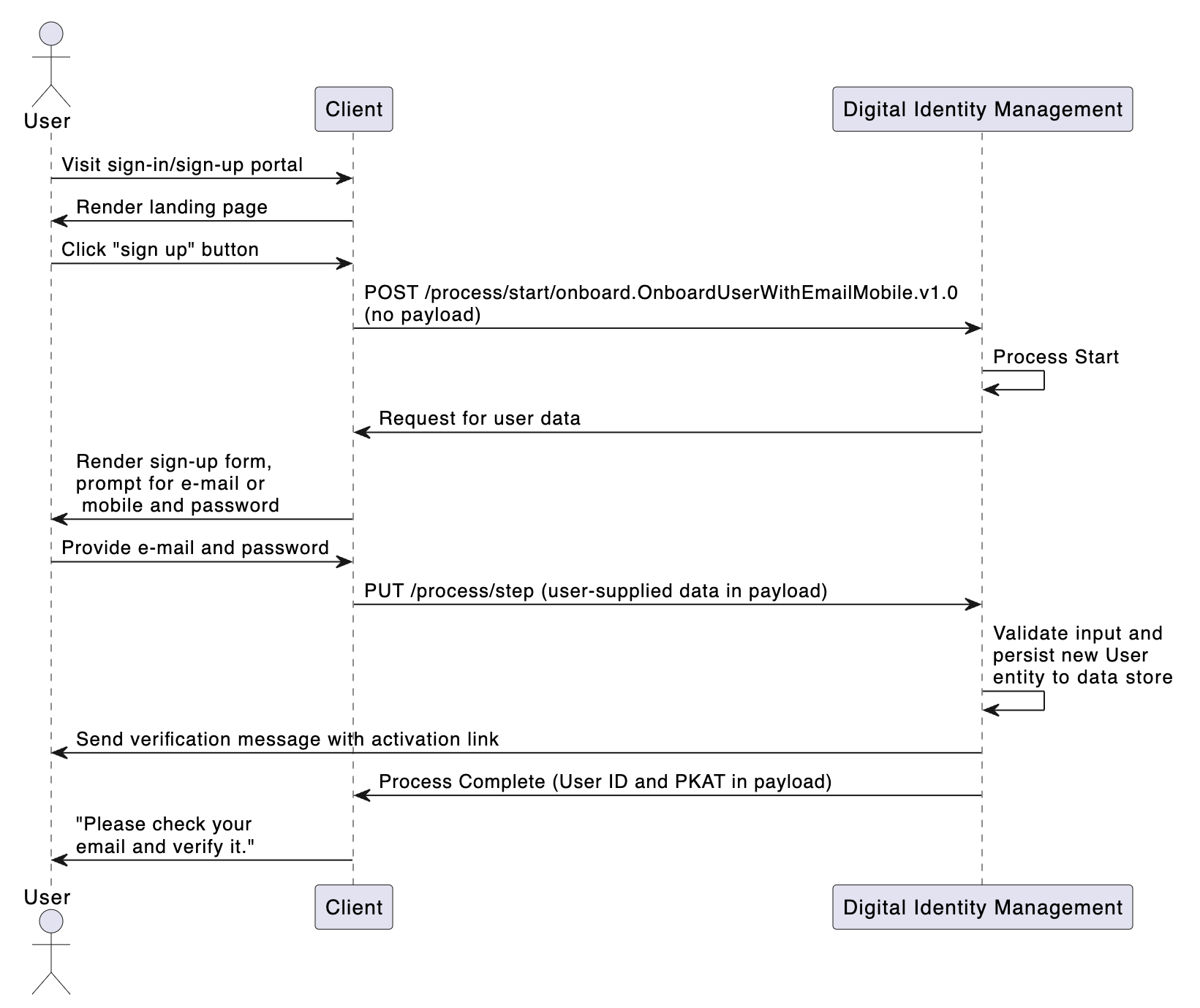
Consider the below sequence diagram that demonstrates the flow of the Onboard User with Email and Mobile Process. It demonstrates how a client (e.g., web or mobile application) interacts with Digital Identity Management to execute the Process and complete the relevant user journey.
Errors and Retries
If an error occurs during Process execution (e.g., incorrect user input), then the Process returns a comprehensive error output that describes the error (or errors if more than one exist). There are two primary types of errors: operation errors and field errors. Operation errors cover a wide range of scenarios where a Process cannot continue due to some kind of restriction, such as when a user doesn’t have the permissions or entitlements to access or perform something. Conversely, field errors refer to an invalid entry in a given field. Let’s look at an example of each below, using the same Process. Operation Errors Continuing from the above example (the Update Password Process), if a user provides an incorrectoldPassword value that does not match their current password, and the UI passes that input along in the PUT process/step request, then Digital Identity Management returns the following response:
operationErrors array will include or more individual error(s) that describe the reason(s) for failure to execute a given Process step. If there is more than one error object in the array, then each error contains its own specific error code and a message.
Field Errors
Alternatively, say the same user actually provides the correct oldPassword value, but their desired newPasword is weak or doesn’t meet the minimum password complexity requirements. If the client passes that weak password along in a PUT process/step request, then Digital Identity Management returns the following response:
password-regex-rule-violation-.*[0-9]” that the password must include at least one number (from 0 to 9), and that the user-supplied newPassword failed to include one.
Note: Password complexity rules is just one of many configurable settings that control certain aspects of the platform behavior. Your organization’s assigned Admin User can sign into Digital Identity Management Admin console and manage these settings.
In most cases, a Process error response also includes a lastFailedStepAction object that repeats the previous Process response prompt. This is so that the UI may prompt the user to re-enter their information again.
Each Process in this guide has an sub-topic that lists out all the potential error cases for a given Process.