

Process Flow
This section describes the Onboard with Email/Mobile Process from a high-level, “happy path” flow. Preconditions- The user is currently anonymous (i.e., they are not authenticated).
- The User ID does not yet exist in Digital Identity Management (i.e., the Digital Identity Management User entity does not yet exist in the cloud data store).
- The user navigates to your application’s sign-in page, and submits their email and/or mobile number, plus any other information required by the application. Input fields are:
- Email Address – The user’s email. Required if a mobile number is not provided.
- Mobile Number – The user’s mobile number. Required if an email address is not provided.
- Password – The user’s desired password. Required.
- Additional Fields – Optional user input fields that the Process accepts: First Name, Last Name, Display Name (can be used in place of first and last), and Language.
- Digital Identity Management creates the User entity. The email/mobile is stored an authentication identifier (authN ID) and attribute on the User entity. Both the User entity and authN ID are created with an
activatingstatus, pending verification. - Digital Identity Management sends a verification message to the email address or mobile number supplied by the user. The following conditions apply:
- A verification message contains an action token Digital Identity Management Action Token, and the token can be delivered to the user as either a clickable redirect URL, a short custom One-time Passcode (OTP), or both. The type of token in the message depends on your organization’s notification settings.
- If the user provided both an email address and mobile number, then separate notification message are sent to both contact channels, each with their own respective tokens.
- Any Digital Identity Management Process that results in an action token being sent to an external channel will also return a corresponding to the client application. The application should retain this information for onboarding flows wherein the user needs to provide their OTP to the UI, or for a resend verification option.
- Digital Identity Management sends a corresponding pkat
- A new User entity exists in Digital Identity Management with an unverified email and/or mobile. The user must verify the authN ID before they can authenticate into the service with it.
- The user receives a verification message through email or SMS.
- The provided email already or mobile number is already registered to an existing Digital Identity Management User.
- The provided password does not match complexity settings.
- The email or mobile does not pass validation rules.
- The client submitted a request with a missing expected input parameter (e.g., no email or mobile provided)
App Settings
Certain aspects of the Process’ behavior are controlled by configurable settings that you can manage from the Admin console.User Journey Diagram
This diagram illustrates the standard user journey using the Onboarding with Email or Mobile Process, and some of the paths the Process can take based on settings and/or user input. [product: dim]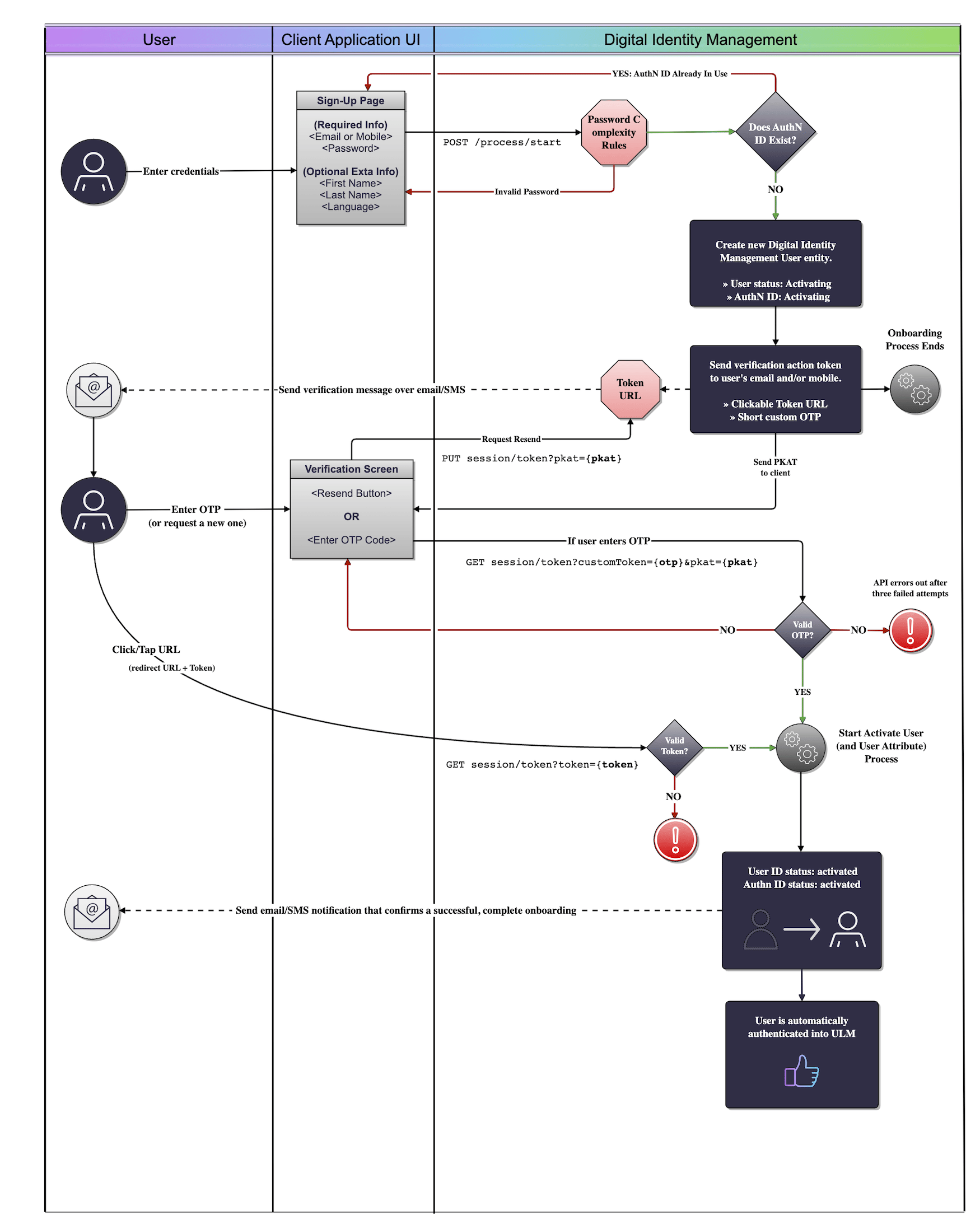
[PUT /session/token](c_putSessionToken) API) and the Activate User Processes, to give a better idea of the true end-to-end onboarding journey.
Use Cases
The following use cases provide guided API walk-throughs of this Process for client developers:- Onboard user with their email address
- Onboard user with their mobile number
- Single step user onboarding
- Onboarding errors
Related Topics
- The Activate User Process is used to complete the end-to-end user journey that the Onboard User Process starts.
- The PUT /session/token API allows an anonymous user to request a replacement verification link and/or OTP.
- The Onboard & Authenticate User with Social Account Process facilitates an alternative, passwordless onboarding journey.
- Onboard and Authenticate with Mobile Number
- Onboard and Authenticate with Email Address
- Single step user onboarding
- Onboarding Errors