

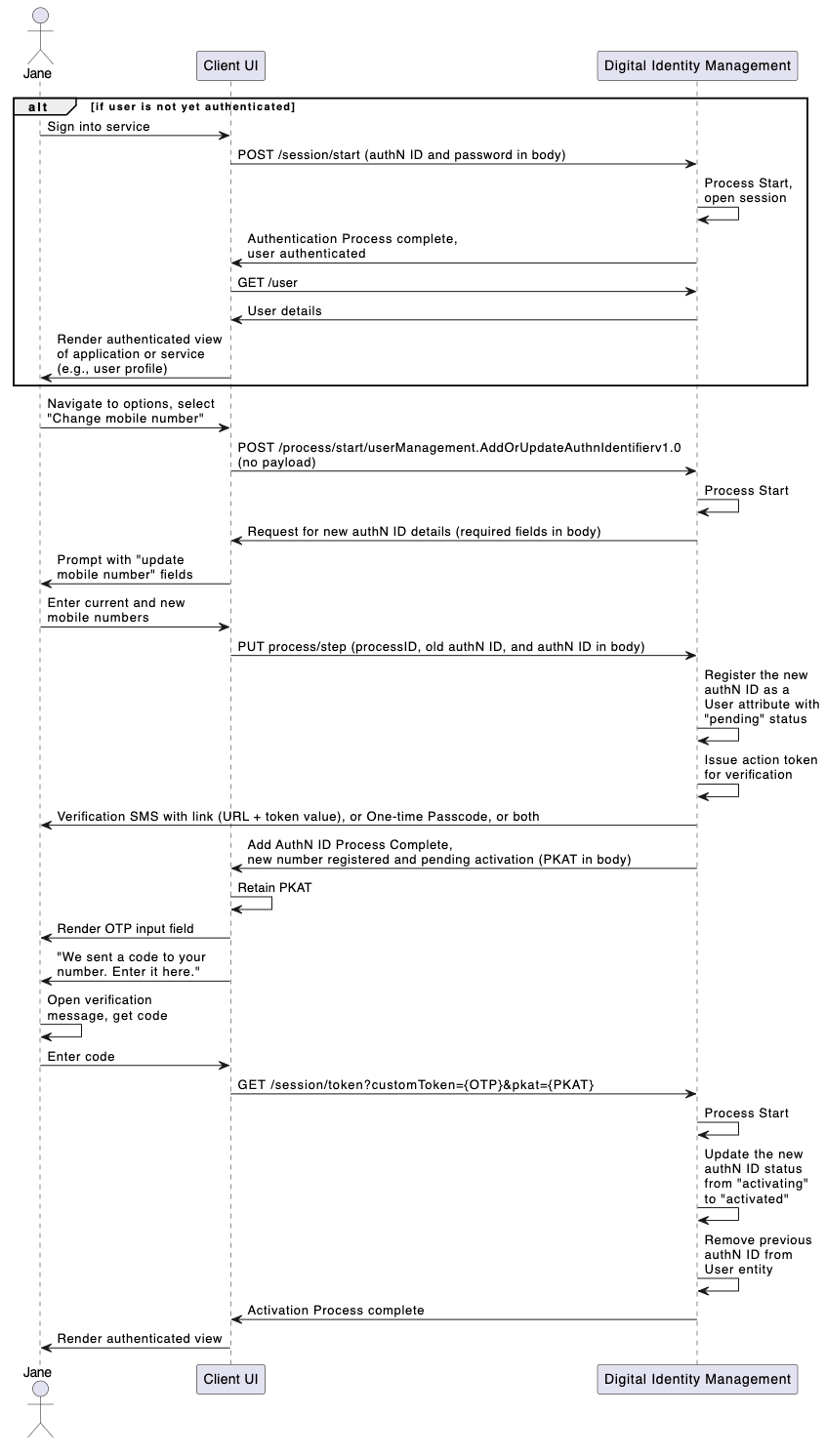
An authenticated user overwrites and replaces an authN ID, one that already exists on their User entity, with a new authN ID. [product: dim][/product: dim]

Initial Request

The Process Start API initializes the Process:

Response

Digital Identity Management responds with a request for authN ID information:

Next Request: Replacement AuthN ID

The user provides their desired new authN ID, and the client passes it along with the old authN ID into the Process Step API.

Process Complete

If the new authN ID does not match an existing authN ID already assigned to the user (or any other Digital Identity Management User ID), the Process completes its task and returns a 200 HTTP status code. The Process also sends an action token to the user through email or SMS.
OTP Verification & Resend Verification Any Process that sends a Digital Identity Management action token to a user also returns a corresponding Proof key for Action Token (PKAT) to the client application. In order to enable OTP verification on the UI, the client must retain the PKAT returned in the final Process response. The PKAT, along with the user-supplied OTP, is required for the Session Token API to invoke the subsequent Activate User Process to complete the updated authN ID activation. In cases where the user is anonymous, the PKAT is required if the application wants to provide a quick token resend option on the UI, using the Token Resend API. This method applies to cases where the user is anonymous (i.e., they are not authenticated in Digital Identity Management). However, if the user is currently authenticated in Digital Identity Management, the client application can instead invoke the Send Verification Process for this purpose.

Update Alias

Updating an existing alias with a new alias is identical to the Email or Mobile-based use case, except that there is no verification required for the new authN ID. If the user submits a valid alias, then Digital Identity Management immediately activates the alias, and removes the previous one. Parent topic:Add/Update Email, Mobile, or Alias Process