

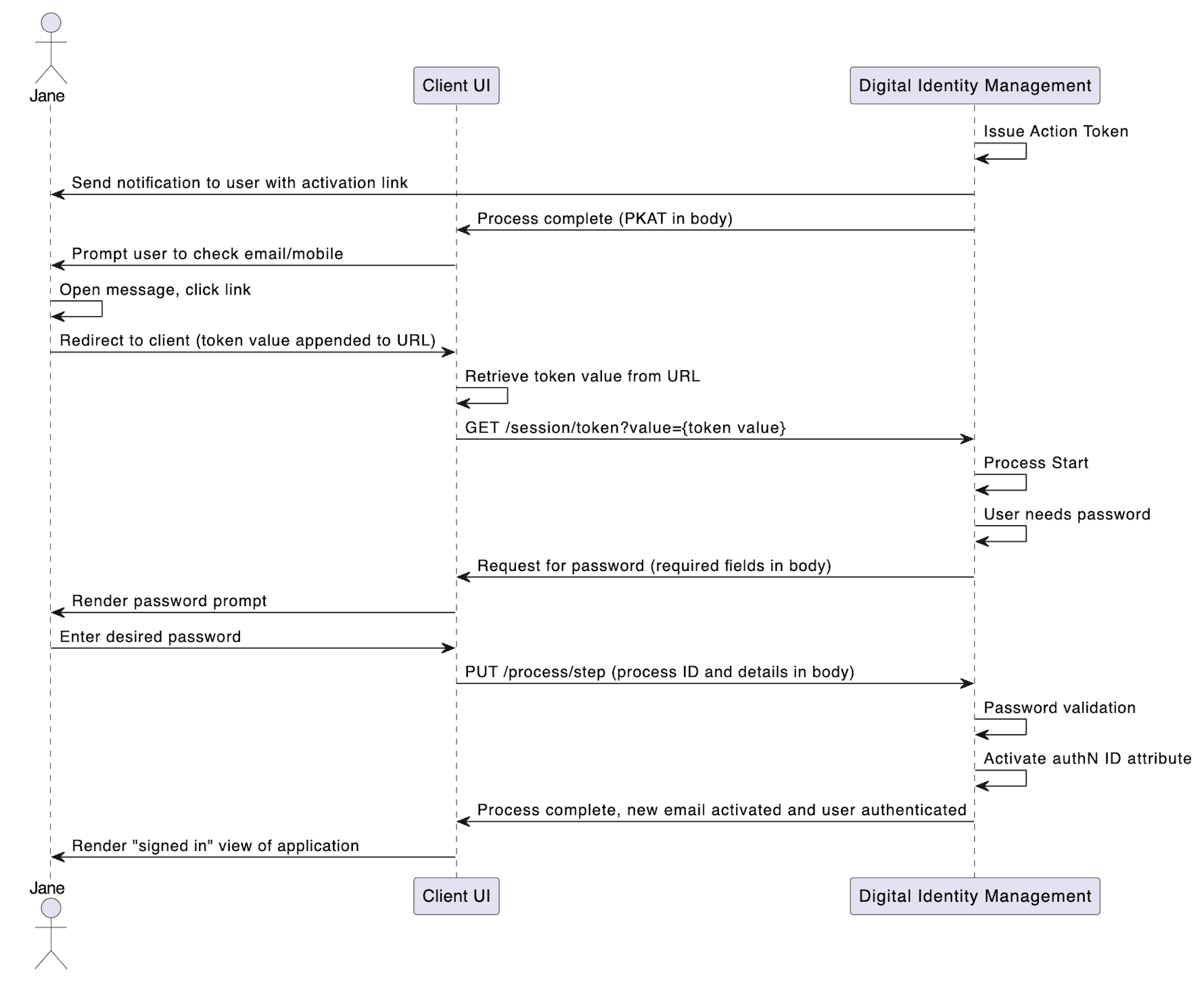
- Issue an action token for the Activate User Process, and store the token in the cloud.
- Send a notification to the newly registered email or mobile. The message contains either a verification link, or a verification One-time Passcode (OTP), or both. Note: The verification type (link or OTP) that Digital Identity Management sends is dependent on your organization’s notification settings and notification templates. These settings are configured during your initial onboarding and integration period with Digital Identity Management.
- Return a Proof Key for Action Token (PKAT) to the client application.
Initial Request
The user clicks the verification link that Digital Identity Management sent to them in an email or SMS. This redirects the user’s browser back to the client application. The client immediately takes the token value from the URL, and calls the Session Token API with the token value as a request path parameter:Response: Need Password
If the token is valid, the Process starts and requests for the user to set a password:Next Request: Provide Password
The user enters their desired password, and the client passes that info to the Process with the Process Step API.Final Response
If the password passes validation, the Process activates the authN ID, and returns aHTTP 200 status: