

Adding the authN ID
Like most Processes, the Update Notification Channel Process is initialized by the Process Start API. The Process Start API optionally consumes no payload, and then returns a prompt for the required information. If the client uses this method to call the Process, then Digital Identity Management will first calculate the current user’s registered authN IDs, and the initial response will include indexed set of applicable authN IDs that they can choose from. However, your client can also add the target contact channel upfront in the initial API request (either in the request body, or in the request URL as a query parameter), if it has that information. See the single step use case single step use case for examples. If the client uses this method to call the Process, then Digital Identity Management will validate the specified authN ID to ensure that:- The authN ID is a supported channel type (email or mobile).
- The authN ID is registered to the current user, with an
activatedstatus. - The authN ID is not already the current preferred notification channel.
Process Flow
This flow describes the Process at a high level. Preconditions- The user is currently authenticated.
- The user has at least one verified authN ID, aside from their current notification channel.
- The user selects to change their primary contact channel, and the client starts the Process.
- Digital Identity Management returns a list of all the applicable authN IDs, and prompts for the client (i.e., the user) to specify one. Note: Digital Identity Management performs the calculations to identify all of the user’s currently valid choices, and will only include those choices in the response.
- The user selects their desired authN ID, and the client sends the user’s selection back to Digital Identity Management.
- Digital Identity Management sets the new preferred notification channel, and the Process ends. Digital Identity Management sends a confirmation message to both the new and old notification channels.
- The user selects to change their primary contact channel, and selects a specific channel authN ID.
- The client application starts the Process, and sends the new/desired contact channel in the first request.
- Digital Identity Management validates the authN ID and, if valid, sets it as the new preferred notification channel. The Process ends. Digital Identity Management sends a confirmation message to both the new and old notification channels.
- The user has successfully updated their preferred notification channel.
- The current user has no other applicable authN IDs that they can set as their notification channel.
- The authN ID specified by the client was not found, or does not belong to the current user.
- The authN ID specified by the client does not have an
activatedstatus.
App Settings
Many Processes can be configured in the MarketONE Admin Portal under the Branding, Provider and Notification Template pages. The Digital Identity Management Admin console is available to your organization’s administrative users that need to modify settings and register OIDC clients for single sign on. This Process has an internal setting called Supported Notification Channel Types that controls what type of contact channel can be set as the primary notification channel. The options are email, mobile, or both (the default is both). This configuration point may be useful for scenarios where your organization needs to deliver system notifications over just email or just SMS. By default, both email and mobile numbers are set as the valid types that a user can set as their primary contact channel. However, available upon request, can change this internal setting so that users can select only their email addresses or only their mobile numbers exclusively for notifications.User Journey Flow Diagram
This diagram illustrates the standard user journey using the Update Notification Channel Process. [product: dim]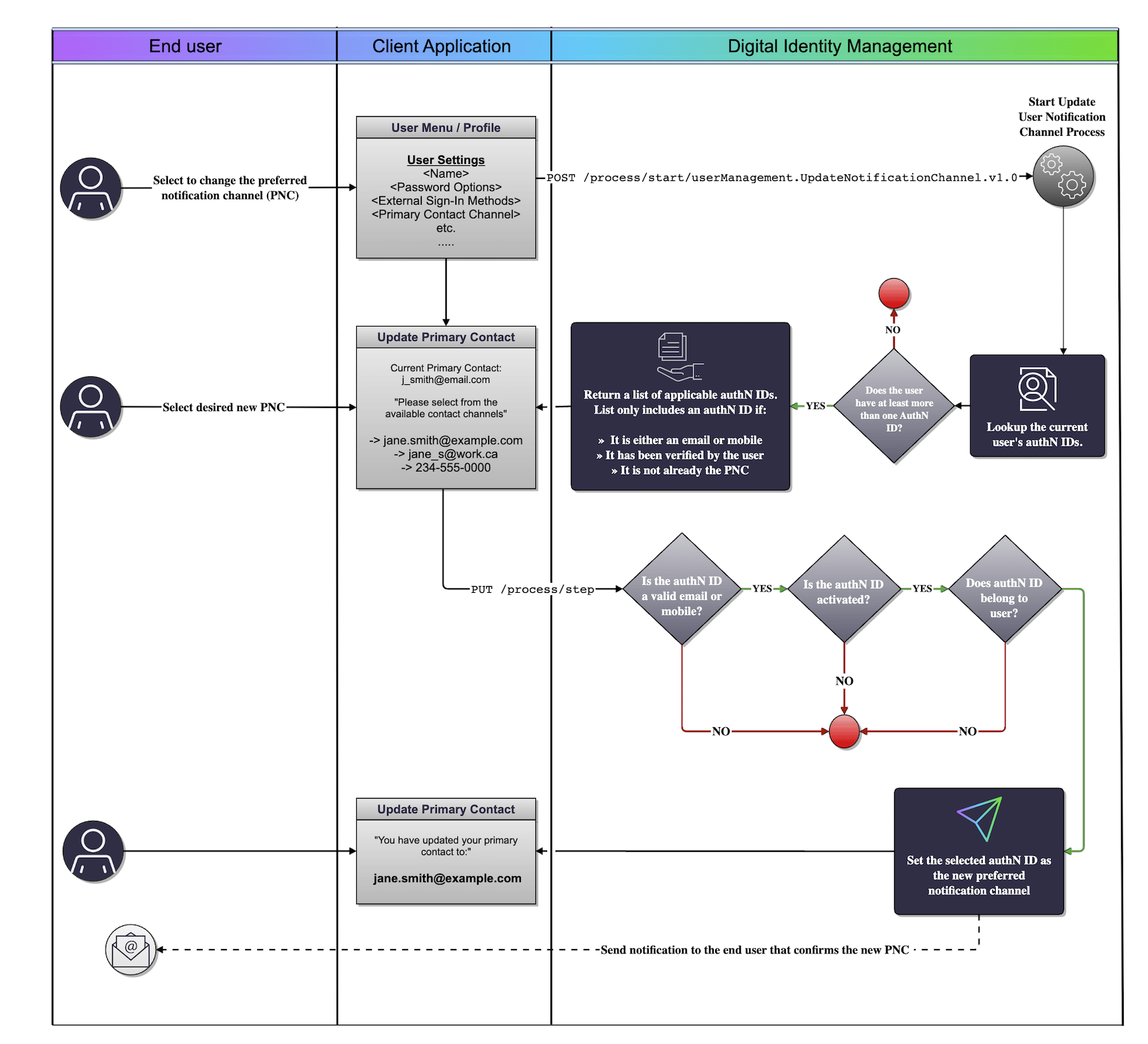
Use Cases
The following use cases provide API walk-throughs of these Processes for client developers:- Update user notification channel
- Single step notification update
- Notification update errors
- Update user notification channel
- Single step update notification
- Notification channel update errors