

activated status, and the user is authenticated at the end of the flow.
[product: dim]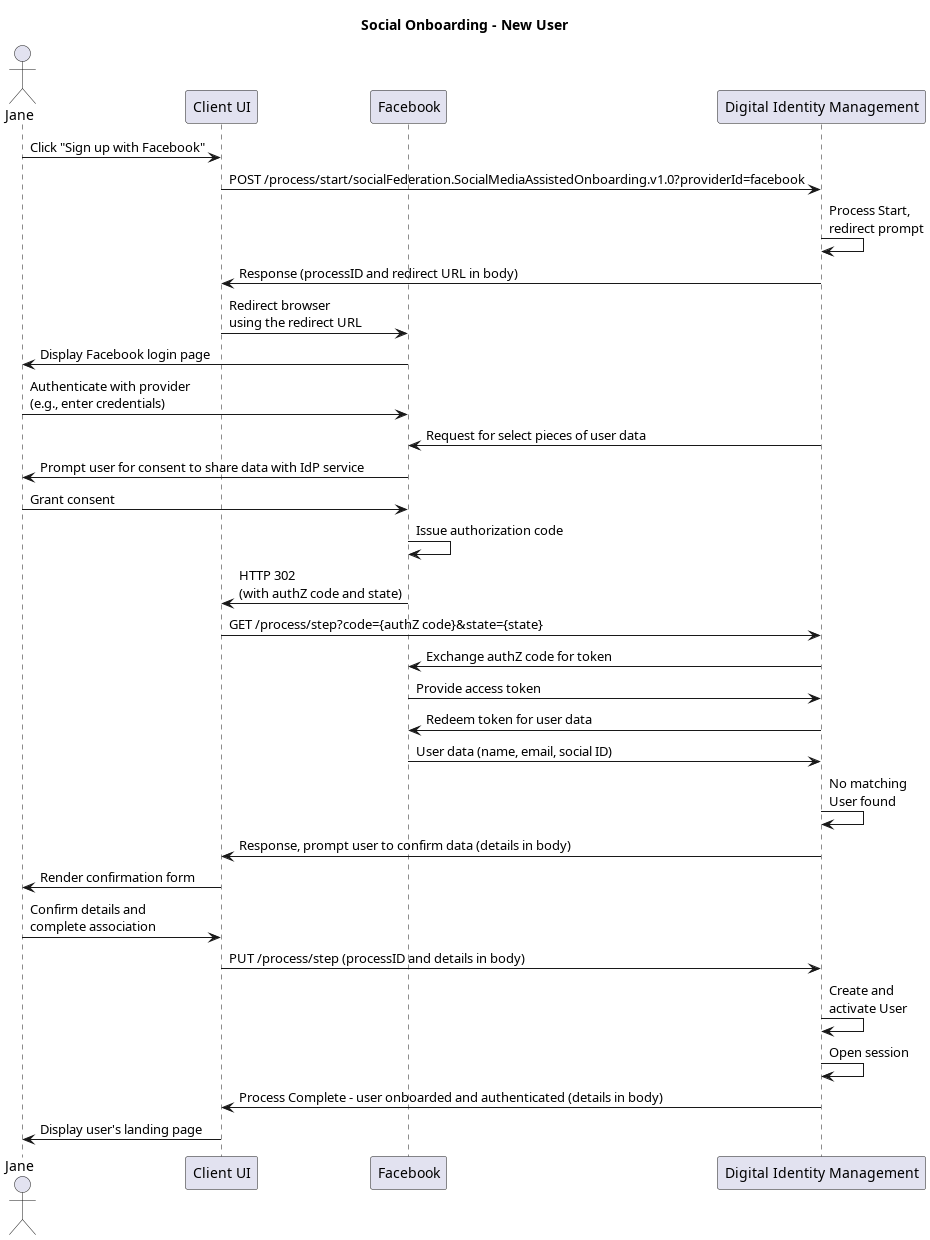
Initial Request
Your client calls the Process Start API to initialize the Process:Response
The Process responds with a request to specify a social provider. The response includes an array of available providers:Next Request: Specify social provider
Your client calls the Process Step API, and passes the selected provider to Process:Response: Redirect URL
The Process responds with a redirect for the client to follow:Next Request: Redirect to social provider
Your client must then redirect to the location provided in therequestUrl parameter. This URL redirects to the selected social provider (in this example, Facebook), and includes the request for certain “scopes” or user resources as defined by OAuth 2.0 authorization framework. The user then authenticates with the provider, and grants the provider permission to share basic information (their name, email address, etc) with Digital Identity Management.
Response: Authorization code and state
The social provider then sends an HTTPS 302 redirect to the user’s browser, and sends the browser back to your client application. Note: The social provider redirects to a landing page that you need you construct and host on your client. The redirect to this page is defined in the Digital Identity Management Admin console when you enable and configure the integration with the social provider. Setting that redirect URL in Digital Identity Management Admin allows this Process to automatically supply that information to the social provider during the initial redirect to the provider website. Ensure that you have this landing page made, and that you have the redirect to this page set in Digital Identity Management Admin console. See Managing Social Digital Identity Management Settings in the Digital Identity Management Admin User Guide for more details. When the social provider redirects back to your client, it passes along an authorizationcode, and state in the URL:
code and state, as it will use these values in the next request to Digital Identity Management.
Next Step: Pass code and state to Digital Identity Management
Your client immediately takes thecode and state values from the social provider’s redirect, and then passes those values to Digital Identity Management using the [GET /process/step](c_getProcessStep) API. These values must be provided in the request URL:
Response: No user found
Once the Process acquires the actual user data from the provider, it quickly checks to see if there is an existing Digital Identity Management User with a matching email or mobile. This use case assumes that no existing Digital Identity Management User match is found, so the Process returns the provider details to the client for user confirmation:Last Request: Confirm new user details
Your client application should render the data as returned by the social provider, and prompt the user to confirm that the details are accurate. This use case assumes the user confirms/submit their details and does not change the contact channel (email or mobile) that was returned by the social provider. Your client then sends that confirmed data back to the Process in a final Process Step request:Process Complete
If the user confirms the information returned by the provider, Digital Identity Management trusts the provider has already verified that contact channel. The new User is created, activated, and associated to the social account without any need to verify their authN ID. The Process automatically authenticates the user, and returns a200 HTTP status:
Alternate Flows
- If the user changes the contact channel returned from the provider, they will need to first verify that channel in order to fully activate the User entity. The Process sends a verification message to that updated contact channel, returns aPKAT to the client, and ends.
- If the user invokes this Process from the onboarding/authentication page, and Digital Identity Management discovers an existing User entity with a matching email or mobile, then the Process prompts the client for the user’s password. If the user provides their password, then the Process authenticates them, associates the social account, and ends.