

- A redirect URL back to client application (set in the MarketONE Admin web app settings)
- The actual Digital Identity Management action token appended to the end of the URL (generated by the Recover ID Process)
| Action Token Redirect URLs |
|---|
Two things are required to set up redirect URLs to work automatically. First, you’ll need to build the appropriate landing page that, when visited, automatically takes the token value from the URL to call the GET /session/token?token={token value} API method. Then, navigate to the MarketONE Admin console and set the redirect URL to that landing page on the Security page under Advanced Token Settings. When the enduser completes the relevant Process, Digital Identity Management sends the redirect URL with the token value appended to the end of the string, and your client then uses that token value in the Session Token API. |
[product: dim]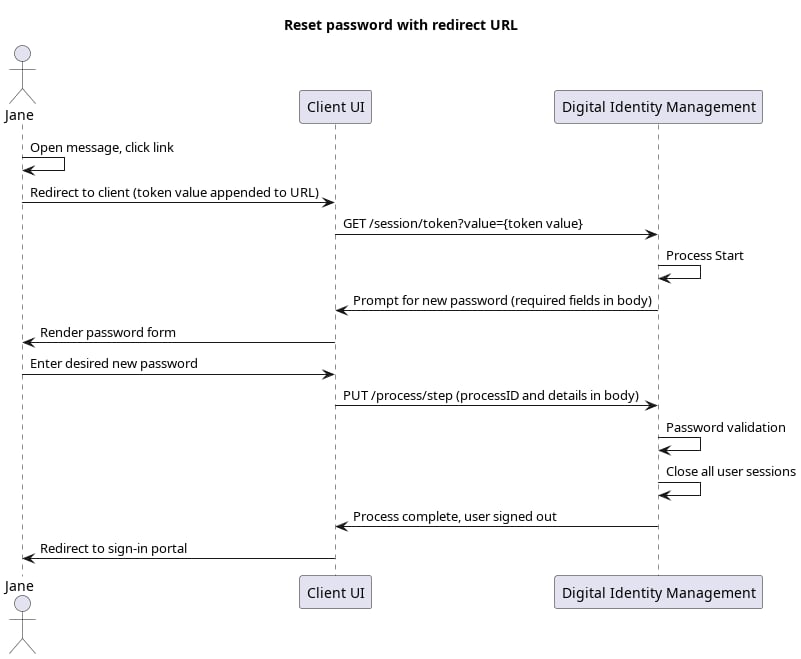 |
Initial Request: User clicks link
The end user goes to their email/SMS and clicks the link. This directs their browser to the client application, and the client takes the token value from URL and passes it into the Session Token API:Response
Digital Identity Management responds with a request for a new password:Final Request: User Password
Your client calls the Process Step API, and passes the user-supplied password to the Process:Process Complete
If the password passes complexity rules, then Digital Identity Management replaces the end user’s paword. The Process completes and returns a200 HTTP status: