

How Tokens Work
An action token is a unique one-time use token that triggers a one-time action when redeemed. Action tokens are context-aware, meaning that upon token redemption:- Digital Identity Management knows what task needs to be performed such as what Process is executed next on what resource(s).
- Digital Identity Management knows who is redeeming the token, even if no current Digital Identity Management user session exists.

- Recover lost passwords: A anonymous user forgets their password and invokes the Process. Digital Identity Management sends a token to the end user’s email address or mobile number, and the user retrieves that token to complete their password reset.
- Add new authentication identifiers: An authenticated user adds a new email or mobile to their user ID with the Add/Update Email, Mobile, or Alias Process. Digital Identity Management sends a token to the new email or mobile for verification. The user retrieves and uses the token to trigger the Activate User (and User Attribute) Process.
Token Formats & Notifications
When Digital Identity Management Process issues an action token, it is rendered and delivered to the user in one or more of the following formats:- A long-form clickable link (URL) with the full token appended to the URL that the user clicks or taps.
- A short One-Time Passcode (OTP) that the user enters into the client application. Digital Identity Management also generates a Proof Key Action Token (PKAT) for OTP redemption and Token Resends.
sessionTokenGet API to invoke the next dependent Process.
The token URL is composed to two separate pieces of information:
- A redirect URL that navigates the user from their email/SMS back to the client application UI. These URLs are Process-specific app settings in the Digital Identity Management Admin > Authentication > Tokens > Advanced Settings page.
- A long-form token ID which represents the actual token. When a Process completes, a token value is automatically generated and appended to the redirect URL that is sent to the user.
GET /session/token?value=b8a2ac7c-47be-4d4b-8c. See the Developer Hub for more details on this APIs.
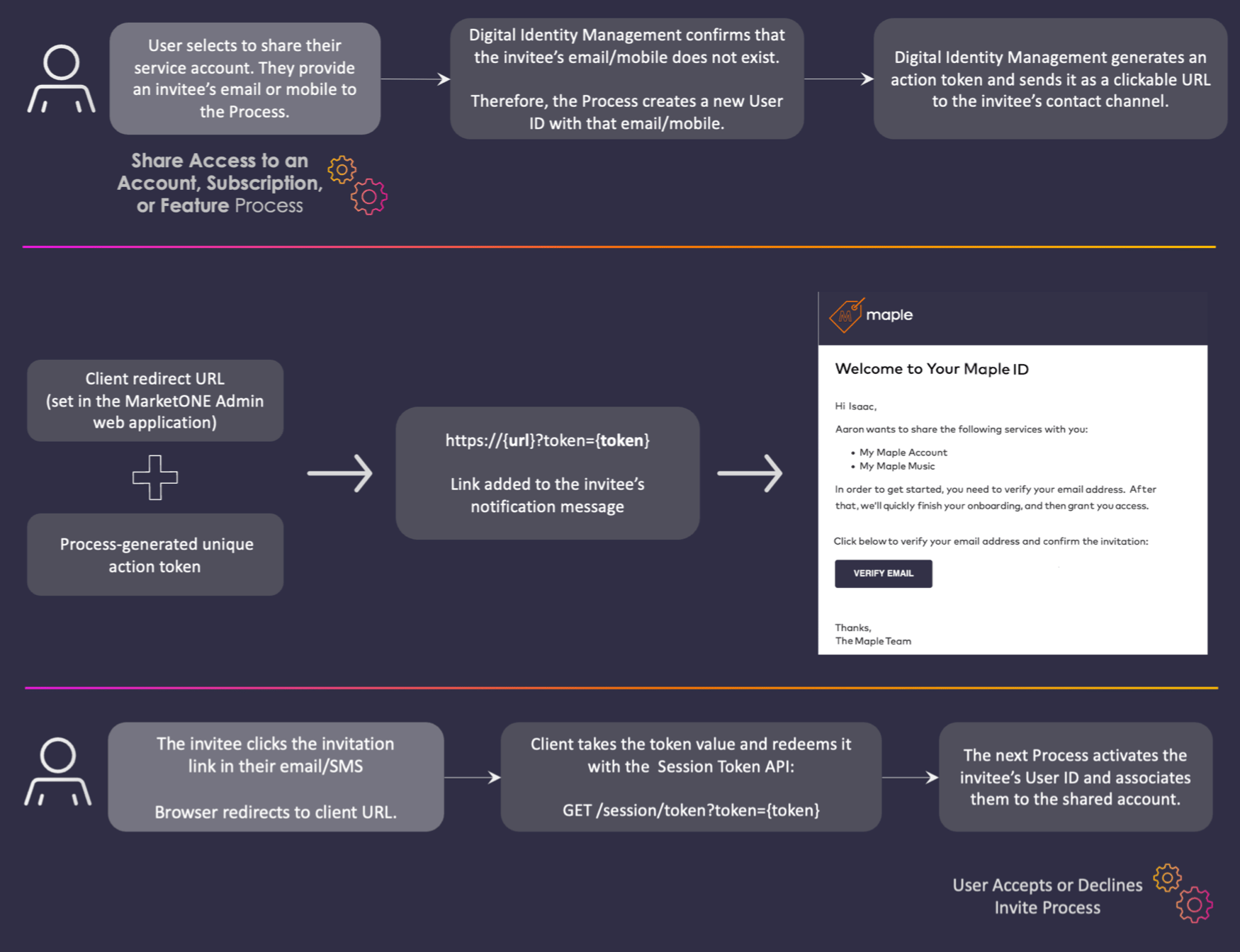
sessionTokenGet API to invoke the next linked or dependent process.
An example of this API call is GET /session/token?customValue=7834&pkat=b8a2ac7c-47be-4d4b-8cf1-7fa6576d07fe
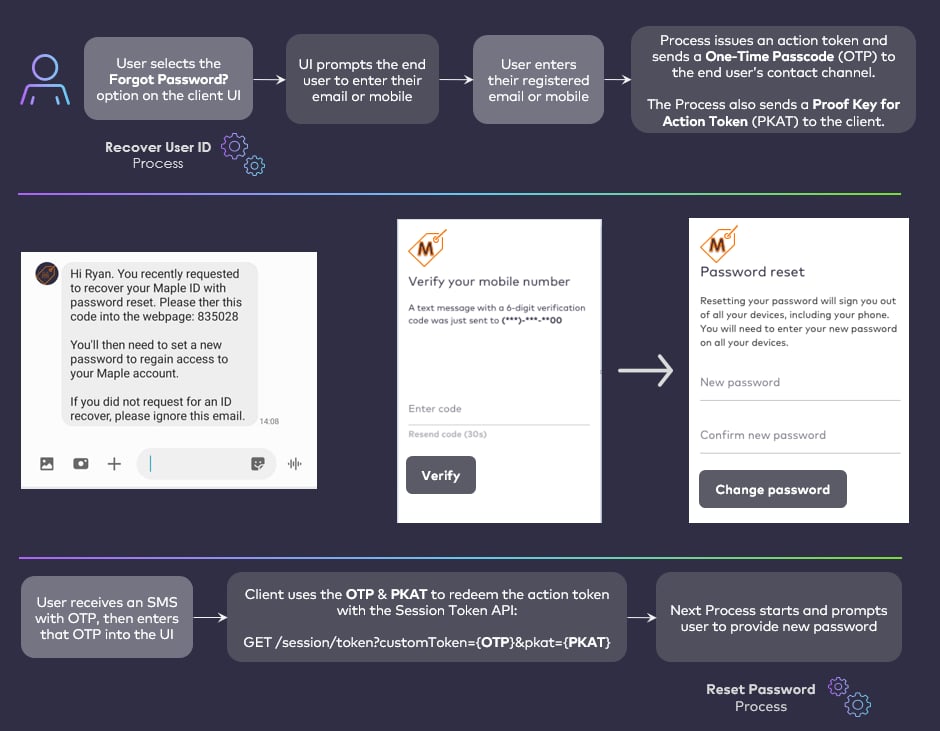
Resending Tokens
There are use cases where Digital Identity Management needs to resend an action token to a user upon request. For client application(s) that need to facilitate a quick Resend function or OTP validation option on the application UI, then the UI must retain and use thepkat that is returned from a Process.
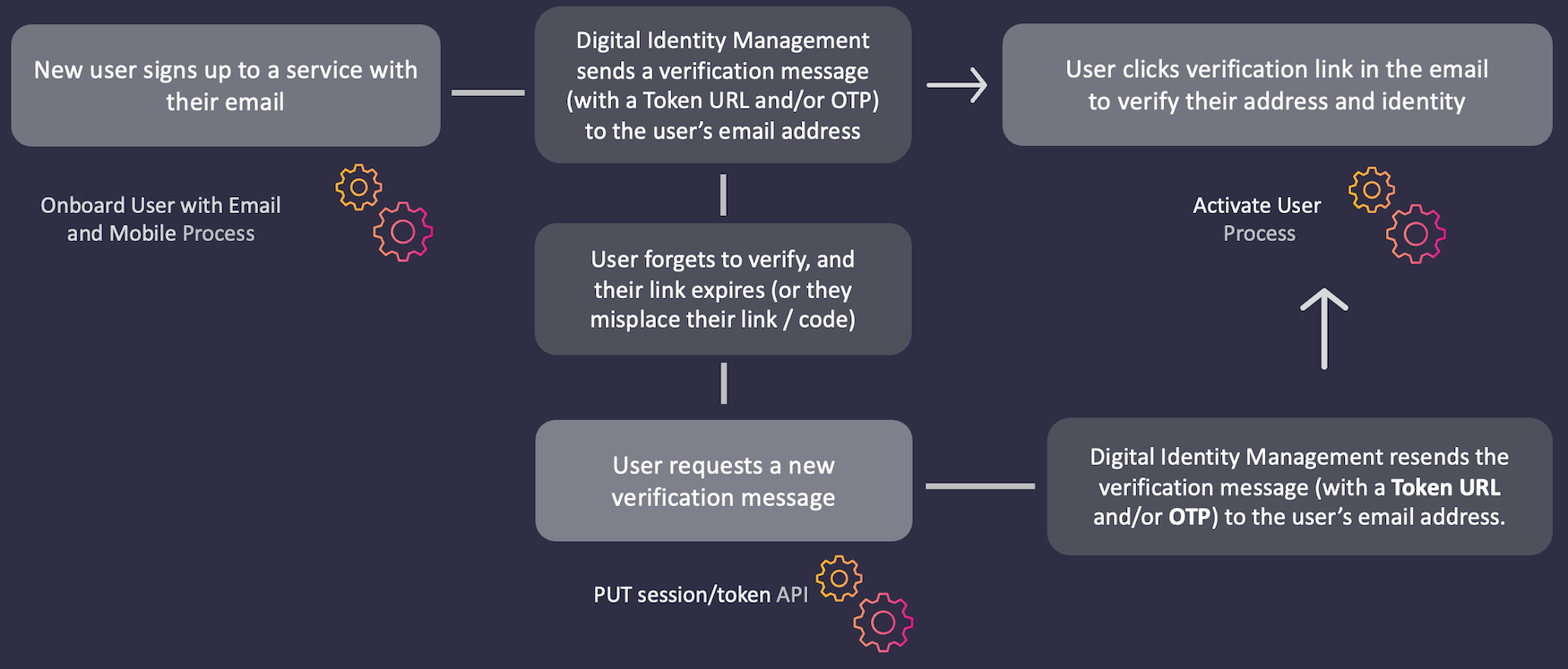
pkat that’s returned from a Process.
Proof Key for Action Tokens (PKATs)
Any Process that issues a Digital Identity Management action token also sends a key in the final API Step response to the client application. This key is known as apkat, or Proof Key for Action Token.
pkat to facilitate OTP verification and/or a quick Resend option on the client application UI.
An example of the Resend Process using OTP and pkat is PUT /session/token?pkat=b8a2ac7c-47be-4d4b-8cf1-7fa6576d07f. The following occurs:
- The API returns a new pkat value that must be used instead of the value used before.
- The API generates a new OTP value and invalidates the previous OTP value issued.
- The OTP expiration period is reset by the process.
- The maximum failed sign in attempts counter is reset.