

What are Backup Codes?
Backup codes are a set of unique codes that a user can submit if their two-factor authentication (2FA) or multi-factor authentication (MFA) methods aren’t accessible. A BUC is a temporary one-time code that a user enters once to gain access to their account or services. Some scenarios where a backup code is needed may be when a user loses their phone, or they’re unable to open the authenticator app to complete their 2FA/MFA process. The user enters a backup code to gain access to the requested service or resource. Once the backup code is used, it’s no longer valid. If a user needs to enter a backup code again, they select another code from the generated set. Digital Identity Management supports backup codes by:- Digital Identity Management Care allows Care representatives to generate a single backup code to provide to a user for account validation.
- Digital Identity Management IdP enables users the ability to generate a series of backup codes if 2FA is enabled within your tenant.
- Backup codes can be generated with APIs by users and Care representatives.
- The Onboard and Authenticate V2 Process accepts BUCs during the 2FA/MFA challenge, improving security.
- BUCs can be used as an alternative for all factors types during MFA challenges when the user’s authentication method isn’t accessible.
- Corresponding notifications and UXDRs are available for BUC management and usage use cases.
Backup Code APIs
The Backup Code APIs that are available:- Generate BUC - The user generates a set of backup codes for themselves. A generated set can have a minimum of 8 backup codes up to a maximum of 12 codes.
- Delete BUC - The user deletes their set of backup codes. All the backup codes are removed from the set.
- Generate a one-time BUC from Care console - The care representative generates one backup code for the user. Any existing backup codes are deleted and only the newly created backup code is valid. This code can be given to the end user to enter on their client UI.
Benefits of Backup Codes
By implementing BUC, users are provided with the following benefits:- Accessibility to their account in case their authentication method isn’t available.
- Once the user submits a BUC to regain account access, they can update their password or authentication method, providing a better user experience.
- Increased security and management of a user’s account.
Key User Capabilities
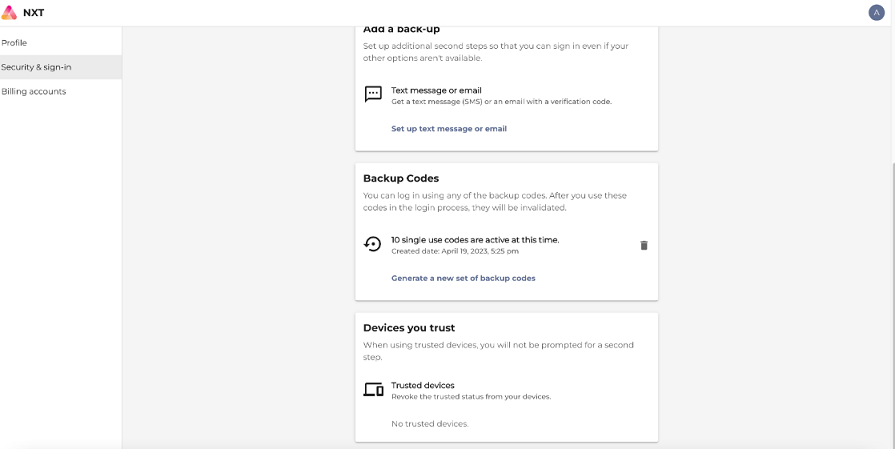
Organizations leveraging Digital Identity Management’s Identity app and have enabled BUC within the tenant, enables users the option to manage backup codes for their accounts from the Identity app. To create a set of backup codes, the users should have at least one 2FA method registered. At any time, users can now:- Create a set of backup codes to use for account logins when their secondary authentication method isn’t available.
- Delete their existing backup codes and create a new set of backup codes.
- Verify their active codes and the numbers of codes left for use.
- Generate one-time backup code for user validation from the Care console.
Application Settings
Digital Identity Management includes a suite of configurable application settings can be set that include:- max2FAtries - number of times a user may enter their factor for 2FA/MFA
- define the number of backup codes generated