

Announcements
The following are Digital Identity Management Announcements:- We are migrating documentation from MarketONE Developer site at https://developer.m1amdocs.com/documentation/ to our Knowledge Center at https://docs.vindicia.com/. New documentation updates will only be available in the Knowledge Center.
- We are in the process of updating documentation and UIs to reflect new product names for the following:
- IdP UI renamed to Identity app
- Admin app renamed to Admin console
- Care app renamed to Care console
Digital Identity Management Features and Enhancements
This section describes the key updates in this release:Generate Backup Code via Care Console
From this release, a care representative can generate a backup code for Two-factor Authentication (2FA) from the Care console. This feature is valuable for users who have lost access to their 2FA method and helps them regain access to their account. From the user’s Identity page, the care representative generates a one-time backup code to give to the user. Once the user enters the supplied backup code, they’re able to access their account again. The user can then remove the 2FA method, and register a new one if required.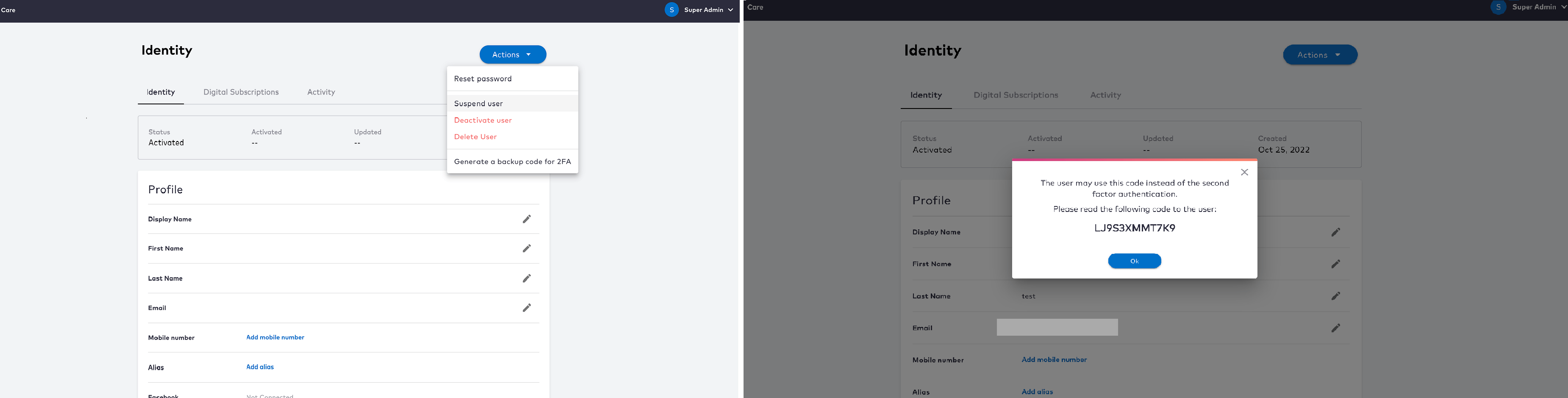
Use Backup Code via the Identity App
From this release, backup codes can be used with the Identity app to submit a second factor for authentication. Organizations that leverage the Identity app can implement this feature to provide their users the option of entering a backup code instead of a 2FA code. With this update, users can now select the backup code option as an alternative during a 2FA challenge.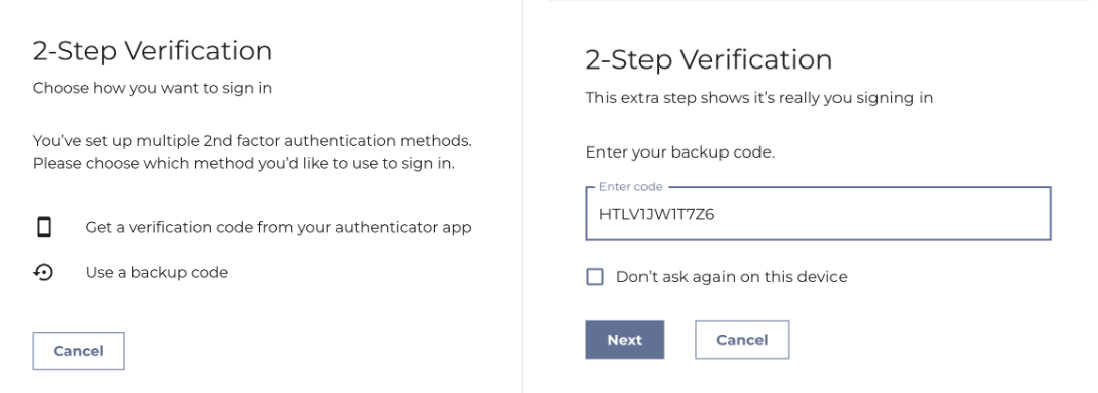
Manage backup codes via the Identity App
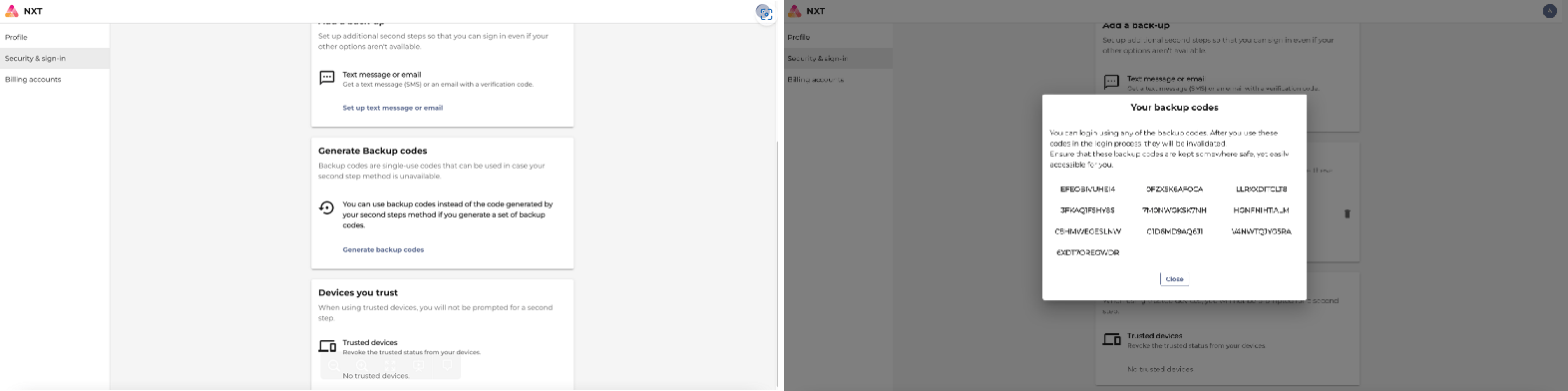
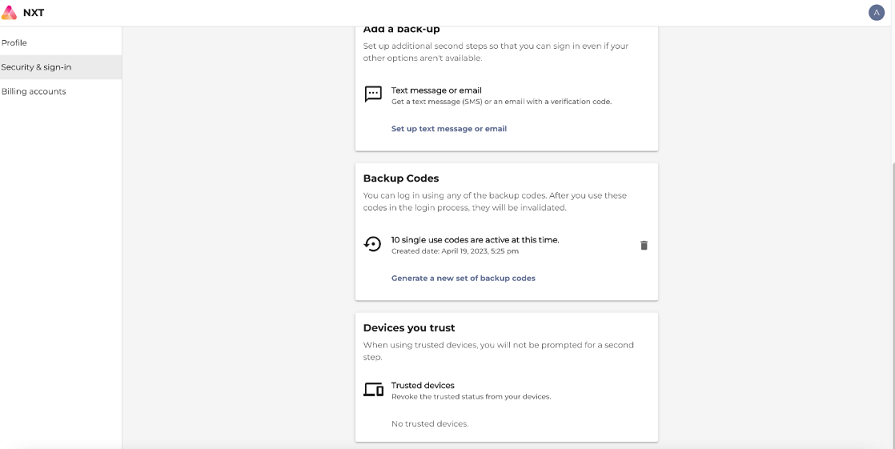
From this release, organizations that leverage the Digital Identity Management’s Identity app can implement this feature to enable users the ability to generate and manage backup codes for their accounts. This feature’s design provides an extra layer of security for users in case they lose access to their secondary authentication method. To create a set of backup codes, the users should have at least one 2FA method registered. At any time, users can now:- Create a set of backup codes to use for account logins when their secondary authentication method isn’t available.
- Delete their existing backup codes and create a new set of backup codes.
- Verify their active codes and the numbers of codes left for use.
Basic support of OpenID Connect Financial Grade API (FAPI)
FAPI is a security profile by OIDC to address the specific security requirements of the financial industry. From this release, customers can configure their OIDC clients to support basic requirements for FAPI. It is beneficial to customers in the Financial Services industry whose Identity Providers (IdP) must support FAPI. For customers who enable FAPI configurations, the following enhancements will be applied:- The ClientId and secret are not passed as query parameters during a token exchange for FAPI-enabled clients. This mechanism provides an extra layer of security because the ClientId and secret are not visible in the URL or in any logs.
- Only HTTPS redirect URIs are allowed for non-Native Apps. The enforcement of the use of HTTPS redirect URIs ensures a more secure user experience by minimizing potential security risks and provides the financial services users a more protected environment. Note: Redirect URIs that use HTTP are only be applicable for Native Apps.
- Whenever a user requests an OpenID scope, the NONCE value must be included in the authentication request. This update adheres to the OpenID Connect specification and enhances the security of your application. NONCE is defined as a number used once and is a random value generated by the client. The server verifies the NONCE to ensure that the request is current and the number hasn’t been tampered or modified. This validation ensures that the authentication process is secure and the user’s data is protected. Replay attacks, server impersonation, and other security threats are mitigated by requiring the NONCE value is present when an OpenID scope is requested.
- When a client doesn’t request an OpenID scope, the state parameter must be sent in the request. This change has been implemented to ensure the security and privacy of our users. The state parameter is a unique string that is generated by the client application to maintain state between the request and the response. It helps prevent cross-site request forgery attacks and ensures that the response received from the authorization server matches the request that was sent. If the state parameter is not sent in the request when the OpenID scope is not requested, the server will reject the request and return an error message.