

/oidc/token endpoint using the device code to check for approval in the background. Once the user approves, the device receives its tokens.
Flow Diagram
The diagram below represents the communication between the key actors using the Device Authorization Grant flow: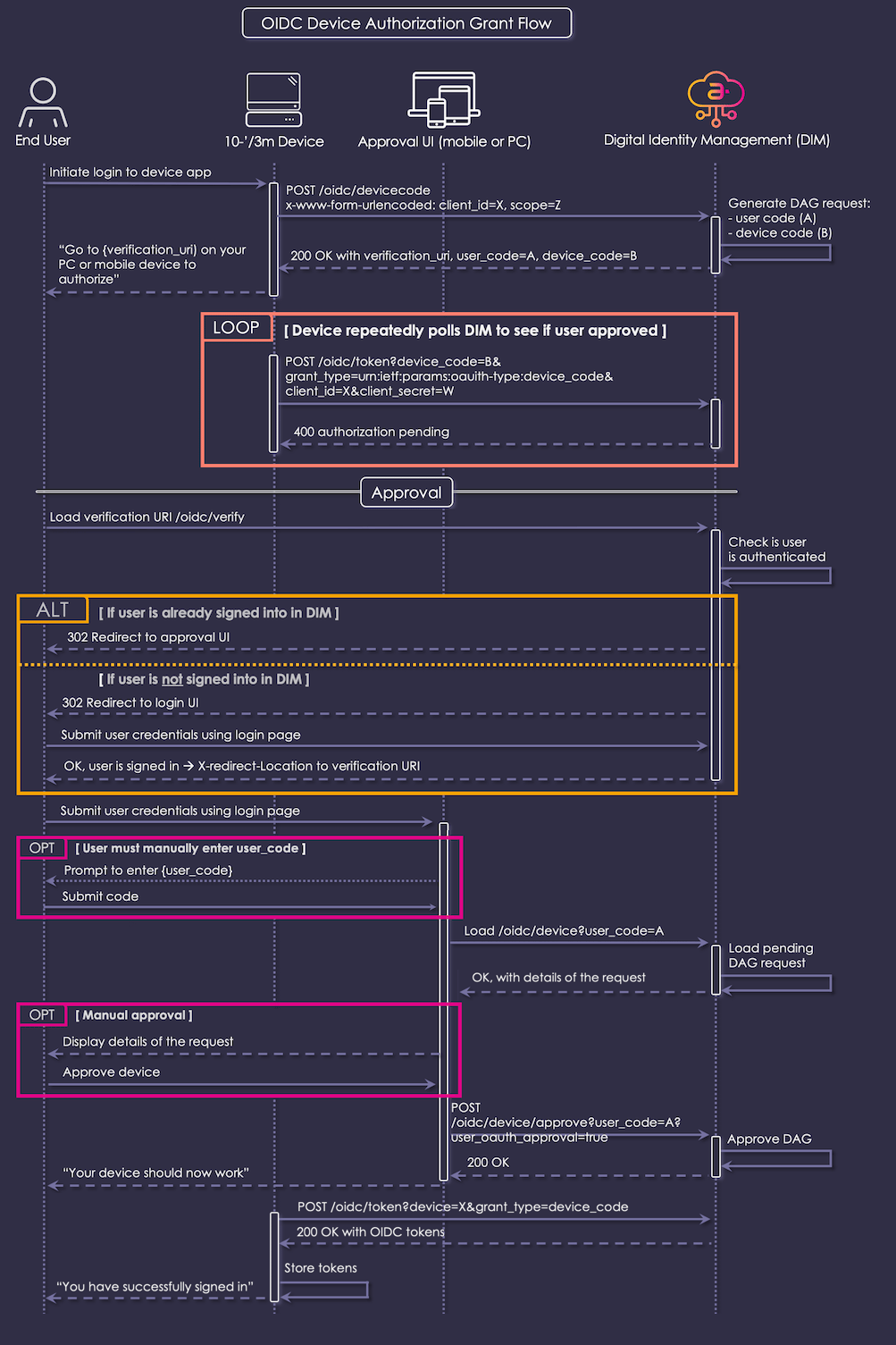
Interaction Steps
The interaction steps between each actor in the flow are as a follows:- The user initiates the login process for your application on the 10’/3m device.
-
The device calls Digital Identity Management’s
POST /oidc/devicecodeDAG endpoint with the following HTTP parameters in anx-www-form-encodedbody: -
Digital Identity Management verifies that the registered RP, specified by the
client_id, is configured to allow DAG, and that the scopes are valid for the client. Digital Identity Management then generates and stores a DAGdevice_codeanduser_codefor the request. - Digital Identity Managements responds to the device with a JSON object that contains the following fields:
-
Your device UI prompts the user to visit the approval page UI on their mobile device or personal computer. Your device may display the
user_codeon the page, or use theverification_uri_completestring that incorporates theuser_codeinto the URI. Note: A URL shortener or other mechanism may be used to make the URL easier to type. The device might even translate the URI into a QR code for ease-of-use with a mobile device. -
While displaying the verification information on the page, in the background your device repeatedly polls Digital Identity Management’s
/oidc/tokenendpoint to check if the request has been approved. The following HTTP query parameters must be supplied in each request:Note: As per section 3.5 of RFC-8628, if Digital Identity Management did not specify anintervalvalue in the initialPOST /oidc/devicecodeAPI response, then your client must assume a default value of 5 seconds. In other words, if Digital Identity Management did not specify an interval, then your client must not poll Digital Identity Management’soidc/tokenAPI faster than once every 5 seconds. -
Digital Identity Management responds with
HTTP 400status and a JSON payload that indicates the request is still pending:Steps 6 and 7 continue in the background until the user authenticates and approves the device. -
The user does as instructed and loads the OIDC device approval URL
/oidc/device(or/oidc/device?user_code=X, if the full URL was supplied), as provided by the device UI, onto a separate device. This is an endpoint on Digital Identity Management. -
The approval UI checks if the user is authenticated on this device. This can be accomplished by any number of means, such as a call to the Digital Identity Management
GET /userAPI or even a call to/oidc/device?device_code=Aendpoint if theuser_codeis already known. Either API will return401 Unauthorizedmessage if the user is already signed in. -
(Conditional) If the user is currently signed in to Digital Identity Management, then Digital Identity Management redirects them to the approval page in the portal UI with an
HTTP 302redirect. Skip steps 11 through 15 and go to step 16. -
(Conditional) If the user is not currently signed in to Digital Identity Management, then Digital Identity Management redirects them to the login page in the portal UI with an
HTTP 302redirect. Proceed to steps 12 through 15. -
User authentication typically begins with Digital Identity Management’s
POST session/startAPI, which initializes the Authenticate User Process. If the user needs to or is allowed to onboard first, they may do that instead (not shown in the diagram). -
Eventually, whether from a
/session/startor other process call, and potentially after several more steps (for example, to satisfy multi-factor authentication rules, if enabled), the final HTTP response from Digital Identity Management indicates that the user is now authenticated, and the approval process can continue. - The user’s browser once again loads the approval endpoint.
- Digital Identity Management recognizes the user as signed in and redirects them to the approval page in the portal UI.
-
(Conditional) If the approval UI was not loaded with the
verification_uri_full, then it must prompt the user to enter theuser_codethat the device displayed on the TV page. -
(Conditional) The user enters the
user_codeto confirm the device that they wish to approve. -
The portal calls Digital Identity Management’s
/oidc/deviceendpoint with the single HTTP query parameteruser_codeset to the value of the user-supplied code. - Digital Identity Management uses the user-supplied code to look up the pending DAG request.
-
Digital Identity Management returns the details of the pending DAG request as a JSON Object, which resembles the following:
The fields of the response are as follows:
- The default DAG approval presents information about the request to the user, and prompts them to approve.
- The user confirms the DAG Request.
-
The approval UI calls the
POST /oidc/device/approveendpoint with the following HTTP query parameters: - Digital Identity Management records the DAG as approved. The next approval-check request by the device will receive the tokens.
- Digital Identity Management informs the portal that the approval is complete.
- The approval UI tells the user that their device should begin working shortly.
-
As it has been doing repeatedly this whole time, the device calls the
/oidc/tokenendpoint in the background to check for approval (see step 6 for details). This time, however, Digital Identity Management is going to respond withHTTP 200 OK. - Digital Identity Management responds to the 10’/3m device with 200 OK and a JSON Object containing the requested tokens.
- The device must store the access token, ID token, and refresh token for future usage.
- The device informs the user that they are now logged in and may begin using the application.