

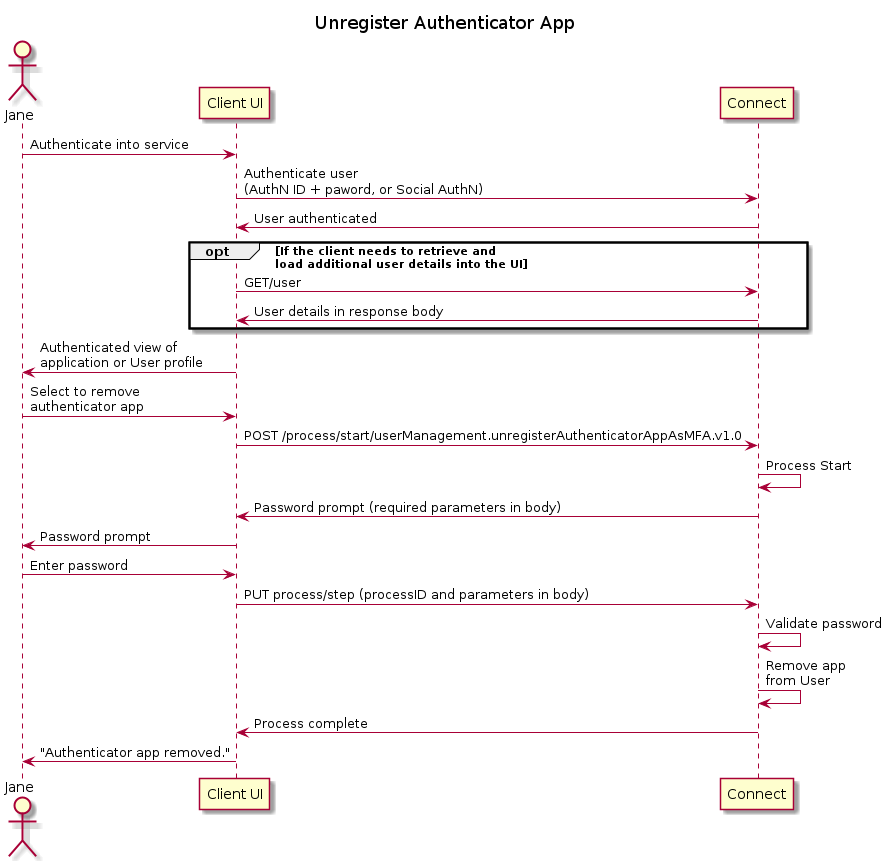
This is the standard use case delivered by the Unregister Authenticator App Process. An authenticated user previously registered a RFC 6238-compliant authenticator app to their User ID. They now choose to remove that app. In order to render meaningful options to the user, your client can retrieve User entity data with the GET /user API (either after the user authenticates, or when they navigate to their profile in your UI). Note: Although the user is already authenticated when they invoke this Process, Digital Identity Management requires them to provide their password to “raise” their authentication level before adding or removing an external MFA security option.

Initial Request

Your client calls the Process Start API to initialize the Process:

Response: Password prompt

Digital Identity Management checks to see if the current user has a registered password. If they do, then the Process returns a prompt for that password.
Note: If the user does not have a password (i.e., they onboarded with a social account) then the Process returns an error, and ends.

Final Request: user provides password

The user enters their password, and your client passes it to Digital Identity Management in a Process Step API request:

Process Complete

Digital Identity Management validates the user’s password and, if the password is correct, removes the authenticator app from the user’s corresponding User entity. The Process returns a 200 HTTP status, and ends.
Parent topic:Unregister Authenticator App Process