

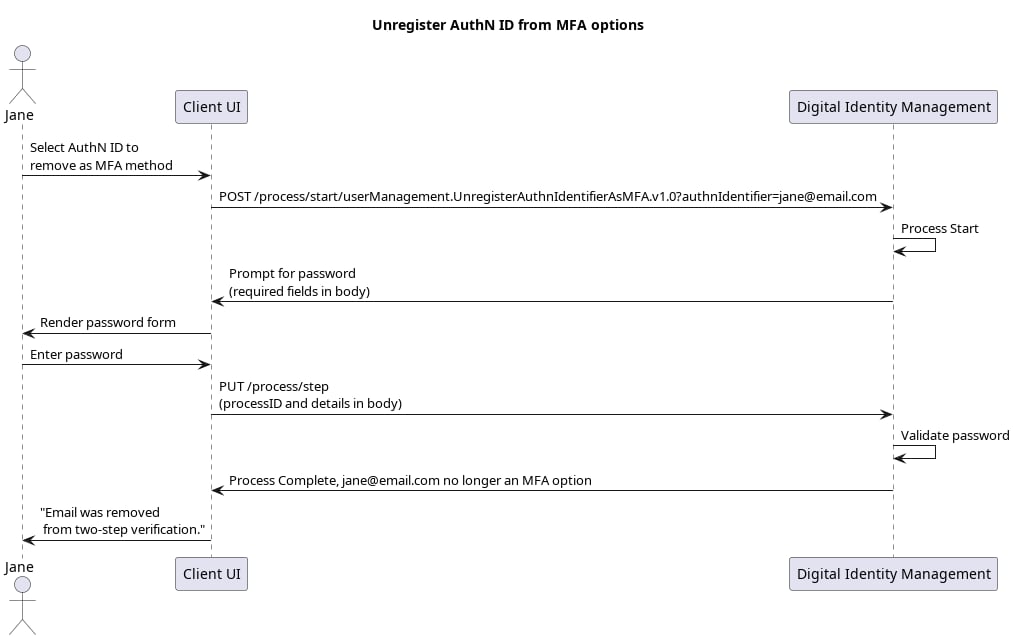
An user removes the MFA configuration from their registered authN ID (email address or mobile number). [product: dim][/product: dim]

Request

Your client calls the Process Start API to initialize the Process:
Note: Unlike most Processes, this Process requires the client to provide the target authN ID upfront in the initial Process Start request. The client can specify the authN ID either directly in the request URL, or in the request body like this:

Response: password prompt

Digital Identity Management checks to see if the current user has a registered password. If they do, then the Process returns a prompt for that password.
Note: If the user onboarded with their social account, and do not have a registered password, then the Process returns an error, and ends.

Next Step: User provides password

The user enters their password, and your client passes it to Digital Identity Management in a Process Step API request:

Process Complete

The Process completes its task, and returns an HTTP 200 status: