

- Profile: Allows a user to set or update their personal information (for example, display name, full name, preferred language) and contact information (for example, email, mobile number, preferred contact). Email address and mobile number are authentication identifiers that the user uses to log in to their account.
- Security and sign-in: Allows a user to set or update their security options (for example, password, PIN) and social sign-in options (for example, connect and manage their social media accounts).
- Billing accounts: Allows a user to associate or disassociate their billing accounts.
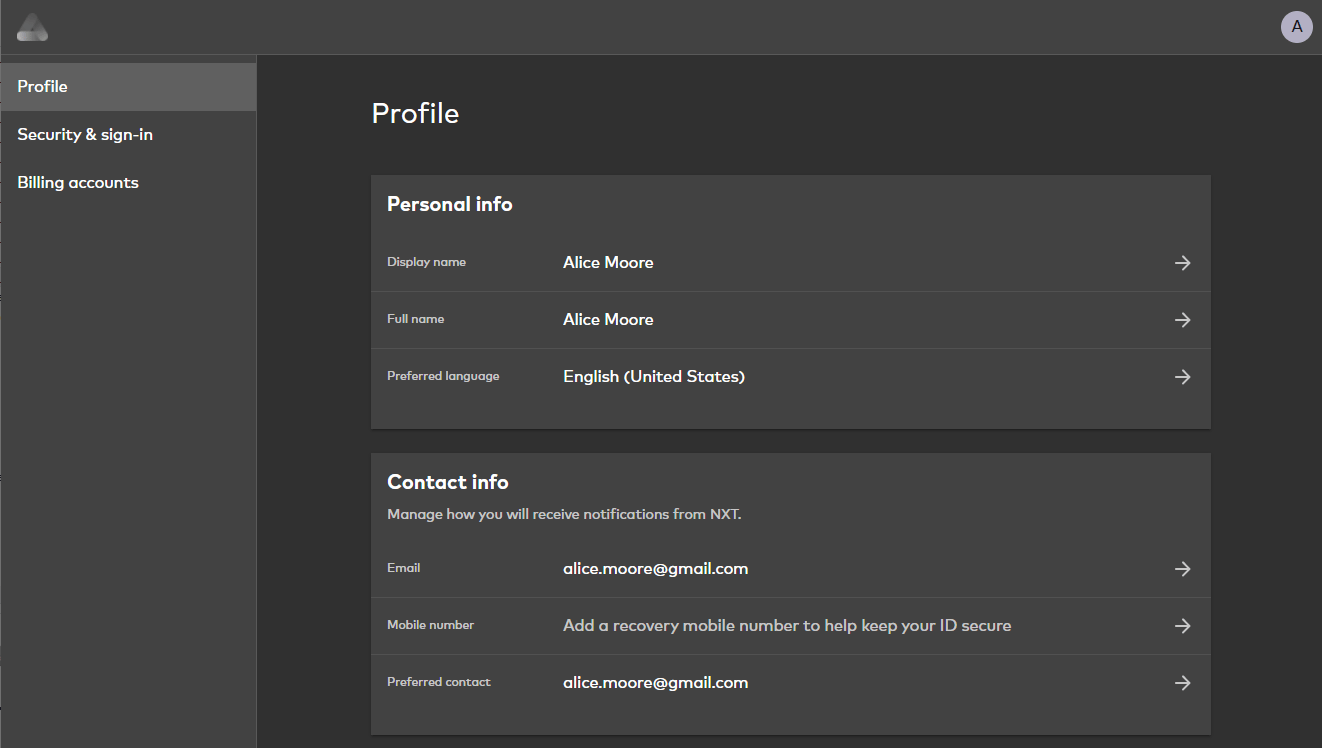
Key User Capabilities
- Add new email address, mobile number, or social media provider to a User ID. Email address, mobile number, and social media account are authentication identifiers that the user uses to log in to their account.
- Update existing email address, mobile number, social media provider, or alias
- Receive verification emails and SMS to verify new or updated email addresses or mobile numbers
- Update preferred contact channel (email address or mobile number)
- Update password or PIN from within the user profile
- Associate or disassociate billing accounts, and view associated billing accounts
- Enable or disable multi-factor authentication (MFA)
- Remove known devices