Release Date: January 27, 2021

Announcements

There are no announcements for this release.

Connect Features

This section describes the key updates in this release.

One-step Onboard User Process

Connect Processes are REST API-based, multi-step (that is, multiple call) operations that streamline identity use cases for front end applications. Although there are some exceptions, most Processes follow this pattern:
  1. The client initiates the Process with the Process Start API. The client does not specify any data in the body.
  2. Connect responds and specifies the data that it needs to complete the Process task.
  3. The client makes a subsequent request with the Process Step API, and provides required data in the request body.
  4. Steps 2 and 3 repeat until Connect confirms that the task is complete.
Each request and response in the Process references a single, unique processId identifier. This enables Vindicia MarketONE to chain together the series of calls and respond appropriately. Additionally, most Processes do not require the client to specify the data in the initial request. The Process responds to the client’s initial request, and specifies the data MarketONE requires. This allows UI programmers to easily create abstraction layers around the Process. Onboard User Process As of this release, the Onboard User with Email and Mobile Process now supports an optional “one-step” flow wherein the client can optionally provide all the required data upfront, in body of the initial Process Start request. This enables a client to onboard a user with a single HTTP request. Onboard User Process - One-step Flow The Process Start API request must include all the required minimum registration information (that is, an email or mobile, and password), contained within a parameters object like in the standard Process flow: Example
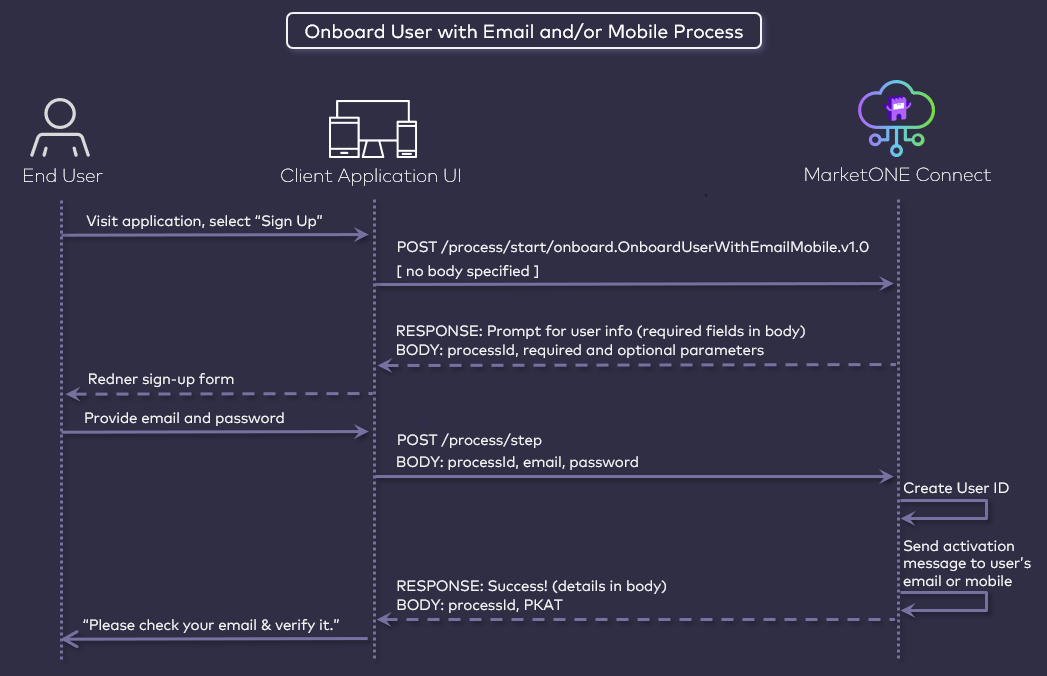
Once the process engine receives and validates the required information, it then creates the User ID, and sends a verification message to the end user’s email or mobile as usual. This “One-Step” option will be added to additional Processes in a future release.

Partner Subscription Information with User Context

MarketONE’s GET and POST /user/partnerSubscription APIs have been injected with user context. This means the following:
  • When a client calls the GET /user/partnerSubscription/{id} endpoint, it will receives partner subscription information owned by the end user.
  • When a client calls the POST /user/partnerSubscription/{id}/reprovision endpoint, this will re-provision a partner subscription owned by the end user.

Updates to Custom Data, Soft Profile, and Business Reports

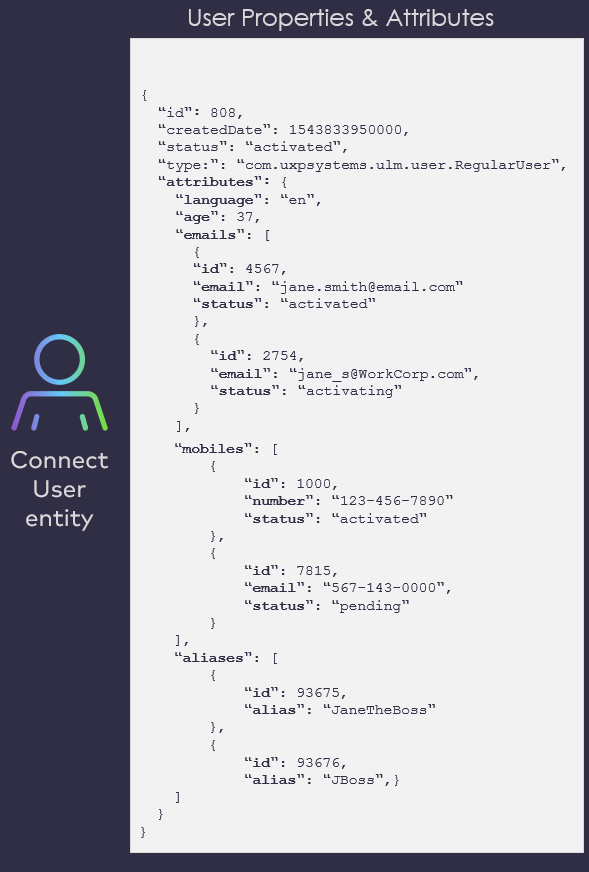
Foundational work is complete for three major features to be fully released in Connect 2021.02 (February). Here’s a preview of each update that will be made available to all customers next month: Custom Data Connect is built on top of a user-centric and entitlement-specific data model comprised of Connect data entities (Users, Runtimes, Groups, Accounts, Subscriptions, and Features). Each entity type is defined by a set of default properties and attributes. Some of these are simple name/value pairs (that is, JSON strings, booleans, integers), and others are more complex (objects, arrays, arrays of complex objects). User Properties and Attributes These properties and attributes capture just enough details to provide merchants and service providers with relevant information about their end users, and the devices and subscriptions in their orbit. However, organizations may want to capture and leverage additional information to better understand the end user, or to define a more personal and relevant user experience within a given application. Therefore, Connect introduces support for merchants and service providers to provision Custom Data fields into in their Connect tenant data store. Connect will expose a set of REST API for creating Custom Data in valid JSON format (strings, integers, booleans, objects, and arrays), and then performing CRUD operations with that data. Applications can then store information as provided by end users, either directly (for example, a user provides their date of birth in a profile, sets their favorite music genre, or toggles a “night mode” preference for the application), or silently (for example, an TV streaming application observes and records the end user’ last watched shows, or a music streaming app creates a list of common genres that the user listens to, based on tags the application maintains for all of it content). Custom Data is not accessed or manipulated by Connect’s Processes or current entity-based APIs. Client applications will instead call new Custom Data endpoints to both persist this data and retrieve it on demand. The first iteration of this capability will be provided by an exposed set of new REST API. These functions will be built into the Connect Admin web application in a subsequent release, so that Admin users can simply log on and manage their provisioned Custom Data. Custom Data is built to scale. It is capable of quickly handling millions (even billions) of requests per day. Soft Profile User Connect introduces functionality that enables a regular Connect end user to create user profiles explicitly for minors or friends and family, in order to grant those soft profiles limited access to services that the regular user owns. A soft profile user can only access resources if they have been authenticated by the regular user who created that soft profile. Regular users also have the option to set a 4-digit pin as an added layer to ensure soft profile users don’t access the associated services outside the purview and explicit consent of the regular user. Additionally, regular users can grant soft profile users service entitlements on per user basis, consistent with Connect’s data model. For example, a regular user (parent) can specify a allowlist/blocklist of content (stored using the above mentioned Custom Data feature) that the soft profile user (child) can and cannot access. When the soft profile users signs in, the application only shows content relevant (and permitted) to the soft profile user. Note: In this example. it is assumed that your UI orchestrates the calls between Soft Profile User and Custom Data. Switching between profiles is straightforward. As an organization, through your UI, you can orchestrate whether switching a soft profile triggers an ask for a profile PIN or a master PIN (regular user’s PIN). PIN is optional. Business Reports Endpoint Connect will introduce an easy-to-use API that generates business reports in JSON and CSV format. Customers can easy retrieve reports at any time with this API, and then feed those files into their preferred visualization tool.
Bug Fixes

The following bugs have been fixed in this release:

Known Issues

There are no known issues in this release.