

Annoucements
This release includes the following announcements:- Create Custom Data Array on Demand
- Onboard, Authenticate and Purchase Process (Soft Release)
Connect Features
This section describes the key updates in this release.Create Custom Data Array on Demand
Earlier this year, Connect introduced a set of Custom Data (or CD) API for client applications to store, retrieve, and update data within the Connect data store, and to associate that data to existing User entities. This feature allows an application to capture and leverage additional data points regarding a known end user, usually with regards to the end user’s activity within a given client’s service (for example, viewing history, preferences, etc). Organizations leveraging this service can structure and store data in most any order they want, provided that the data properly conforms to JavaScript Object Notion (JSON). If valid, the custom data for a User is stored as a single JSON document or record in the cloud. The CD API includes a set of endpoints specifically for writing JSON arrays (that is, lists) to a CD records That set includes following API endpoint:POST /v1/user/{{userID}}/{{propertyArrayName}}
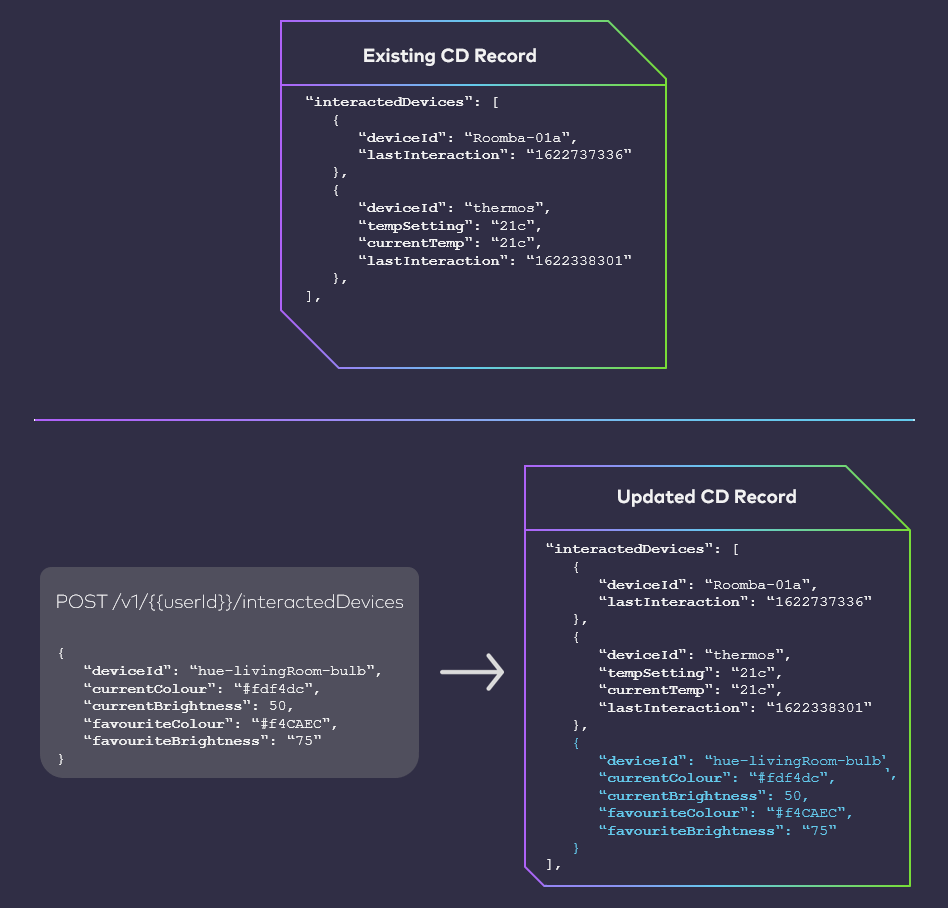
Your client application calls this endpoint, and specifies the target User, as well the desired array name. If the request body is valid, Connect adds the new array to the CD record for the target User, and adds the request body contents to the array. However, as of this release, this API can now also write additional array elements to an existing array in a CD record. In other words:
- If the client calls this API and specifies a propertyArrayName that does not exist, then Connect will write the new array onto the record.
- If the client call this API and specifies a propertyArrayName that does exist on the record, but the body contains an element that does not currently exist in that array, then Connect adds that element to the array as a new entry.
Onboard, Login and Enrol Process (Soft Release)
As of this release, a new Connect API Process is available that enables end users to onboard, authenticate, enrol, and prompt for a purchase in one seamless flow. Key features of this Process include:- An end user can onboard with their email or mobile number. If the end user onboards with their mobile number, then the password is optional. This option supports existing integrations for the sake of backwards compatibility.
- An end user can authenticate with their email or mobile number. If the end user authenticates with mobile number and they currently do not have a set password, then Connect sends a One-Time Passcode (OTP) is sent to the end user’s mobile device. The end user then needs to supply that OTP to authenticate and continue their journey.
- During the initial user authentication, Connect can optionally perform additional checks to determine if the end user is already entitled to any services with your organization. To do this, Connect queries your organization’s customer record system with the end user’s authentication identifier (email or mobile). If a service is found, then the end user successfully authenticates. Alternatively, if a service is not found, the system can automatically prompt the end user to make a purchase before they can proceed.
- Connect can also query your system to verify if the end user owns (or is entitled to) any billing accounts with your organization. If any accounts are found, the end user will have the option to associate the account directly to their Connect User profile.