Annoucements
There are no announcements for this release.Connect Features
This section describes the key updates in this release.Enhancements to the Onboard, Authenticate, and Purchase Process
In the June 2021 release, Vindicia introduced a new Connect API Process (soft release) that combines onboarding, authentication, account association, and prompt for a product or subscription purchase in one seamless flow. This Process does not replace Connect’s standard onboarding, authentication, or account/subscription Processes. However, it serves as a powerful “all in one” solution with multiple configurable flows. As of this release, the Onboard, Authenticate, and Purchase Process includes a few new functional enhancements:- Support for Email – The Process now supports email-based onboarding and authentication (in addition to mobile-based).
- Collect Optional User Data – A client can optionally collect the end user’s First Name, Last Name, Display Name, and Preferred Language in the onboarding flow.
- Password Mandatory Option – In the onboarding or authentication flows, the Process can require the end user to create a password, if they do not have one yet. This requirement is controlled through an optional configuration point.
- reCAPTCHA V2 Invisible Badge – The Process supports reCAPTCHA V2 Invisible Badge on the first prompt for user onboarding or authentication. reCAPTCHA is enabled configured on the Security Settings screen the Connect Admin web application.
Enhancements to the IdP UI
Out of the box, Connect includes an optional, configurable Identity Portal UI (or IdP UI) that your developers can drop in front of your application. Powered by Connect Processes, the IdP UI is an alternative to building your own sign-up/sign-in screen(s) with Connect API. As of this release, the IdP UI includes a few new functional enhancements:- Updated screens to leverage the new Onboard, Authenticate, and Purchase Process – The IdP now leverages the abovementioned Onboard, Authenticate, and Purchase Process. This Process supports a variety of flows, including (but not limited to) onboarding and authentication with no password. To accommodate these flows, number of new screens have been developed in the IdP UI. In other words, the IdP now offers a variety of configurable flows out of the box. If those configuration points change, the relevant screens will change as well.
-
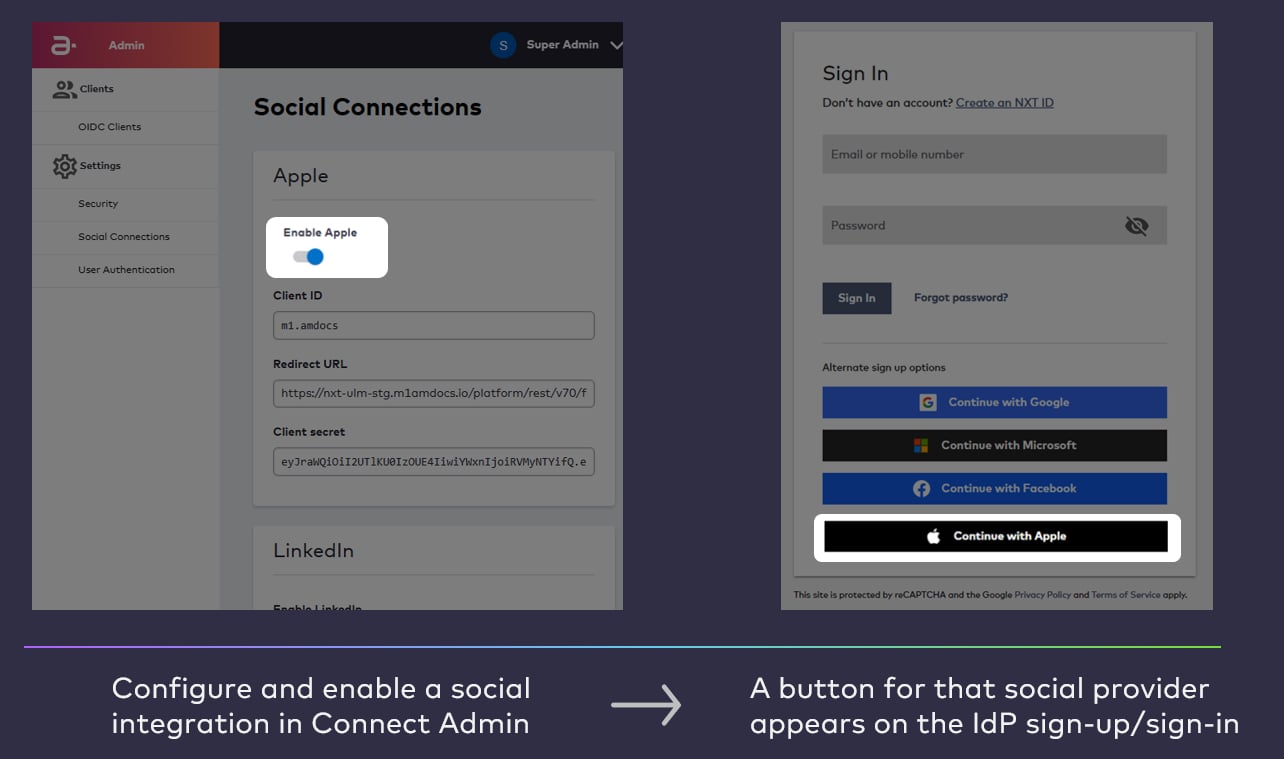
Apple Buttons – If your organization configures and enables an Apple ID social integration (for social onboarding and authentication), the Apple button appears instantly on your onboarding and authentication screens in the IdP. This also applies to Facebook, Google, Microsoft, and LinkedIn buttons when those integrations are enabled.
- User Profile Self-Management – The IdP UI package includes a post-authentication user identity profile screen that allows the end user to manage their basic details (for example, authentication identifiers, disconnect any social connections, etc). As of this release, the profile page now support individual First and Last names that the end user can edit. Previously, only a single full name (first and last together) was available.
Entitlement Data included within Access Token
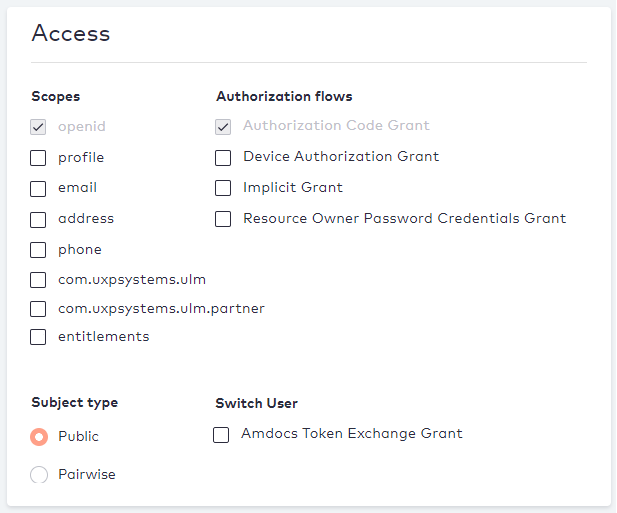
Entitlements are segments of data taken from Connect Account, Subscription, and Feature entities associated to User entity. When an end user signs into a partner service, that service client can request entitlements from Connect, and those entitlements effectively tell the client the what accounts, services, or functionalities to which the end user is entitled. Traditionally, clients request for entitlements with Connect’sGET /entitlements/user or GET /entitlements/user/{id} API. As of this release, OIDC clients (that are registered under a Connect tenant) can request entitlements data with the GET /oidc/authorize request to Connect. The entitlements scope must be selected on the client’s registered page in Connect Care.
Account and Mobile Number Ownership Change
When an organization leverages MarketONE Bundle, Connect can consume events from Bundle that pertain to a change in an end user’s billing account. This effectively allows Connect and keep an end user’s profile and associated account details up-to-date in Connect. As of this release, Connect can consume the following types of updates:- When an end user (or the organization) updates a billing account, Connect will update the corresponding associated Connect Account entity and its attributes (for example, a changed payment method).
- When an end user (or the organization) updates a registered mobile number, Connect will update and verify the mobile number (stored as an authentication identifier on the User entity). The former/old mobile number is removed as an authentication identifier from the User entity.
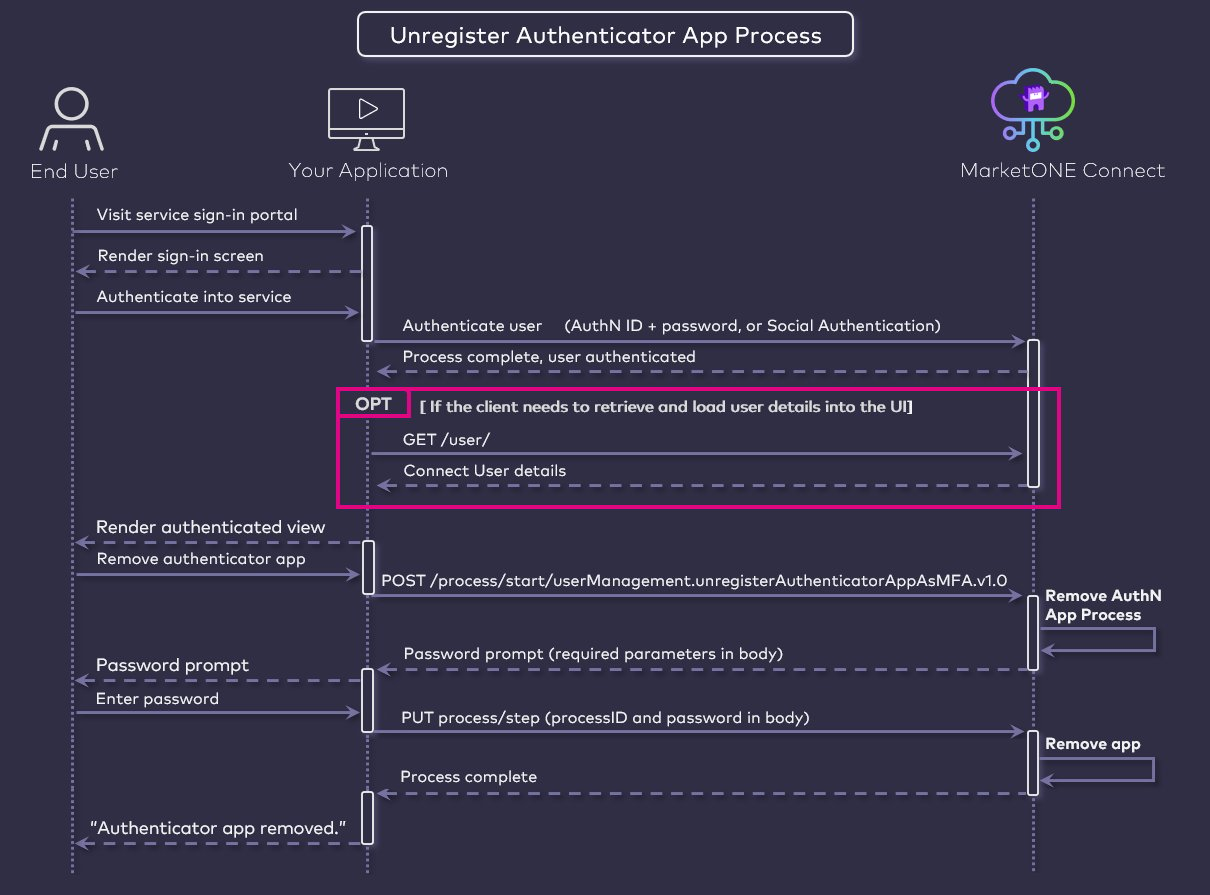
Unregister Authenticator App for MFA
Connect includes a set of API Processes for managing Multi-factor Authentication options for end users. These Processes are:- Register Email or Mobile as MFA Process
- Unregister Email or Mobile as MFA Process
- Register Authenticator App as MFA Process