

Announcements
This release includes the following announcements:- Filtering and ordering of Custom Data array items.
- Machine-to-Machine (M2M) partner access to specified User Custom Data.
- User profile management added to MarketONE Admin.
- Additional OIDC claims that map to “profile” OIDC scope.
Connect Features
This section describes the key updates in this release.Custom Data - Filtering and Ordering
Connect Cloud recently released a set of Custom Data API for client applications to store, retrieve, and update custom data within the Connect Cloud data store, and to associate that data to an existing User entity. This feature allows an application to capture and leverage additional data points regarding a known end user, usually with regards to the end user’s activity within a given client’s service (for example, viewing history, preferences, etc). Organizations leveraging this service can structure and store data in most any order they want, provided that the data properly conforms to JavaScript Object Notion (JSON). If valid, the custom data for a User is stored as a single JSON document or record in the cloud. The Custom Data API includes a set of endpoints specifically for creating JSON arrays (that is, lists) within a Custom Data record. As per the JSON standard, arrays can include complex objects and, depending on the nature of an application, each array (or each object within the array) could feasibly contain numerous individual elements. Therefore, organizations will inevitably need the ability to:- order and organize the custom data in a given GET request
- update select elements within an array of custom data, without the requirement to retrieve and update the entire set of custom data, for a given User entity.
The following table lists and describes the filtering options that the above mentioned API can use as query parameters in the request URL:
For example, this request retrieves all “products” in an array with a price value less than $10:
Ordering
In addition to the new filtering query parameters, the
GET /customData/v1/user/{userId}/{PropertyArrayName} API also includes a new orderBy parameter. When a client application needs to retrieve an array of custom data, it can now specify the ordering of that array’s content, based on an object’s internal field.
For example, this request retrieves all “address” objects by city in ascending ( + ) order:
Conversely, this request retrieves all “address” objects by country in descending ( - ) order.
Note: Navigate to API Reference in the MarketONE Developer Portal, and select ULM Custom Data APIs for the full API library and specification.
Custom Data - Machine-to-Machine Access
Custom Data is primarily created/updated/deleted within a user context. In other words, an end user first authenticates (either with Session Start or Social Login) before the application accesses the Custom Data APIs for that User ID (either explicitly, or silently). However, in some cases, an organization’s back end may need to update a User’s Custom Data outside of a user context. For example, an organization may want to retrieve User Custom Data, ingest the data for their own analytics or other processing, and then push that updated Custom Data back into the cloud. Therefore, applications with the proper partner authorization can now leverage Connect’s Machine-to-Machine (M2M) partner authorization header to apply updates to any registered Connect User’s set of custom data. To do this, the application simply needs to to include Connect Cloud’s X-Partner-AUTHZ header in the API request:MarketONE Admin User Profile
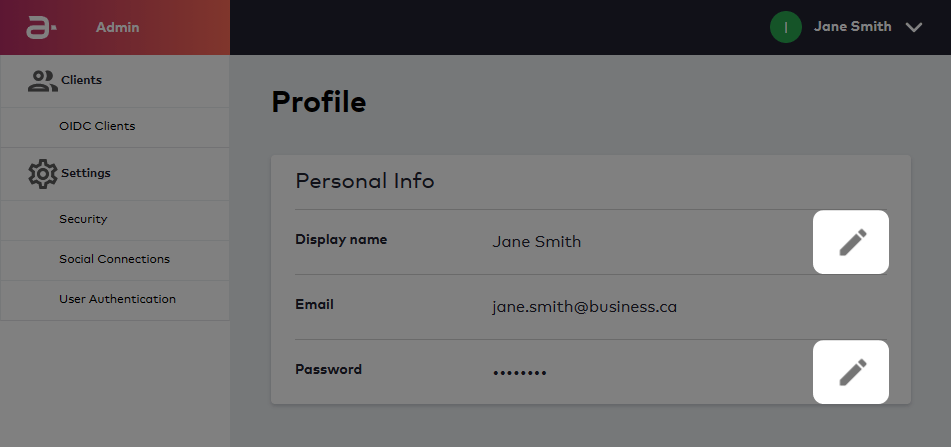
The MarketONE Admin web application is an administrative console available to customer organizations. From this application, an organization’s provisioned “Admin users” can manage various settings that apply to the organization’s Connect Cloud service, such as security settings, social integrations, and OIDC client management. As of this release, an Admin user can now view and manage their own user profile within the application. To do this, the Admin user can click their name in the upper-right corner, and select View Profile.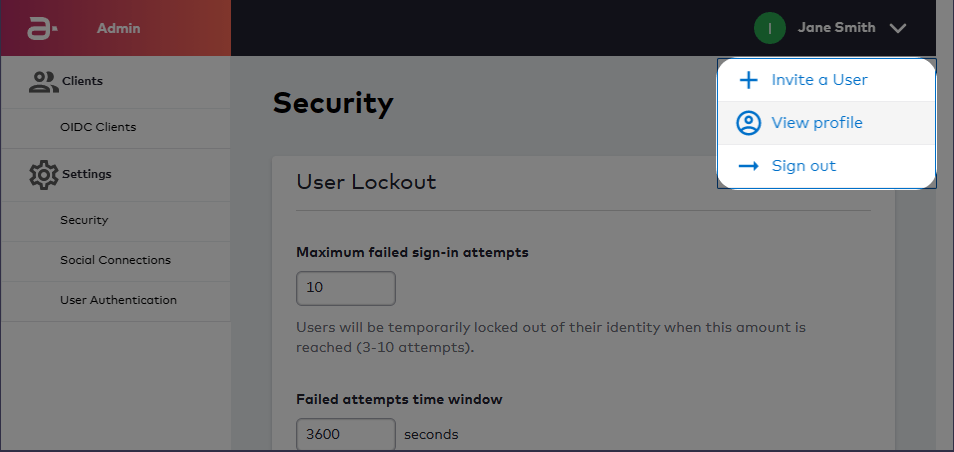
Support for Additional OIDC Claims That Map to the “profile” OIDC Scope
Connect Cloud allows an organization to register their applications as “Relying Parties” under the OAuth 2.0 protocol and it’s OpenID Connect extension. In OpenID Connect (OIDC), a registered Relying Party requests specifies scopes from an identity provider (in this case, Connect Cloud) and the provider then returns a set of claims or pieces of data about a given user (for example, name, email address, etc). As of this release, Connect Cloud supports two additional standard OIDC claims:locale– The local language setting for end user, if one is set.updated_at– The last time the user profile (that is, the Connect User entity) was updated.
profile scope. If the OIDC Client is registered in the MarketONE Admin web application, and the client is configured to access the profile claim, then Connect Cloud will return data values for the locale and updated_at claims, alongside other profile claims already supported by Connect Cloud.
For the complete list of scopes (and the claims that map to those scopes) supported by Connect Cloud, refer to the What Scope and Claims does Connect Cloud Support? section of overview topic on OAuth 2.0 and OIDC.