

Multiple Process Orchestration
Most user journeys are facilitated by a single Process. Conversely, there are some cases where Digital Identity Management orchestrates and links two or more distinct Processes to complete a given journey.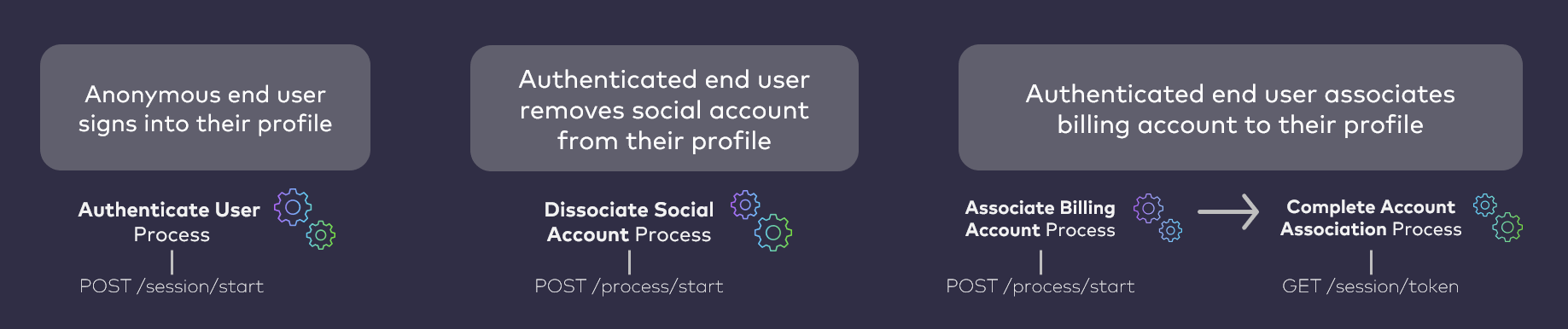
AuthN ID Creation
If the user supplies a mobile number is not already one of their registered, activated authentication identifiers (authN IDs), then this Process automatically adds and activates the mobile number to the User ID (i.e., to the user’s corresponding Digital Identity Management User entity) at the very end of the user journey. This is because they are, in effect, verifying their ownership of the mobile through OTP verification. In some cases, the user might supply a mobile that is already registered as one of their activated authN IDs. They will still need to receive the OTP and supply it back to Digital Identity Management to complete the account association.External Account Discovery
This Process consumes metadata provided by the user to search for and discover the external account. Currently, the only acceptable data type is a mobile number. Note: Support for this Process to accept email addresses and external account numbers is roadmapped for a future release.Digital Identity Management Account Provisioning
If the external system returns an account record to Digital Identity Management, Digital Identity Management then sends an OTP to the user to verify the account ownership. Once the OTP is verified, the Process provisions an equivalent Digital Identity Management Account entity. The Account’s attributes are populated with details from the external B/OSS record data. Account and subscription data will differ architecturally from external service to service. How the account data maps to the Digital Identity Management Account (and or Digital Identity Management Subscriptions and Features, if any) depends on an integration between Digital Identity Management and the external B/OSS. Digital Identity Management’s flexible data model maps external account details to a standard Digital Identity Management Account entity according to a pre-defined template based on the service-specific business requirements. These templates are defined as a part of the onboarding and integration between your business and Digital Identity Management. Note: If your organization is an OTT service provider, and is integrated with MarketONE Subscribe/Partner, then this Process can pull data from the account/subscriptions to create the Digital Identity Management equivalent of those Accounts/Subscriptions/Features.Account Association
Once Digital Identity Management provisions a Digital Identity Management Account, the Process then associates the Account entity to the Digital Identity Management User entity (or user ID / user profile, from the front-end user’s perspective). The Process also associates the Account to a Digital Identity Management Group entity.- If the user is a Primary User of a Group, then Digital Identity Management associates the Account (and any Subscriptions/Features under the Account) to that Group.
- If the user does not yet have a Group, then Digital Identity Management creates a Group and associates the Account (and Subscriptions/Features) to the Group.
- A Digital Identity Management Feature cannot exist independent of a parent Digital Identity Management Subscription
- A Digital Identity Management Subscription cannot exist independent of a parent Digital Identity Management Account
Mapping External Service Data
When a customer’s account records or service subscriptions are provisioned in Digital Identity Management, that data is mapped across an entity hierarchy that consists of a parent Digital Identity Management Account entity, the Digital Identity Management Subscription(s) owned by the Account, and any Digital Identity Management Features that belong to each individual Digital Identity Management Subscription (if any).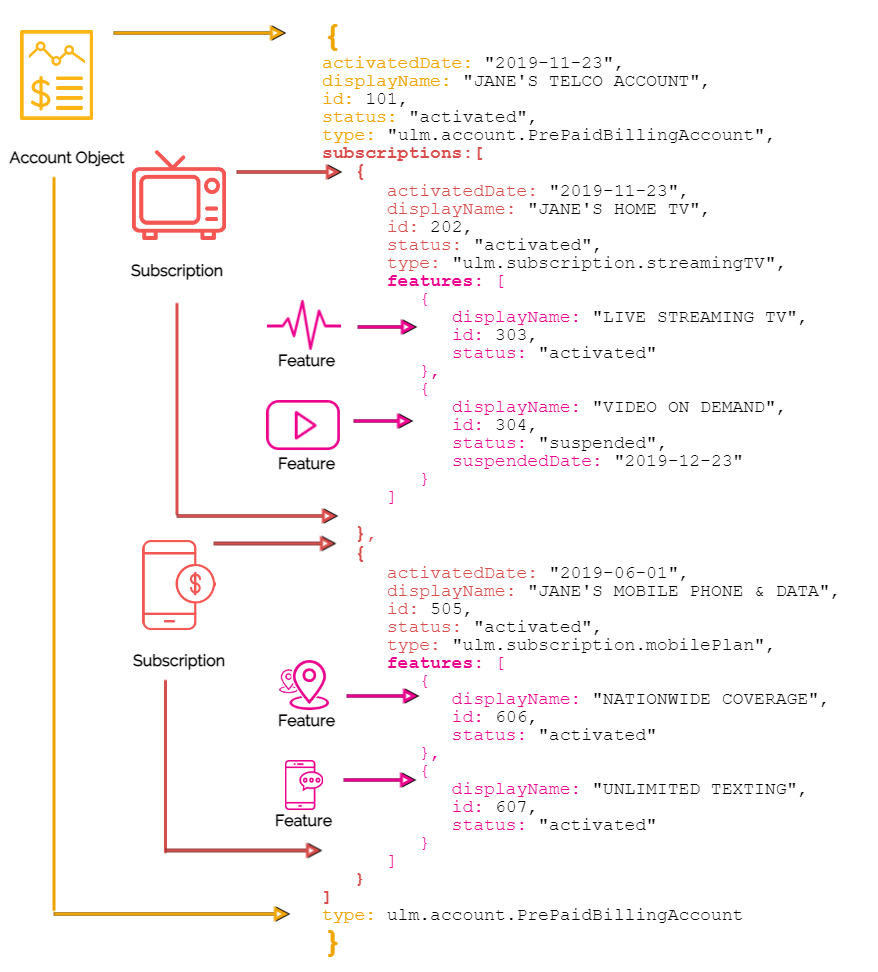
Service Sharing with Group Association
Digital Identity Management enables service sharing by way of user groups. When the Process associates a billing account (and any services/subscriptions under that account) to a Digital Identity Management User ID, the Process also associates the Account entity to a Digital Identity Management user Group entity to which the user is a Primary user. The Primary user of a group can then add other Digital Identity Management users to the same group in order to grant those users conditional access to either the whole Account, or to only specific services under the account. Note: Only a Group’s Primary User can add more accounts or services the existing Group. If the user does not have a Group during an account association, then the Process automatically creates a new Group entity on the back end and assigns the user the “Primary User” role for the that Group to the end user. Once a user adds their Account to a Group (again, this will likely happen automatically), Digital Identity Management also automatically associates the Digital Identity Management Group entity to the entire Account/Subscription/Feature hierarchy.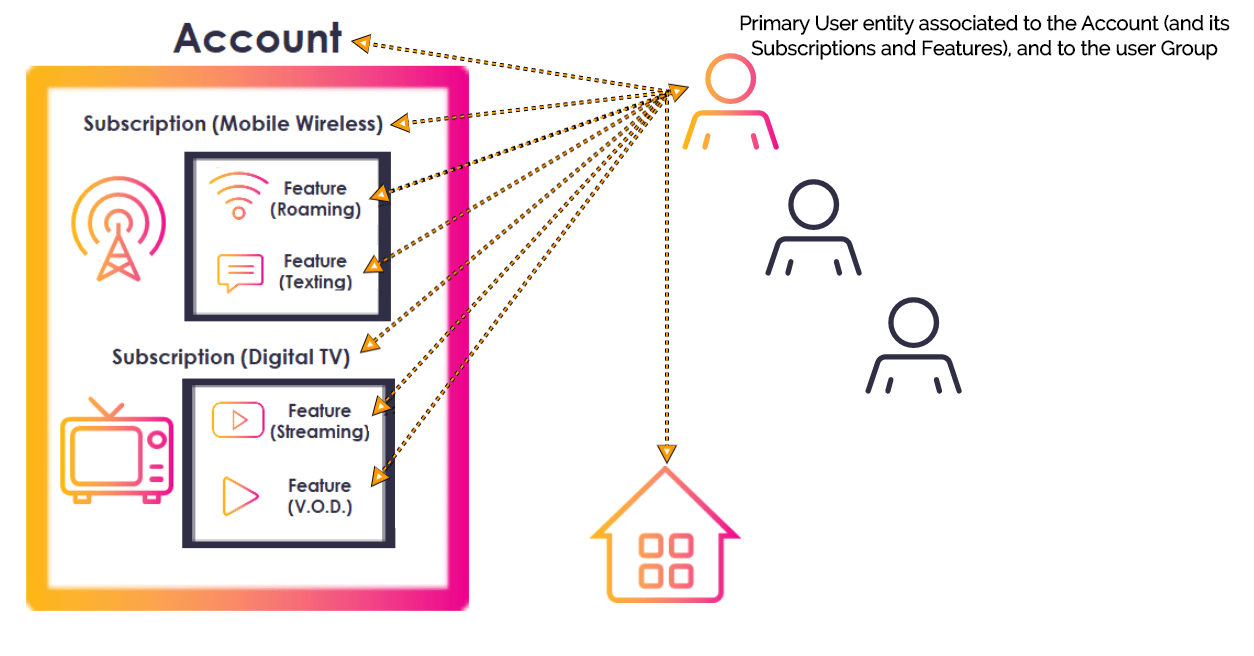
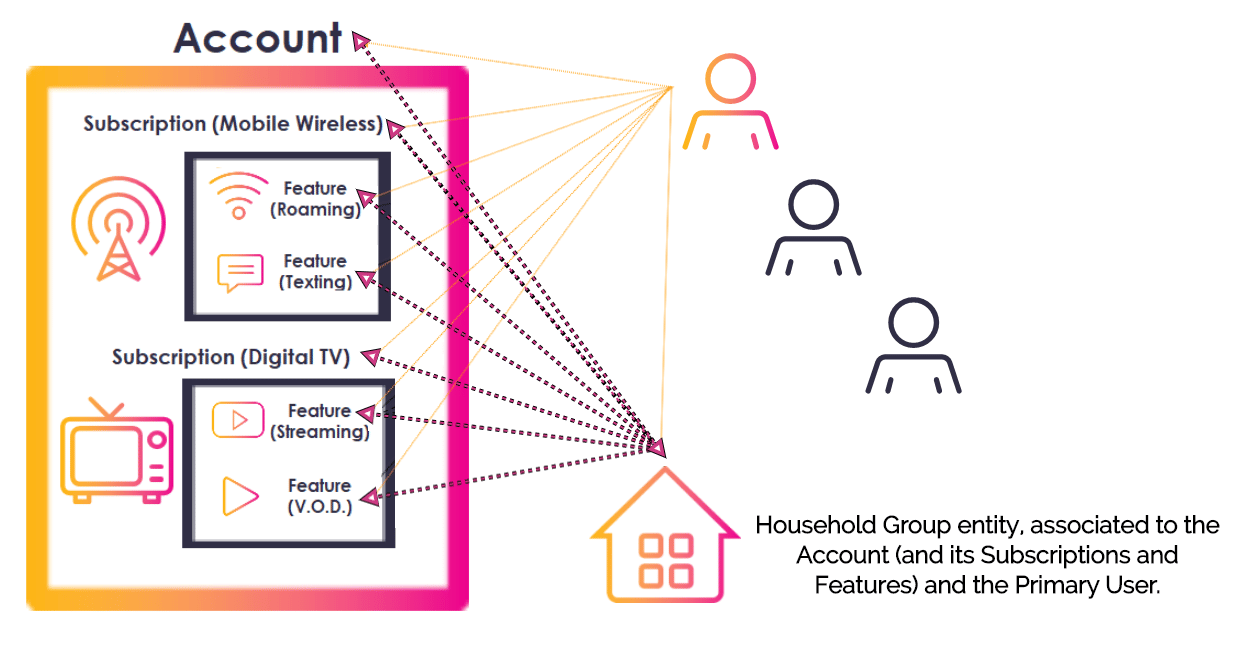
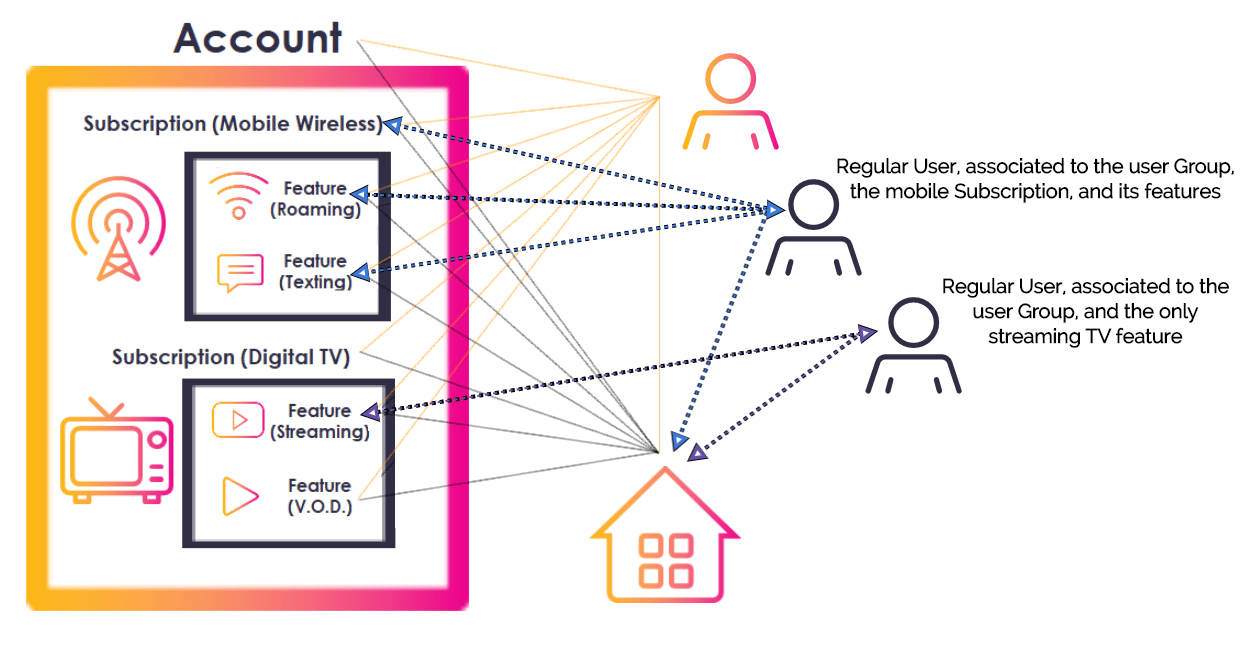
- Admin User access to their spouse. A Group Admin User can access all A/S/F entities in the Group, and add/remove Regular Users from the Group.
- Regular User access to their teenagers. A Group Regular User can only access specific services or features, determined by a Primary or Admin User. They cannot manage any entities or set permissions for other Group Users.
Process Flow
This flow describes the Process at a high level. Preconditions- The user is currently authenticated in Digital Identity Management
- The user has at least one billing account or subscription in the external BSS/OSS.
- The user selects to associate (or “link”) an external account.
- The UI prompts the user to provide a unique account identifier (i.e., mobile number).
- The user provides their mobile number, and the client passes it to Digital Identity Management.
- Before it the Process continues, Digital Identity Management first performs a backend check on the user-supplied mobile number.
- If the mobile number is registered to another Digital Identity Management User entity, then the Process returns an error.
- If the mobile number is registered to the current Digital Identity Management User, then the Process continues.
- If the mobile number is not yet registered in Digital Identity Management at all, then the Process continues.
- Before it the Process continues, Digital Identity Management first performs a backend check on the user-supplied mobile number.
- Digital Identity Management calls the external system, and requests account data for the user-supplied number.
- The BSS responds, and Digital Identity Management inspects the response.
- If the external account maps to an existing Digital Identity Management Account of another Digital Identity Management User, then the Process returns an error.
- If the external account maps to an existing Digital Identity Management Account of the current Digital Identity Management User, then the Process returns an error.
- If the external account does not map to an existing Digital Identity Management Account, then the Process continues.
- Digital Identity Management issues and sends One-time Passcode (OTP) to the user, and the client prompts them for that OTP.
- The user retrieves that OTP from their SMS, and provides it to the client application (and the client passes it back to Digital Identity Management).
- Digital Identity Management takes the external account data and creates the Digital Identity Management Account (including Subscriptions and Features, if any).
- Digital Identity Management associates the Account to the corresponding User entity, and the back end Group entity.
- The user’s external account is now provisioned and linked in Digital Identity Management.
- The external account details are mapped to the Digital Identity Management Account (and Subscriptions and Features, if any).
- (Conditional) The mobile number is added to the User profile as an authN ID, and activated (if it wasn’t already prior to the Process).
- Invalid account identifier (i.e., not a valid mobile number format)
- No matching account details found in the operator’s external system.
- The Account is already associated to another Digital Identity Management User entity.
- The Account is already associated to the current User entity.
App Settings
Certain aspects of the Process’ behavior are controlled by configurable system or app settings. Your organization can manage these and other settings in the Admin console. This Process is affected by the following settings:User Journey Diagram
This flow diagram illustrates the complete user journey using the Associate Billing Account Process (that calls the external system and issues the OTP), and the Complete Account Association Process (that redeems the OTP and associates the account). [product: dim]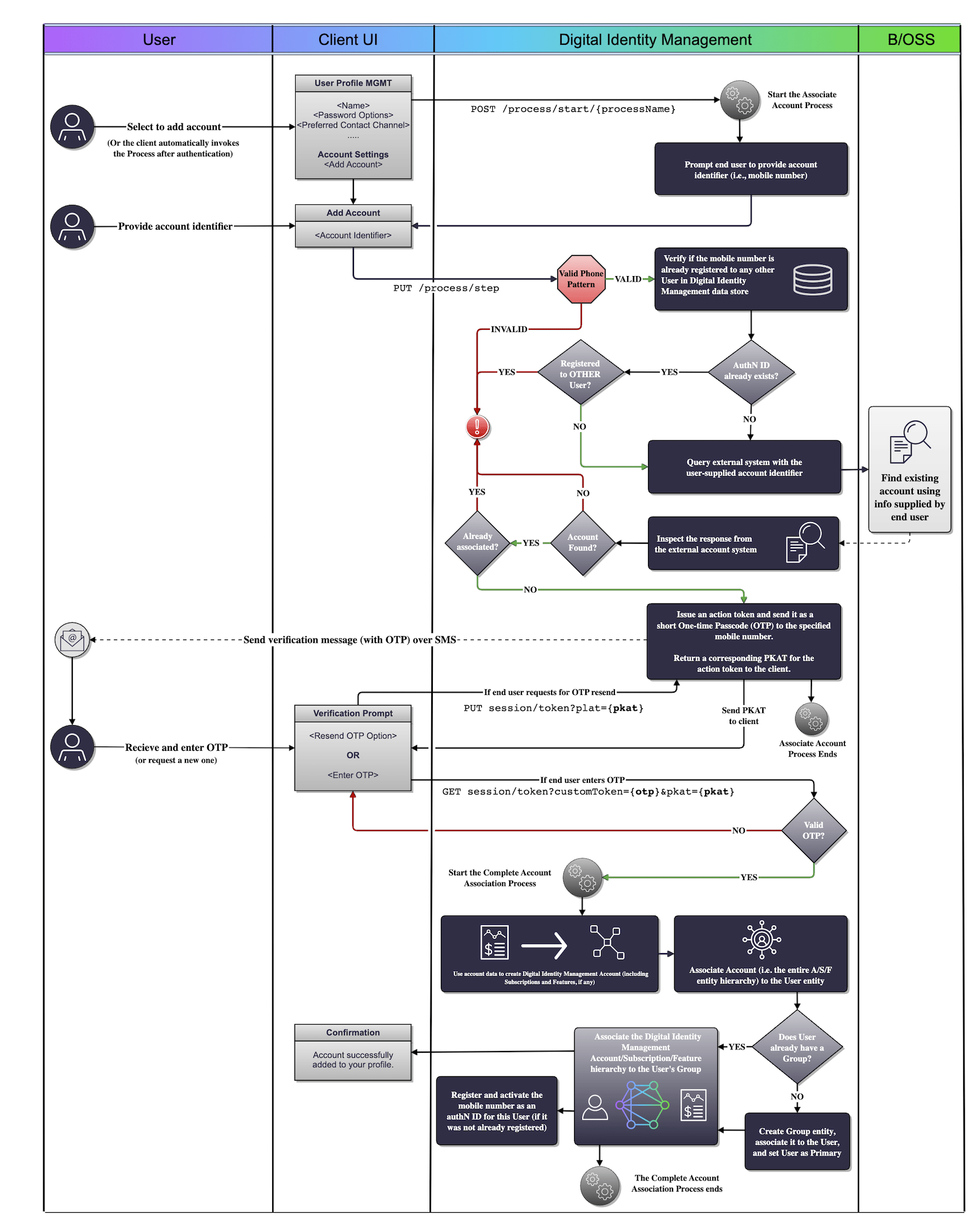
Use Cases
The following use cases provide guided API walkthoughs of this Process for client developers:- Associate account (single account, single group)
- Billing account association errors
- Associate external billing account
- Associate billing account errors