

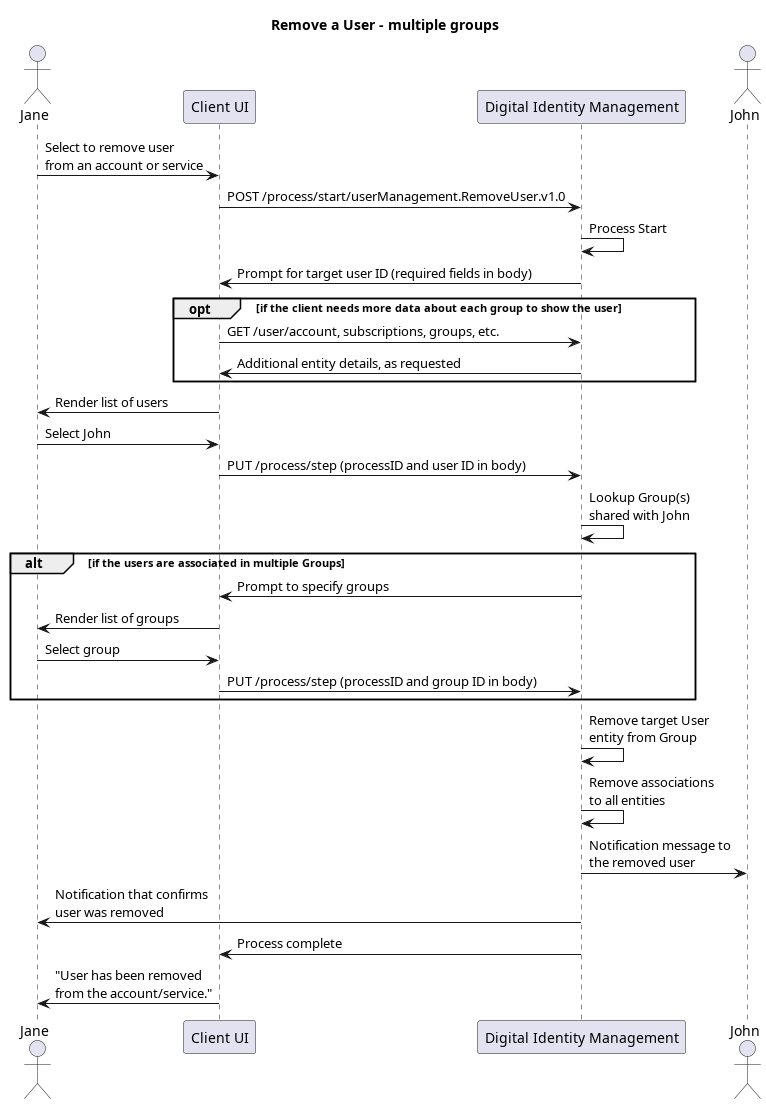
Initial Request
Your client calls the Process Start API to initialize the Process:Response: Specify User
Digital Identity Management responds with a prompt to specify the end user to remove from the current end user’s Group:Next Request: Specify User
Once the current end user specifies who to remove, the client passes the target User entity’sid number through the Process Step API request:
Response: Specify Group
Digital Identity Management returns a prompt to specify the target Group, and includes a list of applicable Digital Identity Management Groups wherein the current end user is the Primary User, and the target user is a Regular User.Final Request: Specify Group
The client passes the end user’s target Group from which to remove the target User:Process Complete
The Process removes the target User from the specified Digital Identity Management Group, and returns anHTTP 200 status: