

Multiple Process Orchestration
Many user journeys are facilitated by a single Business Process. However, there are some cases where Digital Identity Management orchestrates and links two or more Processes to complete a given journey.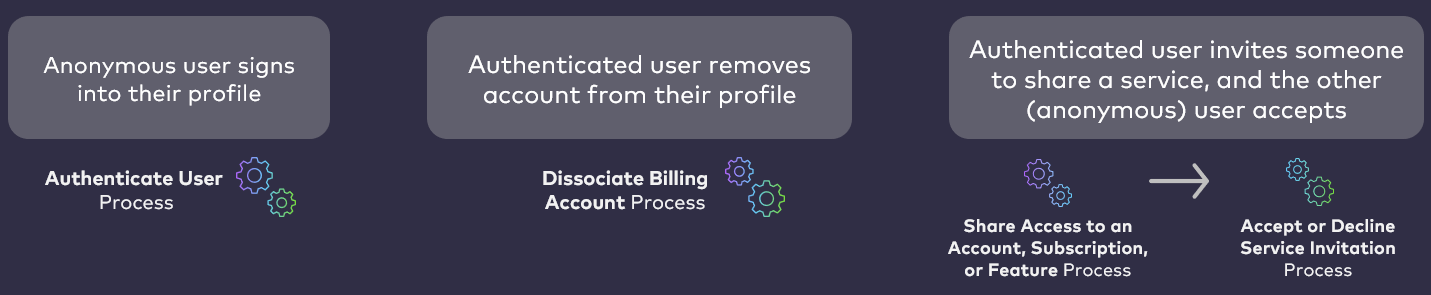
Service Sharing through Group Association
Digital Identity Management enables best-in-class account and service entitlement delegation (i.e., sharing access) by way of Digital Identity Management Groups and associations. Digital Identity Management Groups serve as a connective entity between Digital Identity Management Users and shared services (including communications and digital service providers) that are provisioned as Digital Identity Management Account, Subscription, and Feature entitlement entities. [product: dim]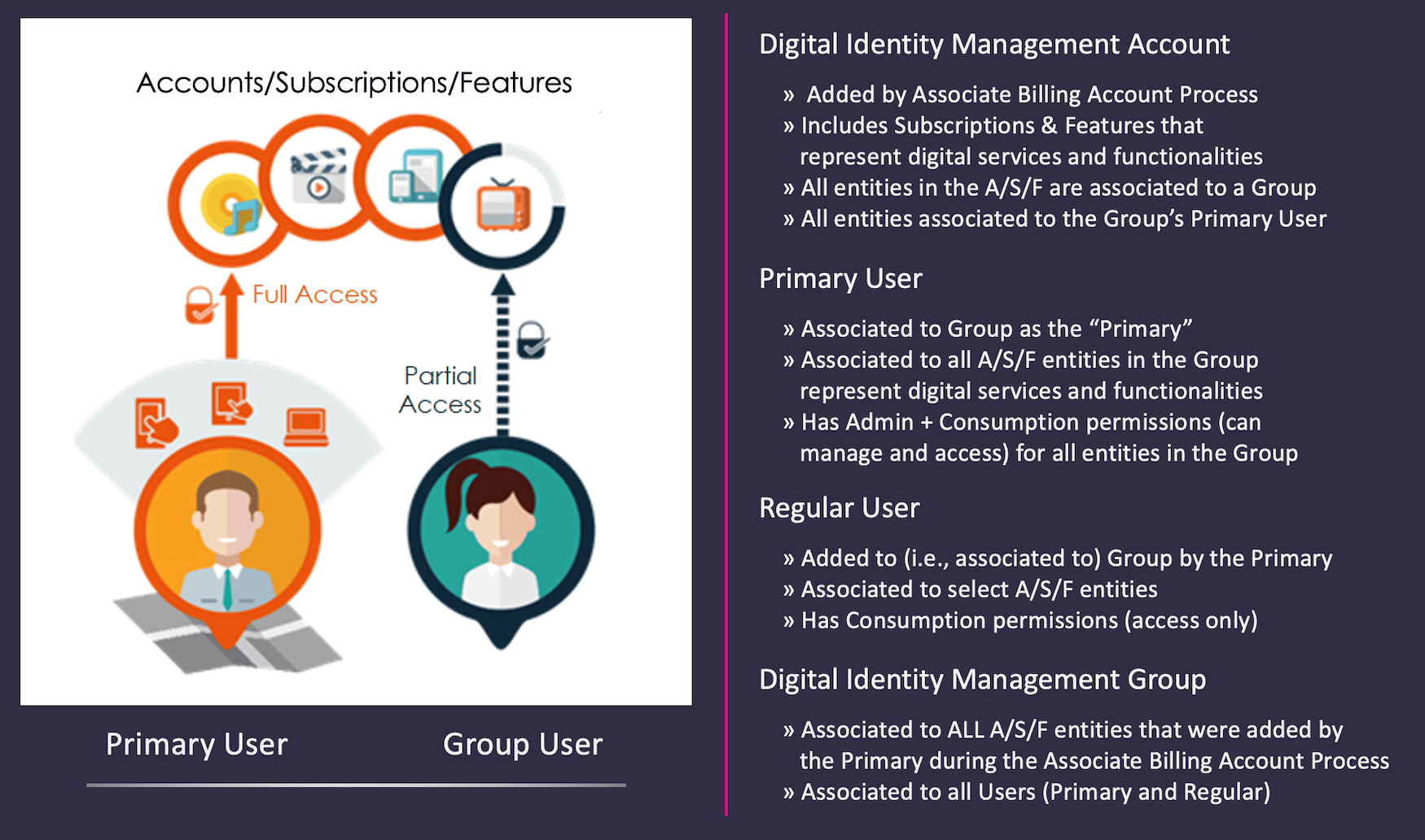
- Digital Identity Management maps external customer data to a Digital Identity Management Account/Subscription/Feature (A/S/F) hierarchy.
- The user then selects a group for the A/S/F.
- If the Digital Identity Management User is not associated to an applicable Digital Identity Management Group, the system creates one.
- Digital Identity Management associates the Digital Identity Management User to the Group, and designates them as the “Primary User.”
- Digital Identity Management associates the User to every entity in the entire A/S/F hierarchy
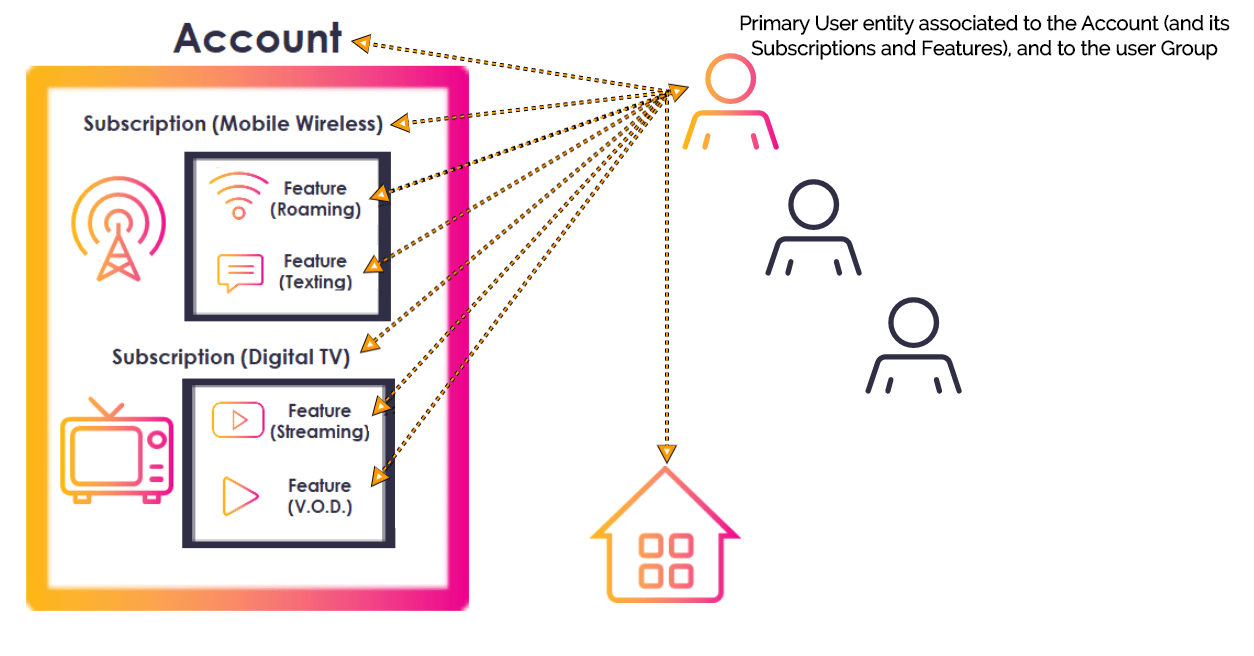
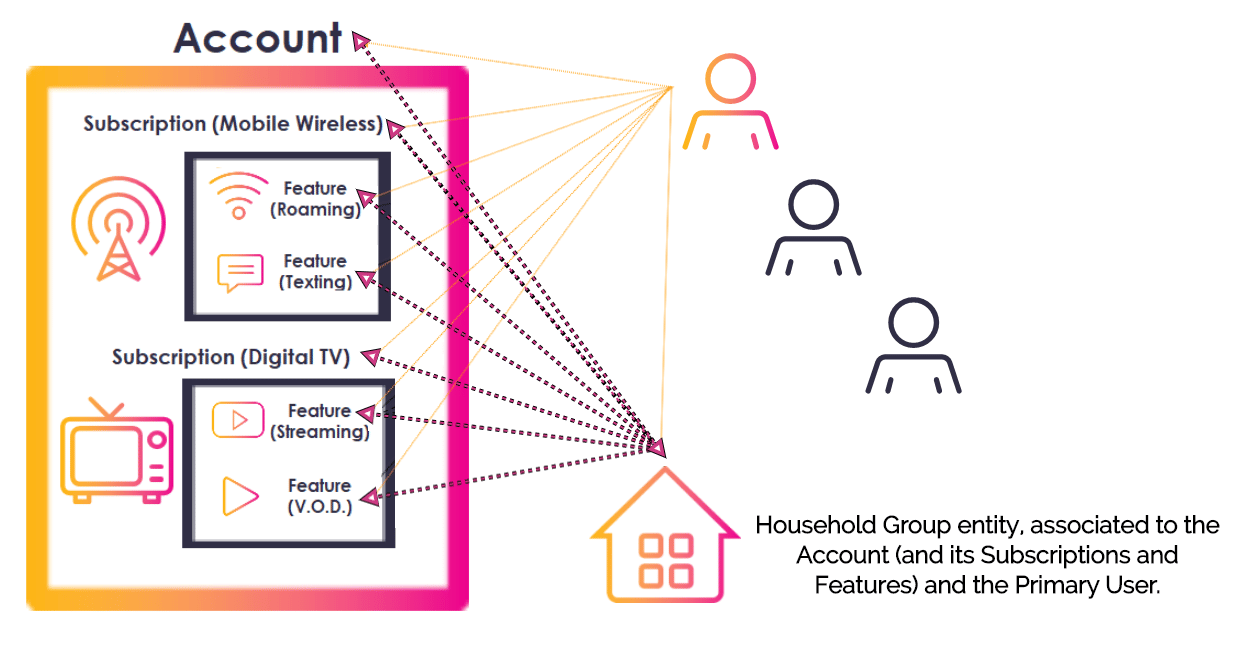
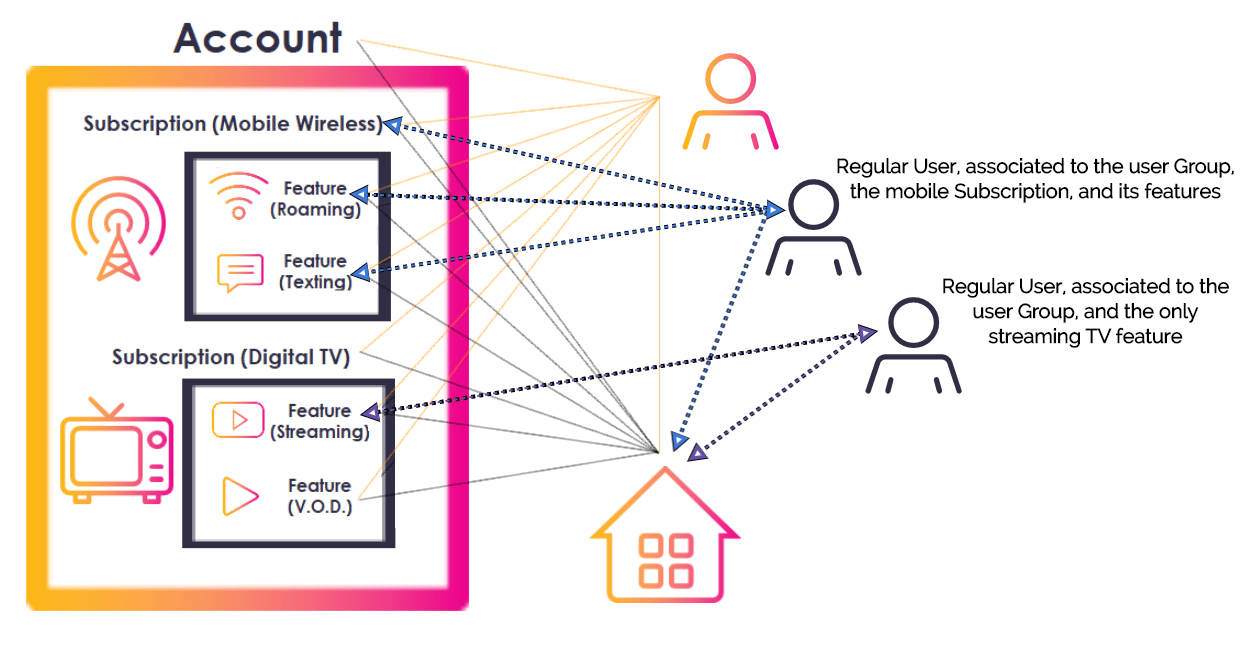
- In many households, multiple accounts are added to a single group owned by the “head of the household” such as a parental figure.
- To access any shared account or service, a Regular User must both be in the group (i.e., their Digital Identity Management User entity must be associated to the Digital Identity Management Group entity) and they must be granted permissions by the group Primary (i.e., their User entity must be directly associated to the relevant shared Account, Subscription, or Feature). Simply being in a group does not grant any access to any of that group’s associated accounts or services.
- If the invitee is not a Digital Identity Management User, the Share Account or Service Process creates a new User entity, and the Accept or Decline Process, when invoked by the invitee, finishes the user onboarding and activation.
- A Regular User entity’s associations do not cascade up or down the A/S/F hierarchy. For example, if a Primary User adds another User to their Group, and assigns the Regular User entitlements (consumption only) to the Subscription entity, then that Regular User does not automatically have access to any of the Account “above” the Subscription, or Features “under” it. In other words, a Group’s Primary User can grant fine-grain entitlements to different accounts and services for other Regular Users in the Group.
Process Flow
This flow describes the Process at a high level. Preconditions- The user is currently authenticated in Digital Identity Management, and in their Identity profile.
- The user has at least one associated account or service (represented by Digital Identity Management Account/Subscription/Feature entitlement entities), and they are the associated Group’s Primary User.
- The user authenticates, navigates to the account/service management section of your application UI, and selects to share an account or service.
-
The client application invokes the Process, and Digital Identity Management responds with a prompt to specify:
- the target invitee’s contact channel
- the target Account, Subscription, or Feature entitlement entity to share
- the type of access permissions that the current User wants to grant to the invitee
- The client renders the prompt to the user. Note: Depending on the UI implementing the Process, this might look like an option to add other users to a service or service group. For example, a user might see Add Users to your Stream TV Group or simply Share Access to your Stream TV. The user group does not necessarily need to be explicitly defined for the end user experience, though it is an underlying component on the Digital Identity Management back end.
- The user specifies the invitee by their email address or mobile number.
- The user specifies the account or service they want to share with the invitee.
-
The user also sets the permissions for each individual account or service to be shared. This Process accepts the following permission types:
- Admin — The invitee can manage the account or service, but they cannot consume.
- Consumption — The invitee can consume the service, but they cannot manage it.
- Admin & Consumption — The invitee can manage and consume the account or service. Note: Once the client submits the user’s choices, Digital Identity Management checks how many User entities are already associated to the Group. If the Group has already reached the maximum number of Users (controlled by the Group Size Limit setting), then the Process ends.
-
The Process searches for any existing Digital Identity Management User with the invitee’s email or mobile number.
- If no Digital Identity Management User already exists, then Digital Identity Management creates a new User ID (i.e., User entity) with the invitee’s email/mobile.
- The email/mobile is stored on the new User entity as an attribute, and registered as the User’s authentication identifier (authN ID) for sign-in purposes.
- Digital Identity Management creates both the User ID and its authN ID with an
activatingstatus. - The invitee will user complete onboarding with the Accept/Decline Process.
-
Digital Identity Management adds the invitee’s User entity to the Group. Digital Identity Management also associates the User entity to the target A/S/F entitlement entities.
- These associations are created with an
activatingstatus. - Digital Identity Management will fully activate these associations when the invitee invokes the Accept/Decline Process and explicitly accepts the invitation.
- These associations are created with an
-
Digital Identity Management sends an invitation out to the invitee’s mobile number or email address.
- If the invitee never clicks the invitation link, Digital Identity Management eventually removes all associations.
- If the invitee was a new user, and they never open the invite, then Digital Identity Management will also eventually destroy eventually the unactivated User entity.
- The invitee receives an invitation through email or SMS, depending on the channel type the inviting user supplied.
- The specified Account, Subscription, or Feature ID was not found.
- The specified permissions does not fall into pre-defined options (e.g., Admin, Consumption).
- The provided email or mobile is not in a valid format.
- The email or mobile field cannot be empty.
- The Group is already at maximum User capacity.
- The current user is not a Primary or Admin of the User Group, and therefore not allowed to invite others.
App Settings
Certain aspects of the Process’ behavior are controlled by configurable system settings. Your organization can manage these and other settings in the Digital Identity Management Admin web application.
Note: There is an additional limit that can optionally be set directly on Digital Identity Management Account, Subscription, and Feature entitlement entities. A
maxUser attribute can control the maximum number of Users that can be associated to those entities, independent of the Group Size Limit.
Unlike the Group Size Limit, the maxUser attribute is typically configured once during the initial onboarding and integration between your organization and Digital Identity Management. It does not technically function in the same way as Digital Identity Management’s application settings.
User Journey Diagram
This diagram illustrates the standard user journey using the Accept or Decline Process. [product: dim]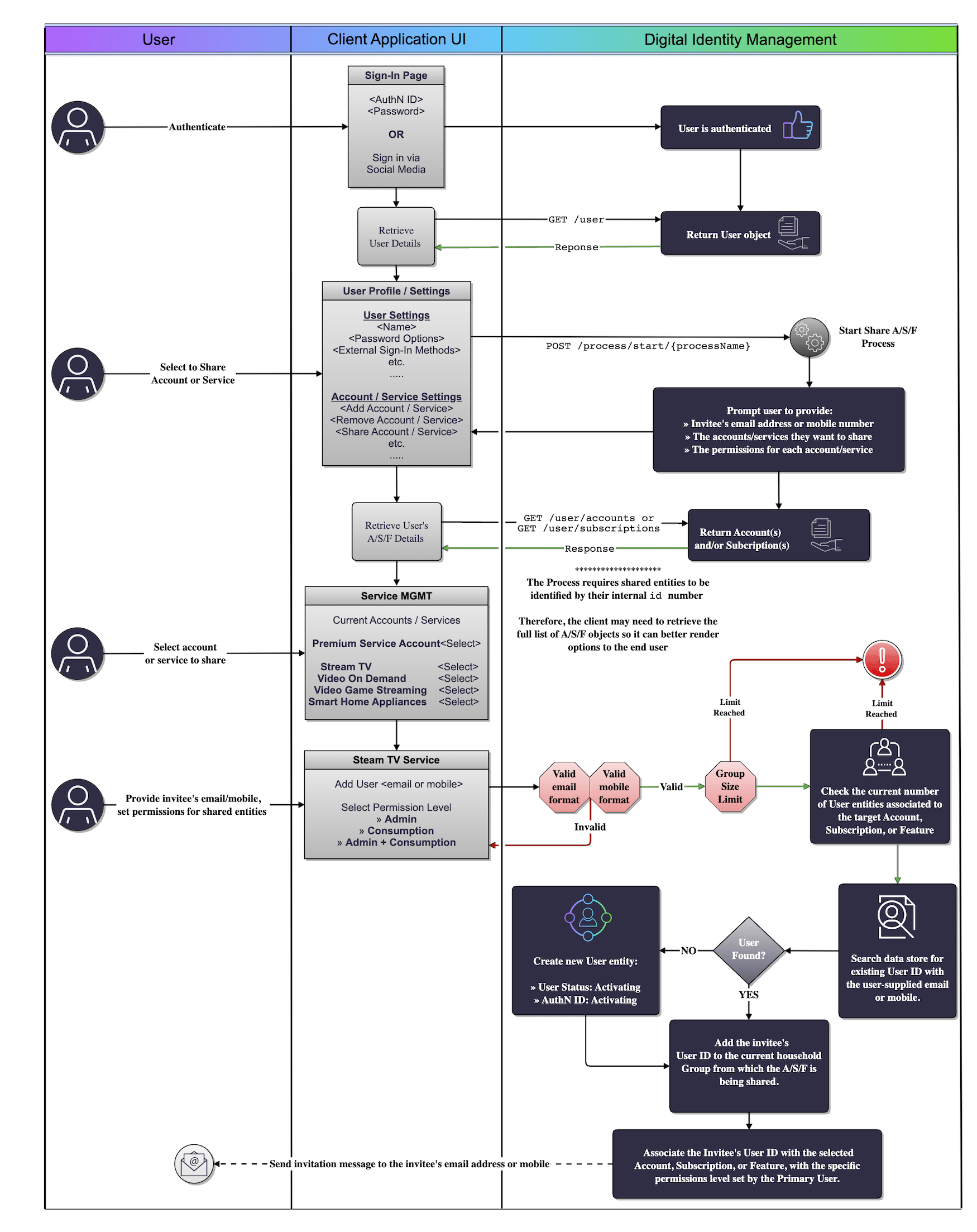
Use Cases
The following use cases provide guided API walk-throughs of this Process for client developers:- Share A/S/F access with an existing user
- Share A/S/F access with a new user
- Share A/S/F access errors
- Share A/S/F with existing user
- Share A/S/F with new user
- Share A/S/F access errors