

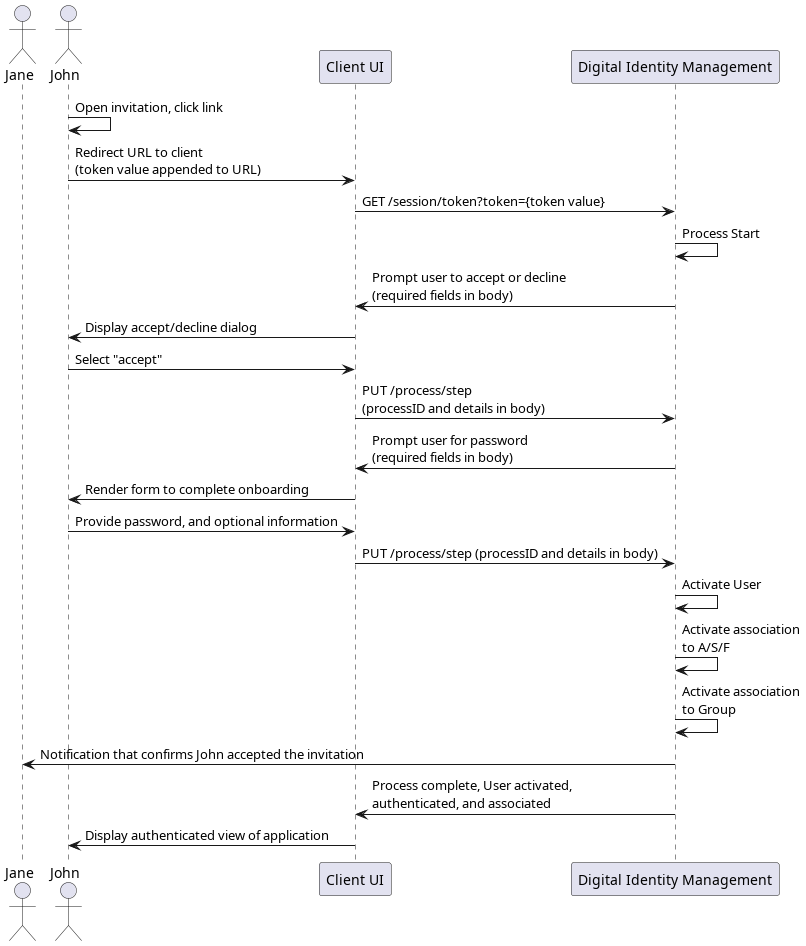
Initial Request
The invitee user clicks the invitation link, which then redirects them back to a dedicated landing page in your application. Your client takes the action token value directly from the redirect URL, and calls the Session Token API with the token value as a URL parameter. This initializes the Process:Response: Accept or Decline
Digital Identity Management responds with a prompt for the user to explicitly accept or decline the invitation:Next Request: User Accepts
The user explicitly accepts, and your client passes this choice back to the Process through the Process Step API:Response: Complete Onboarding
The invitee does not yet have a fully activated Digital Identity Management User ID. Therefore, the Process returns a prompt for a password (and any additional, optional information) to complete the user’s onboarding:Final Request
The user provides a password, and your client and the client passes this through the Process Step API request:Process Complete
If the user’s password is valid, then Digital Identity Management activates the following:- The new Digital Identity Management User entity
- The new user’s AuthN ID
- The associations between the new User entity and the shared accounts / services (that were selected by the inviting user during the Share A/S/F Process)
- The association between the new User entity and the relevant Digital Identity Management Group (to which the shared A/S/F is associated)
200 HTTP status: